
If you have sat in a client meeting and tried to explain why HubSpot shows 2,000 sessions while Google Analytics reports 5,500, you understand the frustration that drives this conversation. The numbers never match. They never will. And most comparison articles skip past the reason: these platforms were never designed to answer the same questions.
The choice between HubSpot and Google Analytics 4 misses the point entirely. The agencies that win at analytics have built systems that extract the right insights from the right platform at the right time. They understand when to trust each platform for specific metrics, and they have stopped their attempts to reconcile numbers that were never meant to align.
This guide synthesizes dozens of practitioner experiences, official platform documentation, and real agency workflows to deliver what actually matters: a strategic framework that makes these tools work together, the specific scenarios where each platform excels, and the mistakes that cost agencies credibility with clients.
What Each Platform Actually Measures and Why It Matters
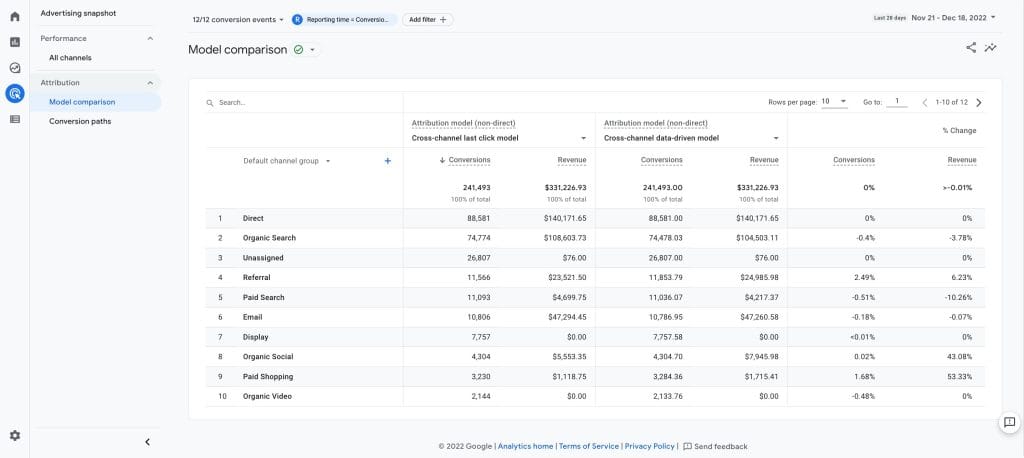
Think of GA4 as the analytics you would run for a retail store before anyone walks up to the counter. It tracks foot traffic patterns, which aisles get the most attention, how long people browse, and which doors they exit through. The platform does not care who these people are because it cares about behavioral patterns.
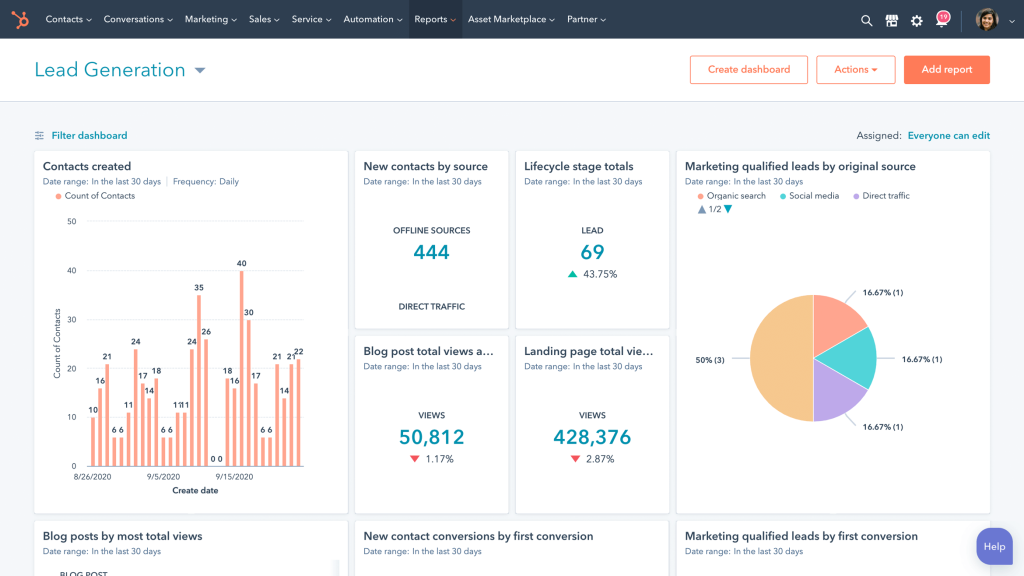
HubSpot operates like your CRM the moment someone hands over a business card. Once a prospect fills out a form, clicks an email link, or books a meeting, HubSpot knows them by name. From that moment forward, it tracks their entire relationship with your client’s business: every email opened, every page visited, every deal closed. The platform cares about individual relationships.
This distinction shapes everything. GA4 excels at questions like “How do users behave on our website?” and “Which channels drive the most engaged traffic?” HubSpot excels at “How much revenue did this campaign generate?” and “What touchpoints influenced this deal?”
According to BFJ Digital’s analysis, HubSpot measures traffic through cookies, IP addresses, and browser settings, and it requires a user to be identified (typically through form submission) before it begins to track them as a known contact. GA4 tracks sessions and events immediately, whether the user identifies themselves or not.
The Reason Your HubSpot and GA4 Numbers Will Never Match
Agencies routinely report HubSpot shows different session counts than GA4 for the same time period. The direction of this difference depends on multiple factors, and before your next client call, you need to understand why this happens.
Why Your Numbers Don’t Match: The 3 Real Causes
Stop wasting time trying to reconcile them. Here’s what’s actually happening.
Session Definition Mismatch
Visit 1
10:00 AM
25 min gap
Visit 2
10:25 AM
GA4 (30 min timeout)
1 session
HubSpot (20 min timeout)
2 sessions
Fix: Standardize timeout settings in both platforms (recommend 60-90 min for B2B)
Bot Traffic Filtered Differently
Total Site Traffic
5,500 visits
GA4 ML filters out 800 bots
GA4 Shows
4,700
HubSpot filters 2,500 bots + unknown
HubSpot Shows
3,000
Fix: Document which platform filters more aggressively. Use that as truth for traffic volume.
Tracking Code Placement Gaps
Homepage
Product Pages
Blog Posts
Fix: Audit every template. Ensure both codes load on same pages, same timing.
What To Tell Your Client
Session Definitions Differ Between Platforms
Both platforms default to a 30-minute inactivity timeout, but critical differences exist in how they handle edge cases.
HubSpot restarts sessions at midnight in the account’s timezone. According to HubSpot’s official documentation, “Sessions are restarted at midnight in the account’s timezone. If a user initiates a session at 23:59 and then returns at 00:01 by viewing a page, the previous session ended at midnight.” GA4 does not restart sessions at midnight. According to Google’s Analytics Help documentation, “If a session crosses a day boundary (e.g. if it starts at 11:55 pm and ends at 12:05 am), it is considered a single session.”
HubSpot also starts a new session when the traffic source changes. Their documentation states: “if the source of a visitor’s session changes due to them interacting with an ad, CTA, link in an email etc., a new session will be created.” GA4 handles this differently: “Google Analytics 4 does not create a new session when the campaign source changes mid session.”
These differences mean HubSpot can show higher session counts than GA4 in scenarios with midnight-crossing sessions or mid-session campaign changes.
Bot Traffic and Ad Blockers Create Opposite Effects
Both platforms filter bot traffic through different detection methods. GA4’s machine learning models identify and exclude known bot patterns. HubSpot uses its own criteria. The same visitor might get counted in one platform and filtered out in another.
HubSpot’s tracking script (js.hs-scripts.com) is frequently categorized as a “Marketing/CRM” tracker by privacy extensions like Ghostery or uBlock Origin and browsers like Safari and Firefox. When blocked, HubSpot records zero sessions for that user. GA4 often benefits from higher allowlist privileges or server-side Google Tag Manager implementations that can bypass some blockers.
These factors typically cause HubSpot to show lower session counts than GA4.
Tracking Code Placement Creates Gaps
When the HubSpot code and GA4 tag sit on different page sets, or when one loads before a cookie consent banner triggers while the other waits, you will see divergent numbers. This represents the most common source of major discrepancies and the easiest problem to fix.
HubSpot’s official documentation acknowledges this directly: “Due to differing tracking methodologies, numbers between HubSpot and Google Analytics will not match exactly.”
The strategic response involves the establishment of which platform serves as the source of truth for each metric category, then clear communication of that to clients. Any attempt to force alignment wastes time and creates confusion.
Attribution Models and Where These Platforms Differ Most
Attribution is where platform choice matters most for agencies. The way each platform assigns credit to marketing touchpoints will directly affect how you report ROI to clients, and the two platforms take fundamentally different approaches.
GA4 Uses Algorithm-Based Attribution
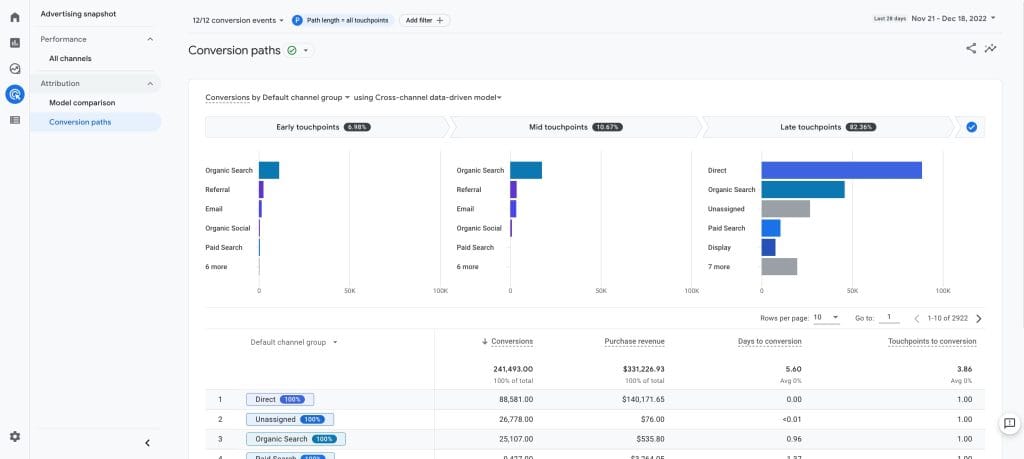
GA4 now offers only two attribution options: Data-Driven Attribution (DDA) and Paid and Organic Last Click. Google deprecated first-click, linear, time-decay, and position-based models in November 2023.
DDA uses machine learning to analyze up to 50 touchpoints over a maximum 90-day lookback window. The system applies Shapley values, a game theory concept, to distribute conversion credit based on actual patterns in your data through an algorithm. The model adapts specifically to each property and each key event (formerly called “conversions” in GA4), which means it learns your client’s unique customer path.
The limitation surfaces when clients ask questions like “why did organic search get 40% credit for this conversion?” You cannot provide a definitive answer beyond an explanation that the model determined influence based on historical patterns. The algorithm’s logic remains opaque.
HubSpot Uses Rule-Based Attribution You Can Explain
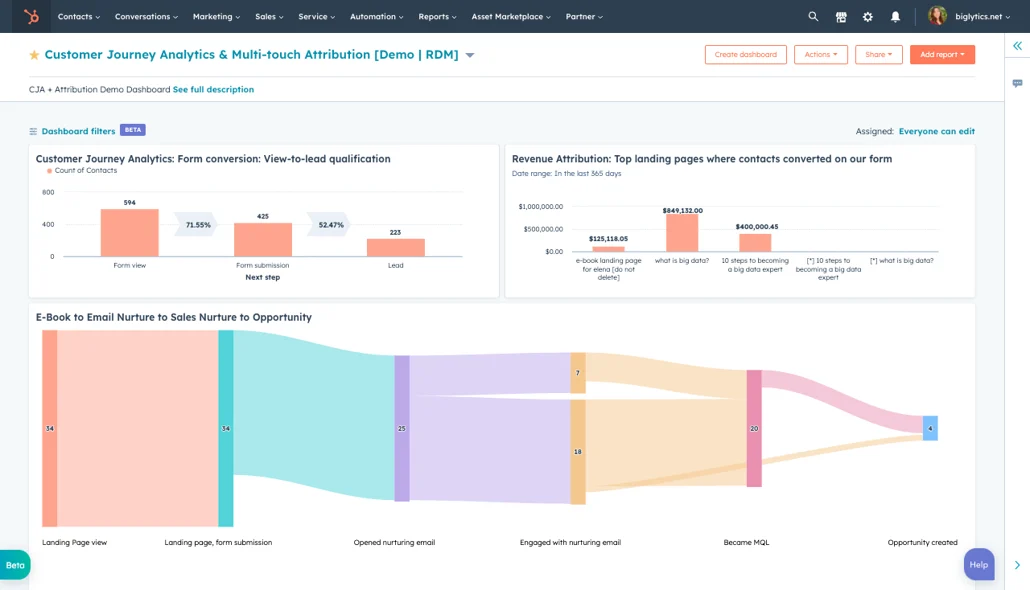
HubSpot takes the opposite approach and offers nine predetermined attribution models according to their attribution documentation: first interaction, last interaction, linear, U-shaped (40/40/20), W-shaped (30/30/30/10), time decay with a 7-day half-life, full path (22.5/22.5/22.5/22.5/10), J-shaped (20/60/20), and inverse J-shaped (60/20/20).
Each model applies fixed, human-defined rules. When a client asks why a touchpoint received specific credit, you can explain the exact logic: “We use U-shaped attribution, which gives 40% to the first touch, 40% to the lead creation touch, and distributes the rest across middle interactions.”
The tradeoff is that HubSpot’s models do not adapt to your data. A U-shaped model applies the same weights whether you measure a SaaS company with a 6-month sales cycle or an e-commerce brand with same-day purchases.
How Each Platform Assigns Credit to Your Marketing
Click each touchpoint to see how credit is distributed
Blog Visit
40%
Email Click
10%
Webinar
10%
Form Submit
40%
Fixed rules: 40% first touch, 40% lead creation, 20% distributed middle
Blog Visit
28%
Email Click
15%
Webinar
22%
Form Submit
35%
Machine learning assigns credit based on actual conversion patterns in your data
Key Difference:
HubSpot uses the same weights every time. GA4’s algorithm adapts to your specific customer journey patterns.
The 90-Day Lookback Limit That Hurts B2B Agencies
GA4’s maximum attribution lookback window of 90 days creates a significant blind spot that rarely gets discussed in comparison articles. For B2B agencies that work with clients whose sales cycles extend 6, 9, or 12 months, this limitation matters enormously. A prospect who first engaged with content in January and closed a deal in October will have their early touchpoints excluded from GA4’s attribution analysis entirely.
HubSpot has no such limitation. Because it tracks contacts through the CRM, attribution can span the entire customer relationship, from first anonymous visit through multi-year account expansion.
Which Platform to Trust for Each Attribution Scenario
The table below shows which platform provides more accurate data for common agency scenarios.
Quick Decision Guide: Which Platform to Trust
Cross-Device Tracking and Why GA4 Falls Short
When your client’s prospects research on their phone during lunch, continue on a tablet at home, and convert on a desktop at work, accurate cross-device tracking determines whether you can connect those touchpoints or lose visibility into the full customer path.
GA4 tracks users across devices through three methods: User-ID (requires logged-in users), Google Signals (requires users to be signed into Google with ad personalization enabled), and device-based cookies. Google Signals effectiveness has dropped significantly after Apple’s iOS 14.5 App Tracking Transparency framework. Opt-in rates for cross-app tracking have fallen to approximately 25% on iOS devices. As of February 2024, Google Signals is no longer part of GA4’s default reporting identity.
HubSpot’s identity-based approach proves more reliable for known contacts. Once someone submits a form or clicks a tracked email link, their activity ties to a persistent contact record regardless of which device they use. The limitation is that HubSpot cannot track anonymous users across devices until identification occurs.
For agencies, this means GA4 provides better coverage for high-volume anonymous traffic, while HubSpot provides more accurate cross-device tracking for engaged prospects that move through the sales pipeline.
How Reports and Dashboards Compare in Practice
The way you build and deliver client reports differs significantly between these platforms. Your choice affects not just what data you can show, but how much time you spend to get there.
HubSpot Dashboard Experience
HubSpot provides drag-and-drop dashboard construction with 17+ pre-built report templates. Dashboard limits scale by subscription tier: 3 dashboards for Free accounts, up to 300 for Enterprise. Reports connect natively to CRM objects that include contacts, companies, deals, tickets, and custom objects, which makes it straightforward to build reports that span marketing and sales data.
The interface prioritizes accessibility. Marketing managers without analytics backgrounds can build functional dashboards. The tradeoff is flexibility, as complex custom analyses often require workarounds or prove impossible within the native toolset.
GA4 Requires Looker Studio for Serious Work
GA4’s native interface is limited. Standard reports cover acquisition, engagement, and monetization at a high level. Explorations enable free-form analysis, funnel visualization, and path exploration, but the learning curve is steep. Many practitioners describe the interface as “unintuitive” and “slow.”
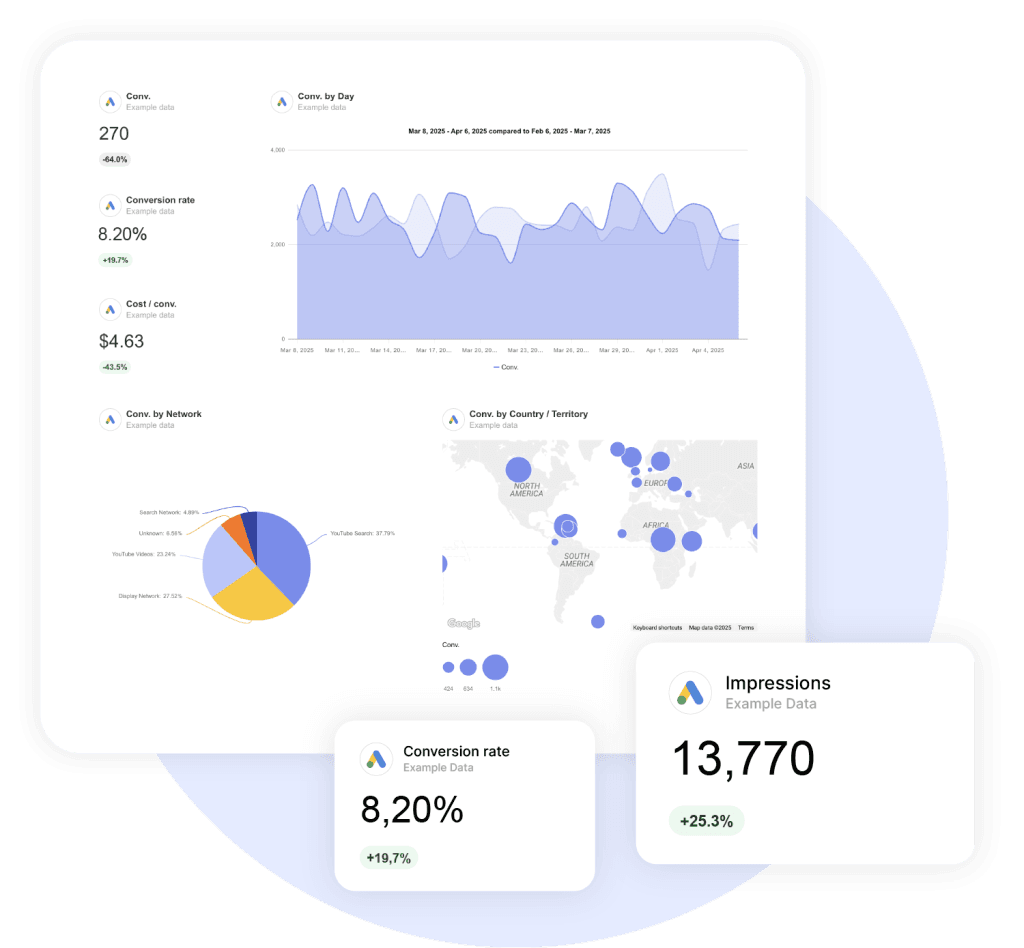
For serious agency work, Looker Studio (formerly Data Studio) becomes essentially required. It offers unlimited free dashboards with native GA4 integration, data blends across multiple sources, automated email scheduling, and extensive white-label options. The cost is additional tool complexity and setup time.
The BigQuery Export Gives GA4 a Major Advantage
GA4’s BigQuery export represents a significant competitive advantage for agencies with technical resources. The export is free for all GA4 users (you pay only for BigQuery storage and queries), provides raw event-level data access, and enables full SQL query capabilities without sampling. The free tier includes 10GB storage and 1TB queries per month, which covers most agency use cases.
HubSpot’s API returns JSON that requires conversion to CSV or Excel, enforces pagination limits of 100-200 results per request depending on the endpoint, and data export links expire after 30 days. Third-party tools like Supermetrics or Coupler.io are typically necessary for automated data extraction.
What These Platforms Actually Cost for Agencies
Cost is where HubSpot and GA4 diverge most dramatically, and where many comparison articles gloss over details that matter for agency economics. The pricing structure of each platform will affect how you scope client engagements and whether certain analytics capabilities are even feasible for smaller accounts.
GA4 Costs Nothing for Most Agency Use Cases
Standard GA4 is completely free. Unlimited properties, 14-month data retention, BigQuery export, and full API access come at no cost. GA360 (enterprise tier) starts around $150,000 annually for unsampled data, 50-month retention, and roll-up properties, but most agencies do not need it.
HubSpot’s Real Cost for Revenue Attribution
Many comparison articles underemphasize a critical detail: HubSpot’s revenue attribution capabilities require Marketing Hub Enterprise at $3,600+ per month. Contact create attribution is available at Professional tier ($800/month), but if your client needs to tie marketing activities to actual closed revenue, Enterprise becomes mandatory.
Each client typically requires a separate HubSpot portal. Contact-based pricing adds cost as marketing contact lists grow. According to ROI Amplified’s analysis, implementation costs range from $3,000 to $7,000 one-time, with ongoing agency management typically at $5,000 to $15,000 per month per client.
Real Agency Costs: What You’ll Actually Pay
GA4 Standard
$0/month
Unlimited properties
14-month data retention
BigQuery export included
Data-driven attribution
Full API access
Perfect for most agency clients
HubSpot Marketing Pro
$800+/month
Custom reports & dashboards
Contact attribution only
Email marketing automation
Revenue attribution
Multi-touch models
Tracks leads, not revenue
HubSpot Marketing Enterprise
$3,600+/month
Everything in Pro
Revenue attribution
9 attribution models
Unlimited lookback window
Advanced CRM integration
Necessary for closed deal tracking
Critical Detail: If clients need to see which marketing activities generated actual revenue (not just leads), HubSpot Enterprise is mandatory. Factor this $43,200/year minimum into your scoping.
Implementation Mistakes That Damage Agency Credibility
After a review of dozens of practitioner experiences and community discussions, these implementation mistakes cause the most problems for agencies. Avoid these and you will sidestep the issues that lead to awkward client conversations and lost trust.
GA4 Mistakes That Will Cost You
- You assume default configuration is sufficient. Industry practitioners estimate 90% of GA4 accounts are improperly configured. Default settings miss critical events, conversion definitions, and custom dimensions that agencies need for meaningful reports.
- You fail to enable BigQuery export on day one. Historical data cannot be recovered. If you enable BigQuery export six months after GA4 setup, you only get data from that point forward.
- You leave session timeout at default 30 minutes. For B2B clients where users research extensively, read long-form content, or get pulled into meetings, 30 minutes is often too short. Consider an extension to 60 or 90 minutes based on typical user behavior.
- You skip documentation for custom event parameters. GA4’s event-based model allows extensive customization. Without documentation, the next person to touch the account will not understand what “event_category: xyz” means or why it was implemented.
HubSpot Mistakes That Will Cost You
- You fail to associate deals with contacts. This breaks revenue attribution entirely. If a deal is not connected to the contact who converted, HubSpot cannot trace marketing touchpoints to closed revenue. Your workflows or sales processes must enforce this association.
- You use custom lifecycle stages. HubSpot’s attribution reports only work with default lifecycle stages. Custom stages may fit your client’s sales process better, but they break the built-in attribution functionality. This significant limitation rarely gets mentioned in promotional materials.
- You install both HubSpot’s GA4 integration AND Google Tag Manager for GA4. This causes double-counting. Choose one implementation method and apply it consistently across all pages.
- You import contacts without source data. When you bulk import contacts from a trade show list or purchased database, attach UTM parameters or original source information. Without this data, these contacts appear as “offline sources” and attribution for their future conversions becomes unreliable.
How to Decide Which Platform to Use for Each Metric
Rather than pick one platform, establish clear guidelines for which platform serves as the source of truth for each metric category. This eliminates confusion in client conversations and helps you always pull data from the most accurate source.
When HubSpot Should Be Your Primary Source
- The client’s primary goal is lead generation and nurture
- You need to measure actual revenue and pipeline impact from marketing
- You track email marketing campaign performance
- You report on sales and marketing alignment
- The client has B2B sales cycles that exceed 90 days
- The client already uses HubSpot CRM extensively
When GA4 Should Be Your Primary Source
- You need granular user behavior analysis that includes scroll depth, video engagement, and page timing
- You optimize Google Ads campaigns with Smart Bidding
- You need to track mobile app and website activity together
- You need device, browser, and geographic segmentation
- The client operates e-commerce with shorter purchase cycles
- You need predictive metrics that include purchase probability and churn probability
How to Make HubSpot and GA4 Work Together
For agencies committed to both platforms, integration becomes the foundation of accurate reports. These four steps will prevent the most common data discrepancies and give you clean, reliable numbers to present to clients.
The Integration Steps You Cannot Skip
Standardize UTM parameters across all campaigns. Both platforms read UTM parameters, but inconsistent naming conventions create fragmented data. Document your UTM taxonomy and enforce it across all team members and channels.
Configure Google Tag Manager to capture HubSpot form submissions as GA4 events. This creates parity between platforms for conversion tracking. When someone submits a HubSpot form, GA4 should record the event simultaneously.
Push GA source data into HubSpot via API or workflow. Create custom contact properties in HubSpot that store GA4’s source/medium classification. This enriches the contact record with behavioral context.
Implement consistent IP filter rules. Exclude internal traffic and known bot patterns in both platforms with the same criteria. Divergent filter rules are a common source of unexplained data discrepancies.
According to Salespanel’s integration guide, the most effective setups use both platforms for their respective strengths while they maintain data consistency through careful integration configuration.
Key Takeaways
- Use GA4 for behavior, HubSpot for revenue. GA4 answers “how do users behave?” and HubSpot answers “what revenue did marketing generate?”
- Stop trying to match the numbers. Different methodologies mean different counts. HubSpot can show higher counts (midnight restarts, campaign changes) or lower counts (ad blocking, bot filtering). Establish one source of truth per metric.
- GA4’s 90-day lookback window breaks B2B attribution. For sales cycles longer than 90 days, HubSpot is the only way to see the full picture.
- Revenue attribution in HubSpot requires Enterprise ($3,600+/month). Factor this into client scoping before you promise ROI reports tied to closed deals.
- Enable BigQuery export on day one. You cannot recover historical data, and you will regret not having it.
- HubSpot attribution only works with default lifecycle stages. Custom stages break the reports. Know this before implementation.
- Standardize UTMs and IP filters across both platforms. This single step prevents most unexplained discrepancies.
HubSpot vs GA4: Common Questions Answered
Direct answers to what agencies and marketers actually want to know
GA4 tracks all website visitors anonymously from their first pageview, focusing on behavior patterns. HubSpot tracks identified contacts from the moment they submit a form or click an email, focusing on individual relationships and revenue. GA4 answers “how do users behave?” while HubSpot answers “what revenue did this person generate?”
Yes, if you want complete visibility. Use GA4 for understanding traffic sources, user behavior, and website performance. Use HubSpot for tracking leads, email campaigns, and revenue attribution. Each platform excels at different things—trying to use only one means losing critical insights the other provides.
Neither is “better”—they serve different purposes. GA4 is better for analyzing anonymous traffic, optimizing Google Ads, and understanding detailed user behavior. HubSpot is better for B2B marketing, tracking known contacts through long sales cycles, and connecting marketing activities directly to closed revenue. Choose based on what you need to measure, not which platform is “better.”
No. HubSpot only tracks visitors after they become identified contacts (form submission, email click). It cannot track anonymous browsing behavior, provide detailed user flow analysis, or integrate with Google Ads bidding. If you need comprehensive website analytics including anonymous traffic, GA4 is essential.
Both are accurate for what they measure—they just measure different things. GA4 is more accurate for total website traffic because it tracks from the first anonymous visit. HubSpot is more accurate for revenue attribution because it tracks identified contacts through the entire sales cycle without time limits. The question isn’t which is more accurate, but which is accurate for your specific question.
Use HubSpot when you need to track revenue and pipeline impact, measure email marketing performance, report on B2B sales cycles longer than 90 days, or analyze how specific contacts interact with your brand across devices. HubSpot excels when you need contact-level data tied to CRM records and closed deals.
Use GA4 for understanding all website traffic including anonymous visitors, optimizing Google Ads campaigns, analyzing detailed user behavior (scroll depth, video engagement, page timing), tracking mobile apps alongside websites, and getting granular device, browser, and geographic data. GA4 is essential when you need complete behavioral analytics before someone identifies themselves.
HubSpot is generally better for B2B because it has no attribution lookback limit (GA4 caps at 90 days), tracks contacts through multi-month sales cycles, connects directly to CRM for revenue reporting, and provides contact-level insights that matter for relationship-based selling. However, you still need GA4 for comprehensive traffic analysis and Google Ads optimization.
GA4 is typically better for ecommerce with short purchase cycles because it tracks the complete customer journey from first anonymous visit through purchase, provides detailed product performance data, integrates natively with Google Ads for shopping campaigns, and offers predictive metrics like purchase probability. HubSpot works better for high-ticket ecommerce with longer consideration periods requiring nurture campaigns.
Yes, and you should. Track the same conversions in both platforms but use each for different purposes. Use GA4 conversion data for optimizing ad campaigns and understanding anonymous user behavior leading to conversions. Use HubSpot conversion data for revenue attribution, lead scoring, and tracking what happens after conversion through the sales pipeline. Configure Google Tag Manager to send HubSpot form submissions to GA4 as events for consistency.
Ad blockers and privacy extensions block HubSpot’s tracking script more aggressively because it’s categorized as “Marketing/CRM” tracking. GA4 often bypasses these blockers or gets allowlisted. Additionally, HubSpot filters out more bot traffic and unknown visitors. This is normal—HubSpot showing 30-50% fewer sessions than GA4 is common and expected.
HubSpot restarts sessions at midnight and when traffic sources change mid-visit. If someone visits at 11:55 PM and returns at 12:05 AM, HubSpot counts 2 sessions while GA4 counts 1. If someone clicks an email link during an existing session, HubSpot starts a new session while GA4 continues the original. These design differences mean HubSpot can legitimately show higher counts.
You can’t eliminate discrepancies, but you can minimize technical gaps: audit that both tracking codes load on all pages at the same time, standardize session timeout settings (use 60-90 minutes for B2B), implement consistent IP filters in both platforms, use Google Tag Manager to fire GA4 events when HubSpot forms submit, and standardize UTM parameters across all campaigns. Accept that 10-30% variance will remain due to fundamental platform differences.
Yes, but with limitations. HubSpot tracks anonymous visitors through cookies and shows them in analytics reports as traffic, but you cannot see individual anonymous user journeys or tie their behavior to specific outcomes until they identify themselves through a form submission or tracked email click. For detailed anonymous user analysis, you need GA4.
GA4 uses a fundamentally different measurement model than Universal Analytics. It’s event-based rather than session-based, handles cross-device tracking differently, processes data differently (some processing happens in real-time vs. all processing being delayed), and has different default filters for bot traffic. Expect 10-20% differences in session counts. Both platforms track accurately—they just measure differently.
Yes, but it requires custom integration. Use HubSpot’s API to create custom contact properties that store GA4 source/medium data, then push this information from GA4 through workflows or third-party integration tools like Zapier or custom scripts. This enriches contact records with detailed traffic source attribution from GA4’s more comprehensive tracking.
Yes, completely free for standard GA4 with no limits on properties, users, or data volume. You get 14-month data retention, BigQuery export, full API access, and Data-Driven Attribution at no cost. GA360 (enterprise tier) costs around $150,000 annually but is unnecessary for most businesses. The only potential cost is BigQuery storage if you export large data volumes, but the free tier covers most use cases.
HubSpot offers basic analytics free, but meaningful features require paid tiers. Marketing Hub Professional ($800/month) provides custom reports and contact attribution. Marketing Hub Enterprise ($3,600/month) is required for revenue attribution tied to closed deals. This is critical—if you need to track which marketing activities generated actual revenue, Enterprise is mandatory. Each client typically needs a separate portal, adding to total costs.
Professional tier ($800/month) provides contact create attribution—tracking which marketing touchpoints led to someone becoming a contact. Enterprise tier ($3,600/month) provides revenue attribution—tracking which marketing touchpoints influenced closed deals and actual revenue. If you need to prove ROI with closed revenue numbers, Enterprise is required. There’s no workaround.
GA4’s native reporting is actually quite limited and has a steep learning curve. Most agencies use Looker Studio (free) for serious client reporting. HubSpot offers more intuitive drag-and-drop dashboards that non-technical users can build easily. However, GA4 with BigQuery export provides far more powerful analysis capabilities for technical users. Choose based on your team’s technical skills and reporting needs.
BigQuery is Google’s data warehouse that stores raw GA4 event data, allowing unlimited custom analysis without sampling. It’s free to export from GA4, and the free tier (10GB storage, 1TB queries/month) covers most agency needs. The critical advantage: you can build custom attribution models, combine GA4 data with other sources, and perform analysis impossible in GA4’s interface. Enable it on day one—you cannot recover historical data later.
Yes, HubSpot excels at this. When you import contacts from trade shows, events, or phone calls into HubSpot and attach source data, the platform tracks their full journey including offline touchpoints. GA4 can track offline conversions through Measurement Protocol or imports, but HubSpot’s CRM integration makes offline conversion tracking more natural for sales-driven businesses.
Not natively in a meaningful way. HubSpot offers a basic GA4 integration that installs GA4 tracking code on HubSpot pages, but it doesn’t sync contact-level GA4 data into HubSpot CRM records. For true integration—pulling GA4 behavioral data into contact records—you need custom API work or third-party tools. This integration gap is why most agencies run both platforms separately and reconcile data manually.
HubSpot keeps contact and attribution data indefinitely as long as your subscription is active—there’s no time limit. GA4 standard keeps data for 14 months (extendable to 2 months for specific reports), though BigQuery export preserves raw data forever. For B2B companies with long sales cycles, HubSpot’s unlimited data retention is a significant advantage over GA4’s 90-day attribution window.
Report on HubSpot and GA4 data side-by-side without the manual work.
Start Your Free Trial Today