
A client report should help you decide what happens next. Which account needs attention? Is the change real? Who will check it, what needs client approval, and when will you know whether the work helped? These prompts for agency reporting connect those decisions.
These 29 prompts cover seven phases of reporting and client delivery, from the first client brief to a review of last month’s actions. Each has a purpose, a question you can copy, a useful follow-up and a practical output. Eight scenarios later in the article show how to combine them when a client needs an answer.
You don’t need to run all 29 each month. Set up the client context once, choose the question your situation calls for, and carry the evidence into the next step. A report, a work brief and a client recap should agree about the result and the action.
The blue sections contain the text to copy. Choose one prompt, add the client context below, and use the follow-up only when you need it.
Start With the Situation in Front of You
Use this index to jump to a scenario. Each scenario includes a prompt path, the inputs to bring and a practical output. A path may span several reviews. Delivery and outcome checks come after implementation evidence and enough time for the relevant result.
- Monday morning with 25 clientsA priority list and a clear specialist brief
- More leads but fewer salesA quality check, an action and a later result review
- SEO results improve but inquiries don'tA link between search evidence and the business goal
- The report and client figures disagreeAn explanation of the difference before the call
- A client asks to double the budgetAn investment decision with assumptions and review rules
- Social engagement rises but its value is questionedAn assessment against the agreed objective
- A client call ends with three next stepsA record of decisions, owners, approvals and delivery
- You need to review last month’s fixA decision to continue, adjust, stop or gather more evidence
Give the AI the Client Context First
Before you copy a prompt, name the client or client group, the data sources, the reporting period and the comparison period. Include the primary KPI, its definition, the reporting time zone and currency where they matter. If you say “last month,” ask the AI to state the actual dates it’ll use.
The prompts refer to “this client,” “the agreed periods” and “the primary KPI.” Those phrases mean the context you supplied. Keep related questions in the same conversation. If you start a new chat, bring the brief and the relevant findings with you. When a prompt needs extra material, such as a CRM export or call notes, attach it first.
Six ground rules for reliable answers
Apply these ground rules throughout the conversation. They keep the prompts short without leaving basic checks to chance.
| Rule | What the answer should do | Why it matters |
|---|---|---|
| Show the scope | Name the client, source, fields, exact dates, filters and relevant definitions. Keep source metric names intact: clicks, sessions, people and leads are different measures. | A correct value can still answer the wrong question. |
| Preserve gaps | Separate retrieval errors, missing values, empty results and reported zeros. | No result is different from a measured result of zero. |
| Make comparisons valid | Keep currencies and different conversion definitions separate. State source and attribution differences. | Similar metric names don’t establish the same measurement. |
| Show the arithmetic | Include both values and the absolute change. Label percentage and percentage-point changes correctly. Flag percentage changes from zero or missing baselines as undefined. Exclude subtotal and total rows when summing detail rows. | A reader should be able to check the conclusion. |
| Keep evidence visible | Separate verified findings, hypotheses, supplied context and proposed actions. | An explanation should show how much is known. |
| Ask for necessary inputs | Name missing information that blocks the decision. Complete the parts the evidence supports. | The AI shouldn’t invent a target, owner, budget or cause. |
Use complete periods for comparisons. Some recent outcomes may still arrive late: Google’s conversion-delay guidance explains how Google Ads results can change after the initial visit. Keep that limitation visible when a recent decline drives a decision.
What Swydo Supplies and What You Need to Add
Swydo’s MCP guide covers connections to ChatGPT, Claude and other compatible MCP tools. The connection can retrieve supported client and source data, available fields, existing report settings and alerts, within your Swydo permissions. The guide includes the connector address and setup instructions. Availability also depends on the AI tool’s plan and workspace settings.
The MCP connection is read-only. Use the chat to inspect data, compare results and prepare drafts. Create or change reports, alerts and schedules in Swydo. Campaign changes, task assignments, approvals and client messages still need their normal action in the relevant tool. A sentence in a chat doesn’t complete that action.
Extra inputs and CSV exports
Swydo data also doesn’t replace the account context your team holds. Supply the agreed goals, budget, scope, sales definitions and known changes. For lead quality, bring the CRM or sales export. For client commitments, bring the action log and current status. For a recap, bring the actual call notes. The prompts below make those inputs explicit.
You can also attach a fixed dataset. Swydo supports CSV export from table and line-chart widgets in reports, for signed-in Swydo users. This export isn’t available in shared dashboards. Include the relevant rows, both periods and the metric definitions. An export is a snapshot. A connected query retrieves available data when you ask, subject to the source’s reporting delays.
The Seven Phases of the Reporting Loop
The loop begins with an agreement about success and ends with evidence about the work. Set up the first phase when the account starts or its goals change. Use the other phases as the account’s needs, delivery dates and review schedule require.
Browse the seven phases
- Agree what success means Prompts 1–4Client brief, measurement agreement and baseline
- Decide what needs attention today Prompts 5–8A daily priority and commitment list
- Explain the change Prompts 9–15Evidence, possible explanations and the next check
- Choose and assign the next action Prompts 16–19An action brief and required client decisions
- Explain the result to the client Prompts 20–23A clear update and a useful review conversation
- Close the loop after the call Prompts 24–26An agreed record, next check and delivery status
- Review whether the work helped Prompts 27–29A result assessment and the next account decision
Agree What Success Means
These prompts give later analysis a stable reference. A business goal, a source metric and an agreed target are separate things. Record all three before you judge performance.
1. Build the Client Brief
Use this when you onboard a client or inherit an account. Supply the proposal, account notes and any confirmed changes to the scope.
Prompt to copy
Build a one-page reporting brief for this client from the context I supplied and the available Swydo sources. Include the business model, services we manage, business goal, primary KPI, agreed target, budget, reporting cadence and audience. Add seasonal factors, constraints and known changes that could affect interpretation. Mark each item as confirmed or needing input. Finish with the few questions that must be answered before we can judge success. Don’t infer business agreements from the report’s contents.
What you get: A reusable brief and a short list of questions for the account owner.
Follow-up question
Follow-up to copy
Which missing answer could change how we interpret this client’s next report?
2. Define What Counts as a Result
Use this when “leads,” “conversions” or “revenue” could mean different things to the agency and client. Supply the client’s business and sales definitions.
Prompt to copy
For each goal in this client’s brief, propose one primary outcome metric and up to two supporting metrics from the available sources. State the exact source field or event, what it counts, and any known attribution or calculation rule. Compare that definition with the client’s supplied definition of a useful result. Flag gaps, such as ad conversions without qualified-lead data. Draft a measurement agreement that separates what we can report now from what needs clarification or additional data.
What you get: A shared measurement definition that prevents later arguments about what a result means.
Follow-up question
Follow-up to copy
Which metric could improve while the client’s business result gets worse?
3. Check the Sources and Report Setup
Use this before the first report or when a number looks wrong. Identify the report you want to inspect, if the client has several.
Prompt to copy
List this client’s accessible Swydo sources and the available metrics and dimensions relevant to the brief. Inspect the selected report and its widget settings. Show which source, field, date setting, comparison and filter each main KPI uses, wherever that configuration is available. Compare these with our measurement agreement. Flag missing access, unsupported fields, filters that change scope and settings we still need to inspect manually. Return a short list of checks in order of their effect on the report.
What you get: A source and report audit with specific discrepancies to resolve.
Follow-up question
Follow-up to copy
Which single configuration check should we complete before quoting the headline KPI?
4. Set the Baseline and Review Targets
Use this when the client needs a target or an existing target has lost its basis. Supply the agreed budget, targets and planned changes.
Prompt to copy
Use this client’s last six complete months of the primary KPI, or the available history if shorter, to establish a baseline. Show monthly values, variation and any known definition changes from the supplied records. Flag uncertainty about historical definitions. Compare the existing target I supplied with that history. Propose a next-period target range and review milestones using the known budget, capacity and seasonal plans. Label assumptions and explain what would need to change to reach the upper end. If the history can’t support a useful target, say which input is missing.
What you get: A target proposal with an evidence base, assumptions and dates to revisit it.
Follow-up question
Follow-up to copy
What would make this target unfair to judge at the first review?
Decide What Needs Attention Today
Use these prompts for the portfolio check and daily account work. The priority list should reflect both performance and commitments. A quiet account can still need action because a promised update is due.
5. Choose Today’s Priority Clients
Use this for a morning or weekly scan. Define the client group and each client’s main KPI before you compare accounts.
Prompt to copy
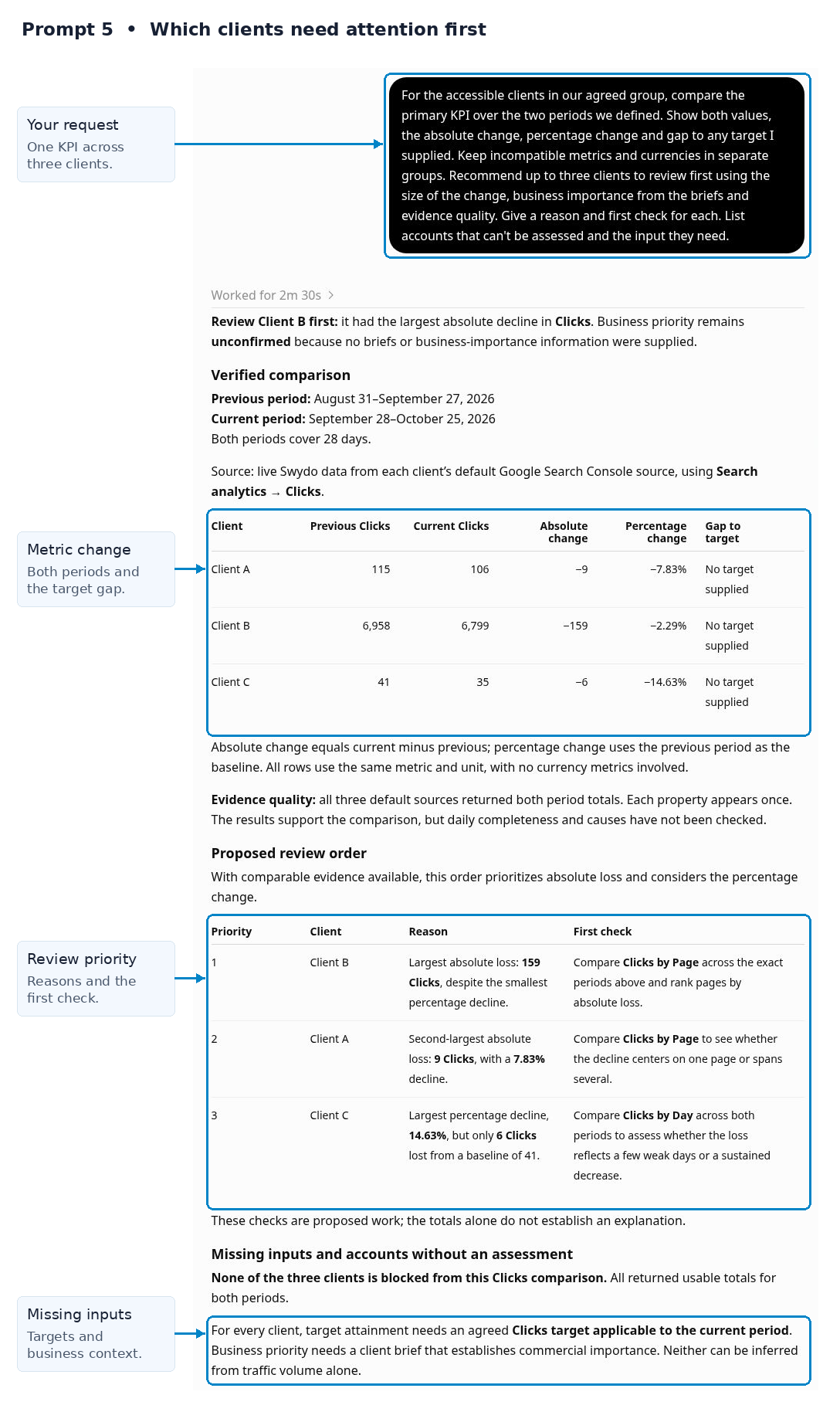
For the accessible clients in our agreed group, compare the primary KPI over the two periods we defined. Show both values, the absolute change, percentage change and gap to any target I supplied. Keep incompatible metrics and currencies in separate groups. Recommend up to three clients to review first using the size of the change, business importance from the briefs and evidence quality. Give a reason and first check for each. List accounts that can’t be assessed and the input they need.
What you get: A defensible review order and the next question for each priority client.
Follow-up question
Follow-up to copy
Would the order change if we used qualified business outcomes or client value instead of the headline KPI?
6. Check Spend Against the Plan
Use this when spend needs an early correction. Supply the current budget sheet and any planned spend changes or campaign pauses. Use the agreed pacing tolerance if it differs from the example’s 10% threshold.
Prompt to copy
For the clients in the supplied budget sheet, retrieve spend from available Swydo sources through the last complete day of the current month. If those sources are unavailable, use the spend export I supply and clearly label that fallback; state its coverage and do not treat missing values as zero. State the dates and currencies. Show budget, actual spend, elapsed days and projected month-end spend at the current daily rate. Flag projections outside the agreed pacing tolerance; use 10% above or below budget if none was supplied. Then assess how the planned changes I supplied affect that simple projection. Separate missing budgets from missing spend. Recommend which accounts need a pacing review, with the calculation behind each flag.
What you get: A pacing table and a practical list of budget checks.
Follow-up question
Follow-up to copy
What daily spend would meet each remaining budget, and does the supplied plan support it?
7. Separate Data Problems From Performance Changes
Use this before you escalate a decline. A reported zero, an empty result and a failed request need different next steps.
Prompt to copy
For our selected clients and sources, compare the primary KPI for the last seven complete days with the preceding four complete weeks. Use the earlier weeks as a comparable daily or weekly baseline. Account for weekday patterns. Return a short status summary for each client and show daily values only for flagged accounts. Separate retrieval errors, missing values, empty results, reported zeros and unusual measured changes. Where existing source-health or alert information is available, use it as additional evidence. For each flagged account, state whether the data supports a performance observation, a measurement concern or an unresolved issue, and name the first check needed.
What you get: A triage list that prevents an unverified measurement problem from becoming a performance claim.
Follow-up question
Follow-up to copy
Which apparent decline should stay out of the client summary until we verify the data?
8. Check Today’s Client Commitments
Use this alongside the performance scan. Supply the current task list, client promises, owners and deadlines. Those details don’t come from performance metrics.
Prompt to copy
Review the supplied commitments for our selected clients as of today, and state the date. List overdue items, actions due today and decisions due in the next seven days. Match relevant items to the verified performance concerns in this conversation. Prioritize by deadline, client impact and dependencies. For each item, show the recorded owner, next action and blocker. Keep unknown status separate from confirmed delay. Draft a concise account-team work queue without assigning new owners or inventing completion dates.
What you get: A daily work queue that connects account promises with current evidence.
Follow-up question
Follow-up to copy
Which commitment should the account owner address before today’s client conversations?
Explain the Change
Start with conflicting definitions or data if either is unresolved. Then examine the relevant campaigns, funnel steps or channels. The goal is to narrow the next investigation and show how strongly the evidence supports an explanation.
9. Resolve Conflicting Numbers
Use this when a report, platform or client spreadsheet disagrees. Name both figures and supply any exports or screenshots the connection can’t retrieve.
Prompt to copy
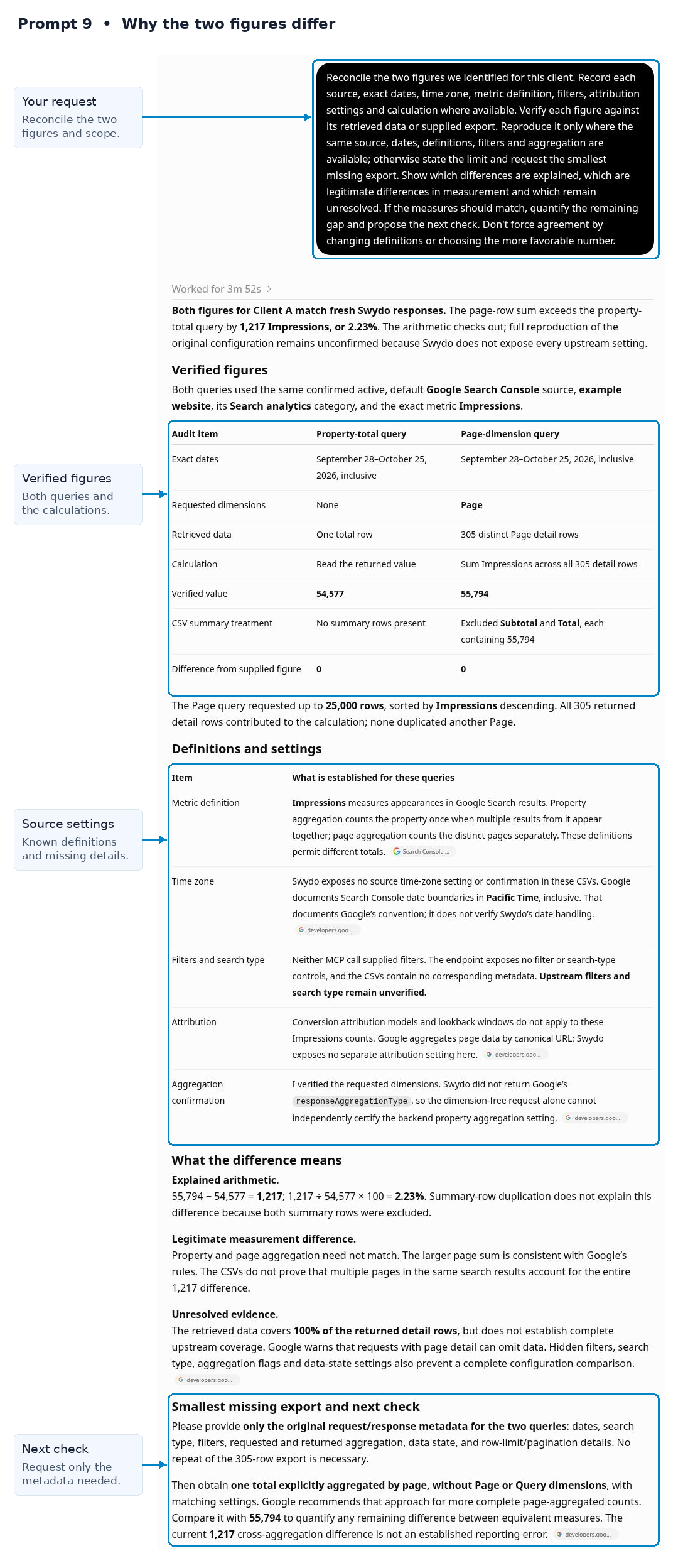
Reconcile the two figures we identified for this client. Record each source, exact dates, time zone, metric definition, filters, attribution settings and calculation where available. Verify each figure against its retrieved data or supplied export. Reproduce it only where the same source, dates, definitions, filters and aggregation are available; otherwise state the limit and request the smallest missing export. Show which differences are explained, which are legitimate differences in measurement and which remain unresolved. If the measures should match, quantify the remaining gap and propose the next check. Don’t force agreement by changing definitions or choosing the more favorable number.
What you get: A reconciliation table and a client-ready explanation of what matches and what doesn’t.
Follow-up question
Follow-up to copy
Which figure answers the client’s actual question, and how should we explain the other?
10. Find Which Campaigns or Pages Account for the Change
Use this once the headline change is reliable. Choose the campaign, page, device or other available dimension that fits the question.
Prompt to copy
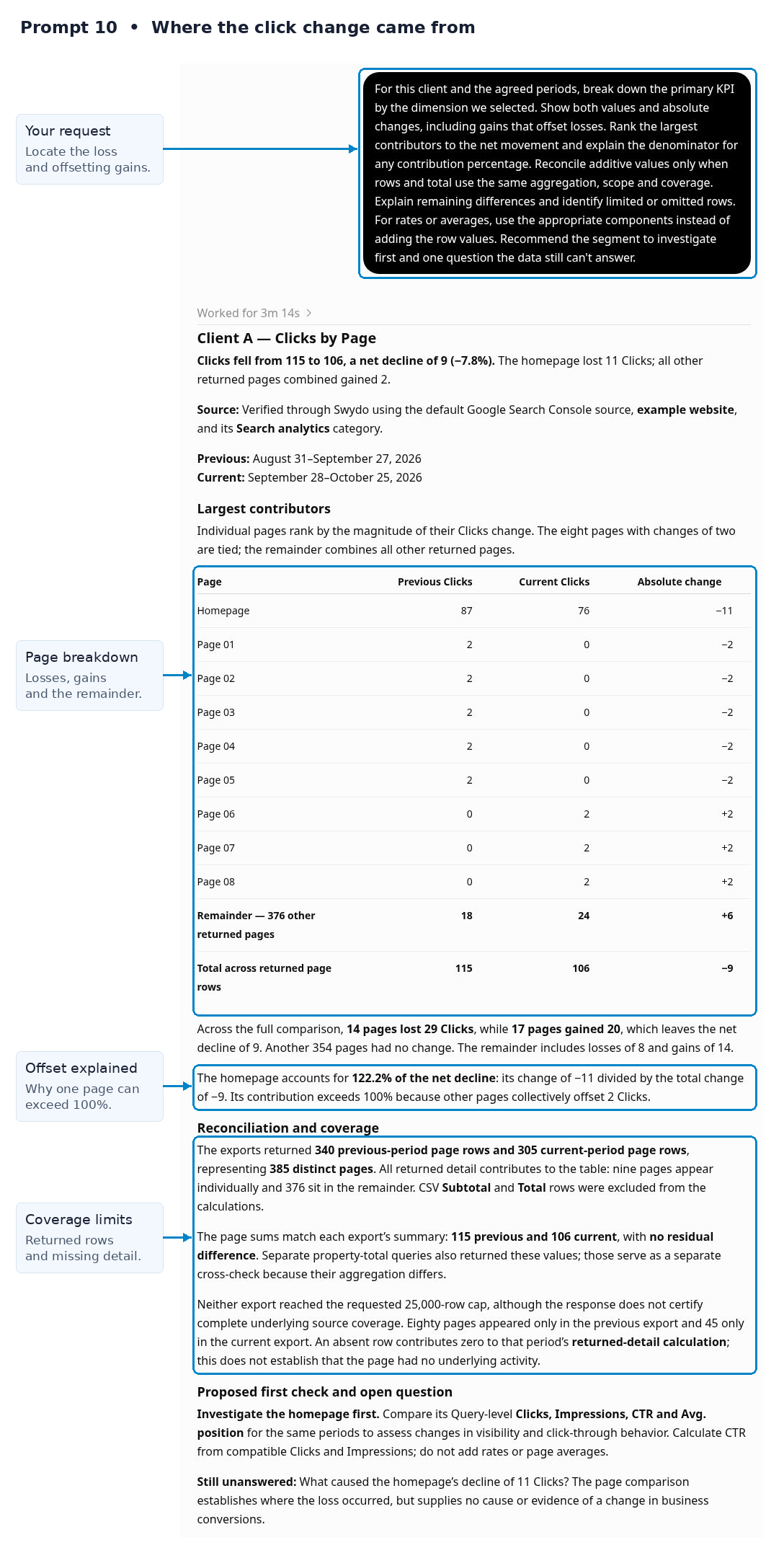
For this client and the agreed periods, break down the primary KPI by the dimension we selected. Show both values and absolute changes, including gains that offset losses. Rank the largest contributors to the net movement and explain the denominator for any contribution percentage. Reconcile additive values only when rows and total use the same aggregation, scope and coverage. Explain remaining differences and identify limited or omitted rows. For rates or averages, use the appropriate components instead of adding the row values. Recommend the segment to investigate first and one question the data still can’t answer.
What you get: A focused diagnosis that names where the change occurred and where to look next.
Follow-up question
Follow-up to copy
Does the priority change when we compare absolute impact with the size of each segment?
11. Find the Weak Step in the Funnel
Use this when you know the result changed but need to locate the next check. Agree which funnel steps matter for this client.
Prompt to copy
For this client and the agreed periods, compare the available stages in our defined funnel, from reach or visits through the primary outcome. Show counts and relevant rates with their denominators. Identify where volume changed and where the rate between comparable steps changed. Keep populations from different sources separate unless the supplied data supports a valid connection. Rank the steps that deserve investigation and suggest a check for each. Explain which parts of the funnel we can’t assess with the available fields.
What you get: A shortlist of weak steps and checks for the right specialist.
Follow-up question
Follow-up to copy
What evidence would distinguish a traffic-quality problem from a page or offer problem?
12. Check Lead Quality and Revenue
Use this when reported conversions haven’t produced the expected business value. Attach the CRM, sales or store export, outcome definitions and relevant dates.
Prompt to copy
Compare this client’s marketing results with the supplied sales data for the agreed periods. Use comparable cohorts suited to the business model and reliable matching fields where available. For lead generation, show leads, qualified leads, sales and revenue; allow time for leads to mature. For ecommerce, compare relevant order and revenue measures and state how returns and cancellations are treated. Calculate cost per qualified result or order only where valid. Flag unmatched records and identify where the observed gap appears. State what we can conclude if the datasets can’t be matched reliably.
What you get: A quality assessment that connects the client’s result to the available marketing and sales evidence.
Follow-up question
Follow-up to copy
Which segment produces useful outcomes, and which one only looks efficient on the marketing metric?
13. Explain Organic Search Results Against the Client’s Goal
Use this when search visibility improves but the business outcome doesn’t. Identify the relevant GA4 key event and supply any SEO or site changes.
Prompt to copy
For this client and the agreed periods, assess organic search against the goal in the brief. Use available Search Console clicks, impressions, click-through rate and average position, then inspect relevant page or query changes. Compare that evidence with GA4 landing-page sessions and the defined key-event measures for Google organic traffic where supported data or a supplied export allows that scope. Otherwise state the scope difference. Keep the two sources’ definitions clear and don't treat Search Console clicks and GA4 sessions as individually matched. Identify useful progress, business-outcome gaps and the strongest next check. Label explanations that still need evidence.
What you get: An organic-search explanation tied to the client’s goal and a specific next investigation.
Follow-up question
Follow-up to copy
Which page deserves a joint SEO and conversion review, and what should each specialist inspect?
14. Assess Social Results Against the Agreed Goal
Use this when engagement is the headline but the client asks what it achieved. Confirm the objective and distinguish paid from organic activity.
Prompt to copy
Assess this client’s social results for the agreed periods against the objective in the brief. Use the relevant available measures for awareness, visits or business outcomes, and separate paid from organic results. Compare platforms using their actual definitions; don’t add incompatible reach or engagement measures. Show which content or campaign patterns support the goal, which changes are only supporting signals, and where the evidence stops. Recommend one next action and the result we should use to judge it.
What you get: A social-performance assessment with a goal-specific recommendation.
Follow-up question
Follow-up to copy
What would we need to see next month before calling this social activity successful?
15. Test Seasonality and Known Changes as Explanations
Use this before you attribute a change to agency work. Supply promotion dates, budget changes, site releases and other relevant account notes.
Prompt to copy
For this client’s primary KPI, compare the agreed periods with the corresponding periods last year where comparable history exists. Note weekday, holiday and definition differences. Place the supplied account changes alongside the trend. Assess each proposed explanation against the timing and affected segments: supported, plausible but unconfirmed, contradicted or untestable with this evidence. Show the comparison behind each assessment and the next useful check. Don’t treat a similar seasonal pattern or nearby change date as proof of cause.
What you get: A short evidence table that makes the remaining uncertainty clear.
Follow-up question
Follow-up to copy
Which explanation would change our action most, and what evidence could test it?
Choose and Assign the Next Action
Once the evidence is clear enough, turn it into a decision and a useful handoff. Supply team capacity, available options and scope terms. The output can propose work and owners; your team still assigns and approves the work.
16. Prioritize the Available Fixes
Use this after diagnosis when several actions compete for attention. Include the team’s constraints and any options the specialists have already proposed.
Prompt to copy
Using this client’s verified findings and the options I supplied, rank the next actions by likely business impact, evidence strength, effort and dependencies. Explain the basis for each judgment; avoid precise uplift estimates without support. Separate checks that reduce uncertainty from changes intended to improve results. Recommend one action to start, one to defer and anything to stop or leave alone. Include the expected learning or outcome, the metric to review and the condition that would change your recommendation.
What you get: A practical priority order with reasons the account team can discuss.
Follow-up question
Follow-up to copy
If the team can do only one thing this week, which choice has the strongest case?
17. Compare Budget or Target Scenarios
Use this before you recommend a budget change or commit to a target. Supply the actual options, margin constraints and delivery capacity.
Prompt to copy
For this client, compare the budget or target options I supplied using the agreed baseline and outcome definitions. Show the arithmetic for each scenario, including the efficiency it assumes and the result it would require. Include a range that tests weaker performance as spend increases. Distinguish simple arithmetic at current efficiency from a forecast. Assess the options against the supplied margin, capacity and risk limits. Identify the evidence or small test needed before we recommend a larger commitment.
What you get: A scenario comparison with explicit tradeoffs and decision thresholds.
Follow-up question
Follow-up to copy
At what outcome or cost level would each option stop meeting the client’s requirements?
18. Write the Specialist Work Brief
Use this when the account manager needs a specialist to act. Supply the approved priority, team roles and any agreed deadline.
Prompt to copy
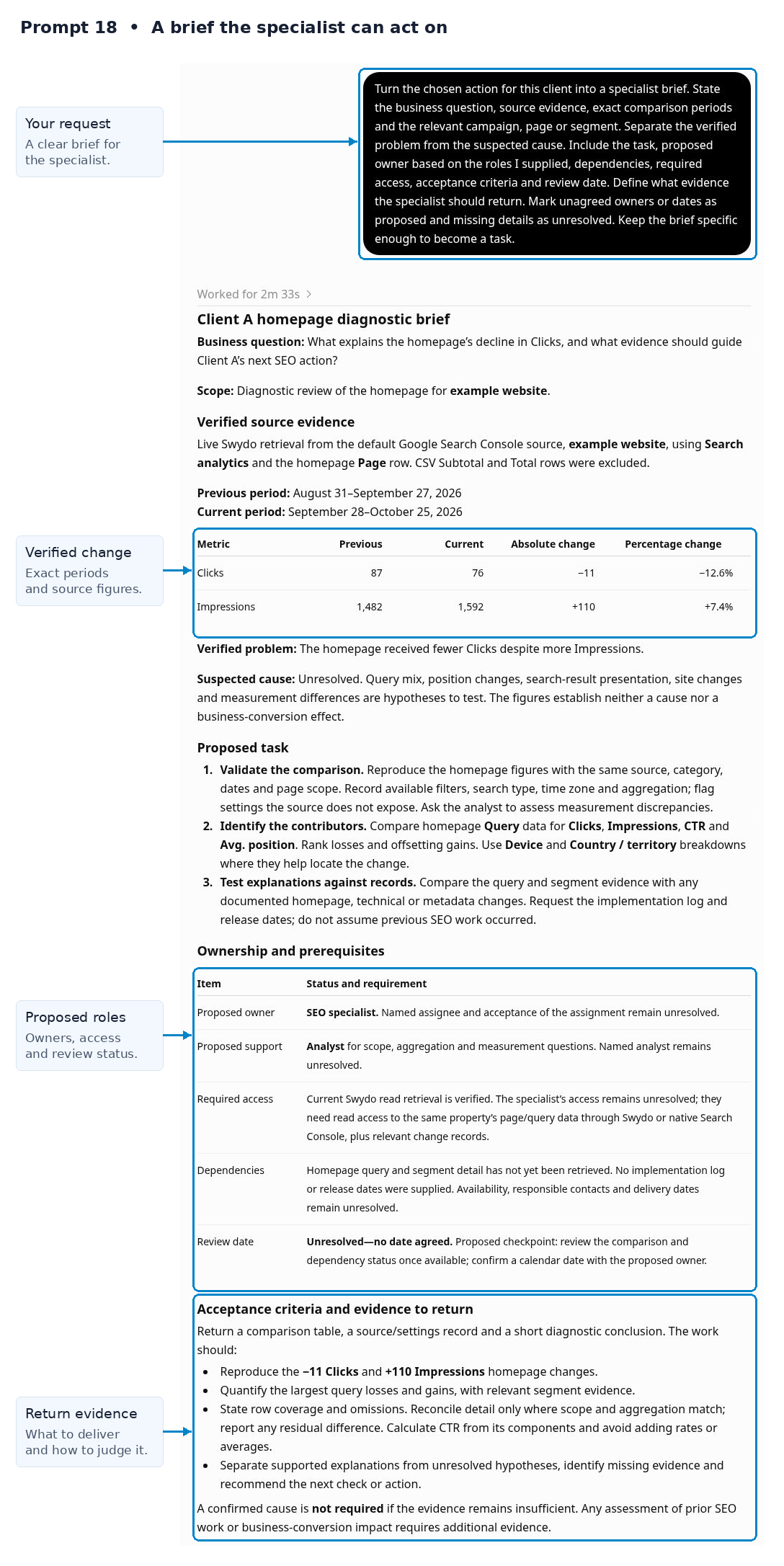
Turn the chosen action for this client into a specialist brief. State the business question, source evidence, exact comparison periods and the relevant campaign, page or segment. Separate the verified problem from the suspected cause. Include the task, proposed owner based on the roles I supplied, dependencies, required access, acceptance criteria and review date. Define what evidence the specialist should return. Mark unagreed owners or dates as proposed and missing details as unresolved. Keep the brief specific enough to become a task.
What you get: A clear handoff with evidence, completion criteria and the next review.
Follow-up question
Follow-up to copy
What would the specialist still have to ask before they could begin?
19. Identify What Needs Client Approval
Use this before the plan depends on new spend, access, client work or extra scope. Supply the relevant agreement and approval rules.
Prompt to copy
Compare the proposed actions for this client with the supplied scope, budget and approval rules. Identify which actions can proceed under the existing agreement, which require a client decision and which can’t be classified from the information available. For each decision, state the request, reason, options, effect of delay and information the client needs. Distinguish approval from missing access or materials. Draft a concise decision list using only confirmed deadlines and costs; label proposed terms clearly.
What you get: A client decision list and a plan for work that can move forward.
Follow-up question
Follow-up to copy
What useful work can proceed while each unresolved decision is with the client?
Explain the Result to the Client
Use the verified findings and agreed next action as the source for client communication. The reader should be able to see the result, its business relevance and the next decision from a short, clear update.
20. Write the Client Summary
Use this for the report or routine update. Name the reader and supply the approved action so the draft doesn’t turn a proposal into a promise.
Prompt to copy
Write a summary of this client’s results for the agreed period and the audience in the brief. Stay under 150 words. Lead with the result that matters most to the business goal, then explain the main supported finding and the agreed next step. Use the verified figures in this conversation. Include the most useful win or concern if it changes the decision. Translate technical terms into plain language while preserving their meaning. Keep unknown causes and proposed actions distinct from confirmed facts and commitments.
What you get: A concise, accurate update that connects results with the next action.
Follow-up question
Follow-up to copy
What one sentence should the client remember, and is it supported by the evidence?
21. Explain a Missed Target
Use this when performance needs a direct explanation. Supply the agreed response and next update date before you ask for a client-ready draft.
Prompt to copy
Draft an email to this client about the missed target identified in our analysis. State the KPI, actual result, target, gap and reporting period near the start. Explain what the evidence confirms and what remains unresolved. Describe the agreed response, any decision needed from the client and the next update date I supplied. Use plain language and acknowledge the effect on the business goal. Don't invent a recovery date, an excuse or a commitment that the team hasn't agreed. Keep the exact source metric names; don't relabel clicks as visits, sessions, people, leads or inquiries.
What you get: A direct explanation with a concrete next update and no unsupported assurance.
Follow-up question
Follow-up to copy
Which sentence could the client read as a promise we can’t yet support?
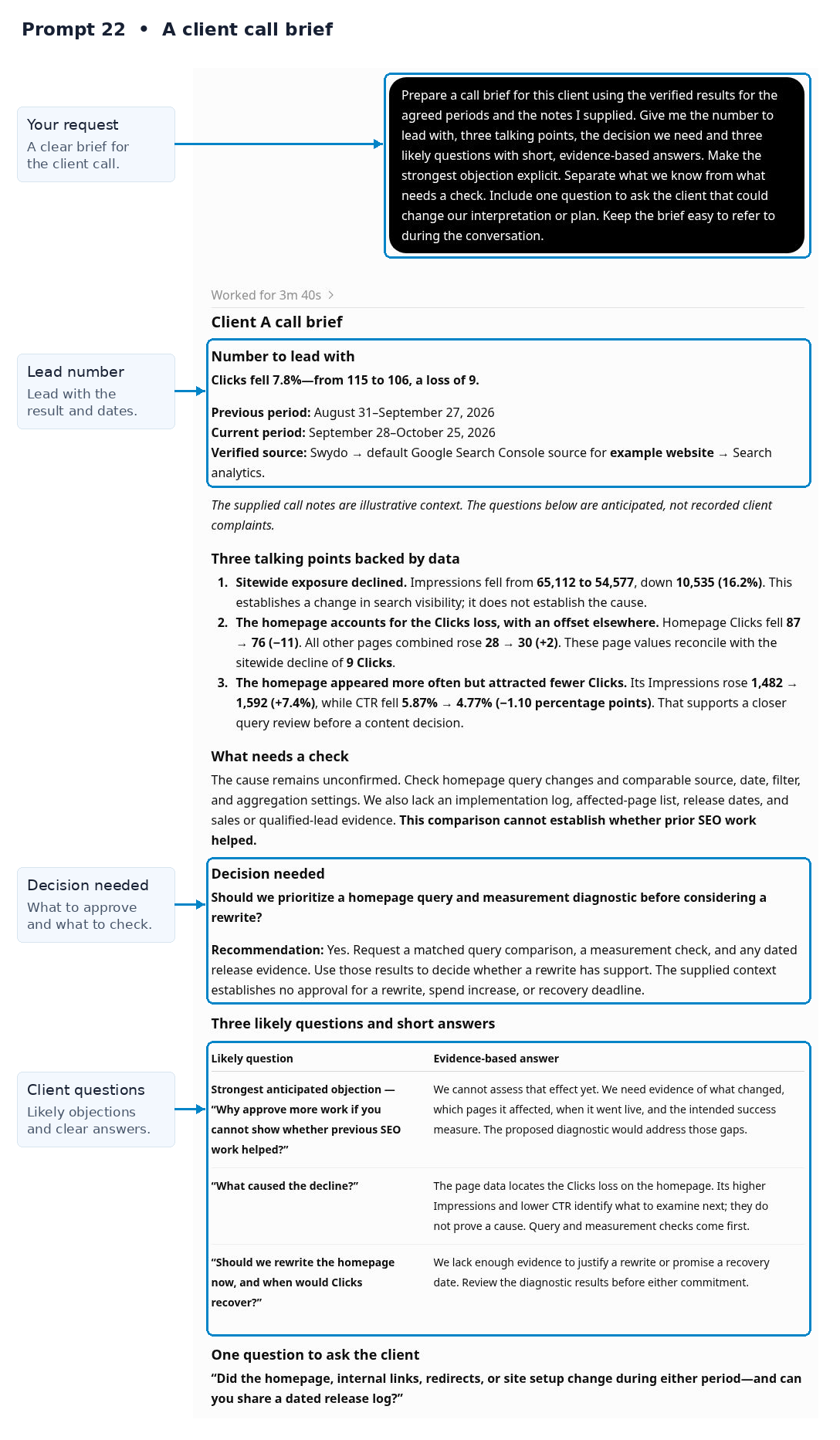
22. Prepare the Client Call
Use this before the call. Supply its purpose, recent client questions and any sensitive context that the reporting data can’t reveal.
Prompt to copy
Prepare a call brief for this client using the verified results for the agreed periods and the notes I supplied. Give me the number to lead with, three talking points, the decision we need and three likely questions with short, evidence-based answers. Make the strongest objection explicit. Separate what we know from what needs a check. Include one question to ask the client that could change our interpretation or plan. Keep the brief easy to refer to during the conversation.
What you get: A call brief that supports an honest discussion and a useful decision.
Follow-up question
Follow-up to copy
If the client asks for another comparison live, which source, dates and definition must we confirm first?
23. Prepare the Quarterly Decision Review
Use this when the review should decide the next quarter’s plan. Supply business priorities, budget options, the action log with completion evidence and the decisions the client needs to make.
Prompt to copy
Outline a quarterly review for this client using the completed quarter’s exact dates, agreed goals and verified results. Limit it to ten sections or slides. Cover results against targets, the most consequential changes, work completed, evidence about its effect and unresolved issues. Then compare the proposed priorities for next quarter and state the client decisions needed. Give each section one point and its supporting evidence. Put the biggest business concern early and flag any claim that still needs data.
What you get: A review outline organized around evidence and next-quarter choices.
Follow-up question
Follow-up to copy
Which sections could we remove without weakening the client’s ability to make the decisions?
Close the Loop After the Call
A good call leaves a record that people can act on. Separate decisions from ideas, schedule the next check in the appropriate tool and review delivery against the promises made.
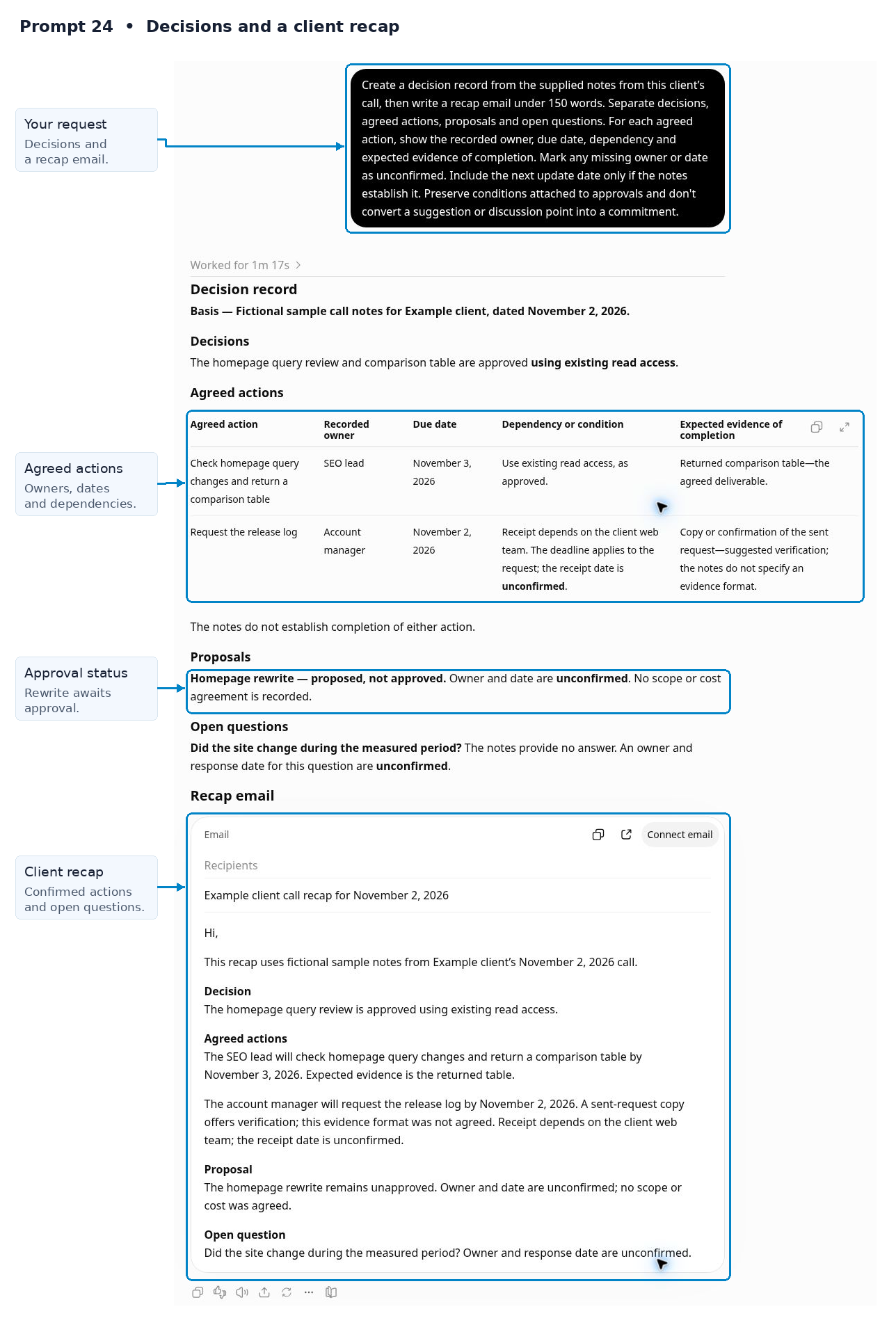
24. Turn Call Notes Into Decisions and Actions
Use this immediately after the call. Supply the actual notes or transcript and identify any draft notes that still need checking.
Prompt to copy
Create a decision record from the supplied notes from this client’s call, then write a recap email under 150 words. Separate decisions, agreed actions, proposals and open questions. For each agreed action, show the recorded owner, due date, dependency and expected evidence of completion. Mark any missing owner or date as unconfirmed. Include the next update date only if the notes establish it. Preserve conditions attached to approvals and don’t convert a suggestion or discussion point into a commitment.
What you get: A client recap and action log that the team can check against the call.
Follow-up question
Follow-up to copy
Which item needs a clarification before we send the recap?
25. Set the Next Check and Alert Rule
Use this when an action needs a follow-up measure. Supply the agreed outcome, tolerance for change and date when a result could reasonably be assessed.
Prompt to copy
For this client and the agreed outcome metric, propose the next review and a candidate alert rule. Use up to 90 complete days of available history, noting weekday patterns, missing values and delayed outcomes. Test the proposed threshold over its proposed measurement period and show the dates it would have triggered. Explain likely false alarms, limitations and what the account owner should do after a trigger. Compare with relevant existing alerts where accessible. Keep the proposed rule separate from any claim that it has been created.
What you get: A review plan and a candidate alert rule to check and configure.
Follow-up question
Follow-up to copy
Would a longer measurement period produce a more useful signal for this client’s volume?
Swydo’s alert setup guide explains how to create the rule in Monitoring → Alerts. The MCP can inspect existing alerts; create or edit them in Swydo. A review date or suggested rule in the chat doesn’t schedule a future check.
26. Check Whether the Agreed Work Happened
Use this before you assess an intervention’s result. Supply the prior action log, current task status and any completion evidence.
Prompt to copy
Compare this client’s agreed actions with the current status and evidence I supplied, as of the review date we defined. Classify completion status as confirmed complete, in progress, blocked or unconfirmed. Flag overdue items separately. Show the original promise, owner, due date, latest evidence and next step. Separate work completed from results observed. Identify any change to the planned scope or completion date that affects when we can judge the outcome. Draft the smallest set of questions needed to resolve uncertain status.
What you get: A delivery check that prevents the team from judging work that may not yet be live.
Follow-up question
Follow-up to copy
Which action is ready for a result review, and which still needs implementation evidence?
Review Whether the Work Helped
Return to these prompts after enough time has passed for the relevant outcome to appear. Completion is one checkpoint; effect is another. Use the findings to decide what to keep, change or test next.
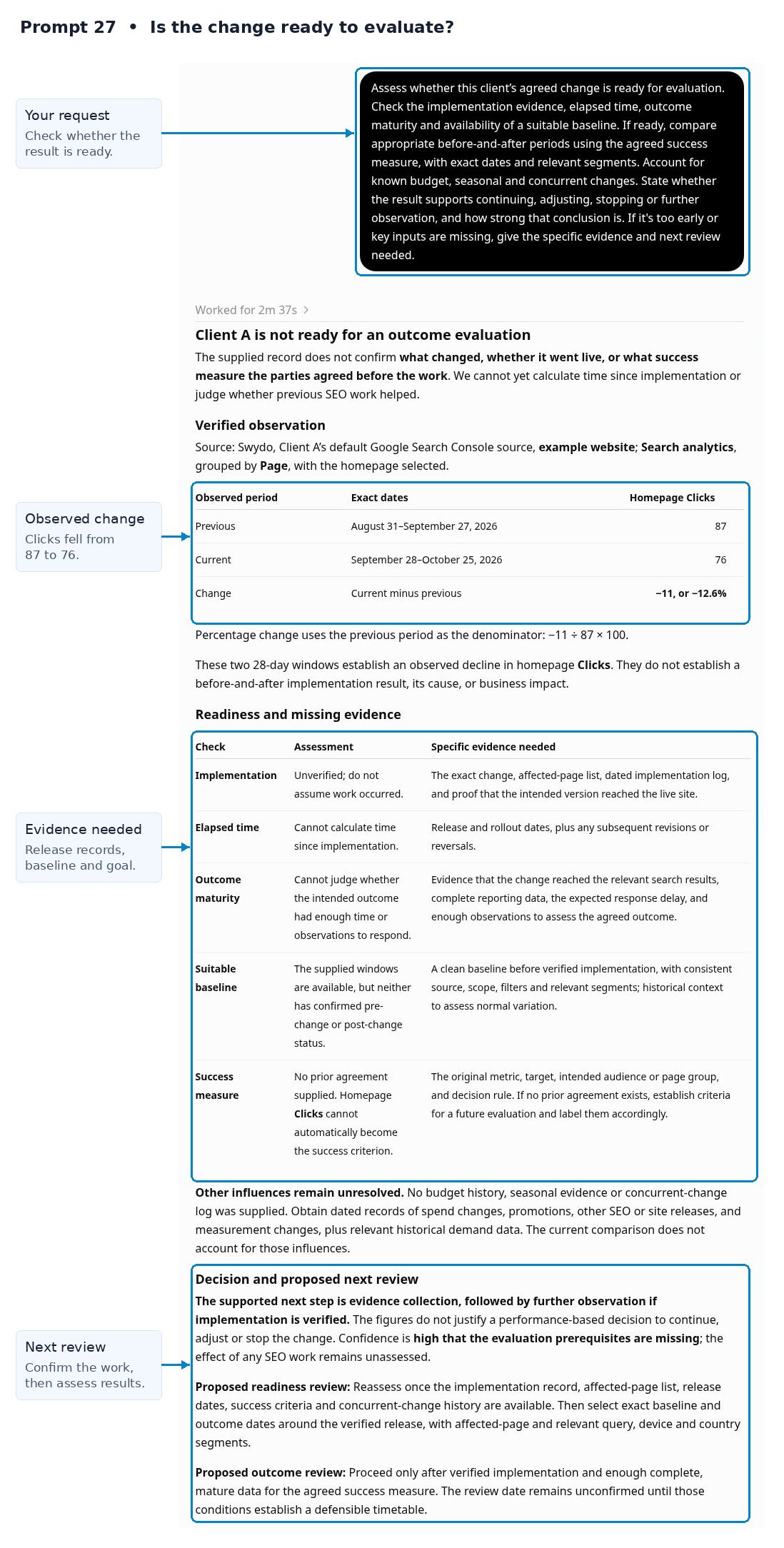
27. Evaluate the Result After a Change
Use this for last month’s fix, a recent test or a revised plan. Supply the change log, confirmed completion date and the success measure agreed before the work.
Prompt to copy
Assess whether this client’s agreed change is ready for evaluation. Check the implementation evidence, elapsed time, outcome maturity and availability of a suitable baseline. If ready, compare appropriate before-and-after periods using the agreed success measure, with exact dates and relevant segments. Account for known budget, seasonal and concurrent changes. State whether the result supports continuing, adjusting, stopping or further observation, and how strong that conclusion is. If it’s too early or key inputs are missing, give the specific evidence and next review needed.
What you get: An evidence-based result review, or a clear explanation of why a verdict must wait.
Follow-up question
Follow-up to copy
What evidence would strengthen or overturn the conclusion that this change helped?
28. Prepare a Retention Review
Use this when an account needs closer attention. Supply client feedback, unresolved commitments, renewal context and any recent change in business priorities.
Prompt to copy
Prepare a retention review for this client using the last three complete months of the agreed KPI, targets and the account context I supplied. Separate performance concerns, delivery issues, relationship feedback and gaps in what we know. Show the evidence for each concern and identify improvements as well as problems. Recommend the conversation, corrective action or clarification that would help most. Don’t treat a KPI decline alone as proof that the client intends to leave or assign an unsupported churn probability.
What you get: A balanced account review and a concrete conversation plan.
Follow-up question
Follow-up to copy
What should we ask the client directly before we decide on a retention plan?
29. Build the Case for More Investment
Use this when results suggest an expansion conversation. Supply margin, sales quality, capacity and scope details before you ask for a recommendation.
Prompt to copy
Assess the case for more investment in this client using the agreed reporting history, business outcomes, scenario analysis and business constraints I supplied. Show what has improved, whether the gains are consistent and what might limit additional results. Compare increased spend or scope with maintaining the current plan. State the assumptions, required approvals and evidence gaps. Recommend an expansion, a limited test, more preparation or no increase, with a measurable success condition and a review point. Don’t promise that historical efficiency will hold at higher spend.
What you get: An investment recommendation tied to business value, capacity and a defined next decision.
Follow-up question
Follow-up to copy
What result would justify expanding further, and what result would make us pause?
Eight Agency Situations That Put the Prompts to Work
A useful prompt sequence starts with a client question and ends with a decision, an assigned action, or a clear reason to gather more evidence. Use the paths below to move through the 29 prompts. You don’t need to run every prompt for every client.
All eight situations are illustrative. The businesses, requests, figures and events describe possible agency work. Provide the brief, dates, targets and notes named in each example before you copy its first question.
Monday Morning With 25 Clients
An account lead has 25 clients to review before a Monday team meeting. One paid account appears to have stopped converting, another may exceed its monthly spend plan, and a client expects a promised update today. The first task is to establish which issues deserve attention.
Bring these inputs: Supply the client list, agreed primary KPIs and targets, complete comparison dates, monthly spend plans, and the current commitments list. Include the accounts that are in scope; don’t assume every connected account belongs in this review.
Prompt path: 7 → 5 → 6 → 8 → 18
First question to copy
Before we rank today’s client work, check whether the requested periods and metrics are available for these clients. Separate a reported zero from missing data, a failed request, and a source that may still be updating. State which performance comparisons are usable and which need a data check first.
The apparent conversion drop is a data problem
Next question to copy
What exactly failed or is missing, and which checks can the account owner perform? Keep this client off the performance ranking until the evidence supports a comparison.
The figures support a real change
Next question to copy
Use the agreed business goals, spend plans, and commitments to choose today’s priorities. Explain why each deserves attention now, then draft a short specialist brief for the first action.
Deliverable: A short team queue with the evidence, business consequence, next task, and supplied owner. Mark missing ownership or due dates for assignment.
Next check: Recheck blocked data after the relevant fix or source update. Review spend and due commitments at the next agreed daily check.
More Leads but Fewer Sales
A roofing client sees more form submissions in its report. Its sales manager says fewer requests become booked jobs. The account manager needs to establish whether the disagreement comes from definitions, lead quality, sales follow-up, or timing before recommending a change.
Bring these inputs: Supply conversion definitions, the reporting periods, a permitted CRM export with lead creation dates and stage outcomes, and any known sales-cycle delay. Include usable campaign identifiers where available; names alone may not support a reliable match.
Prompt path: 2 → 9 → 12 → 16 → 18 → 22 → 27
First question to copy
From this client’s brief and the supplied conversion definitions, explain what each reported lead metric counts. Separate form submissions, unique leads, qualified leads, and customers. Which measures can we compare with the CRM export, and which don’t share the same definition or date basis?
The systems count different events or cohorts
Next question to copy
Reconcile the definitions and compare outcomes for leads created in comparable periods. Show the unmatched records and allow for leads that haven’t had time to progress. What remains unresolved?
The definitions and cohorts are comparable
Next question to copy
Does the gap appear at qualification, sales progression or outcome timing? If qualification is stable, what sales follow-up evidence should we request before recommending campaign changes? Prioritize the supported next check and draft its brief.
Deliverable: A qualified-demand assessment, a specific next action, and call notes that distinguish recorded outcomes from possible explanations. Avoid treating every platform conversion as a unique lead.
Next check: Evaluate an approved change only after its implementation is confirmed and a sufficiently mature lead cohort is available. A later improvement alone doesn’t prove the change caused it.
SEO Results Improve but Inquiries Do Not
A local dental practice receives more organic search clicks. The practice manager reports no increase in appointment inquiries. The SEO specialist needs to connect visibility to the agreed goal and identify the next useful check.
Bring these inputs: Supply the agreed inquiry definition, Search Console results, available GA4 landing-page and conversion data, and any separate call or booking records. Name the geographic service area and include known website or measurement changes.
Prompt path: 2 → 13 → 11 → 16 → 18 → 27
First question to copy
What counts as a successful inquiry for this client, and which available sources measure it? Separate search visibility, website visits, recorded inquiry events, and confirmed appointments. Identify any missing link before assessing the SEO results.
The tracking is usable
Next question to copy
Do the extra clicks reach relevant service pages, and what do the available site-outcome measures show? Identify whether traffic relevance, a page step or another supported issue deserves the next check. Draft the specific SEO or page brief.
Inquiry tracking is incomplete or can’t be linked reliably
Next question to copy
What measurement check would establish whether inquiries changed? State what the current sources can show, and avoid inferring an individual searcher’s path from aggregate Search Console data.
Deliverable: A page or measurement brief with the evidence, proposed task, dependencies, and agreed business success measure. A rise in impressions or clicks is useful context, not a substitute for that measure.
Next check: After the work is confirmed, compare appropriate periods for both search performance and available inquiry outcomes. Account for relevant seasonal changes and recording delays.
The Report and the Client's Figures Disagree
A report shows 52 leads while a client spreadsheet shows 38. The client asks which number is correct before a review call. These fictional totals illustrate a reconciliation task; neither source should win merely because its number looks more plausible.
Bring these inputs: Supply the report’s displayed figure or widget export, relevant widget definitions, the client’s spreadsheet and each system’s metric description. Include dates, time zones where known, visible filters, deduplication rules and the event date each source uses.
First question to copy
Inspect the report and relevant widget setup, then compare the lead figure I supplied with the supplied spreadsheet. List the source, metric, date range, filters and counting rules that are visible. Separate verified differences from settings or records we can’t inspect.
A definition or scope difference explains the totals
Next question to copy
Show a comparison on the same basis where the data allows it. Explain what each original total represents and prepare a brief explanation for the call.
The discrepancy remains unresolved
Next question to copy
Identify the smallest additional export or setting check needed to resolve it. Prepare a call note that states the disagreement accurately and avoids claiming a verified total.
Deliverable: A reconciliation table and a clear client explanation, with unresolved items assigned for checking.
Next check: After the missing evidence or correction arrives, repeat the comparison and verify the client-facing figure before the next delivery.
A Client Asks to Double the Budget
An ecommerce client asks whether it should double next month’s paid-media budget after a strong sales period. The agency needs a useful recommendation without assuming that twice the spend will produce twice the revenue.
Bring these inputs: Supply the current and proposed budgets, comparable performance periods, revenue definitions, and any available margin, returns, stock, or fulfillment constraints. Identify which revenue comes from platform attribution and which comes from the store’s records.
Prompt path: 12 → 17 → 19 → 29 → 25 → 27
First question to copy
Assess the revenue evidence behind this budget request. Which results are comparable, which may overlap across platforms, and which costs or business constraints are missing? Explain what we can conclude about sales quality before modeling a higher budget.
The evidence supports testing more investment
Next question to copy
Compare holding spend, increasing it in stages, and the proposed doubled budget. State the assumptions and uncertainty for each option, then identify the approval and monitoring rules needed before a test.
The evidence doesn’t support an increase
Next question to copy
Separate missing information from results that fail the client’s requirements. Which input could change the decision? Recommend holding spend, no increase or a conditional proposal as the evidence warrants. Don’t infer profit from revenue alone.
Deliverable: An investment proposal with options, supporting evidence, approval needs, and a review rule. Any numerical projection must expose its method and assumptions.
Next check: After approval and confirmed implementation, compare actual results with the agreed baseline and limits.
Social Engagement Rises but Its Value Is Questioned
A B2B consultancy’s LinkedIn posts receive more reactions. Its founder asks whether the work is useful. The answer depends on whether the agreed goal was awareness, website interest, or qualified demand.
Bring these inputs: Supply the campaign objective, audience, agreed measures, comparable platform results, and any available website or CRM evidence. Include the relevant link-tracking definitions and known campaign changes.
Prompt path: 2 → 14 → 11 → 16 → 20
First question to copy
Using the agreed brief, define success for this social activity. Which measures show progress toward that goal, which are supporting signals, and which downstream outcomes can the available sources actually verify?
The agreed goal is awareness
Next question to copy
Assess the available awareness measures against the agreed target. Explain what the increase in engagement adds to that assessment and which audience or reach questions remain unanswered.
The agreed goal is demand
Next question to copy
Compare available post, link, landing-page, and inquiry measures. Identify the weakest supported step or a measurement gap. Keep platform clicks distinct from website sessions and avoid assigning sales to social without adequate evidence.
Deliverable: A goal-based client summary and one prioritized next check or improvement. Explain what the results establish without treating engagement as proof of commercial impact.
Next check: Review the same goal and metric definitions at the next agreed interval. If the goal changes, record the new baseline and target before judging subsequent performance.
A Client Call Ends With Three Next Steps
A call produces three items: check form tracking, revise a service-page message, and consider a budget increase. The notes show approval for the first two, while the budget request awaits the client’s decision. The account manager needs a reliable handoff.
Bring these inputs: Supply the call notes, the existing action list, relevant findings, and any explicit owners, dates, or approval conditions. A suggestion mentioned on a call isn’t automatically a commitment.
Prompt path: 24 → 18 → 19 → 26
First question to copy
Turn these call notes into a decision and action record. Separate approved work, proposals awaiting approval, questions, and dependencies. Preserve the owners and dates that were actually stated; mark anything missing for assignment.
Work is approved and sufficiently defined
Next question to copy
Draft a specialist brief for each approved task with the problem, supporting evidence, expected output, dependencies, and acceptance check. Flag anything the specialist still needs before work can start.
A decision or input is still pending
Next question to copy
Prepare the specific approval question or request for information. Keep the affected task pending and explain which other work, if any, depends on that decision.
Deliverable: A decision log and specific task briefs for the agency’s normal project workflow.
Next check: At the agreed checkpoint, request implementation evidence. Classify each task as completed, incomplete, or unconfirmed; a passed due date doesn’t prove completion.
Review Last Month's Fix
An agency recommended a service-page change last month. The next report needs to answer whether the work happened and whether the relevant results improved, rather than repeating the same recommendation.
Bring these inputs: Supply the approved brief, implementation notes or confirmation, actual release date, baseline, agreed success measure, and known changes to spend, traffic, or tracking. Include enough time after the release for the outcome being assessed.
Prompt path: 26 → 27 → 16 → 20
First question to copy
Check the previous action plan against the supplied implementation evidence. Which tasks were completed, incomplete, or remain unconfirmed? Identify the actual implementation date and any differences between the approved work and what was delivered.
Implementation is confirmed and comparison is meaningful
Next question to copy
Compare the agreed success measure before and after the change using suitable periods. Consider traffic mix, spend, seasonality, and recording delays. State what improved, what didn’t, and how confidently we can connect the result to this work.
The work is unconfirmed or the evidence is premature
Next question to copy
What confirmation or additional observation is needed? Update the action record and set a justified next check without presenting an outcome we can’t yet assess.
Deliverable: A decision to continue, revise, or gather more evidence, followed by a client update that closes the previous action loop.
Next check: Record the next decision point against the chosen action. Keep the implementation evidence with the report so the next reviewer can follow what changed and why.
Choose the Right Review Cadence
A day in agency reporting includes work with different deadlines. Use the cadence that fits the client’s decision, data volume, and reporting agreement. These are suggested routines, not a requirement to run all 29 prompts every day. Use prompt 3 whenever report setup or source access changes, and prompt 19 whenever a proposed action needs an approval check.
Daily
Check urgent commitments, data availability, meaningful exceptions, and spend pacing where daily action is useful. Brief the responsible person on the few items that need attention. Avoid turning normal daily variation into a new task.
Weekly
Investigate the relevant client issues, choose the next actions, and review implementation. Evaluate results only when enough suitable evidence exists. A weekly meeting doesn’t make a long sales cycle mature faster.
Useful prompts: 10, 11, 12, 13, 14, 15, 16, 18, 26, 27
Monthly
Reconcile disputed figures, prepare the client review, record decisions, and update the next checks. Confirm that the report, spoken explanation, and action list use consistent dates, definitions, and approval status.
Useful prompts: 9, 20, 21, 22, 24, 25
Quarterly or at a Strategic Review
Revisit the brief, business goals, targets, investment choices, and retention concerns. Use supplied relationship and delivery context alongside performance. A retention review shouldn’t infer client sentiment from marketing metrics alone.
Useful prompts: 1, 2, 4, 17, 23, 28, 29
Make the Next Decision Easier
The value of these 29 prompts comes from connecting the steps. Confirm what success means, check the evidence, decide what deserves attention, make the handoff clear, and return to the result. When a source, approval, or implementation detail is missing, the useful answer is the next specific check.
Keep the brief, verified figures, decision record, and implementation notes with each reporting cycle. That gives the next conversation a reliable starting point and helps the agency show both what it learned and what happened after the last report.
Agency Reporting Prompts FAQ
Straight answers on using ChatGPT and Claude for client reporting, from setup and privacy to explaining results
Yes, once it’s connected to the data. On its own, ChatGPT only sees what you paste into the chat. With the Swydo MCP connector, ChatGPT or Claude can read live figures from the Google Ads, GA4, Meta Ads, Search Console and other accounts already connected in Swydo, for one client or your whole portfolio.
The connection gives the AI the numbers. Your team still supplies the context it can’t see, such as goals, budgets, sales definitions and recent changes.
A good reporting prompt names five things: the client, the data source, the exact dates of both periods, the metric definition and the output format you want.
Add three instructions that prevent most errors. Ask the AI to separate verified figures from possible explanations, to keep the exact metric names from the source and to say which input is missing instead of guessing. A word limit also helps, because a short answer is easier to check.
AI can draft the written summary, but the report itself should stay in your reporting tool. Use AI for the narrative: the main result, why it matters to the client’s goal and the agreed next step.
Give it verified figures and the actions the client has actually approved, then review the draft before it goes out. That keeps a proposal from turning into a promise in writing.
ChatGPT, Claude and any other AI tool that supports custom MCP connectors. Whether you can add a connector depends on your AI tool’s plan and, on team plans, your workspace admin settings.
Every connected tool reads the same Swydo data, so the choice comes down to which assistant your team already uses.
Daily for exceptions, weekly for investigation and monthly for the client review. Daily checks cover spend pacing, data problems and commitments due. Weekly work explains changes and assigns next actions.
Monthly, reconcile disputed figures and prepare the client conversation. Each quarter, revisit goals, targets and budgets. Running every prompt every day creates noise, not insight.
Add https://ai.swydo.com/mcp as a custom connector in your AI tool, then sign in with your Swydo account to approve access. No API key or developer is needed. The Swydo MCP setup guide walks through each step.
No. The MCP connector is included in your Swydo plan and uses no Swydo AI credits. Your questions run on your AI tool’s own plan, so they count toward that tool’s usage limits.
No. The connection is read-only, so the AI can retrieve and analyze data but can’t create, edit or delete anything in Swydo. Reports, alerts and schedules are still changed in Swydo, and campaign changes still happen in the ad platform.
No. The AI only sees what that person’s Swydo role allows. A Contributor who has access to five clients can ask about those five clients and no others.
With Swydo, client data goes only to the AI tool you connect, and only when you ask a question. Access is read-only and limited to each user’s Swydo permissions.
What happens next depends on your AI tool. Check its data controls, such as whether chats can be used for model training, and confirm that your client agreements allow the use of AI tools before you connect.
Yes. The most common errors are the wrong date range, mixed currencies, mislabeled percentage changes and renamed metrics, such as calling Search Console clicks “visits.” Another is double counting, when a total row gets added to the rows it already sums.
Tell the AI to keep the exact metric names from the source and to exclude subtotal and total rows when it adds figures. Ask it to show the dates and both values behind every change, then check the headline figure once against the matching Swydo report before you quote it to a client.
Ask it to label each statement as a verified finding, a hypothesis or a proposed action, and to name the next check instead of a cause. Data shows where a number changed. It rarely shows why on its own, so a cause needs evidence such as change logs or query-level data.
Usually because the two numbers measure different things. Date ranges, time zones, filters, attribution rules, currencies and conversion definitions all change the result, even when the metric names match.
Compare the report’s source, date settings and filters with how the client calculates its figure before the call. In the article’s example, a widget inherited different dates from its report, which would have made any comparison wrong.
A zero is a measurement. Missing data means no measurement arrived. A reported zero can signal a real performance problem, while an empty result or failed request points to a data or connection issue that needs checking first. Treating one as the other sends the team after the wrong problem.
Because recent days are often incomplete. Conversions can be recorded days after the click, so a period that ends yesterday can look worse than it is. Compare two equal, finished periods, such as back-to-back 28-day windows, and state the exact dates.
Lead with the verified change, show where it happened and name the next check. For example: clicks fell about 8%, most of the loss came from the homepage, and the next step is to compare its search queries across both periods.
Say plainly when the cause isn’t known yet. Clients trust a clear next step more than a confident guess that later turns out wrong.
Not from performance data alone. Before-and-after numbers show that a result changed, not that your work caused it.
To judge impact, the AI needs the implementation record with live dates, the pages and queries the work targeted, and context such as longer trends, comparable pages you didn’t change and seasonal shifts. Without that evidence, the honest answer is that it’s too early to tell.
Yes. Through the MCP connector, the AI can look up any metric, dimension or filter a connected data source offers, even without a widget for it. If you’re not sure what’s available, ask the AI to list the metrics and filters for a source. See the full list of Swydo integrations.
Use the live connection when you need current numbers, and a CSV export when you need a fixed snapshot. A live query returns the data available when you ask, subject to each platform’s reporting delays. An export stays frozen, which suits a dataset you want to reference later. Swydo supports CSV export from table and line-chart widgets for signed-in users.
Run these prompts on live client data and walk into every client call with verified numbers.
Connect Swydo to Your AI Tool