
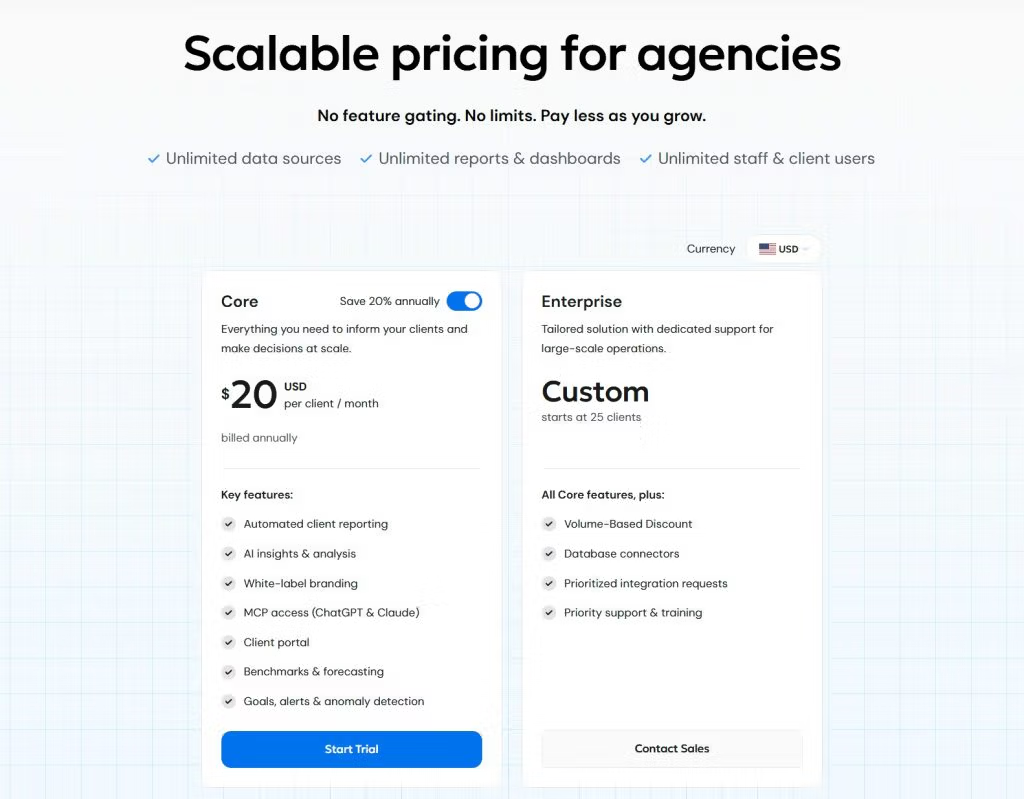
AgencyAnalytics charges per client. Its current Core plan runs $20 per client per month billed annually, or about $25 billed monthly, with every feature included and no caps on data sources, reports, or users (AgencyAnalytics pricing page).
That one design choice, billing by the client rather than by the seat or the dashboard, shapes everything about what you’ll actually pay. It’s also the part most buyers underestimate.
So this guide does two things. It lays out what the plans include, and it shows you the math you’ll live with once your client list grows.
The headline price is easy to find. The real number, what lands on your card each month once you’ve added the clients, the keywords, and the connectors you actually need, takes a little more work. That’s the part worth getting right before you sign anything.
Here’s what’s below:
- A plain breakdown of the current plans and both billing options
- A per-client cost model you can run against your own roster
- The add-ons that change the total
- The gotchas that catch people
- What real users say about the price
- When this pricing fits your agency, and when it doesn’t
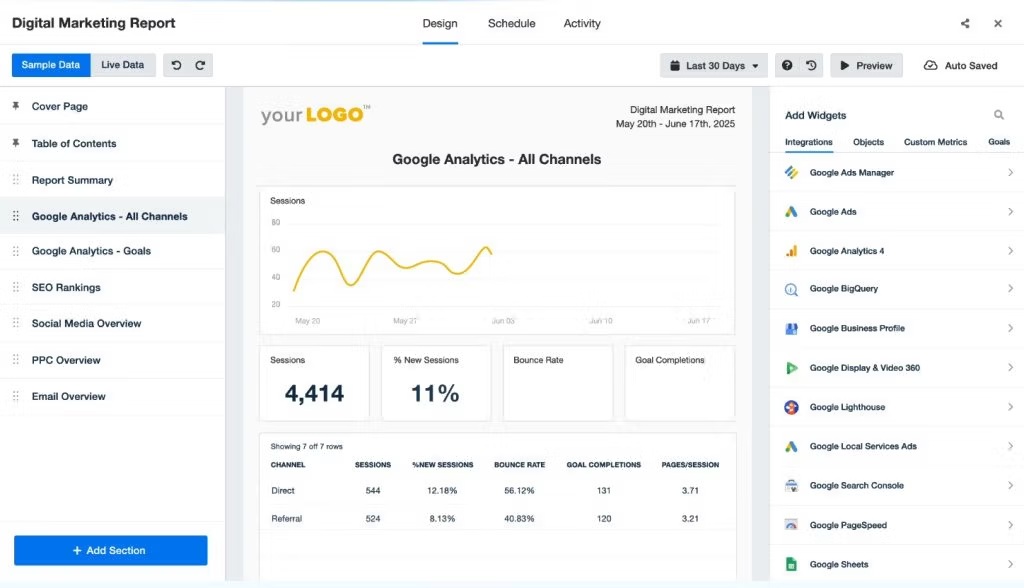
How AgencyAnalytics Pricing Works
AgencyAnalytics uses per-client pricing. Your bill is tied to the number of clients you build reports for, not the number of people on your team or the number of dashboards you create.
Think of it like a cover charge at a venue. You don’t pay for how many drinks you order or how long you stay. You pay per head walking through the door. Every client you bring in is another head.
That model has a real upside, and it’s worth saying plainly:
- Your whole team can use the platform with no per-seat fees.
- You can build as many reports and dashboards as you want.
- You can connect as many data sources as a client needs.
None of that moves the price. The only lever that moves your bill is client count.
Which is exactly why the model rewards some agencies and punishes others. If each client needs ten dashboards and twelve connected accounts, per-client pricing is a bargain, because you’re packing a lot of usage under one flat charge. If you run lean clients with one or two channels each, you’re paying a full per-client rate for a sliver of the platform.
One quick note on the word “client,” because it changed recently. AgencyAnalytics used to call this billing unit a “campaign,” which confused people into thinking they were paying per marketing campaign. They renamed it to “client” for clarity. Same billing logic, clearer label. One client equals one bucket of reports, dashboards, and connected accounts.
What AgencyAnalytics Costs in 2026
AgencyAnalytics runs on a single main plan called Core, plus a custom Enterprise tier for larger operations. The older four-tier ladder (Freelancer, Agency, Agency Pro, Enterprise) is being phased out, though you’ll still see it quoted around the web, and existing customers may stay on it for now.
You can pay for Core two ways:
- Annually: $20 per client per month
- Monthly: about $25 per client per month
So the annual option saves you roughly 20%. But the difference between the two isn’t only the price. It’s the commitment.
| Billing option | Price per client | Commitment | Best for |
|---|---|---|---|
| Monthly | ~$25 / client / month | None. Cancel anytime, you won’t be billed again | Testing the platform, seasonal work, or an unsettled roster |
| Annual | $20 / client / month | 1-year lock-in to hold the discount | A stable roster you’re confident in for 12 months |
Pick monthly if your client list moves around or you want to stay flexible. You trade about 20% for the freedom to walk away any month.
Pick annual if your roster is steady and you’d rather bank the saving. Just know that the annual rate ties you in for a year, and you’ll keep adding clients at the per-client rate inside that term, so the yearly total isn’t actually locked even though the rate is.
What You Get on Core
Here’s the part that changed most. On Core, every feature is included, with nothing gated behind a higher tier.
| What’s included on Core | Detail |
|---|---|
| Unlimited data sources | Connect as many ad accounts, analytics properties, and profiles as a client needs |
| Unlimited reports & dashboards | Build as many as you want per client |
| Unlimited staff & client users | No per-seat fees for your team or for client logins |
| Automated client reporting | Scheduled, recurring report delivery |
| White-label branding | Your logo, colors, custom domain, and custom email. Full branding, not partial |
| AI insights | Automated summaries and analysis on your data |
| Client portal | A branded login where clients view live dashboards |
| 80+ integrations | The standard marketing-platform connectors |
| Benchmarks, goals & alerts | Performance context and proactive monitoring |
The headline shift with Core is that the ladder is gone. White-label, API access, AI features, benchmarks: these all used to live on specific tiers, and climbing the ladder was how you reached them. Now they’re all in at one rate.
A couple of details for budgeting:
- 14-day free trial, no credit card required
- 30-day money-back guarantee if you subscribe and change your mind
- Billing supported in USD, CAD, AUD, NZD, GBP, and EUR
Estimate Your AgencyAnalytics Cost
Core plan is $20 per client/month billed annually, or about $25 billed monthly. Slide to match your agency.
Per Month
$200
$2,400 / year
Blended / Client
$20.00
your true cost per client
The Add-Ons That Change Your Total
Two add-ons sit outside the per-client price, and they’re the most common reason a quoted budget and an actual invoice don’t match. The base plan covers the platform. These are billed on top:
- Rank Tracker: $41.67 per month for every 500 keywords, billed annually. If you sell SEO and track rankings for clients, this stacks up fast. A handful of clients with a few hundred keywords each can rival a meaningful chunk of your base subscription.
- Database Connectors (MySQL, Google BigQuery, Amazon Redshift): quote-based on Core, bundled into Enterprise. If you pull from a warehouse, price this before you commit, because it’s a custom number you won’t see on the public page.
The lesson isn’t that add-ons are bad. It’s that the per-client base price is the floor, not the ceiling. Map the add-ons you’ll actually use into your estimate from day one, so the real total is the number you’re deciding on.
What You’ll Really Pay as You Scale
The per-client model means your software bill grows every time you win a client. So the right way to evaluate AgencyAnalytics is to run the math at your real client count, not the entry price.
A simple check does the job. Call it the True Cost Per Client:
Client count × per-client rate, plus monthly add-ons, divided back by clients.
That last number is the one to compare across tools, because it captures what each client actually costs you to report on.
The chart below runs that base math at the $20 annual Core rate. Notice the slope more than any single bar. Every new client adds a fixed, predictable amount, which is clean for forecasting and rough on margin if your per-client revenue is thin.
(Prefer monthly billing? Add about 20% to every figure, so 10 clients runs roughly $250 a month instead of $200.)
Monthly Cost as Your Client Count Grows
Core plan base cost at $20 per client/month, billed annually. Each client adds a fixed amount — a straight line up.
Red bars (25+ clients) are where you should ask about Enterprise volume pricing. Monthly billing runs about 20% higher than the figures shown.
At 25 clients and up, that’s the point to call sales about Enterprise volume pricing rather than riding the flat rate. The discount curve is where larger agencies claw back the per-client cost.
This is also where your own pricing model matters more than the tool’s. If you charge clients a healthy monthly retainer, $20 a head is a rounding error. If you run high-volume, low-ticket accounts, a per-client software cost is a direct tax on the exact thing you’re trying to do, which is add more accounts. Worth sitting with that before you pick a model.
Three Ways Reporting Tools Bill You
The billing unit decides who pays less — match it to how your agency is shaped.
Per Client
e.g. AgencyAnalytics
Per Data Source
e.g. Swydo
Per Dashboard / Seat
common elsewhere
Pricing Gotchas Most Buyers Miss
The pricing traps with AgencyAnalytics aren’t hidden in fine print. They come from the per-client model interacting with annual billing and add-ons in ways that surprise people after they sign.
Here are the four that catch agencies most often.
1. The annual commitment plus mid-year growth. You commit annually to save the 20%, which is the right call for most agencies. But you keep adding clients inside that term at the per-client rate, so the “predictable annual cost” you budgeted isn’t actually fixed. It climbs every time you onboard. Decide your billing cadence knowing your bill grows during the term, not just at renewal.
2. Per-client cost is a growth tax. This is the single most-repeated complaint from agencies that have scaled on the platform. Winning a client is supposed to be pure upside, but with per-client pricing, every win also nudges a recurring cost upward. Build at least 15% headroom into your software budget so growth doesn’t quietly erode your margin.
3. Add-on stacking. Rank Tracker and database connectors are billed separately. For an SEO-heavy agency, the rank-tracking line can quietly approach the base subscription. Price the add-ons before you decide, not after the first invoice.
4. Old plan versus new plan confusion. If you signed up under the legacy Freelancer, Agency, or Agency Pro tiers, you may still be on them, and your overage math works differently than the flat Core rate. Confirm with AgencyAnalytics which model you’re on, and whether moving to Core raises or lowers your bill.
One honest note that applies to almost any reporting tool: the headline number is never the real number. The real number is base price, plus per-client growth, plus the add-ons you’ll genuinely use. Agencies that get burned are the ones who budgeted off the first figure and met the third.
What Agencies Say About AgencyAnalytics Pricing
The sentiment is strongly positive overall, and the pricing complaints are specific rather than general. On G2, AgencyAnalytics holds 4.7 out of 5 from 430+ verified reviews, with 86% rated five-star. Where the grumbling starts is scale.
4.7
What Users Praise
“The features are great and the price is fair.”— Verified reviewer, G2
Fast, low-friction setup — people call it extremely easy to get running.
Polished, client-ready dashboards straight out of the box.
Support rated quicker than expected at this price point.
What Users Flag
Per-client cost climbs as the roster fills out — felt most past 20–30 clients.
The rank-tracker add-on stacks on top for SEO-heavy teams.
Some longtime users note features that moved to pricier tiers over time.
Smaller shops sometimes find the per-client math hard to predict.
Rating and review data from G2, June 2026. Praise and flags summarize recurring themes across verified user reviews.
The praise is consistent. Setup is fast. The dashboards look client-ready out of the box. Support gets named again and again as quicker than people expect at this price. The value read is positive too, especially next to data-pull tools that cost far more.
The complaints cluster around the model, not the product:
- Agencies that have grown on the platform flag the per-client cost climbing as the roster fills out.
- SEO-heavy teams point at the rank-tracker add-on stacking on top.
- Some longtime users note that features they once had on cheaper tiers moved up the ladder over time.
None of that shows up in a 10-client demo. It shows up in month eight, at 22 clients.
When AgencyAnalytics Pricing Makes Sense
AgencyAnalytics works best for agencies running a moderate number of clients, roughly 5 to 25, where each client uses a lot of the platform. Per-client pricing rewards heavy usage per head. If that’s you, the flat Core rate buys a polished, all-inclusive reporting setup with fast onboarding and strong support, and the math stays comfortable.
It’s a strong fit when:
- Each client connects multiple channels and needs several dashboards, so you’re getting real value out of the flat charge.
- You want every feature available without thinking about tiers.
- Your client retainers are healthy enough that $20 a head disappears into the cost of doing business.
- You value guided setup and responsive support over deep custom data modeling.
It’s a weaker fit when:
- You run a large book of lean, low-channel clients, where the per-client rate compounds against thin per-account revenue.
- You’re past 25 to 30 clients and haven’t priced the Enterprise volume discount.
- You need heavy data blending, custom dimensions, or warehouse connectors as a core part of delivery.
So what does your client roster actually look like: a handful of deep accounts, or a long list of light ones? That answer decides whether per-client pricing is a bargain or a burden, more than any feature list will.
Where a Different Billing Model Comes In
If a long list of lighter clients describes your agency, this is where the per-client model starts working against you.
The thing about per-client pricing is that it’s flat. Every client costs you the same $20 whether they need one dashboard with a single channel or ten dashboards across six platforms.
But your clients aren’t flat. One’s on a $4,000 retainer with paid search, paid social, SEO, and email all running. Another’s a $900 local shop with one Google Ads account. AgencyAnalytics charges you the same for both.
A per-data-source model lines the cost up with the work instead. Swydo starts at $69 a month with the first 10 data sources included and unlimited clients and users, then charges per additional data source, at $4.50 each from 11 to 100, dropping as you scale.
A data source is one connected account: one Google Ads account, one Meta profile, one GA4 property. So the light client adds two or three sources to your bill, the heavy client adds six, and what you pay tracks the depth of reporting you actually deliver.
That matters because it moves your software cost in the same direction as your revenue. The channel-heavy client costs you more to report on, and they’re also the one paying the bigger retainer. The lean client adds almost nothing, which protects your margin where it’s thinnest.
Read our complete guide on how to choose between AgencyAnalytics vs Swydo
The honest flip side: if you run a handful of channel-heavy clients, all those data sources add up, and a flat per-client rate can land cheaper. There’s no universal winner here. It comes down to the shape of your roster.
Count your total data sources, count your clients, and run both models against your real numbers. Our rundown of AgencyAnalytics alternatives walks through the wider field if you want to compare more than two.
AgencyAnalytics Pricing FAQ
Direct answers on plans, billing, refunds, and what you’ll really pay
AgencyAnalytics costs $20 per client per month on the Core plan billed annually, or about $25 per client per month billed monthly.
Every feature is included at that rate, with no separate charge for users, reports, or data sources. Your real bill is simply your client count multiplied by the per-client rate, plus any add-ons.
| Clients | Per month (annual rate) | Per year |
|---|---|---|
| 5 | $100 | $1,200 |
| 10 | $200 | $2,400 |
| 20 | $400 | $4,800 |
| 25+ | Custom (Enterprise) | Volume pricing |
AgencyAnalytics offers one main plan called Core, priced per client, plus a custom Enterprise tier for larger agencies that starts around 25 clients.
Core includes every feature with nothing locked behind a higher tier. An older four-tier structure (Freelancer, Agency, Agency Pro, Enterprise) is being phased out, so existing customers may still be on it, and third-party sites may still quote it.
A “client” is one reporting workspace that holds a set of dashboards, reports, and connected accounts, and it’s the unit AgencyAnalytics charges for.
It used to be called a “campaign,” which confused people into thinking they paid per marketing campaign. You can connect as many data sources and build as many reports as you want inside one client without changing the price.
Yes, in practice there’s a small floor, since the per-client model means your lowest bill is roughly one to a few clients at the per-client rate.
That makes it less economical for someone reporting on a single account than for an agency spreading the platform across several clients. If you only have one or two clients, weigh it against free or per-data-source tools.
No, user seats are unlimited for both your staff and your clients.
Adding team members or giving clients portal logins never changes your bill. Only client count and add-ons affect what you pay.
Yes, paying annually saves about 20% versus monthly, which lowers the rate from roughly $25 per client to $20 per client.
The trade-off is a one-year commitment. The per-client rate is locked for the term, but your total still rises as you add clients during the year.
Choose monthly if your client list changes often, and annual if your roster is stable and you want the discount.
Monthly has no commitment and can be canceled anytime. Annual costs about 20% less but ties you in for a year, so it rewards agencies confident in their client count.
There’s no permanent free plan, but there is a 14-day free trial with no credit card required.
That’s enough time to connect a few clients and run a full report cycle before paying. A good habit is to push two or three real client reports through the trial before committing to annual billing.
You can get a full refund within 30 days of your first purchase under the money-back guarantee, but annual plans are not prorated or refunded for the unused months after that window.
Because the annual discount is taken upfront, canceling mid-term keeps your access until the end of the paid period rather than returning the remaining balance. If you’re unsure, monthly billing avoids that risk.
You can cancel anytime from your account, and you keep access until the end of the period you’ve already paid for.
Monthly subscriptions end at the close of the current billing cycle and won’t bill again. Annual subscriptions can be canceled during the year and stay active until the last paid day.
AgencyAnalytics accepts major credit cards and PayPal, and bills in several currencies including USD, CAD, AUD, NZD, GBP, and EUR.
You only need to enter payment details once you move from the trial to a paid plan.
It’s worth it once client reporting is a real, recurring service, because it trades setup time for money in a way that pays off at scale.
Looker Studio is free but can take a few hours to build and maintain per client dashboard, while AgencyAnalytics offers prebuilt integrations, automated scheduling, and white-label reports out of the box. For one to a few clients, free tools usually win; across several reporting clients, the time saved tends to justify the cost.
It fits best for agencies with a moderate client count where each client connects multiple channels and uses a lot of the platform.
Per-client pricing rewards heavy usage per client, so packing many dashboards and data sources under one flat charge is where the value lands. It’s a weaker fit for a large book of lean, single-channel clients.
Per-client pricing is flat (every client costs the same), while per-data-source pricing scales with the actual reporting depth you deliver.
Under a per-client model, a one-channel client and a ten-channel client cost the same. Under a per-data-source model such as Swydo, which starts at $69 per month with the first 10 data sources and unlimited clients and users included, a light client adds little and a heavy client adds more. Agencies with many light clients often save that way, while a few channel-heavy clients can favor a flat per-client rate.
Multiply your client count by the per-client rate, add any add-ons, then divide back by clients to get your blended cost per client.
That blended figure is the number to compare across tools, because it reflects what each client really costs you to report on. Run it at your actual roster size and add about 15% headroom for clients you expect to win during the term.
The old model split features across four tiers with per-client allowances and overage fees, while Core puts every feature into one flat per-client rate with nothing gated.
If you’re on a legacy tier, your overage math works differently from Core, so confirm with AgencyAnalytics whether moving over would raise or lower your bill.
The Bottom Line on AgencyAnalytics Pricing
AgencyAnalytics pricing is simple to read and easy to forecast: $20 per client per month on Core billed annually, about $25 billed monthly, every feature included.
The honest catch is the model itself. Per-client pricing rewards agencies whose clients use a lot of the platform and quietly penalizes those running many lean accounts. So your blended cost per client, not the headline rate, is the number to judge it on.
Run your real client count through the math, add the rank tracking and connectors you’ll actually use, and build in headroom for growth. Do that, and you’ll know whether this pricing fits your agency before the first invoice tells you.
For a fuller view of how to keep client costs and reporting time in check as you grow, our guide to client reporting best practices is a good next read.
See what your client reporting really costs when the price doesn’t climb with every account you win.
Start Your Free Trial Today