
The best content marketing tools in 2026 are the ones that cover each stage of your content workflow once, without overlap. For most teams that means one SEO research tool (Semrush or Ahrefs), one optimization tool (Surfer or Clearscope), one design tool (Canva), one scheduler (Buffer or Hootsuite), a general AI assistant, and free measurement from Google Search Console and GA4. A solo marketer can run that stack for about $75 to $125 a month. A growing team usually lands around $400 to $500.
Here is the part most tool roundups skip. Almost everyone already uses AI, yet results are flat or falling. HubSpot’s 2026 State of Marketing report found 86.4% of marketing teams use AI. Meanwhile, Orbit Media’s 2026 blogging survey of 1,042 marketers found only 13.9% report strong results, the lowest share in the survey’s 12-year history.
So the real question is not “which tools are best?” It’s “which tools close the specific gap between what you publish and what it earns?” This guide answers that by stack layer, team size and budget, with prices as of November 2026. If you’re still shaping the strategy itself, start with our content marketing guide and map your content marketing funnel first.
The Best Content Marketing Tool for Each Job
If you only need the short answer, start here. Each row pairs the strongest paid pick with a free option that covers most of the same ground for a small team. Prices are monthly starting prices as of November 2026.
| Job | Best pick | Starting price | Best free alternative |
|---|---|---|---|
| Keyword and competitor research | Semrush | $199/mo (Semrush One Starter) | Google Search Console |
| Backlink and content gap research | Ahrefs | $29/mo (Starter) | Ahrefs Webmaster Tools |
| Marketing calendar and planning | CoSchedule | About $29/mo | Notion or Google Sheets |
| Drafting, editing and repurposing | ChatGPT or Claude | About $20/mo | Free tiers |
| Brand-safe AI writing for teams | Jasper | $69/seat ($59/seat billed yearly) | ChatGPT or Claude with a saved style guide |
| Polishing every draft | Grammarly | Free, paid plans available | Grammarly Free |
| On-page content optimization | Surfer | $59/mo ($49/mo billed yearly) | Manual review of top-ranking pages |
| Editorial teams with many writers | Clearscope | $129/mo, unlimited users | Shared Google Docs checklist |
| Design and social graphics | Canva | $18/mo ($12/mo billed yearly) | Canva Free |
| Video, podcasts and repurposing recordings | Descript | Free, paid plans available | Descript Free |
| Social scheduling for small teams | Buffer | $6/channel ($5/channel billed yearly) | Buffer Free (3 channels) |
| Social management at scale | Hootsuite | $99/user billed yearly | Native platform schedulers |
| CMS, CRM and email in one place | HubSpot | $20/seat (Starter) | HubSpot free tools |
| Tracking your brand in AI answers | Semrush AI Visibility Toolkit | $99/mo per domain | Manually testing prompts in ChatGPT, Gemini and Perplexity |
| Measuring what content earns | Google Analytics 4 | Free | Free |
| Client-ready reporting across channels | Swydo | About $69/mo | GA4 + Search Console |
What Content Marketing Tools Are (and Why One Analogy Gets You Most of the Way)
Content marketing tools are software that help you research, plan, create, publish, distribute and measure content. The easiest way to picture them is a restaurant kitchen. The analogy covers the basics, but you’ll need one more distinction to buy well, so we’ll cover both.
Why Every Content Tool Works Like a Kitchen Station
A good kitchen doesn’t buy equipment at random. It sets up stations, and each station handles one part of getting a plate to the table.
- Research tools are the market run. They tell you what people are hungry for (search demand, questions, competitor gaps).
- Planning tools are the ticket rail. They keep orders in sequence so nothing is forgotten or cooked twice.
- Writing and AI tools are the prep and cooking line. This is where raw ingredients become a dish.
- Optimization tools are the taste test. They check seasoning against what’s already working in search results.
- Design and video tools are plating. Same food, far better first impression.
- Distribution tools are the servers. A great plate that never leaves the pass earns nothing.
- Analytics tools read the returned plates. They show what got eaten, what got sent back, and what to change on the menu.
The lesson most buyers miss is that kitchens fail from gaps and duplicates, not from a lack of fancy equipment. Two ovens and no server is a worse kitchen than one oven and a good server.
Tools vs. Suites vs. Content Marketing Platforms
The analogy breaks down at one point: some “stations” are sold as a whole kitchen. Knowing the three product types keeps you from paying twice for the same job.
| Type | What it is | Examples | Best when |
|---|---|---|---|
| Point tool | Does one job very well | Surfer, Clearscope, Buffer, Canva | You have a clear gap in one stage |
| Suite | Covers several stages under one login | Semrush, Ahrefs, HubSpot | You want fewer vendors and shared data |
| Content marketing platform (CMP) | Runs the full workflow, approvals and governance for large teams | HubSpot Content Hub, Contently, StoryChief | Many contributors, strict brand and legal review |
Suites have grown fast. Semrush, Ahrefs, Surfer, Clearscope and HubSpot now all include AI writing or AI visibility features, so check what your current suite already does before adding a point tool.
Best SEO and Research Tools for Content Marketing
Research tools decide what you write about, which makes them the most important purchase in the stack. A great article on a topic nobody searches for still fails. These three tools show you what your audience wants, what competitors already cover, and where the openings are.
1. Semrush for All-in-One Research and Content Planning
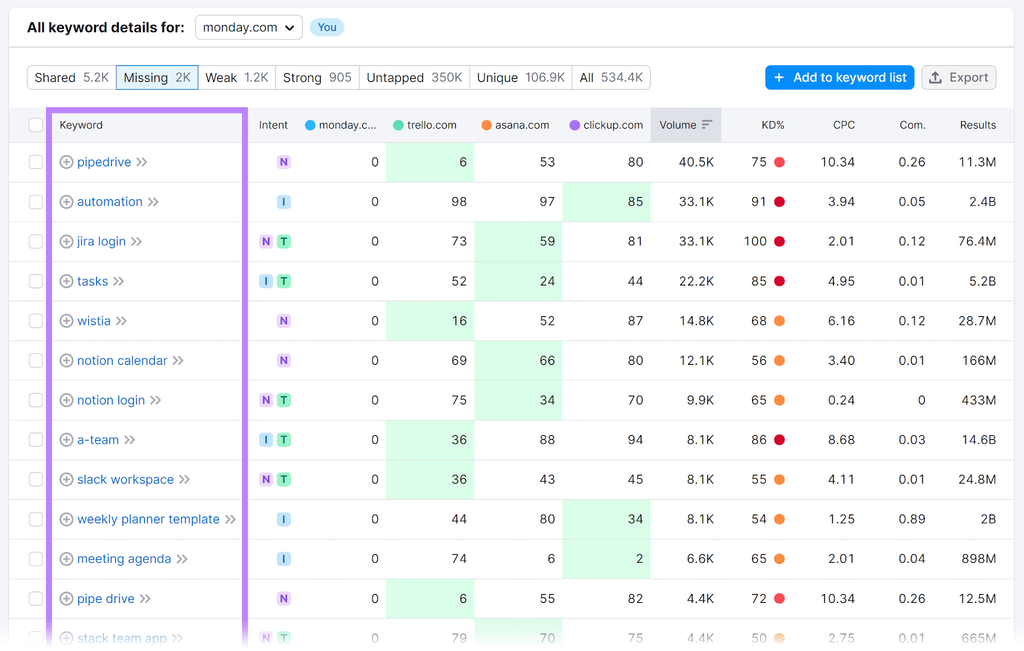
Best for: teams that want keyword research, competitor analysis, site audits and AI visibility tracking under one login.
Semrush is the broadest research suite on this list. Instead of stitching together a keyword tool, a rank tracker and an audit tool, you get them in one place with shared data, so a keyword you research can flow straight into a content brief and then into rank tracking. That breadth is why it earns the top research spot for most content teams. Semrush is now part of Adobe, which matters if you already use Adobe’s marketing products.
Key features
- Keyword research with intent filters. Find topics, group them by search intent and spot question-based keywords that make strong FAQ and section headings.
- Keyword and content gap analysis. Compare your site with your main competitors and see the keywords they rank for that you don’t. This is the fastest way to build a content plan grounded in real demand.
- Position tracking and site audits. Watch rankings for the pages you publish and catch technical issues that hold good content back.
- Content toolkit. Turn research into briefs and drafts without switching tools.
- AI visibility tracking. See whether ChatGPT, Gemini and other AI answers mention your brand (sold as an add-on).
Pricing: Semrush One starts at $199 a month (Starter), with Pro+ at $299 and Advanced at $549. Extra users cost $45 to $100 a month each, the Content Toolkit starts at $60 a month, and AI visibility tracking costs $99 a month per domain.
What users say: Semrush holds a 4.5 rating on G2. Reviewers praise the depth of its features and competitor data, while the most common complaints are price, add-ons that raise the bill, and a learning curve for new users.
Watch out for: add-ons stack up quickly. A team that adds two users, the Content Toolkit and AI tracking for one domain can spend far more than the headline plan.
Skip it if: you’re a solo creator publishing a few posts a month. Google Search Console and a lighter tool will cover you for a fraction of the cost.
2. Ahrefs for Backlinks and Competitor Content Research
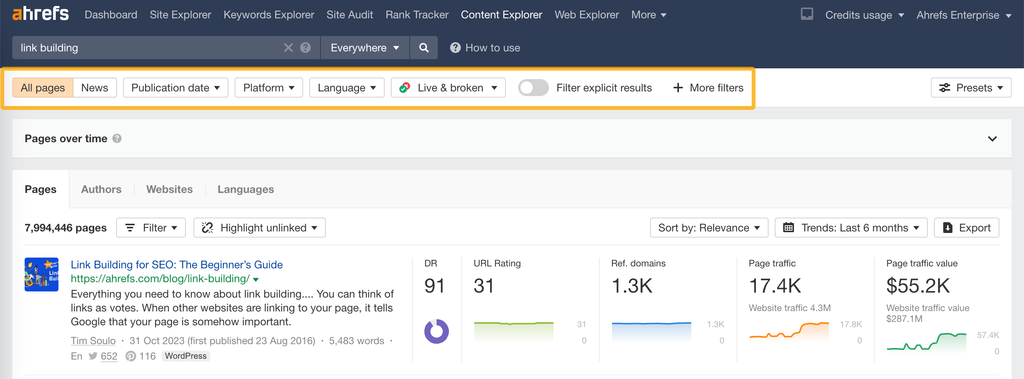
Best for: content teams that care about links, competitor content and the most affordable entry into a premium SEO tool.
Ahrefs built its reputation on backlink data, and it’s still the tool many SEOs trust most for seeing who links to whom. For content marketers, that matters more than it sounds. Knowing which competitor articles earn the most links tells you what kind of content your niche rewards, not just what it searches for.
Key features
- Site Explorer. See any competitor’s top pages, backlinks and the keywords driving their traffic.
- Keywords Explorer. Check search volume and ranking difficulty, and see the broader parent topic a keyword belongs to so you don’t write five posts that compete with each other.
- Content Explorer. Search the web for the most-linked and most-shared content on any topic, which is a shortcut to proven angles.
- Rank tracking and site audits. Track your own pages and fix technical issues.
- Brand Radar. Monitor how your brand shows up in AI answers.
Pricing: Starter costs $29 a month, Lite $129, Standard $249, Advanced $449 and Enterprise $1,499. Billing yearly saves about 17%. Extra seats cost $40 a month on Lite and $60 on Standard, and extra usage credits cost $50 per 500.
What users say: Ahrefs holds a 4.5 rating on G2. Users praise its keyword and backlink data and its clean interface, while price and the credit-based usage system are the most frequent complaints.
Watch out for: seat limits on lower plans. A team of four can outgrow Lite quickly, and credits can run out mid-month if several people research at once. If links are your main focus, compare it with other link building tools before you commit.
Skip it if: you need an all-in-one suite with built-in writing and planning tools. Semrush covers more of the workflow in one place.
3. Google Search Console for Free Search Data and Content Refreshes
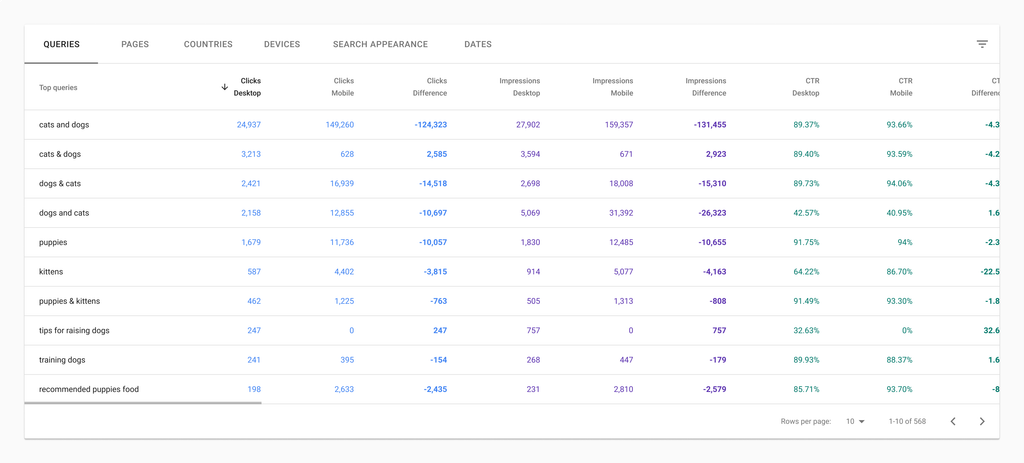
Best for: every content team, at every budget. There’s no reason not to use it.
Search Console is the only tool on this list that shows Google’s own data about your site. It tells you which searches you appear for, how often people click, and which pages are gaining or losing ground. It’s free, and it’s often the most underused tool in a content stack.
Key features
- Performance report. See clicks, impressions, click-through rate and average position for every query and page.
- Date comparisons for content refreshes. Compare two periods to find pages that are losing clicks. Updating a page that already ranks is often a faster win than publishing something new.
- Low-hanging keywords. Spot queries where you rank on page two and a focused update could push you onto page one.
- Indexing and page experience reports. Confirm Google can find and index new content.
Pricing: free.
What users say: marketers value it as the most reliable source of search data because it comes straight from Google. The common frustration is that it only covers your own site and keeps about 16 months of history.
Watch out for: it shows what you already rank for, not what competitors rank for or what you’re missing. That’s the gap a paid tool fills.
Skip it if: never. Even teams using Semrush or Ahrefs should check Search Console weekly. For a wider view of this category, our roundup of the best SEO tools for marketing agencies compares dozens of options by job and budget.
Best Content Planning and Workflow Tools
Planning tools turn a list of ideas into a schedule with owners, deadlines and approvals. They rarely get credit when things go well, but without one, content ships late, gets duplicated, or quietly dies in a draft folder. The right choice depends mostly on whether you want a purpose-built marketing calendar or a flexible workspace your team already uses.
4. CoSchedule for a Dedicated Marketing Calendar
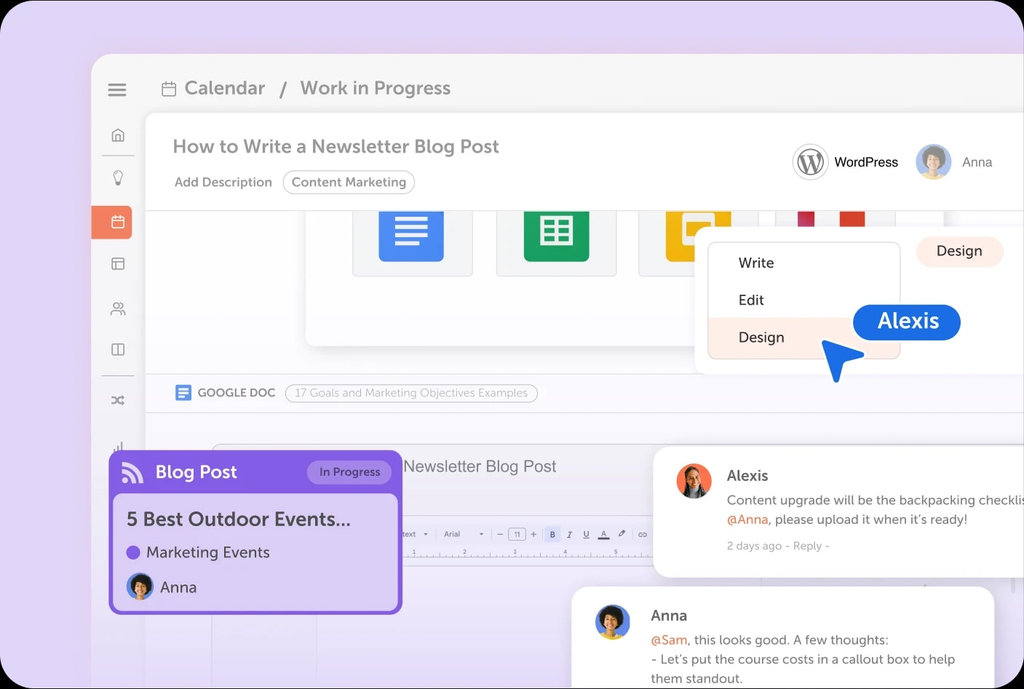
Best for: marketing teams that want blog posts, social posts and campaigns on one shared calendar.
CoSchedule is built specifically for marketers, which is its biggest advantage over general project tools. Everything sits on one calendar, so you can see at a glance whether next week has three launches stacked on the same day or a two-week gap with nothing going out.
Key features
- Marketing calendar. Drag-and-drop scheduling for every content type and channel in one view.
- Social publishing. Schedule social promotion for each piece directly from the calendar, and automatically re-share top-performing posts.
- Headline Studio. Score and improve headlines before you publish.
- Task templates. Reuse the same checklist for every article so nothing gets skipped.
Pricing: a free plan is available, and paid plans start at about $29 a month.
What users say: CoSchedule rates around 4.3 on G2. Users like the calendar view and social publishing, while common complaints mention integrations, support response and an interface that feels dated next to newer tools.
Watch out for: overlap with your social scheduler. If you already pay for Buffer or Hootsuite, check whether you need CoSchedule’s social features before paying for both.
Skip it if: your team already runs all its work in Notion, Asana or Trello and is happy there. Adding another calendar just creates two places to check.
5. Notion for Flexible Content Planning and Documentation

Best for: teams that want their content calendar, briefs, style guide and research in one flexible workspace.
Notion is not a marketing tool out of the box, and that’s exactly why many content teams love it. You build the system you need: a content database that shows up as a calendar for planning, a board for tracking drafts, and a table for reporting, all from the same data.
Key features
- Databases with multiple views. One content list can display as a calendar, kanban board or table.
- Templates for briefs and checklists. Standardize every piece without retyping the same structure.
- Wiki pages for style guides. Keep brand voice rules, personas and SEO guidelines next to the work itself.
- Notion AI. Summarize research, draft outlines and clean up notes inside your workspace.
Pricing: a free plan is available, and paid plans start at about $10 per seat a month.
What users say: Notion rates around 4.6 on G2. Users praise its flexibility, while the most common complaints are the learning curve and how easily content gets buried as a workspace grows.
Watch out for: setup time. Notion is only as good as the system you build, and someone needs to own it.
Skip it if: you want something that works on day one without configuration. CoSchedule or a simple project tool will be faster to adopt. Asana and Trello are also strong options, and our guide to project management software for marketing agencies compares them for client work.
Best AI Writing and Editing Tools
AI tools now handle a large share of drafting, editing and repurposing, but they don’t fix weak ideas or check their own facts. The real decision here is whether you need a general AI assistant or a specialist writer with team controls. The data says the editing process matters more than the tool: Orbit Media’s 2026 blogging survey found 92.4% of bloggers use AI, yet AI use showed no link to stronger results.
6. ChatGPT and Claude for Drafting, Editing and Repurposing
Best for: solo marketers and small teams that want a capable writing partner at a low price.
General AI assistants are the most cost-effective writing tools available. For about the price of a lunch each month, they draft outlines, rewrite clunky sections, summarize research and turn one article into social posts or a newsletter. Both handle long documents well, so you can upload a transcript, a research report or your style guide and work from it directly.
Key features
- Outlines and first drafts. Go from a brief to a structured draft in minutes, then spend your time on the parts only you can write.
- Editing for clarity and voice. Paste a section and ask for a tighter version that keeps your tone.
- Repurposing. Turn a blog post into a LinkedIn post, email or short video script.
- Saved context. Projects and custom instructions keep your brand voice, audience and examples on hand for every session.
Pricing: both have free tiers, and individual paid plans cost about $20 a month. Team plans with admin controls cost more per seat.
What users say: in G2’s head-to-head comparison, reviewers rate ChatGPT higher overall than specialist AI writer Jasper. The most common frustration across both is generic phrasing that needs a human edit.
Watch out for: made-up facts. AI assistants can state invented statistics and sources with confidence, so check every number before it goes live. Also review the data settings before pasting in confidential company or client information.
Skip it if: you need many writers producing on-brand content under shared rules and permissions. That’s where Jasper earns its higher price.
7. Jasper for Brand-Controlled AI Writing at Team Scale
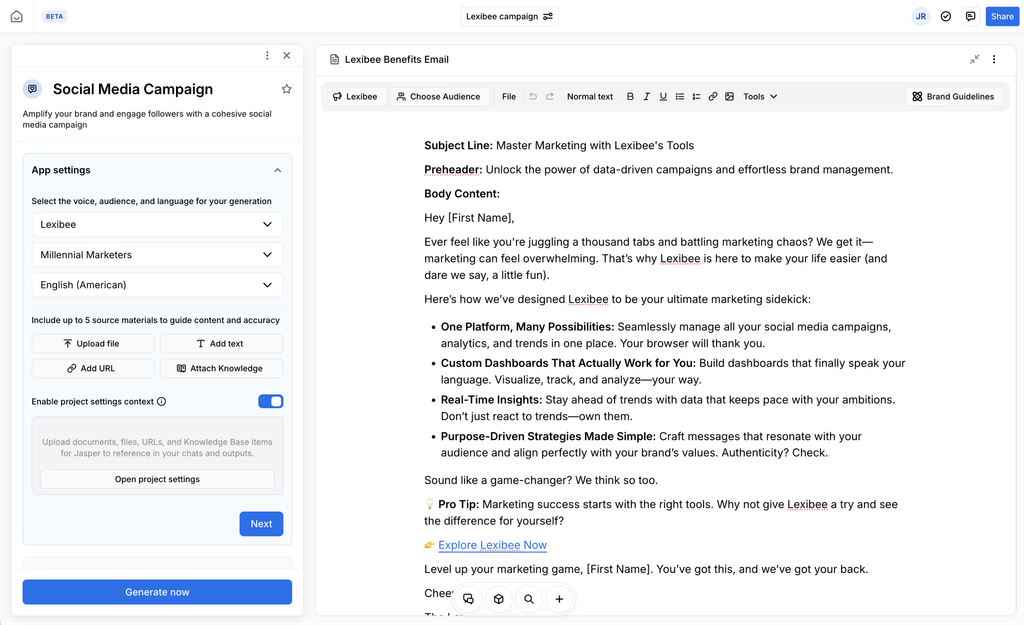
Best for: marketing teams where many people write under one brand and consistency matters.
Jasper’s advantage isn’t better writing than a general assistant. It’s control. Brand voice, product facts and style rules live in one place and apply to everyone’s drafts, so ten writers sound like one company instead of ten different people using ten different prompts.
Key features
- Brand Voice. Teach Jasper your tone and style once, then apply it to every draft.
- Knowledge assets. Store product details, positioning and approved facts so the AI draws from them.
- Team workflows and agents. Build repeatable content workflows that anyone on the team can run.
- Governance. Permissions and admin controls that general assistants offer only on business plans.
Pricing: Pro costs $69 per seat monthly, or $59 billed yearly, and includes 2 Brand Voices and 5 Knowledge assets. Business pricing is custom and requires a 12-month minimum. A 7-day trial is available.
What users say: Jasper holds a 4.7 rating on G2. Reviewers value its brand voice features and templates, while the most common complaints are price compared with general AI assistants and drafts that still need editing.
Watch out for: the annual commitment on Business. Run the trial on real projects with several writers before signing.
Skip it if: you write alone or with one other person. ChatGPT or Claude with a saved style guide gives you most of the benefit for a third of the cost.
8. Grammarly for Polishing Every Draft
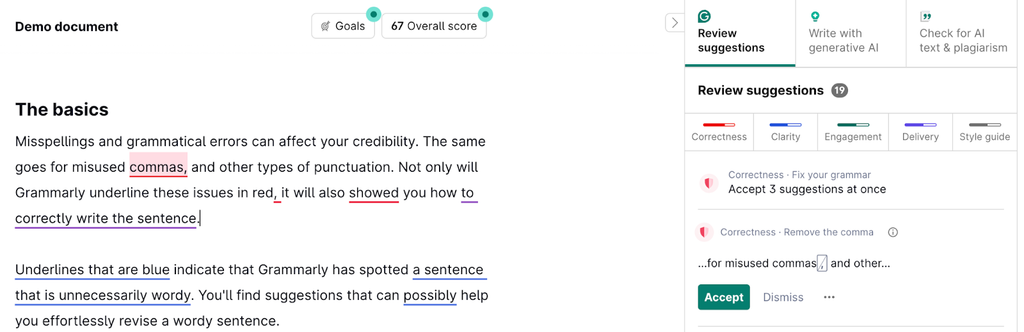
Best for: anyone who publishes, including non-writers on the team who contribute content occasionally.
Grammarly is the safety net that catches what both humans and AI miss: unclear sentences, inconsistent tone and small errors that make content look careless. Because it works in the browser, Google Docs, email and most writing apps, it checks content wherever your team writes it.
Key features
- Real-time clarity and grammar fixes. Suggestions appear as you type, not after the fact.
- Tone detection. See how a draft is likely to come across before you send or publish it.
- Style guides and brand tones. Business plans let teams set shared rules for terms and voice.
- Plagiarism checks. Catch unintentional overlap with published content on paid plans.
Pricing: a free plan covers core grammar and spelling, and paid plans add clarity rewrites, tone controls and team features.
What users say: Grammarly holds a 4.7 rating on G2 across more than 14,000 reviews. Users praise its real-time fixes, while some note it can flatten a distinctive writing voice if you accept every suggestion.
Watch out for: over-editing. Treat suggestions as prompts, not rules, especially for conversational or brand-heavy copy.
Skip it if: your team already uses AI assistants for a final edit and has a strong human editor. The overlap may not justify another subscription.
An alternative for AI-assisted drafts: Grammarly fixes grammar and clarity, but it isn’t built to catch the generic phrasing that makes AI-assisted content sound machine-written. If that’s your bigger problem, Remove AI Slop focuses on exactly that. It rewrites robotic patterns and shows each change, so you decide what to keep. The two work well together on the same draft: one for correctness, one for voice.
Best Content Optimization Tools
Optimization tools compare your draft with the pages that already rank and flag the subtopics, questions and terms you’re missing. They work best as a final check after the writing is done, not as a recipe for writing. Both tools here also help you find older content that needs a refresh, which is often where the quickest gains hide.
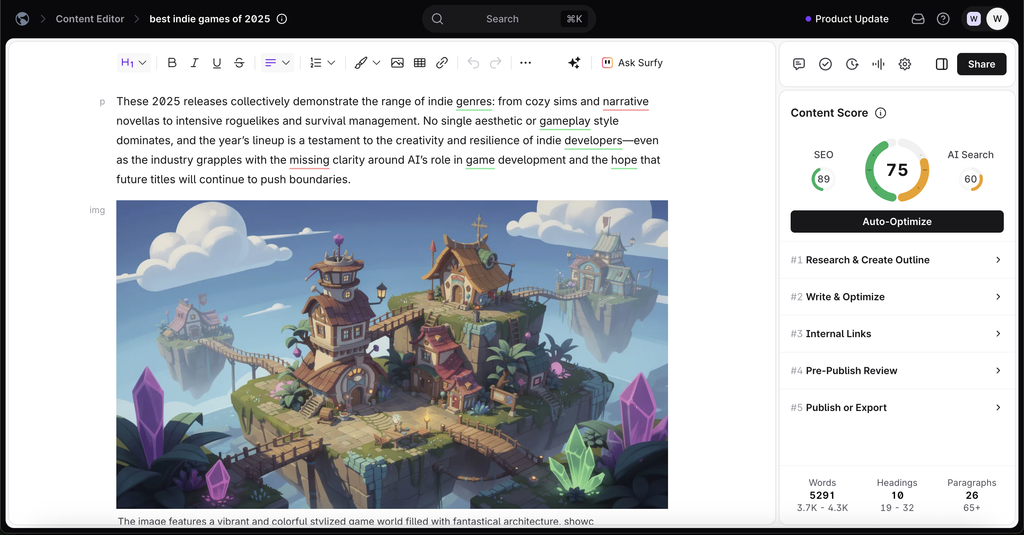
9. Surfer for Optimizing Content at Volume
Best for: teams publishing a high volume of SEO content that want a fast, repeatable quality check.
Surfer gives every draft a live Content Score as you write, based on what top-ranking pages cover. That instant feedback makes it easy for writers of different experience levels to hit the same standard, which is why it’s popular with teams and agencies publishing many articles a month.
Key features
- Content Editor with a live score. See which topics and terms are missing while you write, inside Surfer, Google Docs or WordPress.
- Content audits. Analyze pages you’ve already published and get specific fixes for ones that are slipping.
- Outline and brief building. Pull common headings and questions from competing pages to speed up planning.
- AI visibility tracking. Monitor whether AI answers mention your brand on higher plans.
Pricing: Discovery costs $59 a month ($49 billed yearly), Standard $119 ($99 yearly), Pro $219 ($182 yearly) and Peace of Mind $359 ($299 yearly). Enterprise starts at $999 a month.
What users say: Surfer holds a 4.8 rating on G2. Users praise the content scoring and ease of use, while credit limits and cost are the most frequent complaints.
Watch out for: writing to the score. Chasing a perfect number can lead to stuffed keywords and bloated sections. Aim for a strong score, then edit for the reader.
Skip it if: you publish only a few pieces a month. A manual review of the top results gets you most of the way for free.
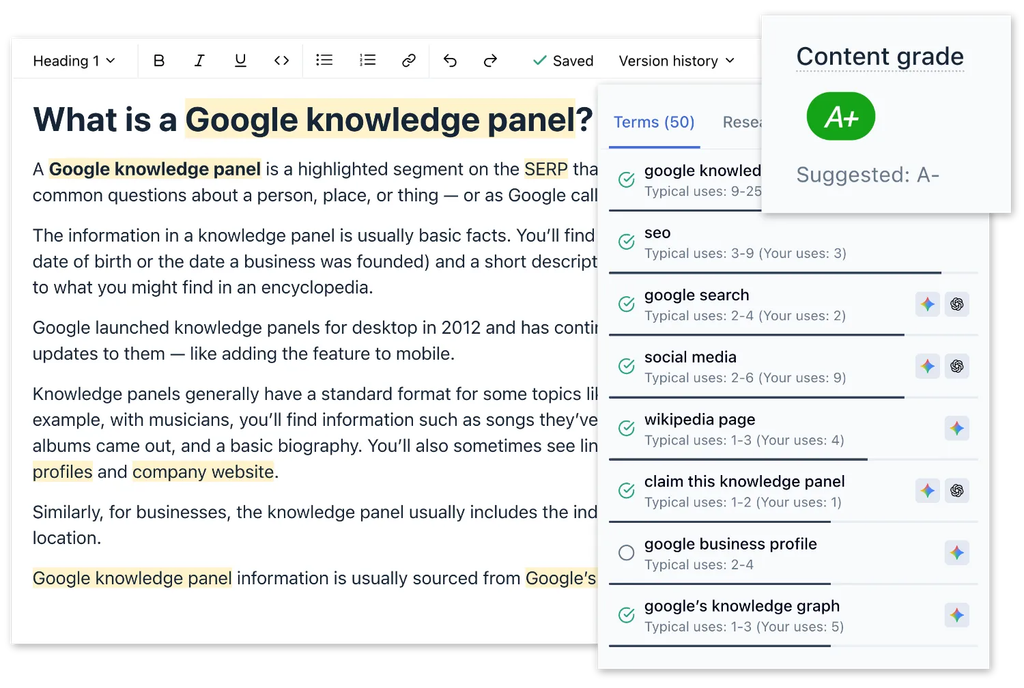
10. Clearscope for Editorial Teams With Many Writers
Best for: editorial teams and agencies with several writers, freelancers or client reviewers who all need access.
Clearscope grades drafts against what searchers expect, much like Surfer, but its pricing is what sets it apart: every plan includes unlimited users. For teams working with a rotating pool of freelancers, that removes the per-seat math that makes other tools expensive as you grow.
Key features
- Content grades and term recommendations. A simple letter grade shows when a draft covers the topic thoroughly.
- Google Docs and WordPress add-ons. Writers optimize where they already work.
- Content monitoring. Track published pages and spot the ones losing ground so you know what to refresh first.
- AI prompt tracking. See how your brand appears in ChatGPT, Gemini and Claude answers, with 50 tracked prompts included on Essentials.
Pricing: Essentials costs $129 a month and Business $399 a month, both with unlimited users. Enterprise pricing is custom.
What users say: Clearscope holds a 4.9 rating on G2. Reviewers praise the quality of its recommendations, its clean interface and its support, while price is the main complaint for small teams.
Watch out for: report limits. Unlimited users doesn’t mean unlimited reports, so check how many drafts and tracked pages your plan covers each month.
Skip it if: you’re a single writer on a tight budget. Surfer’s Discovery plan is the cheaper way in.
Best Design, Video and Repurposing Tools
Visual and video tools decide whether people stop scrolling long enough to read what you wrote. They’re also the engine of repurposing, which is how one well-researched article turns into a week of social posts, a short video and a newsletter without new research. Plan for repurposing before you publish by marking the quotes, stats and examples in each piece that can stand on their own.
11. Canva for On-Brand Graphics Without a Designer
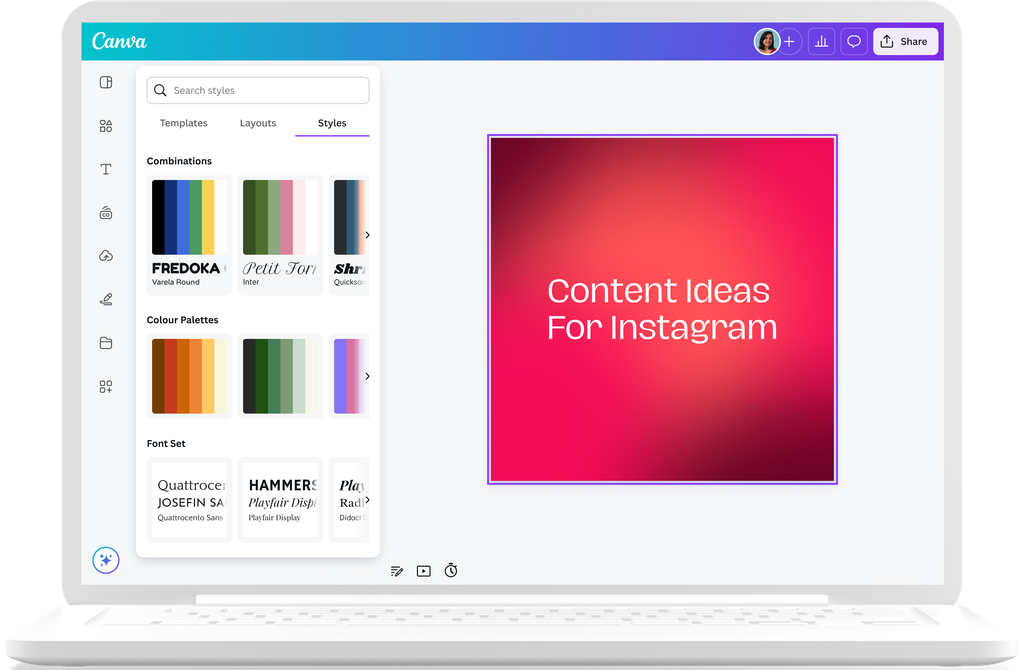
Best for: marketers and small teams who need professional visuals without waiting on a designer.
Canva turns design from a bottleneck into a task anyone on the team can handle. Templates cover nearly every format a content team needs, from blog headers and social carousels to presentations and short videos, and brand controls keep everything consistent even when many people create.
Key features
- Templates for every channel. Start from a layout sized for the platform instead of a blank canvas.
- Brand Kit. Save your logos, colors and fonts so every design stays on brand.
- AI design tools. Generate first drafts of designs, remove backgrounds and resize one design for several platforms in a click.
- Video editing and social scheduling. Create short videos and schedule posts directly from Canva on paid plans.
Pricing: a free plan is available. Pro costs $18 a month ($12 a month billed yearly), and Business costs $25 per person a month ($20.83 billed yearly). Canva has replaced its old Teams plan with Business, so older pricing guides may be out of date.
What users say: Canva holds a 4.7 rating on G2. Users love the templates and how fast non-designers can produce good work, while the most common complaint is that the best features sit behind paid plans.
Watch out for: template sameness. Popular templates show up everywhere, so customize layouts enough that your content looks like yours.
Skip it if: you have in-house designers working in professional design software. Canva is built for speed, not complex design work.
12. Descript for Video, Podcasts and Repurposing Recordings
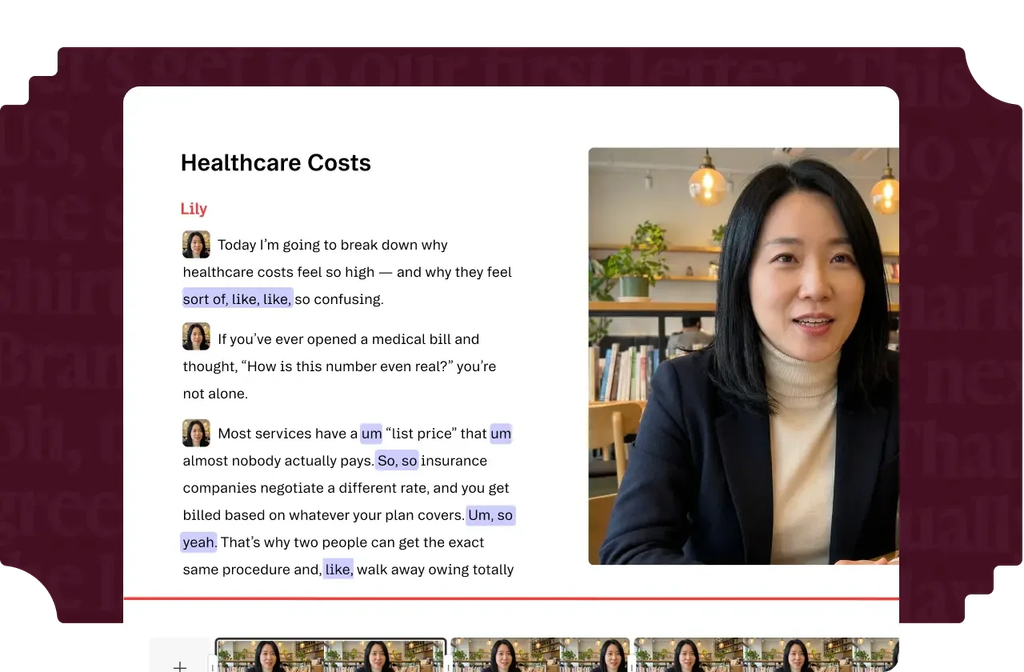
Best for: teams turning webinars, podcasts, interviews and screen recordings into clips, articles and social content.
Descript lets you edit audio and video by editing a transcript, the same way you’d edit a document. Delete a sentence from the text, and it disappears from the recording. That makes video editing accessible to marketers who have never touched a timeline, and it turns every recorded conversation into raw material for written content.
Key features
- Text-based editing. Cut, rearrange and trim recordings by editing the transcript.
- Filler word removal. Remove “ums” and long pauses across a whole recording at once.
- Audio cleanup. Improve sound quality on recordings made outside a studio.
- Clips for social. Pull short, captioned clips from long recordings for social channels.
Pricing: a free plan is available, and paid plans add more transcription hours, export quality and AI features.
What users say: creators most often highlight how much faster transcript-based editing is than a traditional video timeline, especially for talking-head content and podcasts.
Watch out for: highly produced video. Descript shines for talk-based content but isn’t a replacement for professional editing software on complex projects.
Skip it if: your content is almost entirely written and you rarely record anything. A general AI assistant can handle text-to-text repurposing.
Best Distribution and Publishing Tools
Distribution is where good content most often dies quietly. Publishing a strong article and sharing it once is the content equivalent of cooking a great meal and leaving it on the counter. These tools get your work in front of people on social channels and email, and the right pick depends mostly on team size and how many channels you run.
13. Buffer for Simple Social Scheduling on a Budget
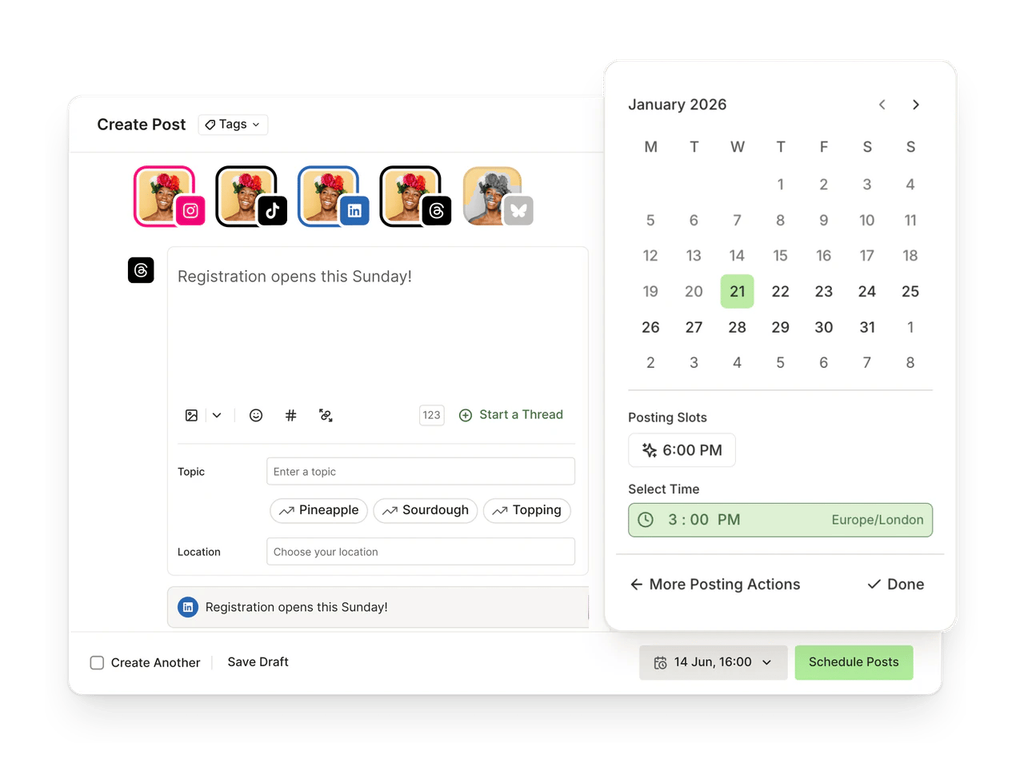
Best for: solo marketers and small teams managing a handful of social channels.
Buffer does one thing very well: it makes consistent social publishing easy. The interface is clean enough that anyone on the team can schedule a week of posts in one sitting, and the free plan is genuinely usable rather than a teaser.
Key features
- Multi-platform scheduling. Queue posts for the major social networks from one place.
- AI Assistant. Draft and rework post copy, even on the free plan.
- Engagement tools. Reply to comments without logging into each platform.
- Analytics. See which posts perform so you can repeat what works.
Pricing: the free plan covers 3 channels with up to 10 queued posts each. Essentials costs $6 per channel a month ($5 billed yearly) for one user, and Team costs $12 per channel ($10 billed yearly) with unlimited users.
What users say: Buffer holds a 4.3 rating on G2. Users praise its simplicity and free plan, while the most common complaints are light analytics and costs that grow with every channel added.
Watch out for: per-channel pricing. Ten channels on the Team plan cost far more than three, so count every profile you plan to manage before choosing a plan.
Skip it if: you need a social inbox, listening and deep reporting for a large team. Hootsuite is built for that.
14. Hootsuite for Social Management at Scale
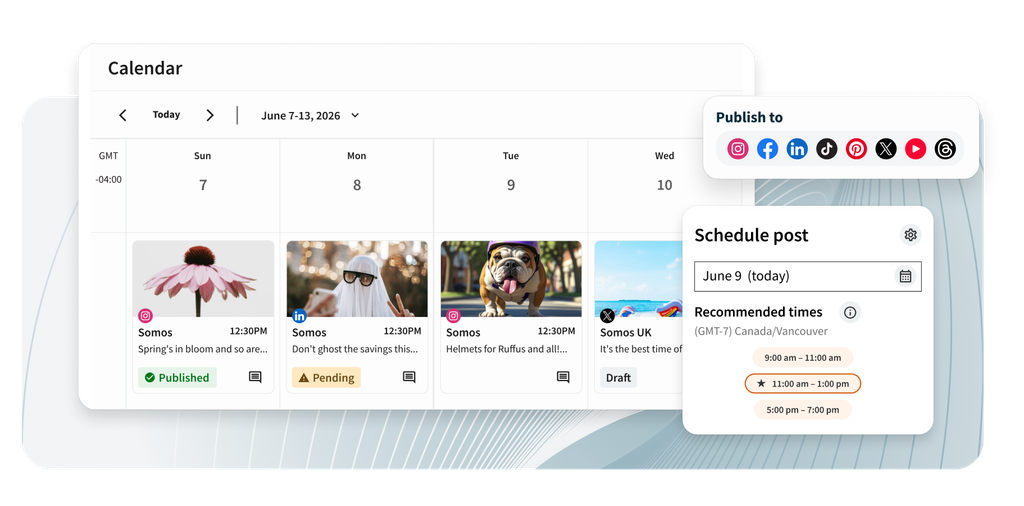
Best for: larger social teams that need approvals, a shared inbox and detailed reporting.
Hootsuite is a full social media management platform rather than just a scheduler. It’s built for teams where several people publish, respond and report, and where a post going out without approval would be a real problem.
Key features
- Unified inbox. Manage comments and messages from every network in one place.
- Approval workflows and permissions. Control who can draft, approve and publish.
- AI writing help. Generate and rework post captions inside the platform.
- Analytics and reporting. Track performance across channels in one dashboard.
Pricing: Standard costs $99, Professional $199 and Advanced $399 per user a month, billed yearly. A 14-day trial is available, but there’s no free plan.
What users say: Hootsuite holds a 4.3 rating on G2. Users value its multi-platform management, while the most common complaint is cost for small teams.
Watch out for: per-user pricing. Every extra person is a full seat, so a team of five on Professional adds up quickly. If approvals are your real bottleneck, a clear social media approval process matters as much as the tool.
Skip it if: one or two people handle social. Buffer covers the essentials at a fraction of the price.
15. HubSpot for Connected CMS, Email and CRM
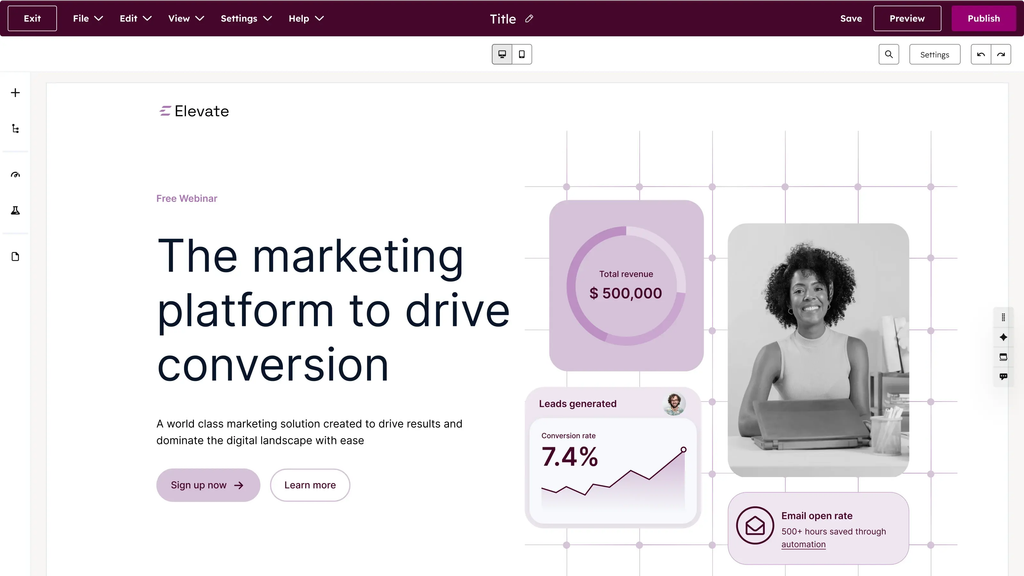
Best for: teams that want to see which content turns into leads and deals, not just traffic.
HubSpot’s strength is connection. Content Hub runs your website and blog, Marketing Hub handles email and automation, and both sit on the same CRM. That means you can trace a deal back to the articles a buyer read before they ever talked to sales, which is the kind of proof most content teams struggle to produce.
Key features
- CMS with built-in SEO recommendations. Publish blogs and landing pages with on-page guidance as you go.
- Email marketing and automation. Send newsletters and nurture sequences triggered by what contacts read and do.
- AI content tools. Draft, repurpose and translate content inside HubSpot.
- Attribution reporting. Connect content to contacts, deals and revenue on higher tiers.
Pricing: free tools are available. Starter plans cost $20 per seat a month. Content Hub Professional costs $500 a month ($450 billed yearly) with 3 seats, and Enterprise costs $1,500 a month with 5 seats. Marketing Hub Professional costs $890 a month ($800 billed yearly) plus a one-time $3,000 onboarding fee. AI features use a credit system.
What users say: Marketing Hub holds a 4.4 rating on G2 across thousands of reviews. Users praise its ease of use, email and automation, while complaints focus on key features locked to higher tiers and costs that rise with your contact list.
Watch out for: the jump from Starter to Professional. That’s where onboarding fees, seat minimums and contact-based pricing change the math.
Skip it if: you only need a blog and a newsletter. WordPress plus a dedicated email tool costs far less. Our picks for email marketing platforms and marketing automation tools cover lighter alternatives.
Reporting HubSpot results alongside other channels: HubSpot’s own reports cover what happens inside HubSpot. If you need to show leads and email performance next to search, social and ad results, Swydo connects to HubSpot with read-only access and pulls that data into the same automated report. It’s especially useful for agencies reporting to several clients at once.
Best Tools for Tracking AI Search Visibility
AI answers now sit between your content and a growing share of readers, and that changes what visibility means. Pew Research Center found that searchers clicked a traditional result on 8% of visits when an AI summary appeared, compared with 15% when none did. If your content is being cited in AI answers but not clicked, traffic reports alone will make it look like it’s failing. AI visibility tools show you the part of the picture analytics can’t.
16. Semrush AI Visibility Toolkit for Monitoring Brand Mentions in AI Answers
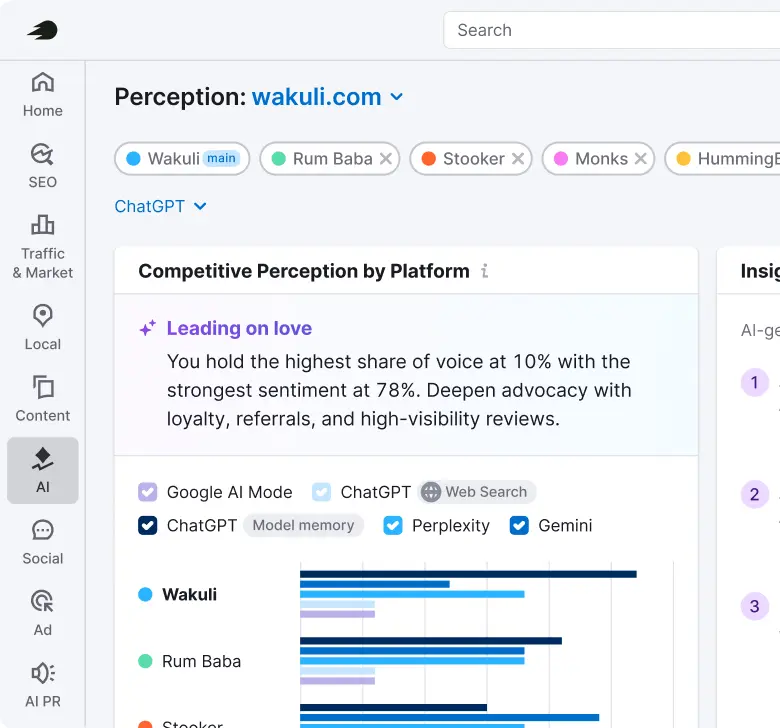
Best for: teams already using Semrush that want to see how their brand appears in ChatGPT, Gemini and other AI answers.
The AI Visibility Toolkit runs a set of prompts your buyers are likely to ask and reports whether your brand is mentioned, which competitors appear instead, and which sources the AI cites. That last part is the most useful for content teams, because it shows which pages and publications shape the answers in your category.
Key features
- Prompt tracking. Monitor the questions that matter to your business on a regular schedule.
- Mentions and citations. See when your brand is named and when your pages are cited as sources.
- Competitor comparison. Find out which competitors AI tools recommend for your target prompts.
- Connection to SEO data. Pair AI visibility with your rankings and content plans inside Semrush.
Pricing: $99 a month per domain, which includes 25 tracked prompts.
What users say: the toolkit is newer than Semrush’s core research tools, so review history is thinner. The practical consideration teams raise most is how quickly 25 prompts fill up once you track several topics.
Watch out for: per-domain pricing. Tracking five brands or client sites costs $495 a month on top of your Semrush plan.
Skip it if: you don’t use Semrush already. Several alternatives may fit better, from tools you might already own to dedicated trackers.
Those alternatives are worth knowing. Ahrefs Brand Radar starts at $199 a month for teams on Ahrefs, Surfer and Clearscope include prompt tracking in some plans, and dedicated platforms such as Peec AI and Profound focus only on AI visibility. On a tight budget, test your top 10 to 20 prompts by hand each month and log the results. Our comparison of AI rank tracking tools breaks down the options, and our guides on tracking AI search visibility and tracking AI traffic in GA4 show how to measure both mentions and visits.
Best Analytics and Reporting Tools for Proving Content Pays Off
Measurement is the layer most teams neglect, and it shows. Orbit Media’s blogging survey found 18% of bloggers don’t know whether their content is working at all. Without measurement, you can’t tell which tools, topics or formats are earning their keep. These two tools cover the job from free site analytics to client-ready reporting across every channel.
17. Google Analytics 4 for Free On-Site Measurement
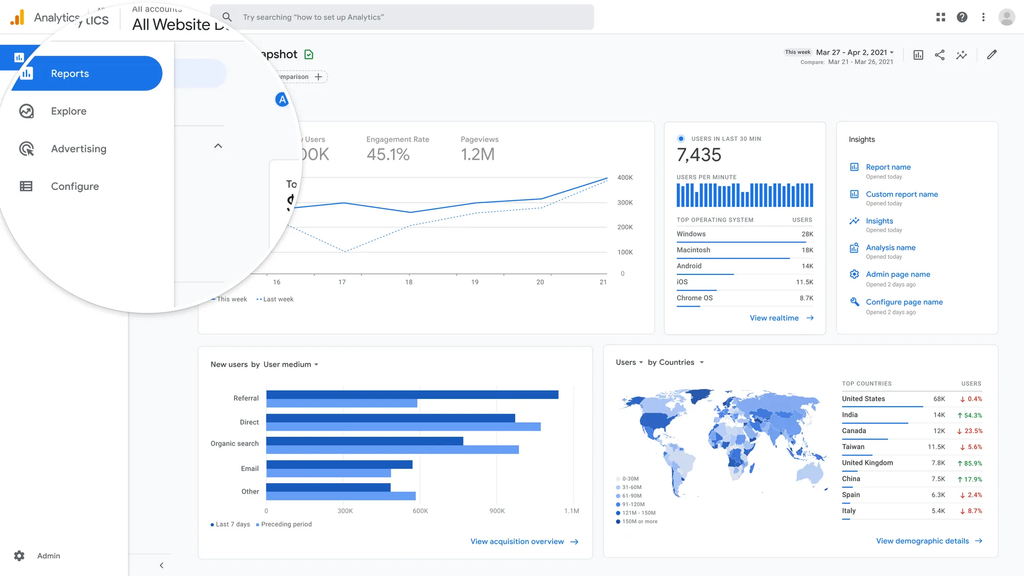
Best for: every content team that needs to see what readers do after they land.
Where Search Console shows how people find you, GA4 shows what happens next: which articles keep readers engaged, which ones lead to sign-ups, and which channels send the most valuable visitors. Used together, the two answer most content questions for free (here’s how GA4 and Search Console differ).
Key features
- Key events. Mark the actions that matter, like demo requests or newsletter sign-ups, and see which content drives them.
- Explorations. Build funnels and path reports to see how readers move from an article to a conversion.
- Search Console integration. View search queries and on-site behavior side by side.
- AI traffic tracking. Segment visits from ChatGPT, Perplexity and other AI platforms so you can see what AI search actually sends you.
Pricing: free.
What users say: marketers value GA4’s flexibility and price, while the most common complaint is a steep learning curve and reports that take setup before they answer real business questions.
Watch out for: missing setup. GA4 doesn’t know what a conversion is for your business until you define key events, so content often gets no credit simply because nothing was tracked.
Skip it if: never. Even teams with paid analytics keep GA4 as their baseline. Pair it with the content marketing KPIs that fit your goals and a clear attribution model so content gets credit for the deals it influences.
18. Swydo for Client-Ready Reporting Across Every Channel
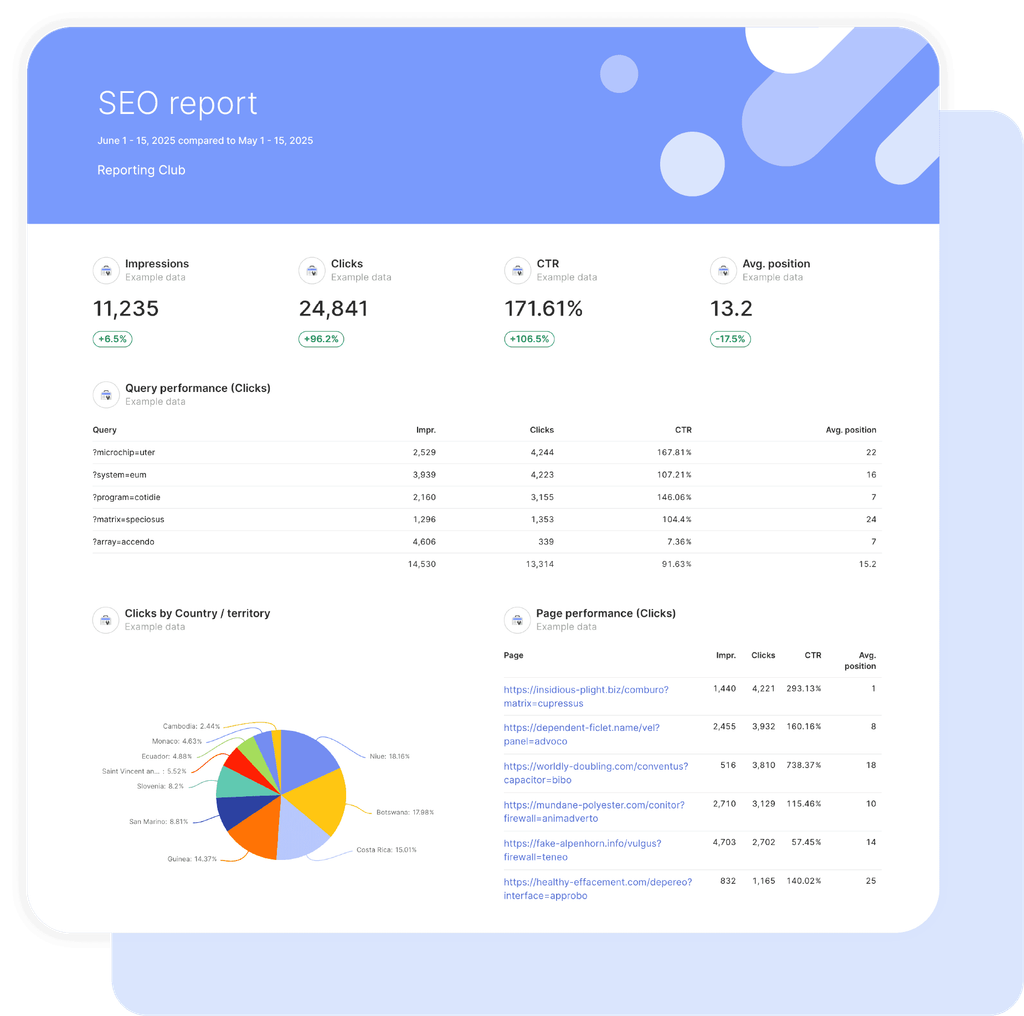
Best for: agencies and teams that report content, search, social and ad results to clients or leadership.
Swydo pulls data from GA4, Search Console, social and ad platforms into one report, so content results sit next to every other channel instead of in a separate spreadsheet. For agencies managing many clients, it also flags what needs attention across the whole portfolio, so problems surface before a client notices them.
Key features
- 40 integrations. Connect analytics, search, social and ad platforms, plus Google Sheets and Excel for anything else. Sources without a native integration can be piped in through Zapier or Make.
- Automated, white-label reports. Build templates once and send scheduled reports to every client.
- Goals, alerts and data health checks. Track progress against targets and get notified when a metric drops or a data connection breaks.
- Client portal and AI report builder. Give clients one place to see their results, and build reports faster with AI.
- MCP connection. Bring Swydo data into ChatGPT or Claude to ask questions about client performance.
Pricing: pricing scales with the data sources you actually connect, starting at about $69 a month, and a free trial is available.
What users say: Swydo holds a 4.6 rating on G2. Reviewers most often praise its easy integrations, the time it saves and how customizable reports are, while a few mention a learning curve when building advanced templates.
Watch out for: niche data sources. If a platform isn’t among the native integrations, plan to bring its data in through Google Sheets, Excel, Zapier or Make during setup rather than after reports are live.
Skip it if: you report on a single website to yourself only. GA4 and Search Console cover that for free. For a full picture of how reporting fits with the rest of your tools, see our guide to building a marketing agency reporting stack.
Recommended Stacks by Team Size and Budget
The right stack depends less on which tool is “best” and more on how many people publish, how many channels you run, and how much content you ship each month. Below are four starting points, each with a realistic monthly total based on November 2026 pricing.
The $0 Stack for Solo Creators and Early-Stage Teams
You can run a serious content program for free if you’re publishing a few pieces a month. Use Google Search Console and Ahrefs Webmaster Tools for research, a free AI assistant for drafts, Canva Free for visuals, Buffer Free for up to three social channels, Notion or Google Docs for planning, and GA4 for measurement.
Upgrade when you notice you’re guessing at keywords or competitor gaps. That’s usually the first paid tool that pays for itself.
The $75 to $125 Stack for a Solo Marketer Publishing Weekly
| Layer | Tool | Monthly cost |
|---|---|---|
| Research | Ahrefs Starter | $29 |
| AI writing | ChatGPT Plus or Claude Pro | $20 |
| Design | Canva Pro (billed yearly) | $12 |
| Social | Buffer Essentials, 3 channels (billed yearly) | $15 |
| Optimization (optional) | Surfer Discovery (billed yearly) | $49 |
| Measurement | GA4 + Search Console | $0 |
| Total | $76 to $125 |
The $400 to $500 Stack for a Growing Team of Three to Five
| Layer | Tool | Monthly cost |
|---|---|---|
| Research | Ahrefs Lite (billed monthly) | $129 |
| Optimization | Clearscope Essentials, unlimited users | $129 |
| Design | Canva Business, 3 people (billed yearly) | about $62 |
| Social | Buffer Team, 5 channels (billed yearly) | $50 |
| AI writing | General AI assistant, 3 seats | about $60 |
| Total | about $430 |
If your team is SEO-heavy, swapping Ahrefs Lite for Semrush One Starter ($199 a month) adds broader keyword and audit tools for about $70 more.
The Scaling and Enterprise Stack for Many Contributors and Channels
At this size, governance, approvals and attribution matter more than individual features. A typical stack combines HubSpot Content Hub Professional ($450 a month billed yearly, with three core seats), HubSpot Marketing Hub Professional ($800 a month billed yearly, plus a one-time $3,000 onboarding fee), Semrush, Clearscope Business ($399 a month) or Jasper Business for brand-controlled AI writing, and Hootsuite for social. Expect $2,000 a month or more before add-ons.
A Note for Agencies
Agencies should price stacks per client, not per team. Tools that charge per domain multiply fast: tracking AI visibility for five client domains in Semrush adds $495 a month. Tools with unlimited users, like Clearscope, scale better as your writer pool grows. For the full picture beyond content, see our list of must-have marketing agency tools and how to build a marketing agency reporting stack.
Content Marketing Tools Pricing Compared by Real Monthly Cost
List prices rarely match what you pay. Seats, channels, domains and usage credits are where budgets stretch, so this table shows both the headline price and the add-ons that change it. All prices are in USD as of November 2026; check each vendor’s pricing page before you buy, since plans change often.
| Tool | Plans and starting prices | Add-ons that raise the cost | Free option |
|---|---|---|---|
| Semrush | Semrush One: Starter $199, Pro+ $299, Advanced $549 per month | Extra users $45 to $100/mo; AI Visibility Toolkit $99/mo per domain; Content Toolkit from $60/mo | Limited free account |
| Ahrefs | Starter $29, Lite $129, Standard $249, Advanced $449, Enterprise $1,499 per month; about 17% off billed yearly | Extra seats $40 (Lite) or $60 (Standard); credit top-ups $50 per 500; Brand Radar AI from $199/mo | Ahrefs Webmaster Tools |
| HubSpot Content Hub | Starter from $20/seat; Professional $500/mo ($450 billed yearly, 3 seats); Enterprise $1,500/mo (5 seats) | Extra seats; AI features use credits | Free tools for up to 2 users |
| HubSpot Marketing Hub | Starter from $20/seat; Professional $890/mo ($800 billed yearly, 3 seats) | $3,000 one-time onboarding on Professional; cost rises with contacts | Free tools |
| Jasper | Pro $69/seat monthly ($59 billed yearly); Business custom | Business requires a 12-month minimum | 7-day trial |
| Surfer | Discovery $59, Standard $119, Pro $219, Peace of Mind $359 per month ($49, $99, $182 and $299 billed yearly); Enterprise from $999 | Monthly billing costs about 20% more | No free plan |
| Clearscope | Essentials $129, Business $399 per month; Enterprise custom | Report and prompt-tracking limits by plan | No free plan |
| Canva | Pro $18/mo ($12 billed yearly); Business $25 per person ($20.83 billed yearly) | Enterprise for brand controls at scale | Canva Free |
| Buffer | Essentials $6/channel, Team $12/channel ($5 and $10 billed yearly) | Cost grows with every channel | Free for 3 channels |
| Hootsuite | Standard $99, Professional $199, Advanced $399 per user per month billed yearly | Every extra user is a full seat | 14-day trial |
Two patterns stand out. First, the cheapest plan is often capped on users, so the price that matters is the plan your whole team needs. Second, AI features are increasingly billed through credits or per-domain fees rather than included outright.
What Real Users Say About These Tools
Review sites tell two very different stories, and both are useful once you know what each measures. G2 reviews mostly come from active users judging the product. Trustpilot reviews skew toward people who had a billing or cancellation problem.
G2 Ratings and the Complaints That Keep Coming Up
| Tool | G2 rating | What users praise | What users complain about |
|---|---|---|---|
| Clearscope | 4.9 | Content quality grades, clean interface, support | Price for small teams |
| Surfer | 4.8 | Content scoring, ease of use | Credit limits, cost |
| Canva | 4.7 | Templates, speed for non-designers | Best features behind paid plans |
| Jasper | 4.7 | Brand voice, templates | Price compared with general AI assistants; drafts still need editing |
| Grammarly | 4.7 | Real-time clarity fixes | Can flatten your tone |
| Ahrefs | 4.5 | Keyword and backlink data, ease of use | Price, confusing credit system |
| Semrush | 4.5 | Depth of features, competitor research | Price, add-ons, learning curve |
| HubSpot Marketing Hub | 4.4 | Email, automation, ease of use | Key features locked to higher tiers; cost grows with contacts |
| Buffer | 4.3 | Simple scheduling, free plan | Light analytics, cost grows per channel |
| Hootsuite | 4.3 | Multi-platform management | Expensive for small teams |
Why Some Popular Tools Score Poorly on Trustpilot
The contrast with Trustpilot is striking. Semrush’s Trustpilot profile shows a TrustScore of 1.6, and Ahrefs’ profile shows 2.1, with many one-star reviews focused on renewals, refunds and cancellations rather than the product itself.
The practical takeaway: these tools are well liked by people who use them, but billing surprises are common. Start on monthly billing, set a calendar reminder before any annual renewal, and read the cancellation terms before you enter a card.
General AI Assistants vs. Specialist AI Writers
One debate shows up again and again: do you need Jasper if you already pay for ChatGPT or Claude? On G2’s ChatGPT vs. Jasper comparison, reviewers rate ChatGPT higher overall. Jasper’s advantage is team-level control (brand voice, shared knowledge, permissions), so it makes the most sense when many writers need to sound like one company.
7 Questions to Ask Before Choosing Content Marketing Tools
Feature lists make every tool look essential. These seven questions cut through that by tying each purchase to a job, a cost and a result you can check later.
- What job will this tool do, and who does that job today? If you can’t name the task and the person, you’re buying a feature, not a solution.
- Does something you already pay for do it? Suites now overlap heavily. Semrush, Ahrefs, HubSpot, Surfer and Clearscope all offer some form of AI writing or AI visibility tracking.
- What will it cost at your real size? Price it with your actual number of seats, channels, domains and monthly reports, not the headline plan.
- Does it connect to where content lives and where results are measured? A tool that can’t talk to your CMS, CRM or analytics creates manual work every week.
- Can you get your data out? Check export options and what happens to your projects if you cancel.
- Does it meet your governance needs? Larger teams should check brand voice controls, approval workflows, single sign-on and security certifications like SOC 2, which are often reserved for business tiers.
- How will you know in 90 days whether it worked? Pick one metric before you buy, such as time to publish, rankings for target topics, AI citations or content-sourced leads.
If a tool fails questions 1, 2 or 7, skip it for now. Those three predict whether a tool will actually get used.
When You Shouldn’t Buy Another Tool
Sometimes the smartest stack decision is to wait. The research is clear that software isn’t what separates strong content programs from weak ones. In the Content Marketing Institute’s 2026 B2B research, marketers with the most effective programs credited content relevance and quality (65%) and team skills (53%), not technology.
Hold off on a new tool when:
- You don’t have a documented strategy yet. A tool can speed up a plan, but it can’t create one.
- A free tier covers your volume. If you publish a few pieces a month, Search Console, Canva Free and Buffer Free will carry you a long way.
- You’re hoping a tool will fix weak results. Orbit Media’s 2026 survey found 92.4% of bloggers use AI, yet AI use showed no link to better results. Better briefs, editing and promotion usually move the needle more.
- Nobody owns it. Every tool needs a person responsible for setting it up and using it weekly.
- You haven’t used what you already pay for. Audit current subscriptions first. Most teams find at least one feature they’re paying for twice.
Common Mistakes and Hidden Costs to Avoid
Most stack problems come from a handful of predictable mistakes. Each one below includes a quick fix you can apply before your next renewal.
Paying for the Same Feature Twice
Tool sprawl is the most common and most expensive mistake. A team might pay for AI writing inside HubSpot, Semrush and a standalone AI tool at once. Fix: list every subscription by stack layer and cut anything that appears twice.
Underestimating Seat, Channel and Domain Pricing
Per-unit pricing looks cheap until you scale. Buffer charges per channel, Hootsuite per user, Semrush’s AI visibility tracking per domain, and Ahrefs caps users on lower plans. Fix: price your plan at next year’s expected size, not today’s.
Locking Into Annual Contracts Too Early
Annual billing saves 15% to 20%, but it removes your exit. Jasper’s Business plan requires a 12-month minimum, and renewal complaints dominate the low reviews on Trustpilot for major SEO tools. Fix: pay monthly for the first two or three months, then switch once the tool is part of your weekly routine.
Publishing AI Drafts Without Real Editing
AI makes it easy to publish more, and that’s exactly the risk. Google’s spam policies treat mass-produced, low-value pages as “scaled content abuse” regardless of how they were created. Fix: require a human edit, fact check and original insight on every piece (see the checklist in the next section).
Measuring Only Traffic
As AI answers reduce clicks, traffic alone undercounts what content does. Ahrefs found that AI Overviews were associated with a 58% lower click-through rate for the top-ranking page. Fix: also track branded search, AI citations, assisted conversions and content-sourced pipeline, and drop the vanity metrics that look good but prove nothing. Our guide to measuring content ROI shows how to tie it all to revenue.
Ignoring Data Ownership and Company Changes
Tools get acquired, plans get retired, and pricing models change. Recently, Adobe acquired Semrush, Canva replaced its Teams plan, and Jasper retired its entry-level Creator plan. Fix: confirm you can export your data, and review your stack once a year.
How to Use AI Content Tools Safely Under Google’s Rules
Google doesn’t penalize content for being AI-assisted. It penalizes content that exists mainly to manipulate rankings without helping anyone. Its spam policies define scaled content abuse as producing many pages primarily to rank rather than to help people, whether by AI, by humans or both.
That puts the burden on your process, not your tools. Before anything AI-assisted goes live, run it through this checklist:
- One clear search intent. The piece answers the question a reader actually typed, in the first few lines.
- Something only you could add. Original data, a real example, a screenshot from your own work, or an expert opinion.
- Every fact checked. Numbers, names, prices and dates are verified against the original source and linked.
- A human edit for voice. Generic phrasing is rewritten so the piece sounds like your brand, not a template.
- Accurate metadata. Titles and descriptions match what the page delivers.
- A named, accountable author. Readers and search engines can see who stands behind the content.
- A reason to exist. If a better page already answers the question and you have nothing to add, don’t publish.
This checklist is also what helps content get cited in AI answers. Clear, specific, well-sourced passages are easier for AI systems to extract and attribute than vague summaries.
Content Marketing Tool Statistics Worth Knowing
These numbers explain why the right stack matters more than a bigger one. Each comes from original research, so you can cite it with confidence.
| Statistic | Source |
|---|---|
| 95% of B2B marketers use AI-powered marketing applications | Content Marketing Institute, B2B Content and Marketing Trends: Insights for 2026 |
| Only 12% of B2B marketers rate their marketing as highly effective | Content Marketing Institute, 2026 B2B research |
| AI-powered marketing tools are the top area for budget increases in 2026 (45%), ahead of events (33%) | Content Marketing Institute, 2026 B2B research |
| 86.4% of marketing teams use AI, and content creation is the most common extensive use (42.5%) | HubSpot, 2026 State of Marketing |
| 19.2% of marketers use AI agents to run tasks end to end | HubSpot, 2026 State of Marketing |
| 92.4% of bloggers use AI, but only 13.9% report strong results, a 12-year low | Orbit Media, Blogging Statistics 2026 |
| The average blog post is 1,312 words and takes 3 hours 20 minutes to write | Orbit Media, Blogging Statistics 2026 |
| Useful, practical information (64%) and demonstrated expertise (59%) are the top ways B2B brands build trust | Content Marketing Institute, B2B Content Marketing Trends Report |
| AI Overviews are associated with a 58% lower click-through rate for the top-ranking page | Ahrefs |
| Searchers clicked a traditional result on 8% of visits with an AI summary vs. 15% without one | Pew Research Center |
Put together, the pattern is hard to miss. Nearly every team has AI tools, fewer clicks reach websites, and results depend on usefulness and expertise. The best stack supports those things instead of just producing more pages.
Content Marketing Tools FAQ
Direct answers on choosing, paying for, connecting and measuring your content stack
Content marketing tools are software that help you research, plan, create, publish, distribute and measure content. Examples include SEO research tools like Semrush, design tools like Canva, schedulers like Buffer and analytics tools like GA4.
The useful way to think about them is by job, not by brand. Every stage of your workflow needs one tool, and a missing stage, usually distribution or measurement, costs you more than any missing feature.
You need five: a research tool, a writing tool, a design tool, a distribution tool and an analytics tool. Google Search Console, a free AI assistant, Canva Free, Buffer Free and GA4 cover all five at no cost.
Start free and add paid tools only when a specific task slows you down. Guessing at keywords and competitor gaps is usually the first sign you’ve outgrown the free setup.
A content marketing tech stack is the set of tools a team uses to cover every stage of content, from research to reporting. A healthy stack has one tool per job and no two tools doing the same thing.
The connections matter as much as the tools. If your CMS, analytics and CRM can’t share data, someone ends up copying numbers between them every week, and that manual work quietly eats the time the tools were supposed to save.
A content marketing tool does one job, such as scheduling posts or grading a draft. A content marketing platform runs the whole workflow, including planning, approvals, publishing and reporting, in one system.
Platforms pay off when many contributors, legal review or strict brand rules slow publishing down. Most small and midsize teams get more value from a few connected point tools, because they only pay for the jobs they actually do.
Semrush is the best all-in-one content marketing tool for research, optimization and AI visibility tracking. HubSpot is the best choice if you want your CMS, CRM and email in one place.
Still, no single tool covers every stage well. Teams usually get better results from a small stack with one strong tool per job than from one suite stretched across all of them.
Semrush is better for broad content marketing work, and Ahrefs is better for backlink and competitor link research. Semrush bundles keyword research, site audits, a content toolkit and AI visibility tracking, with Semrush One starting at $199 a month.
Ahrefs starts much lower, at $29 a month for its Starter plan, which makes it the easier first purchase for a solo marketer. Check seat limits before committing, since both charge extra for additional users.
Not at first. Search Console shows the searches you already appear for, which is often enough to plan your next few months of content.
A paid tool adds what Search Console can’t show: your competitors’ rankings, keywords you don’t rank for yet and backlink data. Buy one when your plan depends on finding new topics rather than improving the ones you already cover.
HubSpot is worth it when you need content, email and CRM data connected so you can see which content turns into leads and deals. Its free tools and Starter plans are a low-risk way to start.
The jump to Professional is where costs climb. Marketing Hub Professional runs $890 a month plus a one-time $3,000 onboarding fee, so it makes sense only once attribution and automation are real priorities, not just nice to have.
Choose each tool by the job it does, the real monthly cost at your team size and one metric you’ll use to judge it. If a tool duplicates something you already pay for, skip it.
Before buying, run a two-week trial on a real project rather than a demo. Check whether your team actually opens it, whether it connects to your CMS and analytics, and whether you can export your data if you leave.
ChatGPT or Claude is the best AI tool for most content marketers, at about $20 a month per person. Jasper is the better pick for teams that need shared brand voice controls and permissions.
The tool matters less than the editing around it. Orbit Media’s blogging survey found 92.4% of bloggers use AI, yet AI use showed no link to stronger results.
No. ChatGPT is excellent for drafting, editing and repurposing, but it doesn’t have your search data, can’t schedule posts and can’t measure what your content earns.
It works best paired with real data. Feed it keyword research, Search Console queries or customer questions, and its drafts get far more specific than anything it writes from a blank prompt.
Not by itself. Google’s spam policies target pages mass-produced mainly to manipulate rankings, whether a person or AI made them.
AI-assisted content that answers one clear question, adds original insight and has every fact checked is treated like any other helpful content. Publishing many thin AI pages quickly is what creates risk.
It depends on the plan and its settings. Before pasting in confidential data, check whether the tool uses your inputs to train its models and whether you can turn that off.
Business and enterprise plans usually offer stronger controls, such as single sign-on, admin settings and security certifications like SOC 2. If you handle client data, agree on which tools are approved before anyone starts pasting reports into a chat window.
Use an AI visibility tool such as Semrush’s AI Visibility Toolkit, Ahrefs Brand Radar, Peec AI or Profound. These tools run your target prompts on a schedule and report when your brand is mentioned or cited.
On a budget, test your top 10 to 20 prompts by hand each month and log the results. Our guides on tracking AI search visibility and tracking AI traffic in GA4 show how to measure both mentions and visits.
The best free content marketing tools are Google Search Console, GA4, Ahrefs Webmaster Tools, Canva Free, Buffer Free and the free tiers of ChatGPT or Claude. HubSpot’s free tools add basic CRM and email.
Together they cover research, creation, distribution and measurement. For a solo creator publishing a few pieces a month, that’s a complete stack.
A complete content marketing stack costs $0 to about $125 a month for a solo marketer and about $400 to $500 for a team of three to five. Larger teams with approvals and attribution needs often spend $2,000 or more.
| Team | Typical stack | Monthly cost |
|---|---|---|
| Solo, a few posts a month | Free tiers only | $0 |
| Solo, publishing weekly | Ahrefs Starter, AI assistant, Canva Pro, Buffer, optional Surfer | About $75 to $125 |
| Team of three to five | Ahrefs Lite or Semrush, Clearscope, Canva Business, Buffer Team, AI seats | About $400 to $500 |
| Many contributors and channels | HubSpot, Semrush, Clearscope or Jasper, Hootsuite | $2,000 or more |
The biggest hidden costs are per-unit fees: extra seats, extra social channels, extra tracked domains and usage credits for AI features. Some plans also add onboarding fees or 12-month minimums.
Price every tool at next year’s expected team size, not today’s. Pay monthly for the first few months, then switch to annual billing once the tool is part of your weekly routine.
An AI assistant, a design tool and a video or audio editor cover most repurposing. ChatGPT or Claude can turn an article into social posts or a newsletter, Canva turns key points into graphics, and Descript turns recordings into short clips.
Repurposing works best when it’s planned before you publish. Mark the quotes, stats and examples in each piece that can stand alone, and one article can feed a week of social posts without new research.
Google Search Console is the best free tool for finding content to refresh. Compare clicks over two periods to spot pages that are losing traffic, then update them first.
Semrush and Ahrefs show which competitors overtook you, and optimization tools like Surfer or Clearscope show which subtopics your page is now missing. Refreshing a page that already ranks is often a faster win than publishing something new.
Use native integrations first, then automation tools like Zapier or Make for anything that doesn’t connect directly. Most CMS, CRM and scheduling tools integrate with each other out of the box.
For results, a reporting platform pulls data from your analytics, search, social and ad tools into one view, so nobody has to copy numbers by hand. Our guide to building a marketing reporting stack shows how the pieces fit together.
Workflow tools with approval steps, such as CoSchedule, HubSpot or Hootsuite, keep drafts moving from writer to reviewer to publish. Project tools like Asana or Notion work too if your team already lives in them.
The tool only helps if the process is clear. Define who approves what and how long they have, and our approval process guide covers how to keep reviews from becoming the bottleneck.
Measure content with Google Search Console for search visibility, GA4 for on-site behavior and conversions, and your CRM for leads and revenue. Both Google tools are free.
Each answers a different question, so use them together (here’s how GA4 and Search Console differ). Agencies managing several clients often add a reporting platform such as Swydo to combine these sources into one report per client.
Prove content ROI by connecting each piece to the leads, sign-ups or revenue it starts or assists, then comparing that value with what the content cost to produce.
Last-click reporting undercounts content because readers rarely convert on their first visit. A clear attribution model gives content credit for the deals it influences, and our guide to measuring content ROI walks through the math.
Track branded search volume, AI citations, assisted conversions and content-sourced pipeline alongside traffic. Clicks alone now undercount what content does.
Pew Research Center found searchers clicked a traditional result on 8% of visits when an AI summary appeared, compared with 15% when none did. Our list of content marketing KPIs shows which metrics fit each goal.
Review your whole stack once a year and each tool before its renewal date. Cut anything nobody used in the last 90 days or that now duplicates a feature in another tool.
Tools change fast through acquisitions, retired plans and new pricing models. A yearly check catches overlap early and keeps you from renewing an annual contract on autopilot.
How We Chose These Tools
We started with the tools recommended most often across leading content marketing guides, then checked each one against its official pricing and product pages. We weighed user reviews on G2 and Trustpilot, focusing on recurring praise and complaints rather than single reviews. Finally, we grouped tools by the job they do in a content workflow, so you can build a stack without paying twice for the same feature.
Show clients what every tool in your content stack actually earns, in one automated report.
Start Your Free Trial Today