
You face clients who demand campaign performance data and ROI proof fast, and you’re done scrambling to deliver. I’ve tested these tools through my own agency battles, pinpointing what helps you come out on top. We’ll walk through this step by step, chasing that sweet spot where you drop clear insights and earn trust. Grab a coffee, let’s dive into the details.
Why These Tools Matter
Your clients demand SEO stats today, social insights tomorrow, and PPC numbers by noon. You need tools that collect data automatically, show your impact with hard numbers, and spot trends before campaigns falter. These platforms cover key areas—web visits, social engagement, email opens, ad spend, app usage, and even phone leads. Some handle everything at once, others focus on one critical piece. They save you hours, prove your worth, and keep you ahead of the game.
The Top 13 Marketing Analytics Tools You Can Trust
Each tool here solves a specific problem you face daily. You’ll find out what it does, its strengths, its drawbacks, and how it fits your agency’s workflow. All details are current to November 2025, based on real features and pricing.
| Tool | Key Features | Pricing (Nov 2025) | Strengths | Weaknesses | Best Agency Fit |
|---|---|---|---|---|---|
| Google Analytics (GA4) | Tracks across platforms, offers AI predictions | Free (360 custom) | Free, works with Google tools | Hard setup takes time, privacy worries clients | Small teams, Google-focused clients |
| Adobe Analytics | Shows customer journeys, divides data precisely | Custom (high-end) | Deep data, fits Adobe systems | High cost strains budgets, needs skilled users | Enterprise, Adobe-using clients |
| Swydo | Creates branded reports, tracks multi-channel goals | Starts at $69/mo (first 10 data sources included) | Saves time and money, easy to use | Doesn’t connect to all tools, pricing scales with data sources | Small/mid-sized, reporting-focused |
| Semrush | Finds competitor details, identifies key keywords | Starts at $139.95/mo | Covers digital needs, gets easier | Costs more, takes time to learn | SEO/PPC-driven clients |
| Sprout Social | Schedules posts, provides social reports | Starts at $199/mo per user | Strong social data, reliable tools | Higher cost needs pitching, tough on budgets | Social media-heavy clients |
| HubSpot | Automates tasks, connects customer management with data | Free tier, Starter from $15/mo per seat | Handles many needs, smooth after setup | Costs grow, setup takes time | Full campaign overhaul clients |
| Mailchimp | Tracks campaign results, uses basic automation | Free tier, Essentials from $13/mo | Fast setup, keeps costs low | Email only, no other channels | Budget, email-focused clients |
| Ruler Analytics | Tracks behavior, explains ROI clearly | Starts at $200/mo | Clear impact details, data privacy | Higher cost needs tech skills | Revenue-driven, data-heavy clients |
| Matomo | Runs on your server, provides full web reports | Free (self-hosted), €29/mo+ cloud | Full control, privacy-first | Setup needs tech effort, web data only | Privacy-first, web-centric clients |
| Plausible | Cookie-free tracking, quick dashboards | Starts at $9/mo | Easy start, low price | Web data only, lacks deep features | Small, privacy-conscious clients |
| Mixpanel | Funnel analysis, retention tracking | Free (1M events); Growth starts at $20/mo | Precise tech data, good for products | Event-based pricing scales quickly | Tech/SaaS product clients |
| Heap | Pulls past data, shows replays for a full view | Free (10K sessions); Growth starts at $3,600/yr | Full data, minimal prep | High cost, can overwhelm | Well-funded, deep-analytics clients |
| CallRail | Tracks calls/forms/chats, offers AI transcription | Starts at $45-50/mo | Easy setup, budget-friendly | Limited call features, scaling costs | Small/mid-sized, lead-focused clients |
Notes: Pricing reflects base plans as of March 5, 2025
Google Analytics (GA4)
You’ve likely used Google Analytics, also called GA4. It connects to Google’s system and tracks websites, apps, and conversions for free. Find future trends with its predictive insights, which give you reliable forecasts when clients ask about upcoming results. Learn its complicated setup, as it takes time to understand. Calm client worries about Google’s privacy practices, which are still an issue in 2025 due to updated consent rules. Use it with another tool for campaigns across multiple channels; it offers a free, dependable starting point for Google-related analytics tasks.
- What Sets It Apart: Free to use, powered by Google’s large system.
- Key Features: Tracks across different platforms, provides AI predictions for planning.
- Strengths: No cost suits small budgets, works well with Google tools.
- Weaknesses: Hard setup takes time to learn, privacy concerns bother some clients.
- How It Fits Your Operations: Choose it for clients who use Google tools or small projects with low budgets. It tracks basics well, but needs extra tools for larger, multi-channel campaigns.
Adobe Analytics

Adobe Analytics goes into detail. Think of it as GA4 with more power; it uses machine learning to show customer paths and stays a top pick for big companies in 2025. Connect it to Adobe’s tools if your client already uses them, making it easy to use together. Show it’s worth the high cost and skills it requires, since it’s hard for small teams to handle. Give clients detailed, company-level insights if they want every number; it grows to meet their increasing needs.
- What Sets It Apart: Improved by AI, linked to Adobe’s tools.
- Key Features: Shows customer journeys, divides data precisely.
- Strengths: Detailed data fits complex needs, matches Adobe systems well.
- Weaknesses: High price stresses budgets, needs skilled users.
- How It Fits Your Operations: Select it for big-budget clients using Adobe products who want full reports. It expands with their needs, but small teams may struggle to use it.
Swydo
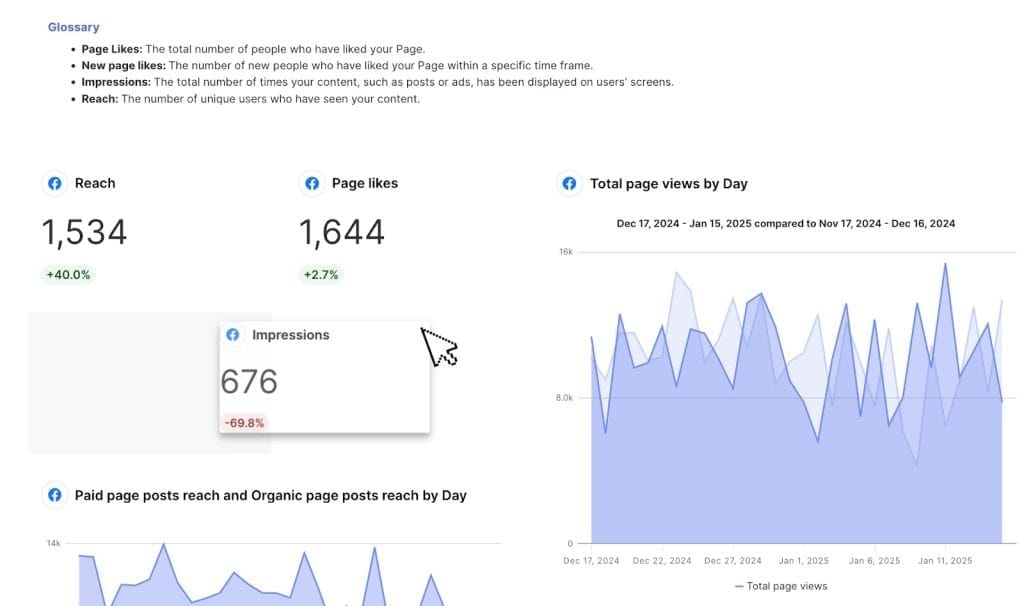
Swydo helps agencies by creating automated reports you can customize with your own branding, and it’s especially useful for pay-per-click (PPC) data at a low price. It remains a solid choice for fast reporting. You can collect data from multiple channels—like Google Ads or Facebook Ads—and set reports to run automatically on a schedule, such as daily or weekly, so you don’t have to stay up late working on them.
Check out our integrations, which connect to over 30 platforms. Once you’ve configured reports, customizing them is simple: add or modify metrics and widgets. The user-friendly design allows you to handle client reporting effectively, without the complexity.
- What Sets It Apart: It offers low-cost automation and centers on PPC reporting.
- Key Features: It creates branded reports and tracks multi-channel goals on a schedule.
- Strengths: It saves time and money, making it good for agencies on a budget.
- Weaknesses: It doesn’t connect to all tools.
- How It Fits Your Operations: Use it if reporting deadlines stack up. It provides a quick, useful solution that grows with new clients, needing little skill to operate.
See why Swydo is the top best client reporting tool on this list.
Semrush
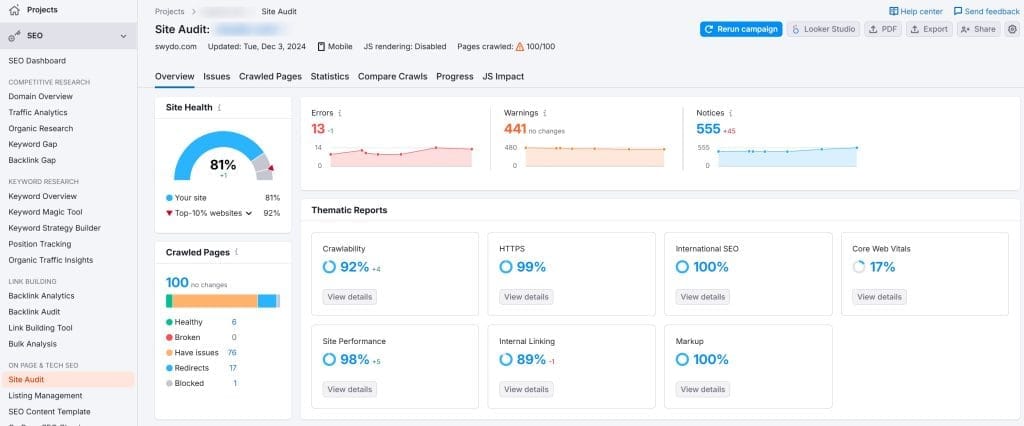
Semrush arms you for digital wins. Search engine optimization (SEO) anchors it with competitor info and keyword pulls that shift outcomes; it’s still a leader for SEO in 2025. Cover SEO and PPC needs in one go, despite a higher price and early challenges for newbies. Turn data into plans for clients chasing search rankings or ad performance; it’s your key to digital campaign analytics.
- What Sets It Apart: SEO strength, full digital toolset.
- Key Features: Digs up competitor details, finds keywords that deliver results.
- Strengths: Broad features cover digital needs, becomes straightforward with practice.
- Weaknesses: Higher cost strains budgets, takes time for your team to learn.
- How It Fits Your Operations: Pull it for clients who need success in search and ads. It adapts to your digital goals, but prepare your team for the initial learning curve.
Sprout Social

Sprout Social sorts your social chaos. Schedule posts and slice analytics across platforms, giving you hard answers for client questions; it stays a social go-to in 2025. Weigh its cost for social-driven clients, as it’s pricier for small budgets, but delivers strong results where social media matters. Pick it up fast; its setup matches your social media workload.
Pricing Update (November 2025): Sprout Social now starts at $199 per user per month (billed annually at $199/mo or monthly at $249/mo). Professional plan is $299/mo per user (annual) or $399/mo (monthly). Advanced plan is $399/mo per user (annual) or $499/mo (monthly). Note that pricing is per user, so costs multiply with team size.
- What Sets It Apart: Social media control, strong analytics backbone.
- Key Features: Times posts across platforms, pulls detailed social reports.
- Strengths: Solid social data meets client demands, reliable tools simplify tasks.
- Weaknesses: Per-user pricing can become expensive for growing teams.
- How It Fits Your Operations: Call it if social campaigns lead the way. It scales with audience growth, fits your team’s workflow seamlessly.
HubSpot

HubSpot pulls marketing, sales, CRM, and analytics into one spot. Yep, a legit marketing analytics tool with punch; it’s still growing strong in 2025 with tighter CRM ties and new Commerce Hub features. Start free and scale with paid tiers that track campaigns across channels, linking data to client relationships. Tackle its setup time and cost for full power; the free version offers a taste but lacks depth. Tie it into clients needing a complete marketing solution; it connects their efforts into one system.
Pricing Update (November 2025): HubSpot now uses seat-based pricing. Marketing Hub Starter begins at $15/month per seat (with annual commitment). Professional starts at $890/month for 3 seats, with additional seats at $45/month. Enterprise pricing is custom. Note that Professional and Enterprise plans require annual commitments and include onboarding fees (Marketing Pro: $3,000; Enterprise: $7,000).
- What Sets It Apart: All-in-one hub for agency tasks with new Commerce Hub.
- Key Features: Automates tasks, blends CRM with campaign data.
- Strengths: Wide reach handles multiple needs, feels smooth after setup.
- Weaknesses: Costs increase with features and users, setup takes time to complete, requires annual commitment for advanced plans.
- How It Fits Your Operations: Choose it for clients wanting a complete campaign overview. It grows with their needs, but plan for the budget investment and commitment.
Mailchimp

Mailchimp keeps email simple. Track campaigns affordably and toss in easy automation for slim budgets; it’s a true marketing analytics pick for email work, still a budget option in 2025. Stick to email data since it won’t cover more, but excels for clients relying on email outreach. Roll it out quick; its simplicity eases your busy days.
Pricing Update (November 2025): Mailchimp’s free plan now supports only 500 contacts with 1,000 monthly email sends (500 daily limit). Essentials starts at $13/month for 500 contacts. Standard starts at $20/month for 500 contacts. Premium starts at $350/month for 10,000 contacts. Note: As of April 2024, Mailchimp charges for ALL contacts including unsubscribed and non-subscribed contacts, which can significantly increase costs.
- What Sets It Apart: Affordable email analytics, budget-friendly vibe.
- Key Features: Tracks campaign results, runs basic automation.
- Strengths: Quick setup saves effort, reasonable pricing for small lists.
- Weaknesses: Limited to email, doesn’t reach other channels, charges for inactive contacts.
- How It Fits Your Operations: Take it for budget clients focused on email with small contact lists. It works for small campaigns but watch for cost increases as lists grow.
CallRail

CallRail tracks calls, forms, and chats, linking them to campaigns with dynamic numbers, updated in 2025 with AI-powered transcription and sentiment analysis. You can monitor call sources (e.g., PPC, SEO) and lead quality via Lead Center, starting at $50 monthly with a 14-day trial. It integrates with Google Analytics and ad platforms, simplifying attribution. Usage limits (e.g., 5 numbers, 250 minutes at base) raise costs as you grow, and it lacks advanced call routing. Use it for clients needing clear, affordable campaign insights without complex call handling.
- What Sets It Apart: It’s simple and blends call tracking with lead management.
- Key Features: It tracks calls, forms, and chats with AI transcription.
- Strengths: Easy setup saves time, and low cost suits small budgets.
- Weaknesses: Limited to basic call features, and scaling increases costs.
- How It Fits Your Operations: Pick it for clients wanting quick ROI proof. It’s lightweight and fits digital-focused teams, needing little training.
See our complete best call tracking software list for more options
Ruler Analytics

Ruler Analytics ties campaigns to cash. Predict results and keep privacy tight to show your financial impact; it remains strong in 2025 for revenue proof. Show clients your worth if they want profit evidence; it digs deep but calls for more budget and tech skills. Scale it for data-heavy projects; it’s your tool to close the deal.
- What Sets It Apart: Cash-focused analytics, prediction edge.
- Key Features: Tracks behavior, breaks down ROI clearly.
- Strengths: Sharp details highlight your impact, privacy builds client confidence.
- Weaknesses: Higher cost requires justification, needs technical skills to operate.
- How It Fits Your Operations: Use it for clients tying marketing to profit. It supports your case with data, but bring some technical expertise.
Matomo

Matomo shields your data. Open-source and self-hosted, it skips sampling and stays all yours; it’s still a privacy leader in 2025. Keep client info safe if privacy matters most; it focuses on web analytics and takes tech effort to set up. Carve out web wins with it; it’s your secure data stronghold.
- Pricing Update (November 2025): Matomo remains free for self-hosted installations. Cloud version starts at €29/month (approximately $32 USD).
- What Sets It Apart: Privacy-first stance, total data control.
- Key Features: Runs self-hosted, pulls full web reports.
- Strengths: Full control ensures security, privacy meets strict requirements.
- Weaknesses: Tech setup takes effort, focuses only on web data.
- How It Fits Your Operations: Grab it for privacy-first clients with web priorities. It scales for secure web tracking, not broader campaigns.
Plausible

Plausible strips web analytics down. Privacy-first at $9 a month, it skips extra mess; it’s still lean and effective in 2025. Fit it for basic needs; it works perfectly for clients wanting simple web stats. Track light and cheap with it; it scales for small, privacy-focused tasks.
- What Sets It Apart: Simple, privacy-first web analytics.
- Key Features: Skips cookies, gives quick dashboard views.
- Strengths: Easy start saves time, low price suits tight budgets, compliance keeps it secure.
- Weaknesses: Limited to web data, lacks advanced features.
- How It Fits Your Operations: Pick it for clients needing basic web stats with privacy. It offers a low-cost, straightforward option, not a comprehensive solution.
Mixpanel

Mixpanel hones in on product analytics. Track events and retention for tech clients; it’s still a tech standout in 2025. Excel with it for SaaS or app projects; it’s a marketing analytics tool when product stats connect to campaigns. Zero in on product data; it grows with tech goals, not wide campaigns.
Pricing Update (November 2025): Mixpanel now offers a Free plan with up to 20 million events per month (previously limited differently). Growth plan starts at $20/month with 1 million events included free (as of February 2025), then pricing scales based on event volume. Enterprise pricing is custom. The pricing model shifted to event-based rather than flat monthly fees, which can scale costs quickly as usage grows.
- What Sets It Apart: Product analytics focus, event-based pricing.
- Key Features: Analyzes funnels, tracks retention sharply.
- Strengths: Precise user data supports tech needs, excels for product-focused tasks, generous free tier.
- Weaknesses: Event-based pricing can escalate quickly with growth, narrow scope avoids multi-channel use.
- How It Fits Your Operations: Choose it for tech clients tracking product performance. It provides a focused tool, not a broad analytics solution. Watch usage to manage costs.
Heap

Heap grabs all data fast. Track every event automatically and offers replays; it’s a marketing analytics beast for depth, still a premium pick in 2025. Skip setup hassle with it; it suits clients needing instant detail, though cost stands out. Scale it for big projects; it’s a strong choice for those who can afford it.
Pricing Update (November 2025): Heap offers a Free plan with up to 10,000 sessions per month. Growth plan starts at approximately $3,600 per year. Pro and Premier plans use custom pricing based on session volume. The pricing model is session-based rather than a flat annual fee, and costs can vary significantly based on usage and add-ons like Session Replay, Data History extensions, and Activate features.
- What Sets It Apart: Auto-captures data, skips setup work, session-based pricing.
- Key Features: Pulls past data, shows replays for full view.
- Strengths: Full data requires no prep, deep insights reduce effort, retroactive analysis.
- Weaknesses: Custom pricing can be unpredictable, might overwhelm small teams, costs increase with scale.
- How It Fits Your Operations: Use it for well-funded clients wanting deep analytics quickly. It delivers a powerful solution if they cover the cost and have the data volume to justify it.
How to Pick the Right Marketing Analytics Tool
You’ve got this list, now what? Match it to your agency’s needs with these steps:
Budget
Pick GA4 or Matomo (self-hosted) if money is tight; free options help you manage costs well. Take Swydo, Mailchimp, Plausible, or CallRail for value; these affordable tools give solid results. Go with Adobe, Ruler, or Heap if you have bigger budgets; their strong results justify the cost. Grab Semrush, Sprout, or HubSpot for mid-to-high funds; they balance cost and ability well.
Client Needs
Use Semrush for SEO and PPC; it ensures strong digital results. Pick Sprout for social; it gives accurate stats for social campaigns. Aim Mixpanel or Heap at tech and SaaS; they secure detailed product data. Choose Plausible or Matomo for privacy; they keep data safe. Take GA4 for Google fans; it works well with Google tools.
Use Adobe for big scale; it manages large, detailed projects. Grab Swydo for PPC ease; it simplifies reporting tasks. Choose HubSpot for all-in-one fixes; it covers all campaign parts. Take Mailchimp for email wins; it tracks email results cheaply. Use Ruler for cash proof; it ties efforts to revenue clearly. Pick CallRail for call insights; it tracks leads simply.
Team Skill
Grab Swydo, Mailchimp, Plausible, or CallRail for quick starts; their simplicity suits any team. Call on GA4, Semrush, or Sprout with some effort; your team can learn them fast. Use Adobe, Ruler, or Heap with pros; they need skilled users to work well. Take Matomo or Mixpanel with tech help; setup needs some skill but pays off. Pick HubSpot with time; it grows well once your team learns it.
Data Scope
Pull Matomo, GA4, or Plausible for web depth; they give thorough web analytics. Cover HubSpot, Semrush, Ruler, or CallRail for campaign reach; they offer a fuller campaign view. Aim Mixpanel or Heap at product focus; they provide precise tech insights. Grab Swydo or Sprout for channel wins; they handle PPC and social data well. Take Adobe or Mailchimp for depth or focus; they suit specific deep or narrow tasks.
Key Takeaway
You have thirteen top tools here. Cut reporting hassles with Swydo if time runs short; it automates reports quickly at $69/month base. Guard data with Matomo if security matters most; it keeps info safe and private. Start free with GA4 for Google-heavy tasks; it tracks basics at no cost.
Scale big with Adobe for detail-hungry clients; it delivers deep insights for large projects. Drive SEO and PPC wins with Semrush at $139.95/month; it boosts digital results well. Nail social stats with Sprout for platform fans at $199/user/month; it captures social data reliably.
Bind your campaign stack with HubSpot starting at $15/seat/month; it ties all efforts into one system. Keep email lean with Mailchimp from $13/month; it tracks affordably for email-focused clients with small lists.
Tie efforts to cash with Ruler at $200/month for profit goals; it shows financial results clearly. Offer simple, safe web data with Plausible at $9/month; it tracks web stats easily and securely.
Sharpen product stats with Mixpanel starting at $20/month for tech needs; it focuses on product results precisely with event-based pricing. Drop deep analytics fast with Heap starting at $3,600/year for clients with budget; it provides detailed insights quickly with automatic capture.
Prove call value with CallRail from $45/month; it tracks leads simply for phone-driven clients.
You work hard daily for results; these tools support you. Line them up with your funds, client needs, and team strength. The right tool makes the difference between scrambling for data and confidently proving ROI.
Scale big with Adobe for detail-hungry clients; it delivers deep insights for large projects. Drive SEO and PPC wins with Semrush; it boosts digital results well. Nail social stats with Sprout for platform fans; it captures social data reliably. Bind your campaign stack with HubSpot; it ties all efforts into one system. Keep email lean with Mailchimp; it tracks cheaply for email-focused clients.
Tie efforts to cash with Ruler for profit goals; it shows financial results clearly. Offer simple, safe web data with Plausible; it tracks web stats easily and securely. Sharpen product stats with Mixpanel for tech needs; it focuses on product results precisely.
Drop deep analytics fast with Heap for clients with cash; it provides detailed insights quickly. Prove call value with CallRail; it tracks leads simply for phone-driven clients. You work hard daily for results; these tools support you. Line them up with your funds, client needs, and team strength.
Marketing Analytics Tools FAQ
Quick answers to the most common questions about marketing analytics tools
A marketing analytics tool is software that collects, measures, and analyzes data from your marketing campaigns to show what’s working and what isn’t. It tracks metrics like website visits, email opens, ad clicks, and conversions, then presents this data in reports and dashboards so you can make informed decisions about your marketing strategy.
Google Analytics (GA4) is the best free option. It tracks website traffic, user behavior, and conversions across platforms without any cost. While it has a learning curve, it provides comprehensive data and integrates seamlessly with other Google products like Google Ads and Search Console, making it ideal for businesses on a tight budget.
Most businesses need 2-4 tools: one for web analytics (like Google Analytics), one for reporting automation (like Swydo), and 1-2 specialized tools based on your channels (Semrush for SEO, Sprout Social for social media, or CallRail for phone tracking). Having too many tools creates unnecessary complexity and wastes time.
Focus on three core metrics: traffic sources (where visitors come from), conversion rate (percentage who take desired actions), and cost per acquisition (how much you spend to get each customer). Add channel-specific metrics like email open rates, social engagement, or call tracking based on your marketing activities. Avoid tracking everything—pick metrics that directly impact business decisions.
Without analytics tools, you’re guessing what works instead of knowing. These tools show which campaigns generate leads, which channels waste money, and where to invest more budget. They save hours of manual work, prove ROI to stakeholders, and help you spot problems before they become expensive mistakes. Businesses using analytics consistently outperform those relying on intuition alone.
Match the tool to three factors: your budget (free to $500+/month), your team’s technical skills (beginner to expert), and your specific needs (web tracking, social media, SEO, or multi-channel). Start with one core tool that solves your biggest pain point, then add specialized tools as needed. Choose platforms with good support and easy learning resources.
Google Analytics is excellent for web tracking and works well for most small to medium businesses. Paid tools offer specific advantages: better customer support, easier reporting, deeper insights for specialized channels (SEO, social, email), and less technical setup. If GA4 meets your needs, stick with it. Upgrade to paid tools when you need features GA4 doesn’t provide or when manual reporting takes too much time.
All-in-one tools like HubSpot ($890+/month) work well if you want everything integrated and have the budget. Multiple specialized tools often cost less and perform better at specific tasks—combining Google Analytics (free), Mailchimp ($13/month), and Swydo ($69/month) gives you strong capabilities for under $100/month. Choose based on your budget and whether you value integration over best-in-class features.
Free tools require more technical knowledge, offer limited customer support, and often need manual data exports and report creation. Paid tools provide automated reporting, better customer support, easier interfaces, and specialized features like competitor analysis or advanced attribution. Free tools work fine for basic needs, but paid tools save significant time as your business grows and your data needs become more complex.
Start with Google Analytics (free) for website tracking, then add budget-friendly specialized tools based on your main channels: Mailchimp ($13/month) for email, Plausible ($9/month) for simple web analytics with privacy, or CallRail ($45/month) for tracking phone leads. These tools are affordable, easy to learn, and provide the essential data small businesses need without overwhelming features or complexity.
Yes, typically. Google Analytics handles web traffic well but doesn’t track social media engagement, email performance, or phone calls. Use channel-specific tools for best results: Sprout Social for social media, Semrush for SEO, Mailchimp for email, and CallRail for phone tracking. A reporting tool like Swydo can then combine data from all sources into unified dashboards for clients.
Simple tools take 1-3 days (Plausible, Mailchimp), moderate complexity tools need 1-2 weeks (Swydo, Semrush), and enterprise platforms require 4-12 weeks (HubSpot, Adobe Analytics). Add extra time for team training and connecting data sources. Start with one tool and get it working properly before adding more—rushing setup leads to inaccurate data and wasted time fixing problems later.
It depends on the tool. Basic tools like Swydo, Mailchimp, and Sprout Social need only standard computer skills. Google Analytics requires some learning but no coding. Advanced tools like self-hosted Matomo or Adobe Analytics need technical expertise or hired specialists. Choose tools matching your team’s current skill level—you can always upgrade to more complex tools as your team’s abilities grow.
Use tools with built-in integrations whenever possible—Swydo automatically connects to 30+ platforms including Google Analytics, Facebook Ads, and major marketing platforms. For custom connections, use automation tools like Zapier. Ensure you use consistent UTM parameters across all marketing campaigns so data tracks properly. A central reporting dashboard consolidates metrics from multiple tools into one view.
Yes, but it requires manual work. Use Google Analytics (free) for web conversions, UTM parameters to track campaign sources, and spreadsheets for ROI calculations. This approach works for small operations but becomes error-prone and time-consuming as you scale. Budget tools like CallRail ($45/month) automate much of this work, saving hours weekly while reducing mistakes from manual tracking.
Tracking too many metrics without focusing on what matters. People install tools and track everything, then get overwhelmed by data without useful insights. Start with 3-5 key metrics that directly impact your business goals. Once you’re consistently using those, add more metrics gradually. Also, many people never check if tracking is working correctly—always verify data accuracy when you first set up any tool.
Check key metrics daily or weekly for active campaigns, but do deep analysis monthly. Daily checks catch urgent problems like broken tracking or failed campaigns. Weekly reviews identify trends and inform quick adjustments. Monthly analysis reveals bigger patterns and guides strategy changes. Set up automated reports so you don’t have to manually check dashboards constantly—you’ll get alerts when something needs attention.
Different tools count things differently. Google Analytics excludes bot traffic while ad platforms include it. Tools use different time zones, attribution models, and tracking methods. Small differences (5-10%) are normal and expected. Larger gaps mean tracking is broken—check that tracking codes are installed correctly, UTM parameters are consistent, and conversion goals match across platforms.
Test your tracking by completing a conversion yourself and checking if it appears in your analytics. Compare data across multiple sources—website analytics should roughly match CRM leads. Check for obvious errors like zero conversions when you know sales happened, or traffic spikes that don’t match reality. Use browser extensions like Google Tag Assistant to verify tracking codes are firing correctly.
Common causes include: incorrect tracking code installation, ad blockers preventing data collection, bot traffic inflating numbers, manual data entry errors, disconnected systems not sharing information, and tracking codes breaking when websites update. Regular data audits, automated validation, and standardized processes help maintain accuracy. About 10-20% of marketing data contains errors, so verification is essential.
First, centralize data in one platform to reduce inconsistencies. Use automation instead of manual data entry to eliminate human errors. Establish standard naming conventions for campaigns and UTM parameters across your team. Run monthly data audits to catch issues early. Invest in data validation tools that automatically check for errors, and train your team on proper data entry and tracking setup procedures.
Yes, with specific setup. Use unique phone numbers (tracked by CallRail), custom promo codes, QR codes linking to tracked URLs, or dedicated landing pages for offline campaigns. CRM integration helps connect offline sales to online marketing touchpoints. While offline tracking is less precise than digital tracking, these methods provide reasonable attribution for print ads, events, direct mail, and in-person sales.
Data integration means connecting information from different sources (website, email, social media, CRM) into one system so you see the complete customer journey. Without integration, you have fragmented data showing only pieces of the story. Integrated data reveals which marketing touchpoints actually lead to sales, prevents duplicate work, and ensures everyone works from the same accurate information.
Connect marketing activities directly to revenue. Track which campaigns generate leads, calculate cost per lead, and follow leads through to sales. Tools like Ruler Analytics specialize in revenue attribution, while CallRail tracks phone leads to sales. Present data in business terms: “This campaign generated 47 leads worth $94,000 in revenue at $40 cost per lead” rather than just reporting clicks or impressions.
Focus on revenue metrics: leads generated, cost per lead, conversion rate, and return on ad spend (ROAS). These directly show whether marketing makes money. Secondary metrics like traffic, engagement, and brand awareness matter but shouldn’t overshadow revenue metrics. Always connect marketing activities to business outcomes—executives care about dollars earned, not just vanity metrics like page views or likes.
Digital attribution is 70-85% accurate for online touchpoints. First-click and last-click attribution are simple but reliable. Multi-touch attribution (in HubSpot, Adobe Analytics) gives better accuracy but needs more data. Phone calls and offline conversions remain challenging to track perfectly. No attribution is 100% accurate, but it’s far better than guessing—use attribution to guide decisions, not as absolute truth.
Switch when your current tool can’t scale with growing data needs, lacks essential features you now need, becomes too expensive for the value provided, or consistently gives inaccurate data. Common triggers: outgrowing free plan limits, spending too much time on manual reporting, or needing better integration with other tools. Plan carefully—run new and old tools in parallel for 30-60 days before fully switching.
Initial insights appear within days once tools are properly set up—you’ll immediately see which channels drive traffic and conversions. Meaningful improvements take 1-3 months as you collect enough data to identify patterns and test changes. Significant ROI improvements typically show after 3-6 months of consistent data-driven optimization. The key is using insights to make decisions, not just collecting data.
It depends on what they save or earn you. If a $200/month tool saves 10 hours of manual work monthly, it pays for itself if your time is worth more than $20/hour. If it helps identify which campaigns waste $1,000/month in ad spend, it’s worth it. Calculate ROI based on time saved, improved decision-making, and revenue impact—not just features. Start with budget tools and upgrade when you clearly see the value.
Choose simpler tools that match your team’s skill level. Provide training through the tool’s free resources (Google Analytics Academy, HubSpot Academy). Start with one clear use case that solves a painful problem so the value is obvious. Schedule regular review meetings where you use the tools together. If tools remain unused after training, they’re either too complex or solving problems your team doesn’t actually have—switch to something simpler.
Stop scrambling for data. Automate your marketing analytics reporting today.
Try Swydo Free for 14 Days