
Social media metrics are the numbers platforms like Instagram, TikTok, LinkedIn, Facebook, YouTube and X record about who saw your content, what they did with it and what happened next. They’re only useful when you know exactly how each one was counted. The same post can show an engagement rate of 0.80% or 3.13% depending on which formula your tool uses.
Think of a shop on a busy street. One counter at the door tallies every time someone walks past the window. That’s impressions, or views. A smarter counter tallies each person once, however many times they pass. That’s reach. Some people step inside and pick something up, which is engagement. A few buy, which is conversion. As a definition, that holds up fine.
It breaks the moment you run shops in more than one mall. Every mall installs a different counter. One counts a passerby after two seconds. Another counts anyone whose reflection crosses the glass. A few swap their counter halfway through the year without telling you, and some shred the tape after 90 days.
That’s how social media measurement actually works. So this guide spends as much time on how the numbers get counted as on which numbers to track. It starts with definitions and formulas, moves to benchmarks, then covers the part most reports get wrong: why the numbers drift, and how to keep your reporting from drifting with them.
Social Media Metrics at a Glance
These five facts shape everything that follows. Each one changes how you should read a social media report.
- Definitions change under you. Meta deprecated Instagram’s
impressionsandplaysmetrics in favor ofviewsfor all API versions on April 21, 2025, according to Meta’s Instagram media insights reference. Facebook Pages followed on November 15, 2025. After that date, requests for the old metrics return an invalid metric error. - Benchmarks disagree by more than 10x. Instagram’s “average engagement rate” ranges from 0.30% to roughly 5.5% across three well-known studies. Each one counts and samples differently.
- History disappears. Meta’s documentation says Instagram user-level metrics are stored for up to 90 days.
- Some metrics can’t be added up. Unique reach for three posts is not the sum of each post’s reach.
- Hand-built spreadsheets are fragile. Field audits summarized by spreadsheet-error researcher Raymond Panko found errors in 94% of the operational spreadsheets studied.
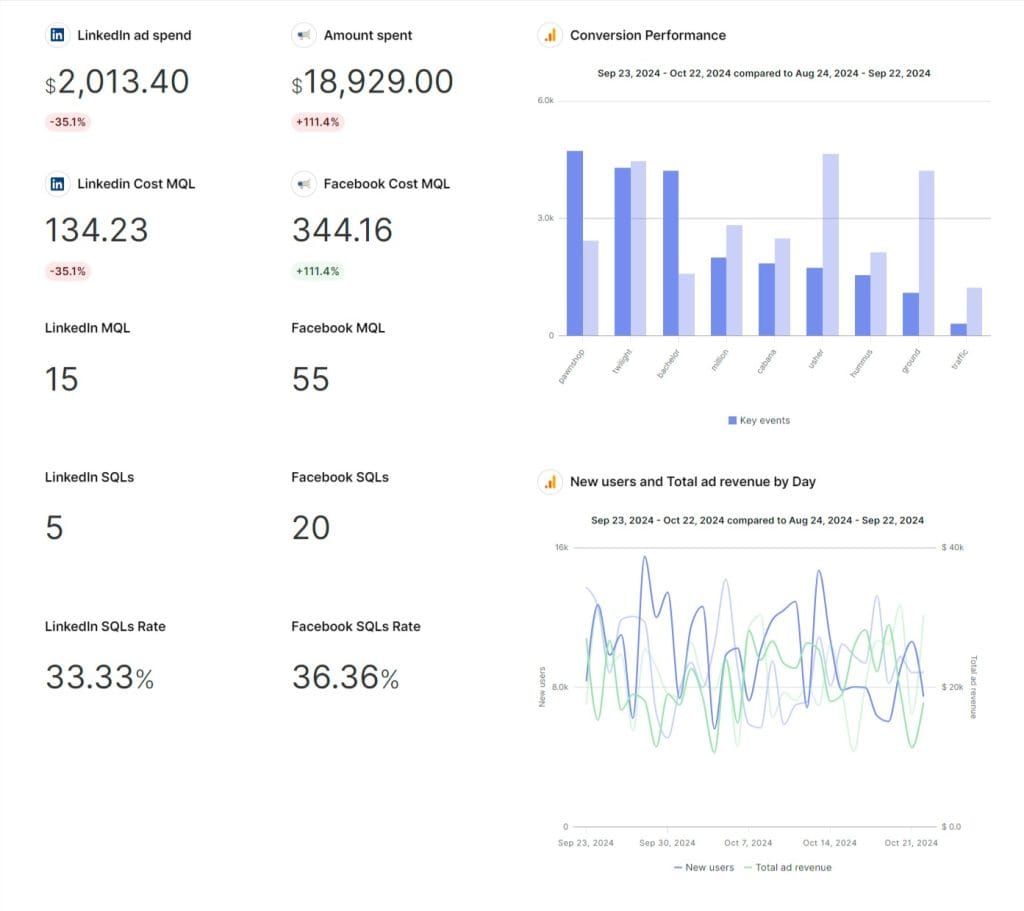
What Are Social Media Metrics?
Social media metrics are quantitative measurements of how content and accounts perform on social platforms. They cover exposure (views, reach), interaction (likes, comments, shares, saves), audience change (followers gained and lost), attention (watch time, completion), action (clicks, conversions) and cost (CPM, CPA, ROAS). Platforms calculate most of them before you ever see them. That’s why understanding the definition behind each one matters more than memorizing a list.
Metrics, KPIs and Vanity Metrics Are Different Things
A metric is any number a platform gives you. A KPI is the small set of metrics you’ve agreed will decide whether the work succeeded. If you want the longer version, here’s the difference between a KPI and a metric.
A vanity metric is a number that looks good and changes no decision. Follower count is the classic example. It isn’t useless. It becomes a vanity metric when it’s reported alone, with no growth rate, no audience quality and no link to an outcome. The same number becomes diagnostic once you turn it into a follower growth rate and compare it to the month before. There’s more on spotting vanity metrics and replacing them.
Here’s the test: if this number dropped 30% next month, would anyone change what they do? If the answer is no, it belongs in an appendix, not on page one.
How the Numbers Connect From Exposure to Revenue
Social media metrics work as a chain, and each link depends on the one before it. Exposure (views, reach) creates the chance for attention (watch time, completion). Attention creates interaction (shares, saves, comments). Interaction and clicks create action (sessions, sign-ups, purchases). Action creates value (revenue, retention).
Reading the chain tells you where a problem actually sits. Strong reach with weak watch time is a creative problem. Strong engagement with almost no clicks usually means the post never gave anyone a reason to leave the app. Strong clicks with weak conversion points to the landing page, not the social team. Most monthly reports list these numbers side by side and never connect them. Connecting them is where the insight lives.
Why Social Media Metrics Matter for Agencies and Brands
Social media metrics matter because leadership now expects social to show up in business results, not just likes. In Sprout Social’s research, 65% of marketing leaders said they want to see direct connections between social campaigns and business goals. That expectation lands on whoever builds the report.
Say you run organic and paid social for a coffee subscription brand. In January, the client’s Instagram views jump sharply. Was that a strong creative month, or a change in how the platform counts views? If you can’t answer that with confidence, every number on the page is a liability. The client can’t tell the difference between a real result and a measurement artifact, so it’s on you to know.
Accuracy isn’t a nice-to-have in a social report. It’s the whole job.
The Social Media Metrics Worth Tracking by Category
The metrics worth tracking fall into seven categories: awareness, engagement, audience growth, video and attention, traffic and conversion, customer care and brand health, and paid social. You won’t report all of them to every client. You need to know what each one counts, whether you can add it up across days and posts, and which question it answers. The table below covers all three. The sections after it explain the judgment calls.
Awareness Metrics
Awareness metrics measure how many people your content reached and how often it was seen.
- Reach counts unique accounts that saw your content. It’s the closest thing to “how many people,” and it can never be summed across days or posts. Platforms deduplicate people internally, and you can’t do that from outside.
- Views count every time content was displayed or played, repeats included. On Instagram and Facebook, views replaced impressions as the main exposure metric. On YouTube, a view now registers from the first frame.
- Impressions still exist on LinkedIn, X and in ad platforms. They count displays, not people.
- Non-follower view share is the percentage of views that came from people who don’t follow you. Meta’s Instagram account insights let you break views down by follower type. This metric tells you whether the feed is distributing your content beyond your existing audience. In recommendation-driven feeds, it’s often more useful than follower count.
- Share of voice is your brand mentions divided by total mentions in your category, times 100. You’ll need one of the social listening tools to measure it, because native analytics don’t track competitors.
Engagement Metrics
Engagement metrics measure what people did after seeing your content. Not every interaction is worth the same.
A like costs the viewer nothing. A save means “I’ll come back to this.” A share or send means “I’m putting my reputation behind this.” A thoughtful comment means the post started a conversation. Lumping them together into one “engagements” number hides the signal. Report shares and saves per 1,000 reach as their own lines.
Behavior is shifting toward private, low-effort actions. Socialinsider’s 70-million-post study, covered in the benchmarks section, found comments per post fell on TikTok and Instagram while shares rose. If your report only celebrates comments, it’s measuring the interaction people use less and less. Track reply rate too: the percentage of incoming comments your team answered. It’s one of the few engagement metrics fully in your control.
Audience Growth Metrics
Audience growth metrics measure how your follower base changes. Report the rate and the net number, never the total alone.
- Net follower growth = followers gained minus followers lost.
- Follower growth rate = (net new followers ÷ followers at the start of the period) × 100.
Gaining 200 followers on a base of 10,000 is a 2% month. Gaining 200 on a base of 200,000 is 0.1%. Same number, very different story. Also watch gross losses. A spike in unfollows after a campaign tells you something the net figure hides.
Video and Attention Metrics
Video metrics measure whether people actually watched, and they vary more by platform than any other category.
TikTok’s Ads Manager defines video views as the number of times your video starts to play, with replays excluded. It also reports 2-second views and 6-second focused views. YouTube Shorts count a view whenever a Short starts to play or replays, with no minimum watch time. YouTube keeps the stricter count as “engaged views” in YouTube Analytics. Instagram’s views include repeat displays.
So “10,000 views” on three platforms describes three different behaviors. The metrics that travel better are:
- Average watch time (total watch time ÷ views)
- Completion rate (views to 100% ÷ views × 100)
- Engaged views ÷ views on YouTube, which tells you what share of plays turned into real viewing
There’s a deeper breakdown of video marketing metrics if video is a big part of your mix.
Traffic and Conversion Metrics
Traffic and conversion metrics connect social activity to what happens on your site. This is where social earns its budget.
- Link clicks and CTR (clicks ÷ impressions or views × 100) measure whether a post moved people off the platform.
- Sessions and conversions should come from your web analytics, tagged with UTM parameters, not from the social platform’s own click count. Platform clicks and analytics sessions never match exactly, because people bounce before the page loads.
- Conversion rate = conversions ÷ clicks (or sessions) × 100. State which denominator you used.
The full list of conversion metrics goes deeper on the funnel side.
Customer Care and Brand Health Metrics
Customer care and brand health metrics measure how people feel about the brand, and how fast the brand responds when they speak up.
- Response rate: percentage of messages and comments answered.
- First response time: report the median, not the average. One message answered after a long weekend can wreck an average and mislead everyone.
- Sentiment: positive, neutral and negative share of mentions. It’s useful as a trend, unreliable as an absolute score.
- Mention volume: spikes are worth an alert, not just a chart.
Paid Social Metrics
Paid social metrics measure efficiency and return on ad spend. They follow different rules from organic metrics.
| Metric | Formula | Watch out for |
|---|---|---|
| CPM | Spend ÷ impressions × 1,000 | Compare within a platform, not across |
| CPC | Spend ÷ link clicks | “All clicks” includes profile taps on some platforms |
| CPA | Spend ÷ conversions | Depends on the attribution window |
| ROAS | Attributed revenue ÷ spend | Platform-reported revenue overlaps across channels |
| Frequency | Impressions ÷ reach | Only valid with deduplicated reach |
Keep paid and organic in separate sections of the report, and read up on ROAS and ROI before you promise a client either number. For platform-specific ad metrics, the guide to LinkedIn Ads KPIs and the overview of paid social cover the details.
How Each Platform Defines Views, Reach and Engagement
Every major platform defines its core metrics differently, so cross-platform comparisons need a translation layer. The table below shows what each platform’s headline numbers actually count, and the one thing most likely to trip up your reporting.
| Platform | What a “view” or “impression” counts | Reach | Native engagement rate | Watch out for |
|---|---|---|---|---|
| Views count each time content is played or displayed, repeats included. Views replaced impressions and plays on April 21, 2025 | Unique accounts, estimated by Meta | No single official rate. You calculate it | Account metrics kept 90 days; Story metrics available for 24 hours via API | |
| Facebook Pages | Views (page_media_view) replaced Page impressions on November 15, 2025 | Unique people per day, week or 28 days | No single official rate | Unique values are computed separately, so parts won’t add up to the total |
| TikTok | Ads: video views = times the video starts to play, replays excluded | Unique users | No single official rate | 2-second and 6-second views are separate metrics |
| YouTube | Views count from the first frame, for Shorts and all other formats | Unique viewers | No single official rate | “Engaged views” keep the stricter count; use them for trends |
| Impressions = times a post was displayed | Unique members (where available) | (Clicks + Likes + Comments + Shares + Follows) ÷ Impressions | Includes clicks and follows, so it runs higher than other platforms’ rates | |
| X | Impressions = times a post was displayed | Not reported for posts | Engagements ÷ impressions | No unique reach, so frequency can’t be calculated |
Two of these definitions need sources of their own. YouTube extended first-frame view counting from Shorts to all formats on August 24, 2026, and kept engaged views in Advanced Mode. LinkedIn’s Page analytics define engagement rate to include clicks and follows.
For platform deep dives, see the guides to Instagram organic metrics, Facebook page metrics, organic TikTok metrics, YouTube metrics and X analytics metrics.
How to Calculate Engagement Rate on Social Media
Engagement rate is total interactions divided by an audience number, multiplied by 100. The audience number, the denominator, changes the answer more than anything else. There are four legitimate denominators. None is “correct.” Each answers a different question, and the mistake is mixing them in one report.
Engagement Rate by Followers
Formula: (likes + comments + shares + saves) ÷ followers × 100
This answers “how active is my audience relative to its size?” It’s the method most published benchmark studies use, which is its main strength. You can compare your number against theirs. The weakness is that recommendation feeds show your posts to non-followers, so a viral post can produce a rate that says more about the algorithm than your audience.
Engagement Rate by Reach
Formula: (likes + comments + shares + saves) ÷ reach × 100
This answers “of the people who saw it, how many acted?” It’s the best measure of content quality, because it ignores how big your audience is and focuses on how persuasive the post was. Use it to compare posts against each other.
Engagement Rate by Views or Impressions
Formula: (likes + comments + shares + saves) ÷ views (or impressions) × 100
This answers “per display, how often did someone act?” It runs lower than reach-based rates, because one person can generate several views. After Meta moved Instagram and Facebook to views, many tools quietly switched to this denominator. That makes historical comparisons risky.
Platform-Native Engagement Rate
Formula: whatever the platform shows, such as LinkedIn’s (clicks + likes + comments + shares + follows) ÷ impressions
This is the number your client sees when they open the native app. Including clicks pushes it higher than a rate built only from likes, comments and shares. Report it when the client lives in native analytics, and label it as the platform’s own calculation.
One Post, Four Engagement Rates
Here’s what the denominator choice does to a single post. Take one post with 120 likes, 18 comments, 22 shares and 40 saves, so 200 interactions. It also got 60 link clicks, from an account with 25,000 followers. The post reached 6,400 accounts and earned 9,100 views.
| Method | Calculation | Engagement rate |
|---|---|---|
| By followers | 200 ÷ 25,000 | 0.80% |
| By views | 200 ÷ 9,100 | 2.20% |
| Platform-native style (adds clicks) | 260 ÷ 9,100 | 2.86% |
| By reach | 200 ÷ 6,400 | 3.13% |
Same post, nearly a 4x spread, and every number is honest. That’s why “our engagement rate is 3%” means nothing without the formula next to it.
Pick one formula per client, write it in the report’s definitions section, and lock it in place. In Swydo, you can build your chosen formula as a Custom Metric, so every report and teammate uses the same calculation instead of whatever a given chart defaults to.
What Is a Good Engagement Rate on Social Media?
A good engagement rate depends on the method behind the benchmark. Three reputable studies put Instagram anywhere from 0.30% to about 5.5%. Before you compare your number to any benchmark, confirm the benchmark divides by the same thing you do. Otherwise you’ll either panic or celebrate for no reason.
| Platform | Quid (Rival IQ) median, by followers | Socialinsider average, by followers | Buffer median, platform-specific definitions |
|---|---|---|---|
| 0.30% | 0.48% | ~5.5% | |
| TikTok | 2.01% | 3.70% | not published in the summary |
| not published in the summary | 0.15% | ~5.6% | |
| X | not published in the summary | 0.12% | ~2.5% |
| not covered | not covered | ~6.2% | |
| YouTube | 0.21% | not covered | not covered |
Sources: Quid’s 2026 Social Media Industry Benchmark Report, the report formerly published by Rival IQ. Socialinsider’s social media benchmarks study, which analyzed 70 million posts. Buffer’s State of Social Media Engagement report, which analyzed more than 52 million posts from Buffer accounts.
Why Benchmark Reports Disagree
Benchmark reports disagree because of three choices: what counts as an interaction, what it’s divided by, and whose accounts are in the sample.
Socialinsider’s Instagram rate counts only likes and comments, divided by followers. Quid reports medians, which sit below averages because a few viral accounts pull averages up. Buffer’s sample is its own users, many of them small accounts, which naturally post higher per-follower rates. Buffer also applies each platform’s own definition. That’s why its LinkedIn figure includes clicks.
Measurement changes leak into benchmarks too. Socialinsider noted that Instagram’s 29% jump in average views may be partly due to Meta’s new way of counting views. That’s a definition change showing up as “growth” in an industry study, and if it can fool a research team, it can fool a monthly report.
Buffer’s data also surfaced one of the most actionable patterns in any of these studies. Accounts that replied to comments outperformed those that didn’t on every platform tested, by as much as 42% on Threads and 30% on LinkedIn.
How to Build a Baseline You Can Trust
Your own history is a better benchmark than any industry report. Calculate the median engagement rate of your posts over the trailing 90 days, using the same formula every time. Treat anything 25% or more above or below that median as worth explaining.
Medians beat averages here for the same reason they do in benchmark studies: one viral post shouldn’t redefine “normal.” Segment by format too. Reels, carousels and static images behave differently enough to need separate baselines.
If you manage many accounts, put the baseline where you’ll see it daily. Swydo’s Metrics Overview shows up to six metrics across all your clients in one view, so an account drifting below its normal range stands out before the monthly report does.
Why Social Media Numbers Don’t Match Across Tools and Time
Social media numbers don’t match because platforms calculate unique metrics internally, change definitions, delete history, deliver data late and blend paid with organic activity. Each of these produces a number that looks precise and is quietly wrong. Here are the five failure modes, roughly in the order they cause trouble.
Some Metrics Can’t Be Added Up
Reach, unique viewers and any other “unique” metric can’t be summed across days, posts or campaigns. If three posts each reach 4,000 accounts and most of those accounts are the same followers, true combined reach might be closer to 5,500 than 12,000. The platform knows which people overlapped. Your spreadsheet doesn’t.
Meta’s own Page Insights documentation warns that unique values are calculated independently, so total Page reach won’t always equal paid plus organic reach. It also provides unique Page reach only in day, week and 28-day periods.
Ratios have the same trap in a different form. If week one has 100 engagements on 1,000 views (10%) and week two has 300 on 10,000 (3%), the average of the two rates is 6.5%. The real combined rate is 400 ÷ 11,000, or 3.6%. Always rebuild a ratio from summed parts, never average the percentages.
Swydo shows the same constraint honestly. Meta’s API only returns exact unique reach for 1-, 7- and 28-day windows, so Swydo estimates reach for any other date range. For an exact figure, use one of those windows or enter the number as a Manual KPI.
Platforms Rename and Retire Metrics
Platforms change what their metrics mean, and the change rarely shows up as a warning in your report. It shows up as a jump, a drop or a flatline.
Instagram’s switch from impressions to views, Facebook’s matching switch, and YouTube’s two view-counting changes each created a break in historical data. A year-over-year chart that spans one of those dates compares two different measurements. Mark the change date on the chart, compare the periods before and after separately, or use a bridge metric that didn’t change, like YouTube’s engaged views.
Platforms Delete Your History
Platforms keep your data for limited windows, and the windows differ by metric. Instagram keeps account-level metrics for 90 days. Meta’s media insights reference says post-level metrics are stored for up to two years, and Story metrics are available for only 24 hours. Through Swydo’s X integration, the API returns only the past 30 days of posts.
So if nobody captured last March’s numbers, there may be no year-over-year comparison to make this March. Treat every monthly report as a record. Save the PDF, keep the scheduled email, and don’t assume you can pull the history again later.
Late Data and Missing Values Look Like Real Numbers
Platform data arrives late, and missing data doesn’t always look missing. Meta’s media insights reference notes that data used to calculate metrics can be delayed by up to 48 hours. It also says that when data doesn’t exist or isn’t available yet, the API returns an empty dataset instead of a zero.
Two practical rules follow. Don’t pull a month’s numbers on the 1st at midnight, because the last two days will be incomplete. Wait until the 3rd. And make sure your reporting setup tells “no data” apart from “zero,” because averaging a blank as a zero drags every rate down.
Organic, Paid and Attribution Windows Get Blended
Organic and paid activity overlap in ways that inflate or deflate “organic performance.” A boosted post collects paid and organic interactions on the same object. Some platform metrics include promoted activity and others don’t, and the label rarely tells you which.
Attribution windows add a second layer. Meta stopped returning 7-day view and 28-day view attribution windows in its Ads Insights API on January 12, 2026. Click windows and 1-day view remain available. Any report that relied on longer view-through windows saw conversions fall that week, with no change in actual performance. Note the attribution window on every conversion number you report, and pick an attribution model that stays the same month to month.
Why Spreadsheets and Vibe-Coded Dashboards Break Quietly
Spreadsheets and vibe-coded dashboards break quietly because building a report is a one-time task, but keeping the data pipe working is ongoing maintenance. An afternoon with an AI coding assistant can produce a dashboard that looks finished. What it can’t produce is someone who notices when a token expires, a metric is renamed or an API version is retired. The failure is rarely an error message. It’s a number that stops changing, or changes for the wrong reason.
If you build social reporting yourself, you aren’t building a report. You’re signing up to maintain six integrations with six companies that change their APIs on their own schedule.
Access Tokens Expire on a Schedule
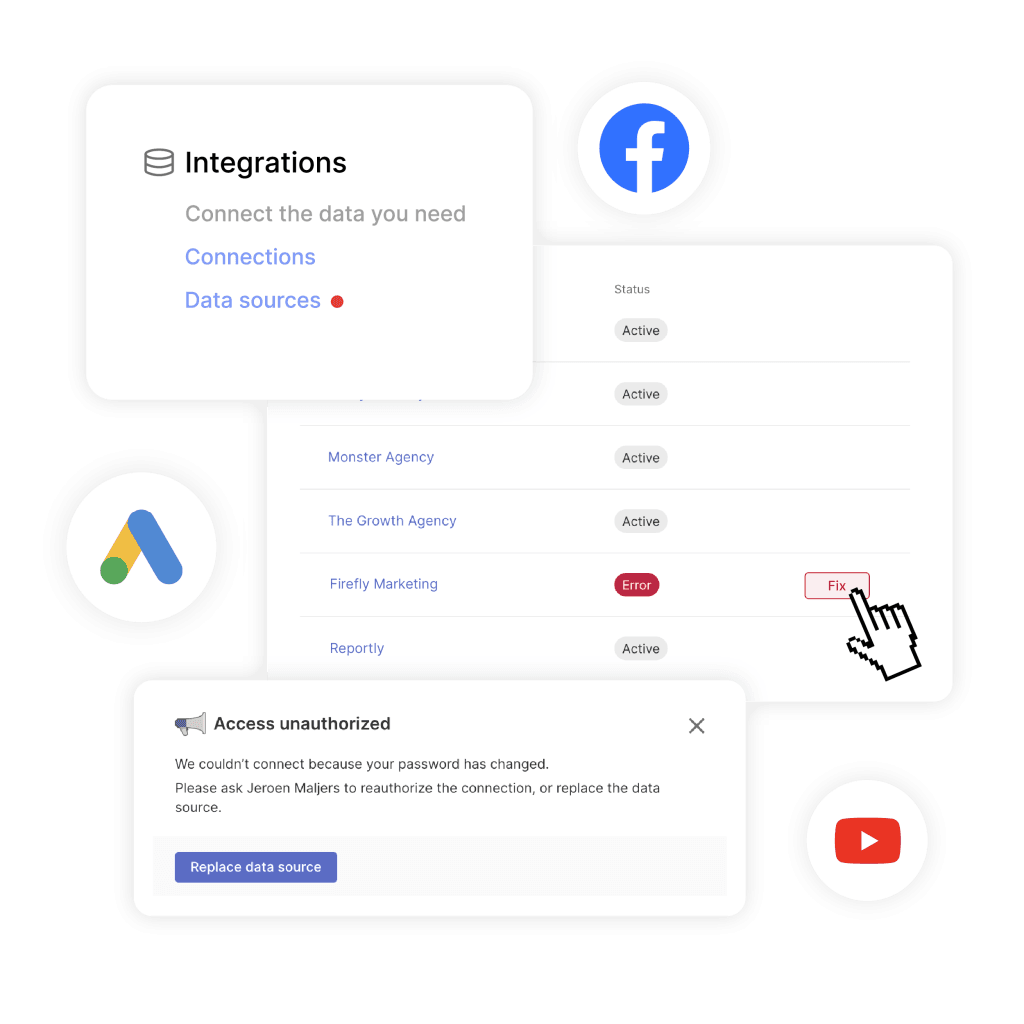
Every connection to a platform API runs on an access token, and tokens expire. Meta’s documentation says long-lived Instagram tokens are valid for 60 days and can only be refreshed while still active and at least 24 hours old. Miss the window and someone has to log in and reconnect by hand. Until they do, a homemade dashboard keeps showing the last numbers it received, with nothing telling you they’re stale.
Swydo’s Data Health Check Alerts monitor every connection for broken links, expired tokens and permission problems. They put a red dot next to the affected item under Settings → Connections and email the connection owner a direct link to fix it, before a client opens a report full of stale numbers.
APIs Change Every Month
Platform APIs are versioned, and old versions are retired. LinkedIn’s Marketing API publishes a new version monthly and supports each one for a minimum of one year. A script written against one version has a built-in expiry date. Meta’s deprecations are blunter: retired metrics return an error, and retired attribution windows simply return nothing.
A dedicated reporting tool absorbs this as part of the product. When Meta replaced Instagram impressions and plays with views, Swydo updated its Instagram integration so reports moved to the new metric, instead of every customer rewriting formulas.
Some Platforms Charge You to Read Your Own Data
Pulling data isn’t always free anymore. X’s API runs on prepaid credits. Its documentation lists $0.005 per post read, with reads of your own posts and followers priced at $0.001. Pay-per-use plans are capped at 2 million post reads per month, and X states that API requests will fail until you purchase more credits.
For a DIY dashboard, that means a billing account, a budget and a new silent failure mode: the credits run out and the X chart freezes.
Formulas Drift and Nobody Notices
Spreadsheet formulas break in ways their authors don’t see. Field audits summarized by Panko found errors in 94% of real operational spreadsheets. The usual culprits are mundane:
- a range that doesn’t extend when a new month is added
- a copied formula pointing at the wrong column
- an average of percentages
- a SUM over reach
Vibe-coded dashboards move the same risk into code, where fewer people on the team can read it.
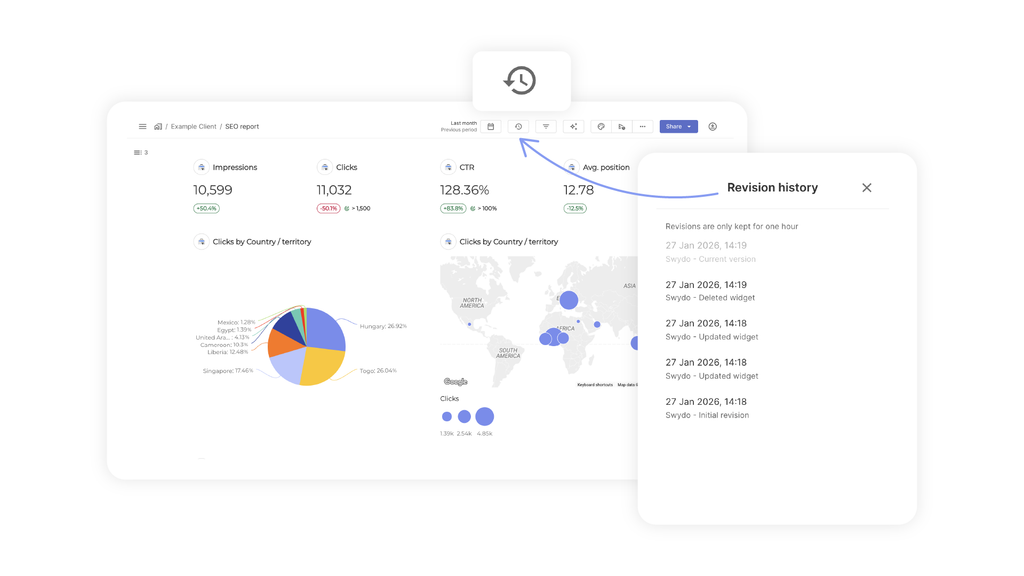
Swydo’s Report Revision History keeps up to 100 revisions per report and shows who changed what and when. Restores work for changes made within the past hour. It’s a safety net for edits, not a long-term audit trail, so pair it with locked templates for anything that matters.
What a Dedicated Reporting Tool Does Differently
A dedicated reporting tool exists to keep the data pipe working, not to draw charts. Here’s how the two approaches handle the failure modes above.
| Failure mode | DIY sheet or vibe-coded dashboard | Dedicated reporting tool |
|---|---|---|
| Token expires | Data freezes silently until someone notices | Connection monitored; owner alerted to reconnect |
| Metric renamed or retired | Formula errors or zeros; you rewrite the logic | Connector updated by the vendor |
| API version sunset | Script breaks on sunset date | Vendor migrates versions |
| Non-summable metrics | SUM() over reach is easy and wrong | Platform-provided totals or flagged estimates |
| Formula edits | Untracked; anyone can overwrite | Locked templates and revision history |
| Silent drops in performance | Found at month end, if at all | Daily alerts on thresholds you set |
| Cost of maintenance | Your team’s time, every month | Included in the subscription |
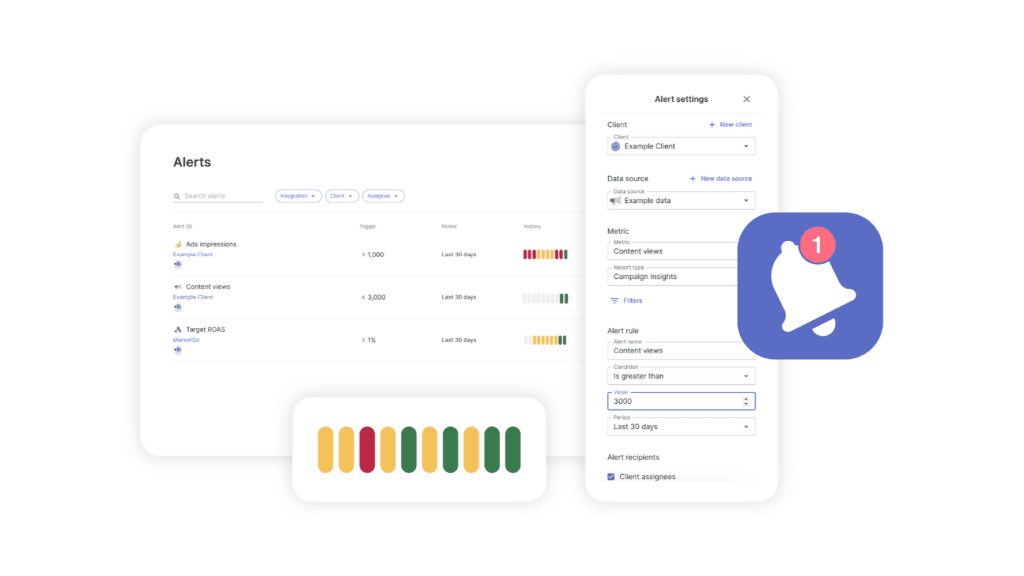
That last row in practice: open Monitoring → Alerts → +New Alert, choose the client, data source and metric, set a trigger condition, and pick a 1-, 7-, 30- or 90-day trigger period. Swydo checks it daily and notifies you by email or Slack when results go out of bounds. If you’re weighing this against Google’s free option, the rundown of Looker Studio limitations covers where connector-based dashboards struggle. The difference between monitoring versus reporting explains why both matter.
The Metric Trust Test Before Any Number Goes in a Report
The Metric Trust Test is a four-question check that every social media number should pass before it appears in a client report. It takes about a minute per metric, and it catches the errors that make clients stop trusting reports.
Run it once on your current template. Which numbers in your last report would fail at least one check?
Which Social Media Metrics to Report by Goal and Audience
The right metrics to report depend on two things: the goal the client is paying for, and who will read the report. A small number of goal-linked KPIs, read in context, beats a long list of everything the platform exports.
Match the Lead Metric to the Goal
Each goal gets one lead metric, a few supporting metrics and a list of numbers to leave out.
| Goal | Lead metric | Supporting metrics | Leave out of page one |
|---|---|---|---|
| Awareness | Reach and non-follower view share | Views, follower growth rate, share of voice | Raw impressions alone |
| Community and engagement | Engagement rate by reach | Shares and saves per 1,000 reach, reply rate | Total likes |
| Website traffic | Link clicks and UTM-tracked sessions | CTR, engaged sessions | Engagement rate |
| Leads and sales | Conversions and CPA or ROAS | Conversion rate, assisted conversions | Follower count |
| Customer care | Median first response time | Response rate, sentiment trend | Mention volume alone |
Match the Depth to the Reader
An executive reads three to five KPIs and wants to know what changed in business terms. A client marketing manager wants five to ten KPIs with commentary on why they moved. A channel manager wants post-level detail: which formats, hooks and posting times worked.
Build each depth once as a template. In Swydo, a linked report template pushes changes to every report built from it, so fixing a definition in one place fixes it everywhere. More on structuring these in our guide to client reporting best practices.
A Monthly Social Media Report Structure That Holds Up
A monthly social media report that survives scrutiny follows the same order every month:
- Summary. Three sentences on what happened and what you’ll do about it. Swydo’s AI summary block in the report email generates this commentary automatically for every scheduled send. Edit it before it goes out.
- Goal KPIs. The lead metric for each goal, compared to last period and the trailing baseline.
- What drove the change. Top and bottom posts, with the reason for each.
- Paid performance. Kept separate from organic, with the attribution window stated.
- Annotations. Platform changes, budget shifts, campaign launches and outages during the period.
- Definitions. Every formula used, especially engagement rate, written out once.
The definitions section is the one most reports skip, and it’s the one that protects you when a client compares your number with a screenshot from the app. For more on the format, see the guide to social media reporting.
How to Measure Social Media ROI
Social media ROI is the value attributed to social activity minus its total cost, divided by total cost, times 100. The formula is simple. The discipline is in the inputs.
Formula: (attributed value − total cost) ÷ total cost × 100
Total cost includes everything: ad spend, team or agency hours, creative production, creator fees and tools. Attributed value comes from UTM-tagged conversions in your analytics, or from CRM revenue tied back to social sources. It shouldn’t come only from each platform’s own conversion count, because platforms each claim credit for the same sale.
A quick example. A month of social costs $8,000: $5,000 in agency fees, $2,500 in ad spend and $500 in tools. If UTM-tracked conversions are worth $14,000 in revenue, ROI is ($14,000 − $8,000) ÷ $8,000 × 100 = 75%.
Two things keep that number honest. First, state the attribution window and model, and keep them the same month to month. Second, report a range when attribution is uncertain rather than one confident figure. The full method is in the guide to social media ROI.
Common Social Media Metric Mistakes to Avoid
Most social media reporting mistakes come from treating platform numbers as fixed facts rather than calculations with assumptions built in. These ten cause the most damage:
- Summing reach across days, posts or platforms. Use platform-provided totals for the period.
- Averaging percentages instead of rebuilding the rate from summed parts.
- Comparing engagement rates across tools or benchmarks that use different denominators.
- Comparing across definition changes without marking the change date on the chart.
- Mixing paid and organic results in one “performance” number.
- Ignoring the attribution window when conversions suddenly drop or spike.
- Pulling data too early, before platforms finish processing the last days of the month.
- Treating blanks as zeros, which drags averages and rates down.
- Reporting follower count without a rate, which hides whether growth is speeding up or slowing down.
- Trusting a dashboard because it loaded. A chart that renders isn’t proof the connection behind it is alive.
Next Steps
Social media metrics are only as useful as the definitions, denominators and data pipes behind them. Pick one engagement-rate formula and write it into every report. Build your baseline from your own trailing 90-day median, not an industry average. Run the Metric Trust Test on your current template before the next report goes out.
If your reporting runs on spreadsheets or a homemade dashboard, count how many connections it depends on and when each token expires. That number is your maintenance workload. Swydo handles it on one plan at $69 per month, or $62 per month billed annually, with 10 data sources included and unlimited users. The 14-day trial is enough time to connect a client’s social accounts and compare the numbers against your current setup. There’s also a wider roundup of social media reporting tools if you want to compare options first.
One post, four engagement rates
Enter one post’s numbers. The interactions stay the same, only the denominator changes.
Likes
Comments
Shares
Saves
Link clicks
Followers
Reach
Views
By followersinteractions ÷ followers
0%
By viewsinteractions ÷ views
0%
Platform-native style(interactions + clicks) ÷ views
0%
By reachinteractions ÷ reach
0%
Same post, different answers.