
Google Ads accounts spending between $10,000 and $50,000 a month returned 565.8% on ad spend in Q1 2026. Accounts spending more than $50,000 a month returned 377.3%, according to Optmyzr’s benchmark report covering more than 21,000 accounts.
Return on ad spend, usually shortened to ROAS, just means how many dollars come back for every dollar you put in. A 565.8% return is about $5.65 back per dollar spent.
So the biggest account on your roster is probably not your most profitable one.
What separates the accounts that earn from the ones that drain your team gets decided early. Most of it happens in the first two weeks, before a single ad goes live.
One note on who is writing this. Swydo makes client reporting and monitoring software for marketing agencies. We will say plainly where our product fits and where it falls short. The Google Ads work itself applies no matter what tool you use to report on it.
This guide covers five things in sequence. The check to run before you take a client on. The eight setup steps. Two ways accounts leak money after launch. What to charge. And how long profit actually takes to show up.
What Makes a Google Ads Account Profitable for an Agency
Every client account has two profit and loss statements running at the same time. Most agencies only watch one.
The client’s statement. Revenue from ads, minus ad spend, minus your fee, minus what it costs them to make and deliver the product.
Here is where that gets uncomfortable. Say an account returns 4x, meaning $4 back for every $1 spent. That sounds strong.
Now suppose the client’s gross margin is 25%. Gross margin is the share of each sale left over after the cost of producing it, so on a $100 sale they keep $25.
That means four dollars of revenue is only one dollar of real margin. And that dollar is what paid for the ad in the first place.
The account is breaking even while your report calls it a win.
Your agency’s statement. Your monthly fee, minus your team’s hours, minus software costs, minus the onboarding work you did for free in month one.
Plenty of agencies run accounts that make the client money and cost the agency margin. It only surfaces when someone finally tracks hours against the retainer.
Both statements need to work. That is why the first conversation with a prospect covers four numbers rather than keywords:
- Average order value. What a typical sale is worth.
- Gross margin. What percentage of that sale they keep.
- Close rate. For lead generation, how many leads become customers.
- Customer lifetime value. What a customer is worth over the whole relationship, not just the first purchase.
Those four numbers turn a performance target into something real. Without them, you cannot tell a good month from a lucky one.
If a prospect does not have them ready, that is not a reason to walk away. It is usually the first genuinely valuable thing you can do for them.
The Profit Floor
The Profit Floor is a five-question check to run before you agree to manage an account. A no on any question means the account cannot be profitable for either side until that condition gets fixed.
- Do we know what a conversion is worth? A conversion is any action you tell Google to count as success, like a purchase, a form submission, or a phone call. You need to know what one is worth in dollars and what margin sits inside it.
- Can conversions be measured? There has to be a trackable event tied to money. A sale that closes over the phone with nothing recorded in a CRM is a problem to solve before launch.
- Can the budget produce enough conversions to learn from? Google’s automated bidding gets accurate somewhere around 30 conversions a month. Multiply the target cost per lead by 30 to get a workable minimum spend.
- Does the math leave room for our fee? Ad spend plus your fee plus their delivery cost has to sit under revenue with margin left over. Run this before you send the PPC proposal.
- Can we run this in the hours we are pricing? A small account still takes 8 to 12 hours a month, and that floor barely moves when the budget shrinks.
The Profit Floor
Five checks to run before you agree to manage a Google Ads account.
Do we know what a conversion is worth?
Order value or closed-deal value, plus the margin on it.
Can conversions be measured?
A trackable event tied to money, not a proxy for interest.
Will the budget clear 30 conversions a month?
Target cost per lead x 30 gives the real minimum spend.
Does the math leave room for our fee?
Spend plus fee plus delivery cost must sit under revenue.
Can we run it in the hours we’re pricing?
A small account still takes 8 to 12 hours a month. That floor holds even when the budget drops.
One no is a no. An account that fails any check can’t be rescued by campaign skill. Fix the failing condition first, or decline the account.
Question three catches the most agencies, so here is the arithmetic in full.
A client has $900 a month to spend. Their cost per lead is around $70. That produces roughly 13 conversions a month.
Thirteen is not enough for Google’s bidding system to find a reliable pattern. The account will swing up and down for reasons nobody can explain, and you will spend four months explaining volatility that was baked in before launch.
Three options at that point. Raise the budget. Narrow the scope to a single high-value service so the same money concentrates on fewer, better searches. Or pass.
Passing on a $600 retainer feels expensive for about a week. Then you get the hours back.
Which Accounts Return the Most
Mid-market accounts beat both smaller and larger ones by roughly 50%, at 565.8% return versus 387.8% for accounts under $10,000 a month and 377.3% for accounts over $50,000.
That gap has a straightforward explanation.
Return on ad spend by monthly spend tier
Mid-market accounts return roughly 50% more than either neighboring tier.
Under $10K
(SMB)
$10K–$50K
(mid-market)
Over $50K
(enterprise)
Mid-market accounts generate enough conversion data for automated bidding to get accurate, while staying narrow enough to hold commercial intent.
Source: Optmyzr Q1 2026 Google Ads Benchmark Report, based on more than 21,000 accounts.
Google’s bidding system learns from conversion data. Accounts in the middle band generate enough of it for the system to get accurate, while still being small enough to stay focused on searches with real buying intent.
Smaller accounts do not feed it enough data to learn from. Larger accounts have already captured the obvious demand and have to buy their way into vaguer, less committed searches to keep growing.
For your own pipeline, a $12,000-a-month account is usually a better business decision than a $2,500 one. It is often better than an $80,000 one that arrives with six stakeholders and a procurement process.
Treat those numbers as a sanity check rather than a promise. They are averages across one group of accounts, they mix advertisers who track revenue with advertisers who do not, and any return figure is meaningless without knowing gross margin. That last point is why ROAS vs ROI causes so much confusion in client meetings.
How to Set Up a Profitable Google Ads Account
Eight steps. The order matters, because steps two and three set a ceiling on how well everything after them can perform.
1. Take Access Without Taking Ownership
Ask the client for access to their existing Google Ads account using their ten-digit customer ID. Leave the account in their name.
You will do this through a manager account, sometimes called an MCC. A manager account is a single login that lets you move between all your client accounts without separate passwords for each one.
Leaving ownership with the client sounds like giving up leverage. It does the opposite.
It removes the most common objection in a pitch, which is the fear of being locked in. It makes offboarding clean if the relationship ends. And it keeps someone else’s ad spend off your credit line.
Set access at the user level rather than sharing a password. Shared passwords break two-factor authentication and wipe out the change history, which is the record showing who changed what and when. You will want that record the first time someone asks why performance shifted in March.
Two more things in the same hour.
Complete advertiser identity verification. Google requires advertisers to confirm who they are, and accounts that ignore the request can have their ads stopped. Handle it during onboarding rather than during an outage.
Then open the billing tab yourself. Check the payment method and any unpaid balance left by the previous agency. Five minutes there prevents ads going dark mid-month, which the client will remember far longer than a good week.
2. Build the Measurement Layer Before the Campaigns
Google’s automated bidding, called Smart Bidding, sets your bids for you. It does exactly what your conversion data tells it to do. That makes the conversion setup the highest-return hour in the entire build.
A comparison that makes this concrete.
Imagine you hired a media buyer this morning. This person can read more auction signals per second than your whole team combined. They have never met the client, know nothing about the business, and follow their written instructions with total literalism.
Tell them a newsletter signup counts as success, and they will bring you thousands of newsletter signups and consider the job well done.
So write the instructions carefully.
Pick one primary conversion. It should be the action closest to actual money. Everything else becomes a secondary conversion, which means you can see it in reports but the bidding system ignores it.
For lead generation, push it as deep into the sales process as your volume allows. A qualified lead beats a form fill. A booked call beats a qualified lead.
Then recover the conversions the account is currently missing. Privacy rules and browser changes mean a large share of conversions never reach Google by default. Three layers fix most of it, and they work together:
- Enhanced conversions. Sends securely scrambled customer data, like a hashed email address, so Google can match up conversions it would otherwise lose.
- Consent Mode v2. Passes the visitor’s cookie consent choice to Google. It is required for advertisers serving Europe and the UK, and without it you lose enhanced conversions for those visitors entirely.
- Server-side tagging. Moves conversion tracking off the visitor’s browser and onto a server you control, so ad blockers and browser restrictions break it far less often.
One trap catches experienced teams. A cookie consent tool can show a healthy green status while never actually sending the signal to Google. Check it in Tag Assistant, which is Google’s free tag debugging tool, rather than trusting the consent vendor’s own dashboard.
Import offline conversions if the client has a sales team. This means feeding closed deals from their CRM back into Google Ads.
It changes what the system optimizes for. Instead of buying leads, it starts buying customers. In business-to-business accounts it returns more than any campaign work you could do in the same week.
It usually gets filed as a phase two project. Week two is a better home for it.
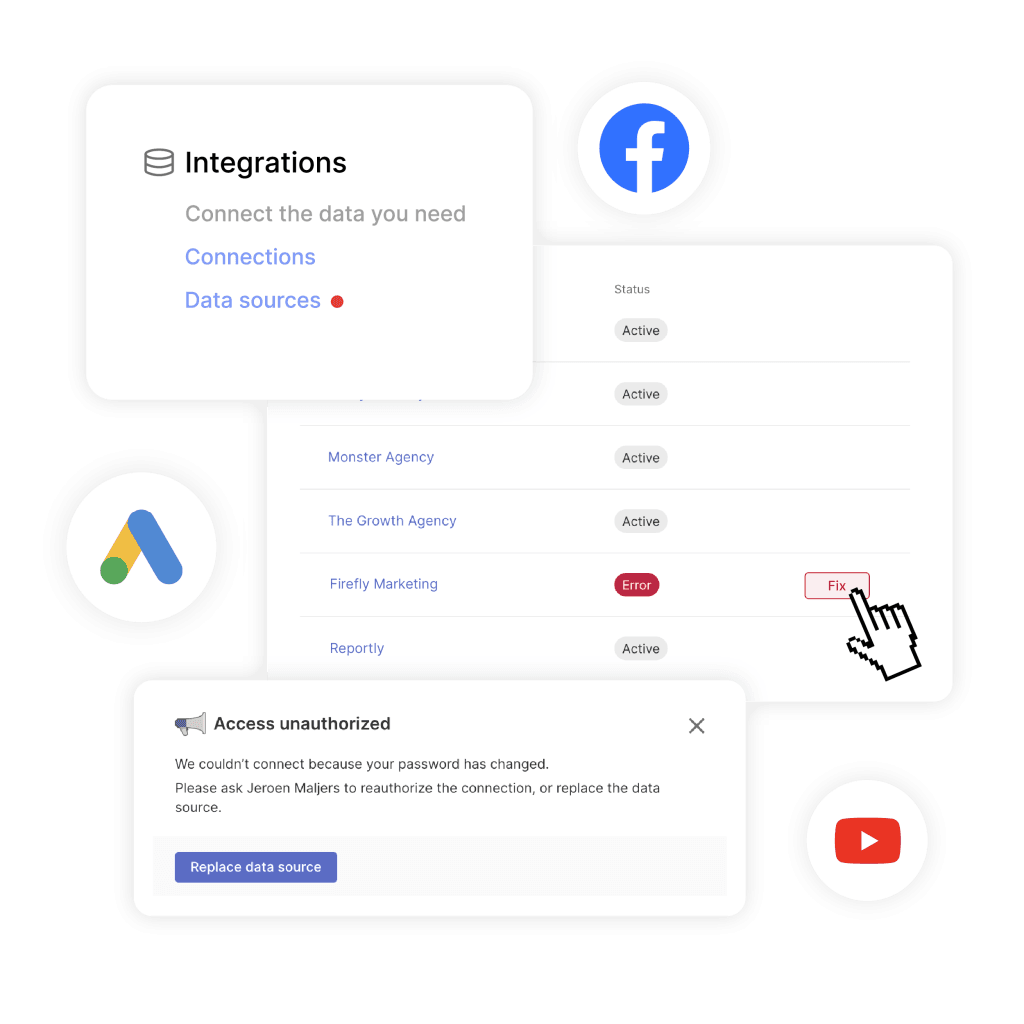
Last, protect the reporting connections. Reporting tools connect to Google Ads through an authorization that can expire, and permissions change when a client’s staff turns over.
When that connection breaks, the data source simply stops filling in. Nothing announces it.
Swydo runs a Data Health Check across every Google Ads reporting connection, flags the broken one under Settings and Connections, and emails whoever owns it with a direct link to reconnect. The point is that you find out before the client does.
Our guide to PPC tracking covers the event-level detail behind this step.
3. Structure for Data Density
Group closely related keywords into ad groups of roughly 5 to 15 keywords each. An ad group is a container holding keywords and the ads that show for them.
Skip three habits that used to be standard: one keyword per ad group, separate campaigns for each match type, and separate campaigns for mobile versus desktop.
Those habits existed so humans could control bids precisely. Humans set very few bids now, and splitting an account that finely cuts your conversion data into pools too small for the system to learn from.
A comparison. Picture a restaurant with ten tables, each holding one diner. Tidy, and it tells you almost nothing about what people want to eat. Three full tables tell you plenty.
| Setup | Verdict | Why |
|---|---|---|
| One keyword per ad group | Skip | Splits conversion data, starves bidding, high upkeep |
| Themed ad groups, 5 to 15 keywords | Use | Enough volume to learn, tight enough for relevant ads |
| Match types in separate campaigns | Skip | Your own campaigns compete for the same search |
| Mobile and desktop split apart | Skip | Bid adjustments handle this inside one campaign |
| Brand kept separate from non-brand | Required | Completely different intent, cost, and conversion rate |
That last row needs a word of explanation. Brand searches are people typing the client’s own company name. Non-brand searches are people describing a problem or product without naming anyone.
Brand searches convert far better, because the person already decided. Mixing them into one campaign makes the whole thing look successful while hiding how the non-brand side is really doing.
Split a campaign only when a setting genuinely has to differ between the two halves. Five reasons qualify: separate budget control, a different performance target, geographic or legal separation, a different primary conversion, or a landing page telling a different story.
Wanting cleaner reporting is not a reason. Use labels for that.
4. Pick Campaign Types on Purpose
Start from what the client’s demand actually looks like, rather than from whichever campaign type Google put in front of you first.
| Campaign type | What it is | Best used for |
|---|---|---|
| Search | Text ads on Google results pages, triggered by keywords you choose | Capturing demand you can prove exists |
| Search with AI Max | A setting that lets Google find searches beyond your keyword list | Expanding into related searches, not replacing your core |
| Performance Max | One campaign running across Search, Shopping, YouTube, Gmail, and Display at once | Ecommerce with a strong product feed |
| Demand Gen | Visual and video ads on YouTube, Discover, and Gmail | Creating demand rather than capturing it |
| Standard Shopping | Product listings driven by your product feed | When you need feed control and clean reporting |
Keep a tight core of exact match keywords underneath whatever else you run.
Match types control how loosely Google interprets your keyword. Exact match shows your ad only for that search or very close versions. Broad match lets Google decide what counts as related, which can be helpful or expensive depending on the account.
Exact match still gets priority when someone searches that exact term. So your exact core protects the searches you most want to win, while broader campaigns explore around it.
When testing an automated campaign type, hold back a comparison group. Run the test in some regions and not others, then check whether total conversions went up or whether the new campaign simply took credit for conversions you were already getting.
There is a second reason to keep some broader matching alive, and it involves AI Overviews. Those are the AI-generated summaries now appearing at the top of many Google results pages.
Ads can appear above and below an AI Overview, or inside it. Those are different placements with different rules.
Exact and phrase match stay eligible for the spots above and below. When an exact keyword and a broad keyword both qualify there, the exact one wins.
Only the placement inside the AI Overview requires broad match or keywordless targeting through AI Max, Performance Max, or Shopping. So an exact-only account gives up in-Overview inventory, not every AI search placement. That is a narrower loss than most coverage suggests.
5. Fund the Account Above the Learning Threshold
Set the budget from the number of conversions the bidding strategy needs, not from what the client feels comfortable spending.
| Bid strategy | Google’s documented requirement | Practitioner floor |
|---|---|---|
| Maximize conversions | None | Use this at launch |
| Target CPA | Varies by campaign type | 30 in 30 days, ideally 50 to 80 |
| Target ROAS | 15 conversions in the past 30 days for Search and Shopping | 50 or more |
Those two columns measure different things.
Eligibility is the point where Google lets you switch the strategy on. Stability is the point where it stops swinging around. Most disappointing Smart Bidding tests live in the gap between them, so treat the right-hand column as the number that decides whether you launch.
Work backwards from it. Forty leads a month at a $70 cost per lead points to roughly $2,800 in spend before any buffer for the learning period.
That same calculation tells you the smallest client you can serve profitably. It also explains why a few well-funded campaigns beat many thin ones. A campaign running on $10 a day never gathers enough signal to optimize, no matter who manages it.
Keep budget changes under about 20% in the early weeks. Bigger jumps restart the learning period, which costs you two weeks getting back to where you already were.
6. Set Bid Targets You Intend to Hit
Launch on Maximize Conversions, which simply spends the budget on as many conversions as it can find. Move to a target-based strategy once the account clears the volume in the table above.
Target CPA means you tell Google what you are willing to pay per conversion. Target ROAS means you tell it what return you need instead.
Something important changed in how those targets behave. Google now steers budget-limited campaigns more literally toward the number you set.
That flips the usual logic. A campaign comfortably beating its target will drift back toward it, so results you were quietly enjoying get optimized away.
The fix is a review rather than a panic.
Find every campaign where the actual cost per conversion sits well below target, or the actual return sits well above it. Those are the exposed ones.
Move each target toward what the account is really delivering. One step at a time, letting each one settle before the next.
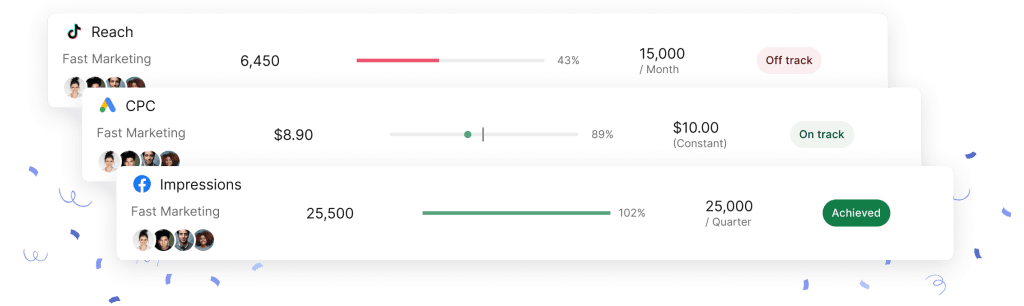
Setting that number gets easier when you can see what the account has been doing historically. In Swydo, go to Monitoring, then Goals, then New Goal, and pick the client, data source, and metric before setting the condition and period.
The Recent Periods Overview shows past values while you are still defining the goal. So the target gets set against real performance rather than a number that sounded good.
Goals then track as On Track, Off Track, or Achieved, with pacing calculated for the period. That is the view you want open when a client asks whether the month will land.
7. Turn Off What Google Turns On for You
New accounts arrive with auto-applied recommendations switched on. These let Google make changes without asking you, including adding broad match keywords, changing your bid strategy, and swapping ad copy.
Go through them category by category and switch off anything you did not choose. There is no single master toggle, so budget about ten minutes.
While you are in there, understand what optimization score measures. It scores how closely you follow Google’s suggestions. It does not measure your client’s profit, and the two are not the same thing. Useful as a prompt list, wrong as a client-facing metric.
Set your remaining guardrails before the first ad runs:
- Negative keyword lists at the account level. Negative keywords stop your ads showing for searches you do not want. Start with job seekers, people looking for free versions, do-it-yourself intent, and adjacent categories you do not serve.
- Brand exclusions on any Performance Max campaign. More on why in the next section.
- A scheduled export of your reporting data. Google keeps hourly, daily, and weekly reporting for 37 months, while monthly and annual data stays available for 11 years. Anything more granular than that, you keep yourself or lose.
- A written change log. Automation and several people are all touching this account. You need a record of who did what.
Our roundup of common Google Ads mistakes covers the ones that cost the most beyond this list.
Worth knowing alongside the retention limits: the bigger day-to-day gap in search term data comes from privacy redaction. Google hides low-volume searches by rolling them into a line called “other search terms,” so exporting protects your history but does not reveal the queries Google withholds.
8. Wire Up Monitoring Before Launch Day
Monitoring set up on launch day means you hear about problems first, while there is still time to fix them.
A monthly report tells a client what happened. It will not tell you that your cost per conversion doubled on the 11th. That distinction is the practical difference between monitoring vs reporting.
Set daily checks on the metrics that would change what you do next.
In Swydo that lives under Monitoring, then Alerts, then New Alert. You pick the client, data source, metric, and the condition that triggers the alert, then choose whether it checks against a 1, 7, 30, or 90-day window.
Alert history is color-coded, so a glance tells you whether something was a one-off spike or a real trend. Notifications arrive by email or in Slack, and you can skip quiet days so weekends stay off your list.
Match the window to the metric. A daily spend spike suits a 1-day window. A slow decline in conversion rate suits 7 or 30 days, because one quiet Tuesday is rarely a signal.
What to check, and how often
Match the review window to how fast the metric can move.
Daily
Automated alerts
- Spend spikes against a 1-day window
- Conversions dropping to zero
- Broken data connections
Weekly
Pacing and goals
- Budget pacing against target
- Cost per acquisition trend on a 7-day window
- Search term and negative keyword review
Monthly
Client reporting
- Blended cross-channel return
- Lead quality against CRM outcomes
- What changed, why, what happens next
How to Stop Performance Max From Eating Your Brand Search
This is the most common money leak in agency-managed accounts, and it disguises itself as good news.
Here is the mechanism.
Performance Max will serve ads on searches for your client’s own company name. Those searches convert extremely well, because the person already decided to buy.
So Performance Max reports a spectacular return. Meanwhile your Search campaigns look weaker by comparison, and total account performance stays flat or drops, because you are now paying for traffic the client was getting anyway.
Four moves fix it, and they work as a set:
- Turn on brand exclusions inside the Performance Max campaign. Necessary, and not sufficient on its own.
- Add the brand terms as campaign-level negative keywords. Note that these apply to Search and Shopping inventory rather than every channel Performance Max touches, so coverage stops short of complete.
- Run a dedicated brand Search campaign on exact match. This gives brand searches a deliberate home instead of leaving them to whichever campaign grabs them.
- Check whether your Search campaign was even eligible to serve. This is the cause most people miss. Performance Max often wins a search because Search could not compete, thanks to a budget cap, a geographic setting, an ad schedule, or an audience mismatch.
Tell the client what to expect before you make the change.
Performance Max conversions will drop, sometimes sharply. That drop is brand traffic returning where it belonged. Total account numbers should hold steady or improve.
This is also why judging any single channel in isolation misleads. A channel can look like a star performer while quietly taking credit from the channel next to it.
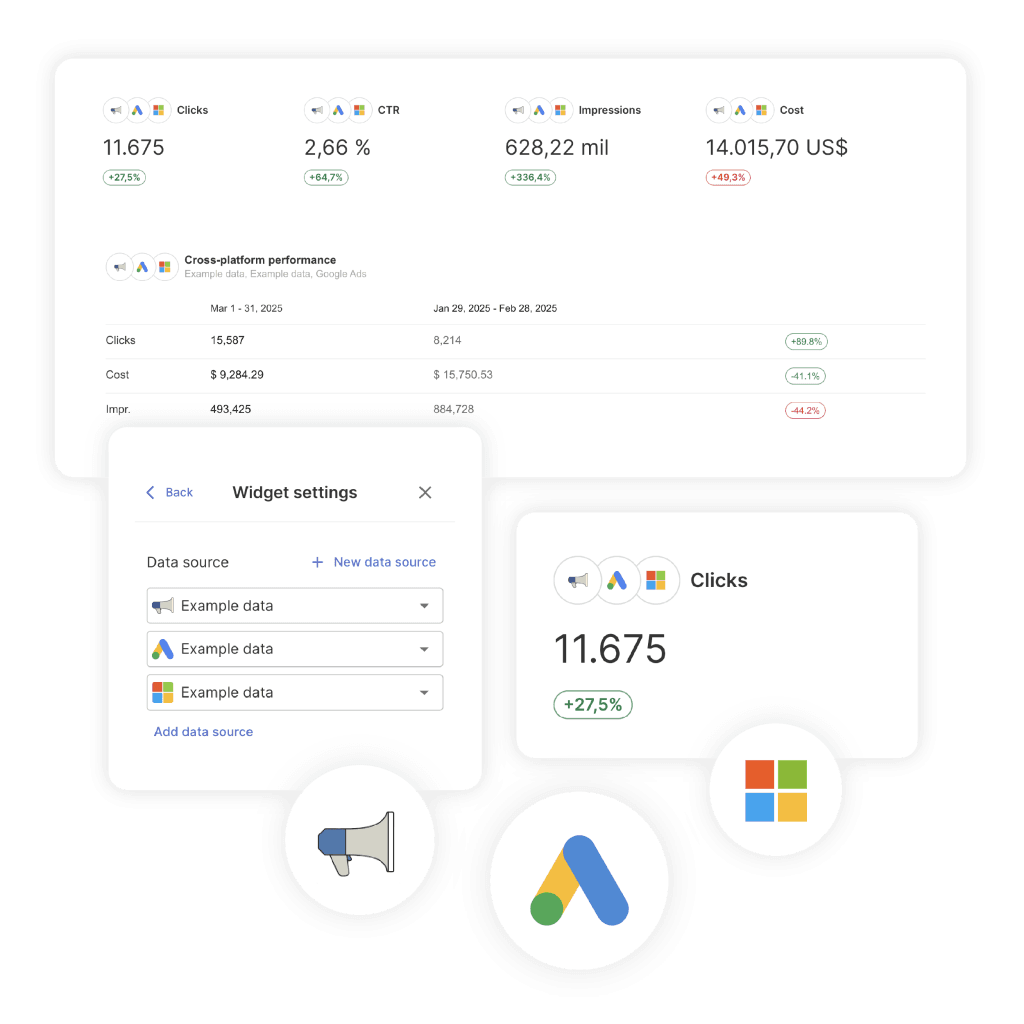
Swydo connects to 38 platforms and blends up to five ad platforms into one widget through Combined Data Sources, covering Google Ads, Microsoft Ads, Meta, LinkedIn, and TikTok, with cost, conversions, revenue, ROAS, and purchases supported across them.
One honest limit before you build it. Custom metrics are not available inside combined widgets, so a margin-adjusted profit metric has to live in a single-source widget or a manual KPI instead.
How to Watch Thirty Accounts Without Working Weekends
Reviewing accounts one at a time stops working somewhere around a dozen clients. The answer is not working faster.
The answer is a view that shows every client at once and surfaces the two accounts that moved, so you skip the twenty-eight that did not.
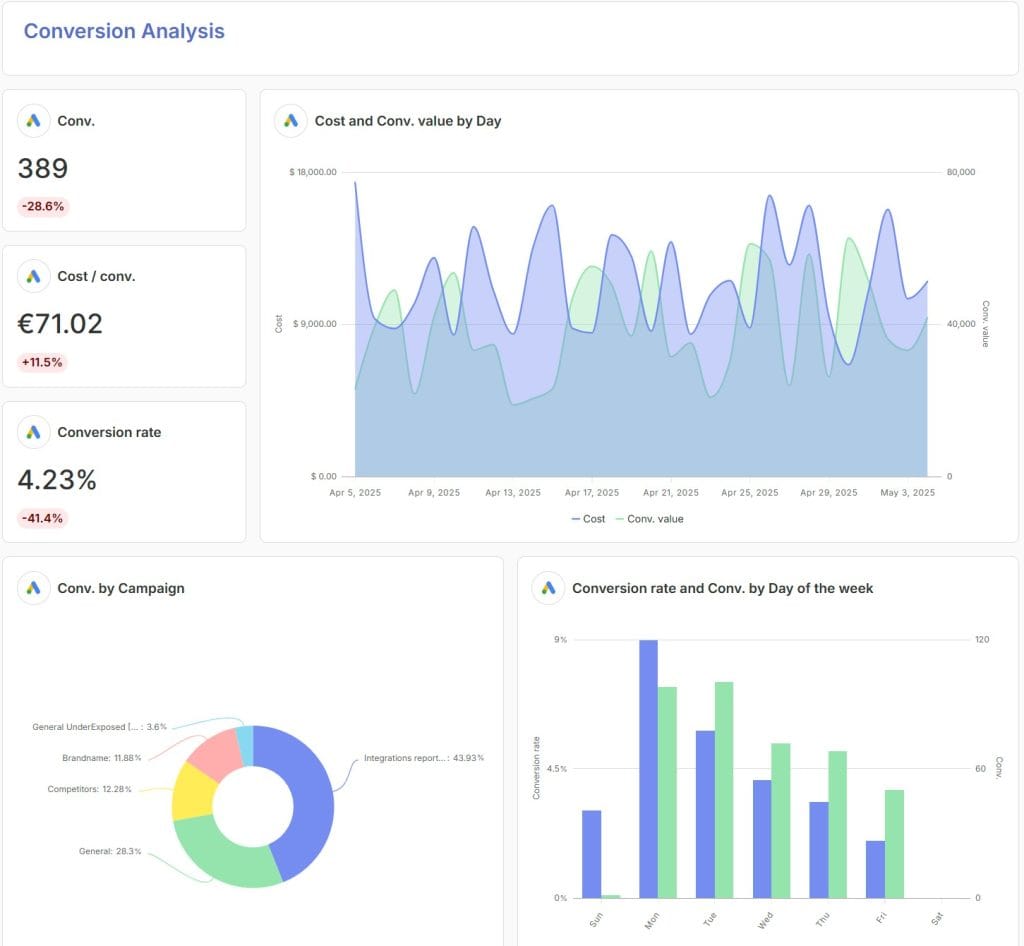
Swydo’s Metrics Overview puts up to six metrics across all clients on a single screen, with unlimited views per team, ready-made templates including a Google Ads report template, and filtering by client label.
Build one view for paid search efficiency and another for budget pacing. Open them at the start of the day instead of working down a client list alphabetically.
What does your Monday morning look like right now? For a lot of teams it means opening accounts one by one and hoping nothing moved over the weekend. The hours a cross-client view hands back go into the accounts that actually need attention.
For the wider tooling picture, we compare the options in our guide to the best PPC monitoring tools.
How to Keep Clients Informed Between Reports
If your clients email you on the 18th asking for a number, a portal is what stops that.
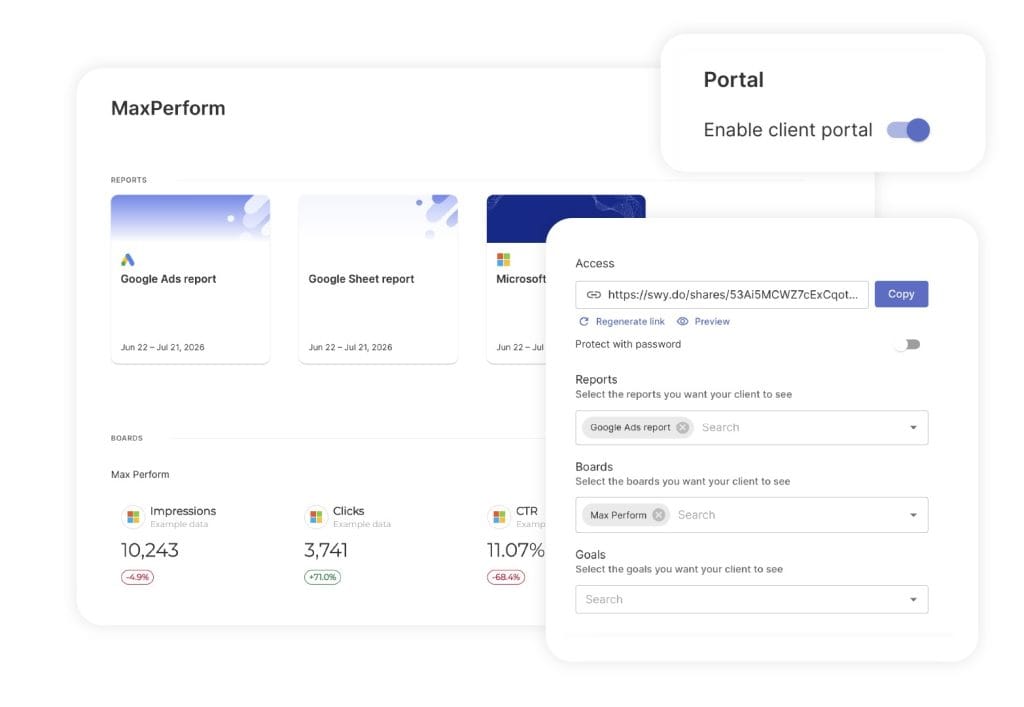
Swydo’s Client Portal combines reports, boards, and goals into one secure link per client. A PPC report, a quick view of key metrics, and progress against targets all sit in one place rather than three separate URLs.
Setting it up takes a few minutes. Open the client’s account, go to the Portal tab, enable it, choose what to share, and send the generated link.
You can preview it first to see exactly what the client sees. Add a password when the data warrants one. Regenerate the link to cut off access to the old one when a contact leaves the company.
You can also switch on AI for clients and your team under Settings, which lets a client ask questions about their own dashboard instead of emailing you to explain a number.
That usage draws on the AI credits included with your plan. You get 4,000 a month, an average report summary uses around 95 credits, and they reset monthly without carrying over. You are billed only for what you actually use, you can set a spending limit, and Billing then View Usage Details breaks it down by team member.
The honest limit here: dashboards carry a narrower set of AI features than full reports do. Treat the client-facing version as a way to answer what happened, not as a full analysis tool.
Set the portal up during onboarding rather than after the first awkward month. Our guide to client reporting best practices covers what to put in front of clients and what to keep internal.
What to Charge and What the Account Costs You
Price from your hours, because the hours barely move when the budget shrinks.
Onboarding a new account runs roughly 15 to 25 hours across the audit, tracking setup, structure build, creative, and launch. Ongoing management then holds at a floor of about 8 to 12 hours a month, even on a small and stable account.
| Model | Typical range | Best fit |
|---|---|---|
| Percentage of ad spend | 10% to 20%, commonly 15% | Spend above roughly $15,000 a month |
| Flat monthly retainer | $1,500 to $5,000 | Stable, predictable scope |
| Hybrid base plus percentage | $500 to $2,000 base plus 5% to 10% | A floor that covers cost, with upside as spend grows |
| Hourly | $75 to $300 per hour | Audits and defined projects |
| Setup fee | $1,000 to $10,000 one time | Always |
Charge the setup fee separately.
Burying 20 hours of senior work inside month one of a retainer leaves you underwater until roughly month three. That is exactly when a client is most likely to leave, which means you can lose them before you have recovered the cost of winning them.
Our breakdown of agency pricing works through the tiered percentage structures that protect margin at both ends.
Retention shapes your profitability more than your rate card does. Paid search clients move on faster than almost anything else an agency sells, and price is rarely the reason.
They leave when the advice goes quiet.
A client who gets a clear monthly read on what changed, why it changed, and what happens next will stay with you through a soft month. That habit starts early, and the way you onboard a new client sets the tone for everything after it.
How Long Until an Account Is Profitable
Give a real timeline in the first meeting. Clients stay patient when they know what each stage is supposed to deliver, and that patience is what buys the account enough time to work.
| Window | What is happening | What to promise |
|---|---|---|
| Days 1 to 14 | Access, verification, tracking, structure, launch | A working measurement layer, not results |
| Days 15 to 45 | Learning period, search term cleanup, negatives | Direction, not efficiency |
| Days 46 to 90 | Move to target bidding, first real optimization | The first credible read on cost per conversion |
| Months 4 to 6 | Compounding gains, CRM data feeding the bidding | Performance trending toward target |
| Months 6 to 12 | Scaling and expansion | Sustained profitability |
At around $100 a day in spend, campaigns typically clear the learning period in four to six weeks. Bidding gets reliably accurate somewhere between day 60 and day 90.
Lower budgets stretch every one of those windows, which loops straight back to the Profit Floor.
Is It Really That Simple?
No. The complicated part sits outside the setup checklist.
Every technical step above is learnable, and any good paid search manager can run them. What separates accounts that keep performing from ones that slowly fade is an ordinary Tuesday in month five, when nothing is on fire and nobody has the account open.
Three patterns show up again and again.
Drift. Nobody changed anything, but the auction did. Performance slid two percent a week for eleven weeks and nobody noticed until the quarterly review.
Quiet breakage. A tracking tag removed during a site update, or an expired connection. Conversions keep importing at a number that looks plausible enough to pass a glance.
The reporting gap. Numbers arrive on the 5th describing something that started on the 11th of the previous month.
Monitoring catches all three, which is why step eight sits inside the setup rather than after it.
There is a harder version of this too.
On some accounts, the most profitable thing you can do is spend less. Automation is very good at finding more volume at a worse marginal return, and a client who asked for growth will accept that trade without noticing the margin slipping.
Somebody has to be willing to say the account performs best capped at $18,000 a month, because conversion quality falls off above it. That conversation is uncomfortable when your fee is a percentage of spend.
Clients notice the difference between an agency optimizing their results and one optimizing its own percentage.
Run a PPC audit each quarter against the setup you built. Setups drift in ways that are cheap to catch on a schedule and expensive to catch by accident.
Final Thoughts
Take the client’s monthly budget, multiply by your expected conversion rate, and divide by their target cost per lead. If the answer is under 30 conversions a month, target-based bidding has too little to learn from, and no amount of management skill closes that gap.
If you change one thing from this guide, change the order you work in. Measurement before campaigns, every time, because every bid and budget decision afterward runs on that data.
One concrete next step. Open your three largest accounts and check what the primary conversion action is set to. Not whether it fires, but whether it represents money.
That takes about twenty minutes, and it pays for itself faster than anything else here.
Profitable Google Ads Accounts FAQ
Direct answers to the questions agencies ask most about Google Ads profit, setup, and pricing
A good ROAS is any return above the client’s break-even point, and that point depends on their gross margin, not on an industry average. A 4x ROAS is a loss for a business keeping 20% of each sale and a strong result for one keeping 60%.
Divide 1 by the client’s gross margin. A 25% margin gives a break-even ROAS of 4x (1 ÷ 0.25), so the account only starts making money above $4 in revenue per $1 of ad spend.
Add your management fee to the ad spend before you compare, because the client pays both.
Multiply the average deal value by gross margin, then by the close rate. A $5,000 deal at 40% margin and a 20% close rate makes each lead worth $400 in margin, so anything above $400 per lead loses money.
Use that number as the ceiling for a target CPA, and set the actual target below it to leave room for profit and your fee.
No. ROAS measures revenue per ad dollar, while profit subtracts product costs, fees, and delivery costs. An account can show a high ROAS and still lose money, which is why ROAS should always be read next to the client’s margin.
Mid-market accounts spending $10,000 to $50,000 a month usually perform best. In an Optmyzr benchmark of more than 21,000 accounts, that tier returned 565.8%, compared with 387.8% below $10,000 and 377.3% above $50,000.
They produce enough conversion data for automated bidding to learn, without having to buy vague, low-intent traffic to keep growing.
A client is a good fit when you can answer yes to five questions. Do you know what a conversion is worth, can it be tracked, will the budget produce about 30 conversions a month, does the math leave room for your fee, and can you run it in the hours you are pricing?
A single no means the account will struggle no matter how well it is managed. Fix that condition first or pass on the client.
Multiply the expected cost per conversion by 30. At $70 per lead, that is about $2,100 a month, the point where automated bidding has enough data to work reliably.
Below that, results swing for reasons nobody can explain. Raise the budget, narrow the account to one high-value service, or decline it.
Plan for at least 30 conversions in 30 days for Target CPA and 50 or more for Target ROAS. Google lets you switch strategies on with less, but performance rarely stabilizes until you reach those numbers.
| Bid strategy | Google’s requirement | Practical floor |
|---|---|---|
| Maximize conversions | None | Use at launch |
| Target CPA | Varies by campaign type | 30 in 30 days, ideally 50 to 80 |
| Target ROAS | 15 in 30 days for Search and Shopping | 50 or more |
Start with Maximize Conversions, then add a target CPA or target ROAS once the campaign clears about 30 conversions a month. Setting a target too early gives the system a goal it has no data to hit.
At around $100 a day, expect four to six weeks to clear learning and 60 to 90 days before bidding is reliably accurate. Smaller budgets take longer.
Keep budget and target changes under about 20% at a time, because bigger jumps restart learning.
Google steers budget-limited campaigns toward the exact target you set, so a campaign beating its target drifts back to it. If your real cost per conversion was well below target, the system spends more to “use” that room.
Set targets close to what the account actually delivers, and adjust them in small steps.
Yes. Each extra dollar usually buys weaker searches than the last, so total conversions grow while profit per conversion shrinks. Many accounts have a spend level where results peak, and the honest recommendation is to cap spend there, even when your fee is a percentage of spend.
No. Keep the account in the client’s name and access it through your manager account (MCC). It removes the fear of lock-in, makes offboarding clean, and keeps the client’s ad spend off your credit line.
Optimize for the one action closest to revenue, such as a purchase, a qualified lead, or a booked call. Set everything else as a secondary conversion so you can still see it without it steering bids.
Smart Bidding takes your instructions literally. Count newsletter signups as success and it will deliver newsletter signups.
Use “One” for leads and “Every” for purchases. A person who submits the same form three times is still one lead, and counting it three times teaches the bidding system that low-quality clicks are worth more than they are.
The tools count differently. Google Ads credits a conversion to the date of the ad click rather than the date it happened, uses its own attribution model, and loses some conversions to privacy restrictions, while your CRM records when the deal closed.
Expect a gap, and judge the trend rather than matching numbers line by line. Recent days also look low until delayed conversions arrive, so avoid cutting a campaign based on yesterday alone.
Yes for most accounts. Enhanced conversions recover conversions lost to privacy changes by matching hashed customer data, and Consent Mode v2 is required for advertisers reaching visitors in Europe and the UK.
Check both in Tag Assistant after setup, since a consent banner can look healthy while never sending the signal to Google.
Yes, for any client with a sales team. Sending closed deals from the CRM back into Google Ads changes what the system optimizes for, from cheap leads to leads that become customers. Do it in the first weeks, not as a later project.
Use fewer, larger campaigns with themed ad groups of 5 to 15 related keywords, and keep brand searches in their own campaign. Splitting by single keyword, match type, or device spreads conversion data too thin for automated bidding to learn.
Often because it is taking credit for searches of the client’s own brand name, which convert well because the buyer already decided. Performance Max looks like a star while total account results stay flat.
Turn on brand exclusions, add brand negatives, and run a separate exact match brand Search campaign. Performance Max conversions will drop, and the total should hold or improve.
Check four settings on every new campaign: the Search Partners and Display Network options in a Search campaign, a location setting that includes people only interested in your area rather than located in it, auto-applied recommendations, and broad match keywords running without a negative keyword list.
Each one is easy to miss and quietly pulls budget toward traffic the client never asked for.
Yes, unless you chose each one on purpose. They let Google add keywords, change bidding, and rewrite ads without asking, and there is no single switch, so review each category.
Optimization score only measures how closely you follow Google’s suggestions. It is not a measure of profit.
Usually because the account optimizes for form submissions, and bots and low-intent visitors fill out forms cheaply. Automated campaigns then find more of the same traffic.
Add form validation and spam protection, exclude low-quality networks, and import qualified leads or closed deals from the CRM so the bidding system learns which leads are real.
Yes. Exact match still wins when a search matches it exactly, so a core of exact keywords protects the searches the client cares about most while broader campaigns explore around it.
Yes. Ads can show above, below, or inside AI Overviews. Exact and phrase match keywords can appear above and below, while placement inside the Overview requires broad match or keywordless targeting through AI Max, Performance Max, or Shopping.
An exact-only account gives up the inside placement, not all AI search visibility.
Most agencies charge 10% to 20% of ad spend or a flat $1,500 to $5,000 a month, plus a one-time setup fee. Price from your hours, since even a small account needs 8 to 12 hours of work a month.
| Pricing model | Typical range | Best fit |
|---|---|---|
| Percentage of ad spend | 10% to 20%, often 15% | Spend above about $15,000 a month |
| Flat monthly retainer | $1,500 to $5,000 | Stable, predictable scope |
| Hybrid base plus percentage | $500 to $2,000 base plus 5% to 10% | A cost floor with upside as spend grows |
| Hourly | $75 to $300 per hour | Audits and defined projects |
| Setup fee | $1,000 to $10,000 one time | Every new account |
Yes. Onboarding takes 15 to 25 hours of senior work, and folding it into the first month’s retainer leaves you unprofitable until around month three, which is exactly when clients are most likely to leave.
Usually three to six months. The first 90 days go to tracking, learning, and the first reliable cost per conversion, and performance trends toward target from month four onward.
Share that timeline in the first meeting. Clients stay patient when they know what each stage should deliver.
Daily for breakage, weekly for trends, and monthly for client reporting. Automated alerts handle the daily layer, catching spend spikes, conversions dropping to zero, and broken data connections before the client notices.
They use one view across all clients that surfaces the few accounts that changed, instead of opening each account in turn. In Swydo, Metrics Overview shows key metrics for every client on one screen, while Alerts and Goals flag the accounts drifting off target.
Most leave because communication goes quiet, not because of price. Clients who get a clear monthly read on what changed, why, and what happens next tend to stay through a weak month.
Catch broken tracking and budget drift across every Google Ads account before your clients notice.
Start Your Free Trial Today