
Call tracking apps tie every inbound phone call back to the campaign, keyword, or landing page that drove it, so the phone leads your campaigns generate stop disappearing from your reports. The right one for your agency depends on how your clients get calls, how many tracking numbers you run, and whether the data ends up in front of the client or stuck in a separate dashboard.
That last part is where most agencies get stuck.
You can prove a Google Ads campaign drove 40 calls last month, but if those 40 calls never make it into the client report next to the ad spend, the client only sees the cost, not the leads, which is a quiet client retention risk. The call tracking app captures the data. Putting it where the client reads it is a separate job.
This is a working shortlist of nine call tracking platforms, grouped by who each one actually fits, with current monthly pricing and the catch you should know before you commit. Phone leads still close at high rates for local service, healthcare, legal, and home services clients, and the call tracking software market sits around $10.84 billion in 2026 for a reason.
If your clients run phones, you need this data in your marketing reporting, and in the client report, where it proves the value you’re driving.
The 9 Best Call Tracking Apps at a Glance
Here’s the short version before the detail. Each tool below is grouped by the job it does best, not ranked 1–9 on a single scale, because the best call tracking app for a pay-per-call lead buyer isn’t the best one for a local dentist.
| App | Best for | Standout feature | Free trial |
|---|---|---|---|
| CallRail | Most marketing agencies | AI Conversation Intelligence | 14 days, no card |
| CallTrackingMetrics (CTM) | Customization + contact centers | Call flows, IVR, routing | First month plan fee free |
| WhatConverts | Multi-channel lead attribution | Calls, forms, chats, carts in one view | 14 days |
| Nimbata | Transparent, predictable pricing | Pay-per-answered-call billing | 14 days + free tier |
| Ringba | Pay-per-call + performance | Real-time call routing | Free/limited tier |
| CallScaler | High call volume on a budget | Tracking numbers from $0.50 | Pay-as-you-go entry |
| Invoca | Enterprise conversation intelligence | Predictive AI scoring | Demo only |
| Phonexa | All-in-one performance suite | Call tracking + lead distribution | Demo only |
| Avanser | Australia and APAC | Local number inventory | Quote-based |
What Is Call Tracking and How Does It Work?
Call tracking is a way to connect each inbound phone call to the marketing that caused it. The core mechanism is dynamic number insertion (DNI), which swaps the phone number on your website depending on how the visitor arrived, so a call from a Google Ads click shows a different number than a call from an organic search.
When the call comes in, it routes through the real business line, but the platform logs the source first. So you learn that the call came from a specific campaign, keyword, ad group, or landing page, the same way you’d track a form fill or a purchase. Most platforms add call recording, transcription, and AI summaries on top, so you also know whether the call was a real lead or a wrong number.
For agencies, that turns the phone into a measurable channel. You can finally answer the question every service-business client asks: “How many actual customers did this bring me?” You can tie it straight to the marketing attribution models you already report on.
1. CallRail

The default pick for most agencies, and it earns it.
CallRail is the most widely used call tracking platform among SMB and mid-market agencies, and it’s the safe starting point if you’re not sure where to begin. It handles the core jobs cleanly: DNI to tie each call to a campaign and keyword, call recording, and AI call summaries. It also connects to Google Ads, GA4, HubSpot, and the reporting tools most agencies already run, which is why it lands on most shortlists of Google Ads reporting tools.
What keeps it at the top is balance. It’s not the cheapest, and it’s not the most powerful, but it does almost everything an agency needs without a steep setup or a sales call.
My Favorite Feature
Conversation Intelligence is the standout: automatic transcription and keyword spotting across every call, so you can auto-tag qualified leads and feed call outcomes back into bid decisions instead of guessing. The newer Voice Assist AI agent can answer and qualify calls on its own.
Sidenote. The base plan’s included minutes and numbers are modest. High-volume accounts hit overage charges fast, so model your expected call volume before you pick a tier.
Pricing: From $55/month (Call Tracking plan, with 5 local numbers and 250 local minutes), billed monthly; annual billing runs slightly lower. Higher tiers add Conversation Intelligence and form tracking. Voice Assist is a separate $95/month add-on. 14-day free trial, no credit card.
For reporting, CallRail data drops into a ready-made CallRail call analytics report, so client updates don’t mean starting from scratch.
2. CallTrackingMetrics (CTM)
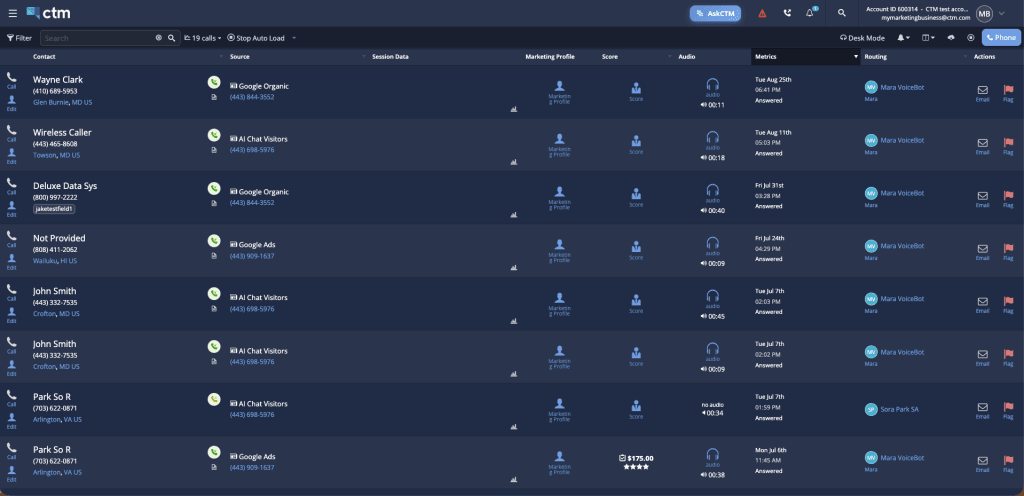
For agencies whose clients have outgrown “just call tracking.”
CallTrackingMetrics (CTM) pairs call tracking with a full contact-center toolkit. Call flows, IVR menus, routing rules, a softphone, and automation all sit inside the platform. It’s the right pick when your clients run real inbound phone operations, not just lead capture, and it covers numbers across more than 80 countries.
The trade-off for that power is complexity. There are more settings to learn than in a tool like CallRail, which is exactly why agencies that need them choose it.
My Favorite Feature
Custom call flows and routing are the reason to pick CTM. Build IVR menus, route calls by geography or business hours, and trigger automations on call events. Unlimited users come on every plan, which matters once your team grows past a few seats.
Sidenote. Plans don’t include numbers or minutes. Those are usage-based on top of the plan fee. Your real monthly cost depends on call volume, so a low plan price isn’t the full picture.
Pricing: From $79/month (Marketing Lite) billed monthly, or $65/month billed annually. Numbers, minutes, and transcriptions are extra usage. First month’s plan fee is free.
For reporting, CTM data lands in a ready-made CallTrackingMetrics (CTM) report you can white-label for clients.
3. WhatConverts

Calls, forms, chats, and carts in one lead view.
WhatConverts tracks more than calls. It captures form fills, chats, and e-commerce transactions, then ties every lead back to its marketing source, so a client report can show total leads by channel, not just phone calls, covering more of the metrics your marketing report should include than a phone-only tool. That makes it a strong fit for agencies that report on blended lead generation for agencies across paid, organic, and social.
If your clients care about “leads,” not “calls,” this framing matches how they already think.
My Favorite Feature
The Lead Manager is the highlight: one filterable view of every lead with its source, value, and quality. AI call summaries and Lead Intelligence score and label leads automatically, so you spend less time listening to recordings to sort good calls from junk.
Sidenote. The single-account plans are priced per account. If you manage many clients, price the agency tiers instead. They start higher but cover unlimited accounts, which works out cheaper at scale.
Pricing: From $30/month for a single account (includes a $30 usage credit); agency plans (unlimited accounts) from $500/month. 14-day free trial.
4. Nimbata
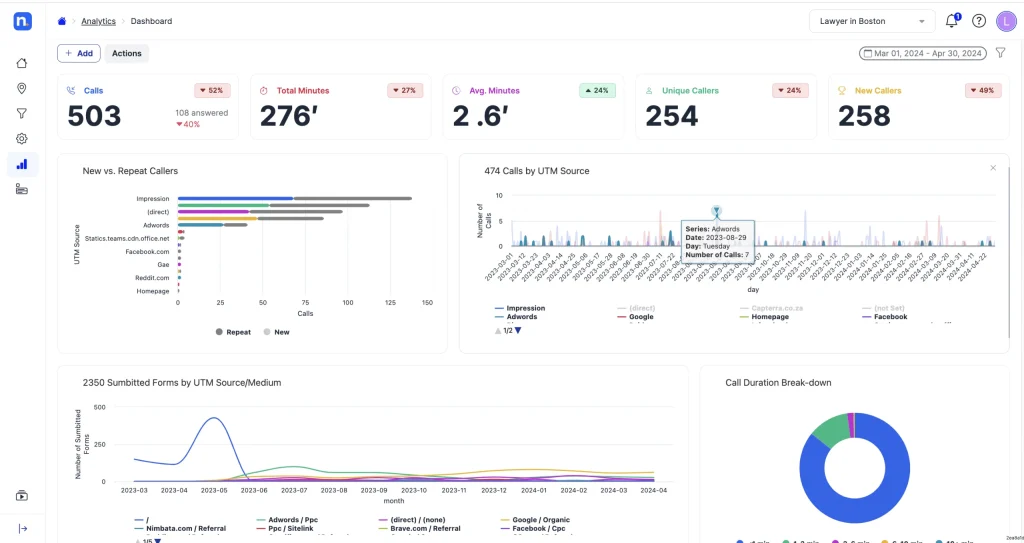
Predictable billing, built with agencies in mind.
Nimbata is a newer, agency-friendly platform with a pricing model worth a second look: you pay per answered call, not per minute. So a 20-minute sales call costs the same as a two-minute one, and your monthly bill stays predictable even when call durations swing. It covers DNI, recording, and attribution to Google Ads and GA4, with a clean white-label setup.
For agencies that have been burned by per-minute overages, the billing model alone makes it worth testing.
My Favorite Feature
Pay-per-answered-call billing is the differentiator, and the free tier lets you run it on a single client before committing a budget. You get the attribution data without the per-minute math.
Sidenote. It’s a smaller vendor than CallRail or CTM, so the integration catalog is leaner. Check that your specific stack (your CRM, your ad platforms) is covered before you move a client over.
Pricing: Free tier available; paid plans from $39/month. 14-day free trial.
5. Ringba
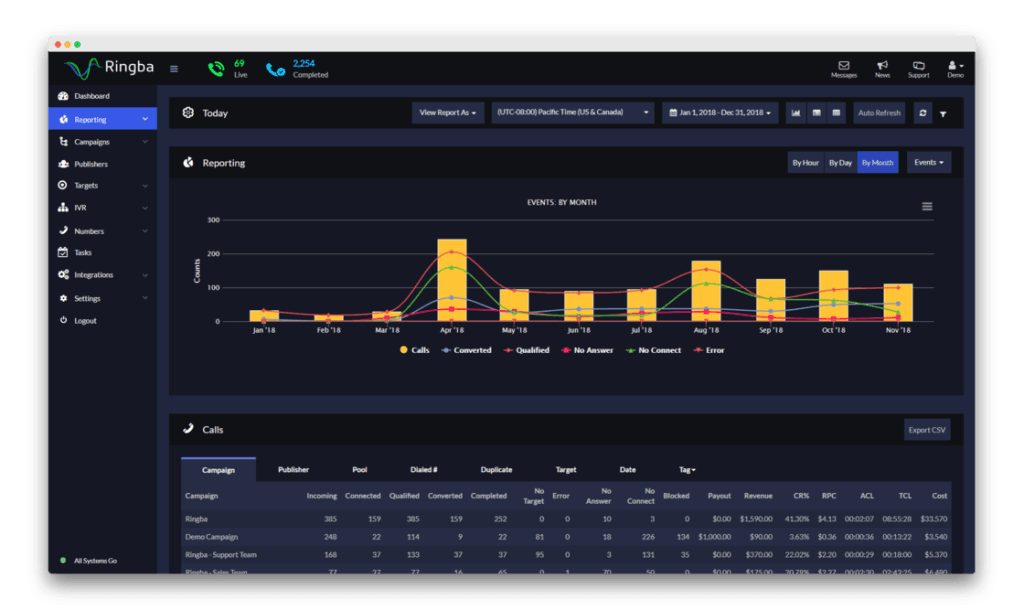
Real-time call routing for performance campaigns.
Ringba is built for pay-per-call marketers and lead buyers and sellers. Its real-time routing, ring trees, and call-marketplace tools are aimed at agencies running performance campaigns where each call has a dollar value and a buyer waiting for it, which keeps the ROAS vs ROI math easy to prove. The programmable routing is genuinely deep.
This is a specialist tool. For a standard local-service client, it’s more than you need, but for pay-per-call, few tools match it.
My Favorite Feature
Real-time bidding and ring-tree routing send each call to the highest-value buyer based on rules you set. That’s the core of a pay-per-call operation, and Ringba makes it programmable.
Sidenote. It’s overkill for a dentist or a plumber who just needs DNI and a monthly report. A simpler, cheaper tool fits better there. Retreaver is a close alternative in the same pay-per-call space if you want to compare two.
Pricing: Premium plan around $99/month with pay-as-you-go number and minute rates on top. No contracts.
6. CallScaler
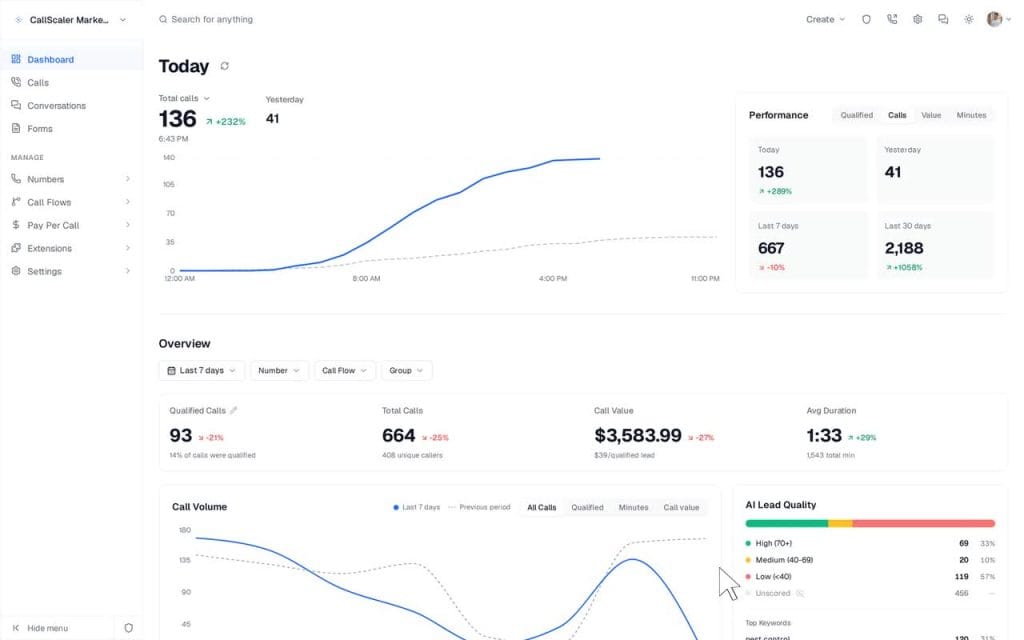
The cheapest tracking numbers in the category.
CallScaler is a budget-first option for agencies that need a lot of tracking numbers without a big monthly fee. Tracking numbers start around $0.50 each, and there’s a pay-as-you-go entry point with no contract. The core features (DNI, recording, routing) are all there.
If you’re running dozens of numbers across many clients and watching margins, the math here is hard to argue with.
My Favorite Feature
Number pricing from $0.50/month with no contracts is the whole pitch, and it’s a good one. When you’re managing numbers at volume, that per-number cost is what actually moves your bill.
Sidenote. It’s leaner on enterprise analytics and conversation intelligence than CallRail or Invoca. You’re trading deep AI features for a low price: a fair trade for high-volume, attribution-focused work, less so if you need call scoring.
Pricing: Pay-as-you-go from $0; Pro from $45/month. Tracking numbers from $0.50/month.
7. Invoca

Revenue-grade call intelligence for large brands.
Invoca is the enterprise end of the market. Its AI analyzes call content to predict outcomes, score leads, and push data into Salesforce, Adobe, Google, and the rest of a large martech stack. It’s built for big brands and the agencies that serve them, not for SMB budgets.
If you’re reporting for an enterprise client with a serious call volume and a CRM team, this is the tier that fits.
My Favorite Feature
Deep conversation intelligence with predictive scoring and prebuilt enterprise integrations is what you’re paying for. Marchex plays in the same enterprise conversation-analytics space and is worth a look as an alternative if you’re comparing enterprise options.
Sidenote. There’s no public pricing and no self-serve plan. Expect a sales process and an annual contract, so factor in lead time and budget approval before you propose it to a client.
Pricing: Custom/quote only. Annual contracts, enterprise-level spend.
8. Phonexa

Call tracking plus the rest of the lead stack.
Phonexa bundles call tracking with lead distribution, email and SMS, and accounting in one suite. Its Call Logic and LMS Sync products sit next to each other, so calls and form leads route through the same platform that handles distribution and reporting. It’s aimed at performance marketers and lead-gen operations that want everything under one roof.
The suite is the whole idea, and it shines when you’ll put several of those pieces to work together.
My Favorite Feature
The all-in-one structure is the draw: route calls and form leads through the same system that distributes and reports on them, instead of stitching three tools together.
Sidenote. If call tracking is all you need, a more focused tool is the better fit. Here, you’d be paying for modules you won’t use. Phonexa earns its place once you’re running the wider suite.
Pricing: Custom pricing; suites typically start in the low hundreds per month. Demo required to scope your setup.
9. Avanser

Strong local coverage for the Australian market.
Avanser is an Australia-based platform with deep local number coverage (1300, 1800, and geographic numbers) plus regional support. For agencies serving Australian or APAC clients, local presence and local numbers matter, and Avanser is built for exactly that market rather than trying to serve everyone everywhere.
It’s a regional specialist, and that’s the reason to pick it.
My Favorite Feature
The Australian number inventory and local support are the differentiators, layered on top of the standard call tracking and analytics features you’d expect.
Sidenote. It’s regional by design. For a primarily US or European client base, the tools higher up this list will fit better. Pick Avanser when your clients are in its home market.
Pricing: From around AUD $25/month for entry plans. Advanced and enterprise tiers are custom-quoted.
How the Pricing Actually Compares
Call tracking pricing has two layers, and the headline plan price only shows you the first one. Most platforms charge a base plan fee, then add usage on top: per tracking number, per minute, or per answered call. Two tools with the same $79 plan can produce very different bills once a busy client runs 1,200 minutes in a month.
The visual below shows the starting monthly price for each tool, with the annual equivalent where the vendor publishes one. Read it as a starting point, then add your expected usage before you commit a client.
| App | Starting price (monthly) | Billed annually | Billing model |
|---|---|---|---|
| CallRail | $45/mo | Slightly lower | Flat + usage |
| CallTrackingMetrics (CTM) | $79/mo | $65/mo | Plan + usage |
| WhatConverts | $30/mo | Flat | Plan + usage |
| Nimbata | $39/mo | Free tier | Pay-per-call |
| Ringba | ~$99/mo | N/A | Plan + usage |
| CallScaler | $45/mo | PAYG from $0 | Flat + low numbers |
| Invoca | Custom | Annual contract | Quote only |
| Phonexa | Custom | N/A | Quote only |
| Avanser | ~AUD $25/mo | N/A | Plan + usage |
Starting plan prices shown. Most platforms add per-number, per-minute, or per-call usage on top. Model your client’s call volume before comparing. Green = flat/predictable, yellow = usage-based, red = sales-quote only.
The pattern worth noting: the flat-rate tools (CallRail, Nimbata, CallScaler) make budgeting easy, while the usage-based ones (CTM, WhatConverts, Ringba) can be cheaper or far more expensive depending entirely on call volume. For pay-per-call and enterprise (Ringba, Invoca, Phonexa), the real number comes out of a conversation, not a pricing page.
Turning Call Tracking Data Into Client Reports
A call tracking app proves which campaigns drive phone leads, but only if that data lands in the same report your client already reads. Getting call data in front of the client, next to the ad spend that created it, is the step where most agencies lose hours every month to copy-paste and screenshots.
Think of any call tracking setup as three jobs. Capture the call and its source. Attribute it to a campaign, keyword, or channel. Report it to the client. The nine apps above handle Capture and Attribute well. Report is the job they hand back to you, and the Capture, Attribute, Report path only pays off when that third stage is as automated as the first two.
The Capture, Attribute, Report Path
Your call tracking app handles the first two jobs. The third one is yours.
Step 1
Capture
A unique tracking number logs the call and the visitor’s source before routing to the real line.
Call tracking appStep 2
Attribute
The call gets tied to a campaign, keyword, or channel, and pushed into Google Ads and GA4 as a conversion.
Call tracking appStep 3
Report
Calls land in the client report next to the ad spend that drove them, updated automatically.
Your reporting toolThat’s where Swydo fits. Pull answered calls, missed calls, average call duration, and calls by city or day straight from CallRail into a client report: more than 40 call metrics, no manual export. The native CallRail connector reads the data directly, so the numbers in your report match the numbers in CallRail without you touching a spreadsheet, and they sit next to the Google Ads and Google Analytics 4 data already in that report.
Running CTM instead? The native CallTrackingMetrics (CTM) connector does the same: calls by country, tracking-number performance, and landing-path activity, pulled straight into the report. Build it once from the call tracking template in the Template Gallery, link that as a master template, and every client report updates from a single build instead of one-by-one edits.
For the other tools (Nimbata, Ringba, WhatConverts, Invoca, anything without a native connector), route the export through Google Sheets with Zapier or Make, and report on it next to your PPC and other channels. One thing to be upfront about: Swydo doesn’t offer a public REST API yet, so custom data comes in through the Google Sheets connection rather than a direct API call. It’s one extra step, and it covers most of the call tracking tools agencies actually run.
Then share it as a live dashboard, so your client sees calls and campaigns update in near-real time, always current, rather than a static PDF from a few weeks back. If you’d rather understand the difference before you pick a format, dashboards vs reports breaks it down. And set an Alert on missed calls, so a sudden spike reaches you first.
The whole call-tracking-into-reporting flow runs inside the 14-day trial: connect one client’s CallRail account, and the call metrics show up in your first report. No credit card to start. The flat rate includes 10 data sources, which covers a first handful of clients, and seats are unlimited, so your whole team can log in without per-user fees.
If reporting across many clients is the real problem you’re solving, that’s a broader topic than call tracking alone: report automation for marketing agencies and the wider set of report automation tools go deeper, and white-label delivery is covered in white-label reporting.
How to Choose the Right Call Tracking App
The best call tracking app is the one that matches how your clients get calls, what you’ll really pay at their volume, and whether the data reaches your reports. Five questions sort it out faster than any feature checklist.
Which Call Tracking App Fits Your Agency?
You run most SMB and local-service clients and want one safe default
CallRail
Your clients run real inbound phone operations with IVR and routing
CallTrackingMetrics (CTM)
You report on blended leads: calls, forms, chats, and carts together
WhatConverts
You want predictable billing and a free tier to test first
Nimbata
You run pay-per-call campaigns with buyers and real-time routing
Ringba
You need lots of tracking numbers on a tight budget
CallScaler
You serve enterprise brands with a CRM team and big call volume
Invoca
Your clients are based in Australia or APAC
Avanser
- How do your clients actually get phone leads? Local service and lead-capture clients are well served by CallRail or Nimbata. Pay-per-call operations need Ringba. Enterprise brands with a CRM team need Invoca.
- What’s your real cost at their call volume? Add the base plan to expected per-minute or per-number usage before you compare. A flat-rate tool can beat a “cheaper” usage-based one once a client gets busy.
- Do you need conversation intelligence, or just attribution? If you need AI call scoring and transcription, look at CallRail, WhatConverts, or Invoca. If you only need to know which campaign drove the call, a leaner tool like CallScaler saves money.
- Will the data land in your client reports? A native connector to your reporting tool saves hours a month. CallRail and CTM both connect directly to Swydo; the rest route through Google Sheets. Factor that step in.
- Where are your clients? US and European client bases are well covered by the tools at the top. For Australia and APAC, Avanser’s local numbers and support fit better.
Answer those five, and the shortlist usually collapses to one or two real options. For the marketing KPIs your clients care about, phone leads almost always make the list, so the choice matters more than it looks.
Call Tracking for Agencies: FAQ
Straight answers to the questions agencies and their clients actually ask
A call tracking app connects every inbound phone call to the marketing that caused it, so a call from a Google Ads click, an organic search, or a specific landing page is logged with its real source. It uses unique phone numbers that route through your normal business line while recording where each caller came from. For agencies, it turns the phone into a measurable channel you can report on like clicks or form fills.
Call tracking works through dynamic number insertion (DNI): a small script swaps the phone number shown on your website depending on how each visitor arrived. When someone calls that number, the platform logs the source first, then forwards the call to your real line with no difference for the caller. The result is that you can tie a phone call back to the exact campaign, keyword, or channel that drove it.
Dynamic number insertion (DNI) is the technology that shows different tracking numbers to different website visitors based on their traffic source. A visitor from a paid ad sees one number, a visitor from organic search sees another, and the platform uses that to attribute each call. DNI is what makes online call tracking possible, because it links the call to the click.
Call tracking ties an inbound call to its marketing source, while call recording captures the audio of the conversation itself. Tracking answers “where did this lead come from,” and recording answers “what was said on the call.” Most call tracking apps include recording as a feature, but recording on its own tells you nothing about attribution.
Call tracking is worth it for any business that takes meaningful phone leads, especially local service, healthcare, legal, and home services, where many customers call instead of filling out a form. Without it, you can see what a campaign costs but not how many calls it produced, which leaves phone leads invisible in your reporting. If your clients run phones and you report on results, that gap is exactly what call tracking closes.
No, call tracking does not hurt SEO when it’s set up correctly. Dynamic number insertion swaps the number only for human visitors through JavaScript, so search engine crawlers still read your real, consistent business number in the page code. The key is to keep one consistent number in your structured data and across your online listings, and let DNI change only the visible number on the page.
Used correctly, tracking numbers won’t damage your NAP (name, address, phone) consistency. For your Google Business Profile, the recommended setup is to add a tracking number as the primary phone and keep your real business number as an additional number, which Google supports and which preserves your local ranking signals. Avoid scattering different tracking numbers across third-party directories, since those citations should always show your one real business number.
Setting up call tracking takes three steps: create tracking numbers in the platform, add a small DNI snippet to your website so the displayed number swaps by source, and connect the platform to Google Ads and GA4 so calls register as conversions. Most modern tools walk you through this without a developer, and a basic setup for one client can be live in well under an hour. Offline campaigns skip the snippet and use static numbers instead.
For online tracking, you need a pool of numbers large enough to give each simultaneous visitor a unique number during their session, which most platforms size for you based on your traffic. For offline tracking, you typically assign one static number per channel, such as one for a billboard and another for a print ad. A low-traffic local site might need only a handful, while a busy site running several paid campaigns needs more.
Yes. For offline channels you assign a dedicated static number to each campaign, such as a unique number on a billboard versus one in a magazine ad, and every call to that number is attributed to that source. This runs alongside the dynamic numbers used on your website, so you can measure online and offline phone leads in the same platform. It’s a simple way to prove which offline placements actually drive calls.
Yes, your real business number stays exactly as it is, because tracking numbers sit in front of it and forward every call straight through to your existing line. Callers reach the same phone, and you don’t change your main published number. In most cases you can also port an existing number into the platform if you’d rather manage it there.
Call tracking typically starts around $30 to $45 per month for small-business tools, with enterprise platforms priced by custom quote that can run into the thousands. Almost every platform adds usage costs on top of the base plan, charged per tracking number, per minute, or per answered call, so your real bill depends on call volume.
Here’s how the starting prices compare across the main tools:
| App | Starting price | Billing model |
|---|---|---|
| WhatConverts | From $30/mo | Plan + usage |
| Nimbata | From $39/mo (free tier) | Pay-per-call |
| CallRail | From $45/mo | Flat + usage |
| CallScaler | From $45/mo (PAYG from $0) | Flat + low numbers |
| CallTrackingMetrics | From $79/mo | Plan + usage |
| Ringba | From ~$99/mo | Plan + usage |
| Invoca / Phonexa | Custom quote | Quote only |
CallRail’s entry plan starts around $45 per month and includes a set number of local tracking numbers and minutes, with higher tiers adding features like Conversation Intelligence and form tracking. Usage beyond your included numbers and minutes is billed on top, so high-volume accounts should model expected call volume before picking a tier. There’s a 14-day free trial with no credit card required.
A few platforms offer a free tier or a free trial rather than a fully free product, since every tracking number and call carries a real telecom cost. Nimbata, for example, has a free tier you can use to track a single client before paying, and most major tools include a 14-day trial. For ongoing use across multiple clients, expect to move to a paid plan.
For most agencies, CallRail is the best all-around call tracking app because it balances core attribution, AI call summaries, and easy integrations without a complex setup. Agencies with heavy inbound phone operations lean toward CallTrackingMetrics for its IVR and routing, pay-per-call shops use Ringba, and enterprise teams use Invoca. The right pick depends on how your clients get calls, your real cost at their volume, and whether the data reaches your reports.
Choose CallRail if you want a clean, fast setup that covers attribution, recording, and AI summaries for typical local-service and lead-gen clients. Choose CallTrackingMetrics if your clients run real inbound phone operations and need call flows, IVR menus, and advanced routing, and you’re willing to manage more settings to get them. CallRail is the simpler default; CallTrackingMetrics is the more powerful contact-center option.
Yes, the major platforms connect directly to Google Ads and GA4, so phone calls appear as conversions alongside clicks and form fills. That integration is the main reason agencies use call tracking: it makes the phone a measurable channel inside the tools you already report on, and lets you optimize bids around calls that actually convert. CallRail, CallTrackingMetrics, WhatConverts, and Nimbata all support it.
Yes, when call tracking is connected to Google Ads, dynamic number insertion can tie a call back to the specific keyword, ad group, and campaign that drove the visit. This is how you learn that a particular search term produced a paying phone lead, not just a click. It’s one of the highest-value reasons agencies run call tracking on paid search.
To get call data into client reports automatically, your reporting tool needs to connect to your call tracking app. Swydo reads CallRail and CallTrackingMetrics data directly, so metrics like answered calls, missed calls, and average call duration appear in the report next to the Google Ads and GA4 data that created them, with no manual export. For tools without a native connector, you route the data through a Google Sheets connection.
In most cases yes, because call tracking and a CRM do different jobs: call tracking attributes leads to their marketing source, while a CRM manages the relationship and sales pipeline after the lead arrives. Many call tracking tools push call data into a CRM so the two work together. Think of call tracking as the top of the funnel and the CRM as everything that happens next.
Call tracking itself is standard and legal in marketing. Call recording, however, is governed by consent laws that vary by country and state, with some requiring one-party consent and others requiring all parties to consent before recording. Check the rules for each region your clients operate in, and use the consent and call-announcement features that platforms provide.
Final Thoughts
Like the rest of your marketing agency tools, pick your call tracking app for the job in front of you, not the longest feature list. CallRail fits most agencies, CallTrackingMetrics (CTM) handles real phone operations, Ringba owns pay-per-call, and Invoca covers enterprise. The rest fill in by budget and region.
Whatever you choose, the real win is getting that call data out of its own dashboard and into the report your client already reads, sitting right next to the ad spend that created it, so they see the full picture. That’s the heart of client reporting best practices, and it’s worth getting right alongside the rest of your client reporting software.
Pull your clients’ call data straight into the reports they already read.
Start Your Free Trial Today