
AI has changed how people search, and Google’s algorithms get smarter every month. Yet on-page SEO still forms the foundation of organic visibility. An effective on-page SEO checklist isn’t rocket science. It’s a set of proven, results-driven approaches you can implement to make your website both Google-friendly and user-friendly.
Some people say SEO is dead. The truth? Search engine optimization has become more sophisticated and valuable than before. Modern SEO helps marketers focus on different types of search intent and user needs, including AI-powered search results. As a marketing agency, you know that truly effective SEO provides value to your clients and their audience, not just ticks technical boxes.
Search engine optimization is a complex ecosystem with diverse page factors, practices, and regulations to consider. You can’t achieve top rankings by focusing solely on link-building or technical optimization. Every SEO aspect impacts your online visibility and deserves your time and effort.
This comprehensive guide focuses on on-page optimization, including the latest trends in AI optimization, E-E-A-T signals, and Core Web Vitals. You’ll learn about meta titles and descriptions, page URLs and headings, AI-friendly content structure, image optimization, and other crucial elements that make up a winning on-page SEO strategy.
On-Page SEO Checklist
Check off each task as you optimize. Your progress saves within this session.
What On-Page SEO Involves Today
On-page SEO means you refine individual website pages to help them gain higher rankings in search engine results pages (SERPs). Today this involves traditional optimization plus preparing your content for AI-powered search engines. You also need to demonstrate expertise, experience, authoritativeness, and trustworthiness (E-E-A-T).
To succeed with on-page SEO, you need to pay attention to several crucial elements.
- Page titles and meta descriptions get optimized for both humans and search engines.
- Strategic heading structure aids comprehension and AI extraction.
- High-quality, comprehensive content demonstrates E-E-A-T and provides unique value.
- AI-optimized content structure increases visibility in AI Overviews, ChatGPT, and other AI systems.
- SEO-friendly URLs are descriptive and keyword-rich.
- Schema markup creates enhanced search results.
- Optimized images and multimedia have proper alt attributes and modern formats.
- Internal and external links build authority and improve navigation.
- Superior page experience includes mobile usability, fast loading speed, Core Web Vitals, and HTTPS encryption.
The main perk of on-page SEO? Your success and progress depend only on your effort. You can take control of optimization strategies and workflows, then instantly make changes to your website. Unlike off-page factors like backlinks, on-page SEO sits fully within your control. However, that doesn’t mean it’s easy. As an agency, you’re often managing optimizations for hundreds or thousands of pages.
On-Page SEO: Impact vs. Implementation Effort
Bubble size represents relative importance to rankings. Prioritize high-impact, low-effort tasks first — then scale into deeper optimizations.
Where to Start with On-Page SEO
The approach differs based on whether you work with a new or existing website. Both need different strategies and priorities.
For New Websites
If you just built your client’s website, optimize the content and core page elements for every key page. New sites are tabula rasa to Google. You need to create a robust SEO strategy and thoroughly follow your blueprint.
Pick unique keywords to target and opt for keyword ideas with high or moderate search volume and low competition. These are most likely to boost your rankings when you’re just getting started. Tools like SE Ranking, Ahrefs, Semrush, and Google Keyword Planner can help with this keyword research heavy lifting.
Understand Search Intent
Simply finding high-volume keywords isn’t enough. You must understand the intent behind each search query.
- Informational intent means users seek knowledge or answers.
- Navigational intent shows users look for a specific website or page.
- Transactional intent indicates users are ready to make a purchase.
- Commercial investigation reveals users who research before buying.
Analyze the top 10 results for your target keywords to understand what type of content Google rewards for that specific query.
Don’t forget technical SEO aspects like site loading speed, links, and crawling. Make sure your website has no broken links since they dramatically affect user experience. SEO is a long-term investment and requires an eye for detail.
Agency Tip for New Sites: Use AI-powered SEO tools that offer automatic intent classification. Semrush labels keywords by intent type. Use these features to speed up your research process and build intent-focused content clusters.
For Existing Websites
To improve an existing client website, start with a comprehensive on-page SEO audit. This helps you identify issues that can harm user experience and interfere with normal website indexing and crawling.
Choose a robust on-page SEO checker to conduct thorough analysis and get a clear view of your strategy’s strengths and weaknesses. Compare your pages with top niche competitors to identify optimization opportunities.
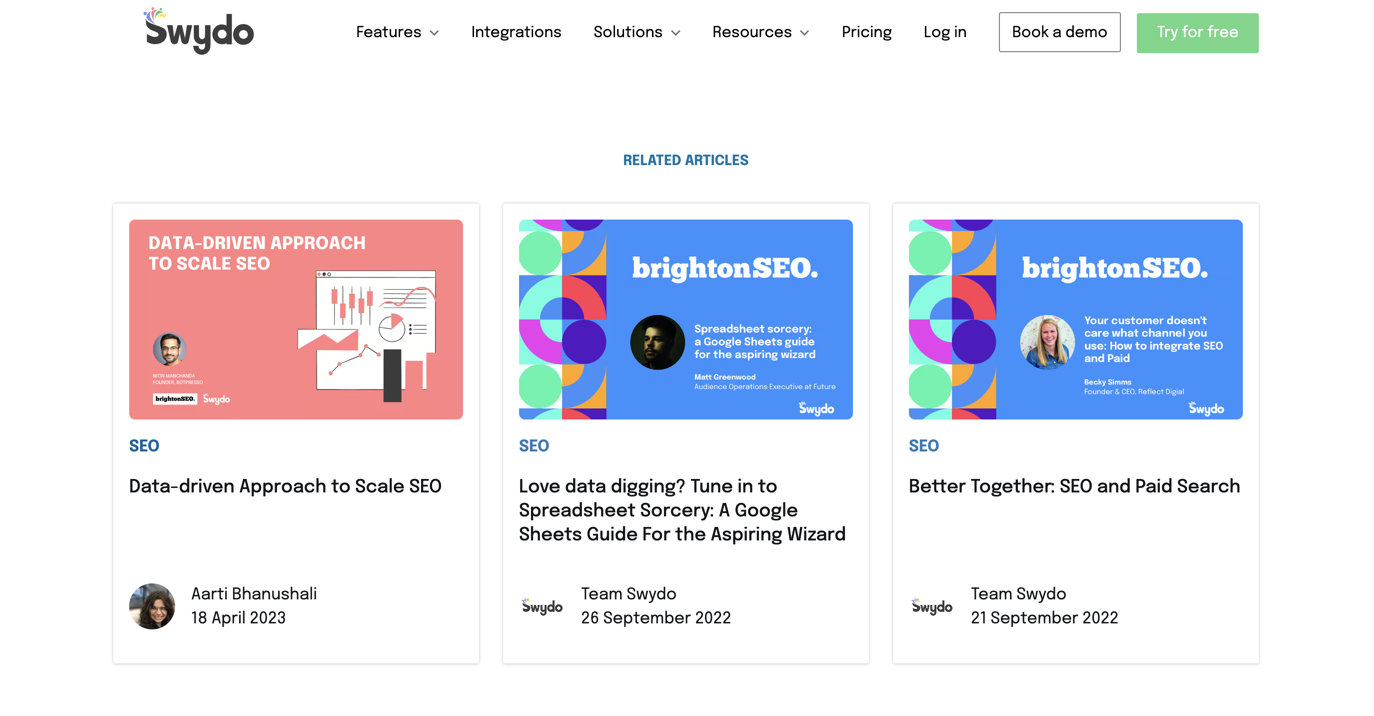
Dive into SEO reporting to get a granular view of search performance. Evaluate the SEO potential of your pages and properly prioritize pages for improvement. Google Analytics and Google Search Console are must-have free tools for this. Many agencies also use SEO reporting tools like Swydo to build automated client reports that combine data from multiple SEO tools.
Important for Audits: When you audit existing content, prioritize pages by their potential impact. Focus first on pages that rank on page 2 (positions 11-20) since these often need only minor optimization to reach page 1. Also identify pages that have lost traffic due to algorithm updates or content freshness issues.
The Complete On-Page SEO Checklist
Below you’ll find the essential elements of modern on-page optimization. We’ll show you why each component matters and how to refine it for maximum impact.
Keyword Research and Search Intent Analysis
Understanding what people search for and why they search for it forms the foundation of successful on-page SEO. You can’t optimize content effectively if you don’t know what users actually want to find.
What Intent-Based Keyword Research Means
Intent-based keyword research goes beyond finding high-volume keywords. You need to understand why users search and what type of content will satisfy their needs. Matching search intent has become one of the most critical ranking factors.
Why Search Intent Matters So Much
Google’s algorithms have become sophisticated at understanding user intent. If your content doesn’t match what searchers actually want, it won’t rank well—regardless of how well-optimized your technical elements are. Studies show that intent-matched content can rank in the top 10 even with lower domain authority.
How to Conduct Intent-Based Keyword Research
Follow these steps for effective keyword research.
Search Intent Classification: Match Content to User Need
Every keyword carries intent. Analyze the top 10 SERPs to classify the dominant intent, then match your content format accordingly. Mismatched intent = high bounce rates.
Informational
Signals: “what is,” “how to,” “guide,” “why does”
Users want knowledge, answers, or explanations
→ Blog / Guide / TutorialNavigational
Signals: brand names, “login,” “website,” specific URLs
Users seek a specific site or page
→ Homepage / Landing PageCommercial
Signals: “best,” “vs,” “review,” “top 10,” “alternative”
Users research options before buying
→ Comparison / ReviewTransactional
Signals: “buy,” “price,” “discount,” “coupon,” “near me”
Users are ready to take action or purchase
→ Product / Service Page- Start with seed keywords. Use tools like Semrush, Ahrefs, or SE Ranking to generate keyword ideas.
- Analyze the SERPs. For each target keyword, examine the top 10 results to understand what type of content ranks. Look at whether you see blog posts, product pages, videos, or other formats.
- Identify intent patterns. Study titles, content formats, and featured snippets to determine user intent.
- Find semantic keywords. Use “People Also Ask” boxes and related searches to identify keyword variations and related topics.
- Assess keyword difficulty. Use personalized keyword difficulty metrics that factor in your domain’s authority.
- Focus on information gain. Identify gaps in competitor content that you can fill with unique insights.
Agency Tip: Many AI-powered SEO tools now offer intent classification automatically. Semrush labels keywords by intent type. Use these features to speed up your research process and build intent-focused content clusters.
Page Title Optimization
Page titles are the first element users and search engines see when they encounter your content. Get this wrong and nothing else matters.
What Page Titles Do
A page title or title tag is a fundamental SEO element that determines the topic of your page content in search results and the web browser tab. It’s your first impression and often your only chance to earn a click.
Why Page Titles Matter
Page titles define your page content to users and search engines. Optimizing your page title should be one of your main priorities to make sure users and search engine crawling bots can get a clear idea of what your page is about.
Page titles rank as one of the most important on-page SEO factors. They tell users and search engines what your page is about and significantly influence click-through rates. A well-crafted title can be the difference between a click and a scroll-past.
How to Optimize Page Titles
To make your page titles SEO-friendly, you need to think about your users’ search intent and how the content of your page can solve their pain points. Then showcase this information in a concise yet informative title that also contains your target keyword.
Anatomy of a High-Performing Title Tag
Title tags are your first impression in SERPs. Each component plays a role in both click-through rate and ranking relevance. Here’s how to construct one that performs.
🌐 example.com › blog › seo
On-Page SEO Checklist: 25 Steps to Higher Rankings (2026)
Master on-page SEO with our complete checklist. Get 25 proven optimization steps, expert tips, and AI-ready strategies to boost your rankings. Start optimizing today.
Character count: 56 of 60 max ✓
✅ Effective Titles
❌ Weak Titles
- Keep titles under 60 characters. Longer titles get truncated in search results, which can confuse users.
- Include your primary keyword near the beginning. This helps both relevancy and user scanning behavior.
- Make each title unique. Duplicate titles dilute your SEO efforts and confuse search engines. Avoid stuffing several pages with the same title tags since search engines consider this duplicate content that brings no value to your search performance. This is a common mistake agencies make when they optimize at scale. Make sure each page has a unique focus keyword and matching unique title.
- Write for humans first. Create compelling, click-worthy titles that accurately describe your content.
- Include freshness signals when relevant. Add the current year or date for topics where timeliness matters.
- Add value propositions. Include numbers, benefits, or unique angles like “10 Proven Strategies” or “Complete Guide.”
Do your best to keep your SEO titles under 65 characters. Otherwise, they won’t fully show up in SERPs, which can confuse your prospects.
Examples of Effective Title Tags
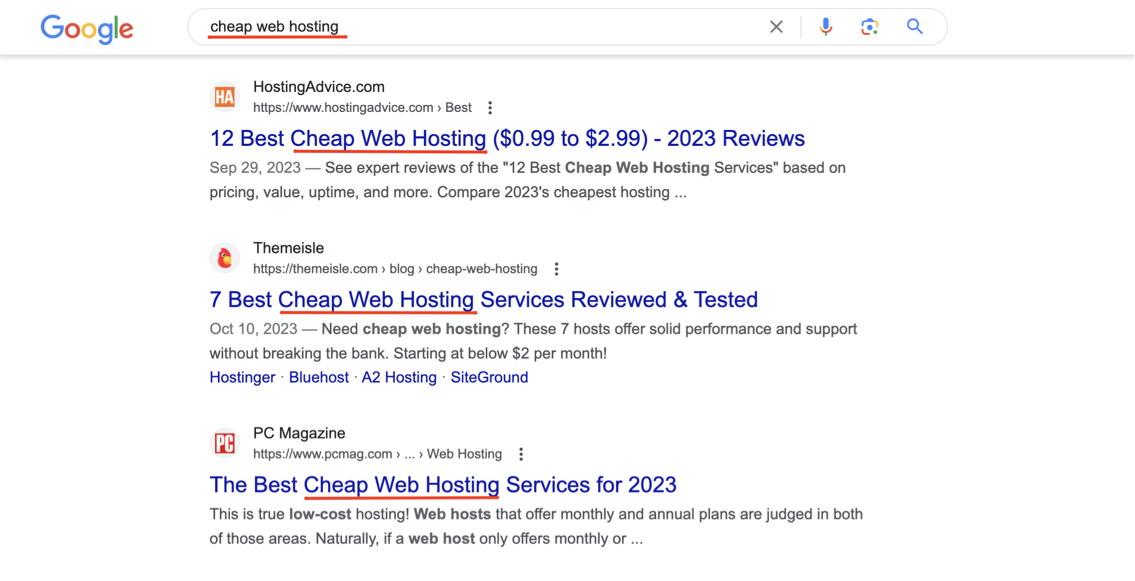
The top three organic search results typically boast unique and engaging titles enhanced with the focus keyword. They also contain attention-grabbers like a timeframe to help users click on the most recent data, a price range to meet their search intent, and proof to show the article has only verified and effective solutions.
Good title tags:
- On-Page SEO Checklist: 25 Steps to Higher Rankings
- Best Budget Web Hosting: $3-$10/Month (Tested & Verified)
- Email Marketing Guide: How to Build a List from Zero to 10,000
Poor title tags:
- SEO Tips | Marketing Agency Blog | Best Practices for Google
- Untitled Document
- Home – Welcome to Our Website
All these approaches work for creating unique and captivating title tags that positively affect your rankings.
Agency Tip: Use AI writing assistants like ChatGPT or Claude to generate title variations, but always have a human review and refine them. Tools can help with ideation, but compelling titles require human insight into your audience’s needs and pain points.
Meta Description Optimization
Meta descriptions don’t directly impact rankings, but they significantly affect whether people click on your result or your competitor’s. Think of them as your sales pitch in the search results.
What Meta Descriptions Do
A meta description is another crucial element on the on-page SEO checklist. It briefly describes your page content and appears directly in SERPs beneath your title tag.
Why Meta Descriptions Matter
Meta descriptions help to capture and encourage users to click on your website in search results. While meta descriptions don’t impact ranking positions directly, they significantly impact click-through rates (CTR). A higher CTR signals to Google that your result is valuable, which can indirectly improve rankings. Your meta description is your sales pitch in the search results.
How to Optimize Meta Descriptions
Provide a call-to-action for every meta description and keep the length under 150-165 characters so that users can fully read it when they find your website pages in search results. You can add your primary keyword to the meta description or enhance it with synonyms related to your main keyword. Both options are great for boosting your SEO page score.
- Keep them between 150-165 characters. Longer descriptions get truncated on desktop and mobile.
- Include a clear call-to-action. Words like “Learn,” “Discover,” “Get,” or “Find out” encourage clicks.
- Add your primary keyword. Google bolds matching keywords in search results, which draws user attention.
- Make each description unique. Duplicate meta descriptions waste a valuable opportunity to differentiate pages.
- Address user intent directly. Explain what value users will get from clicking.
- Include semantic variations. Use related keywords and synonyms naturally.
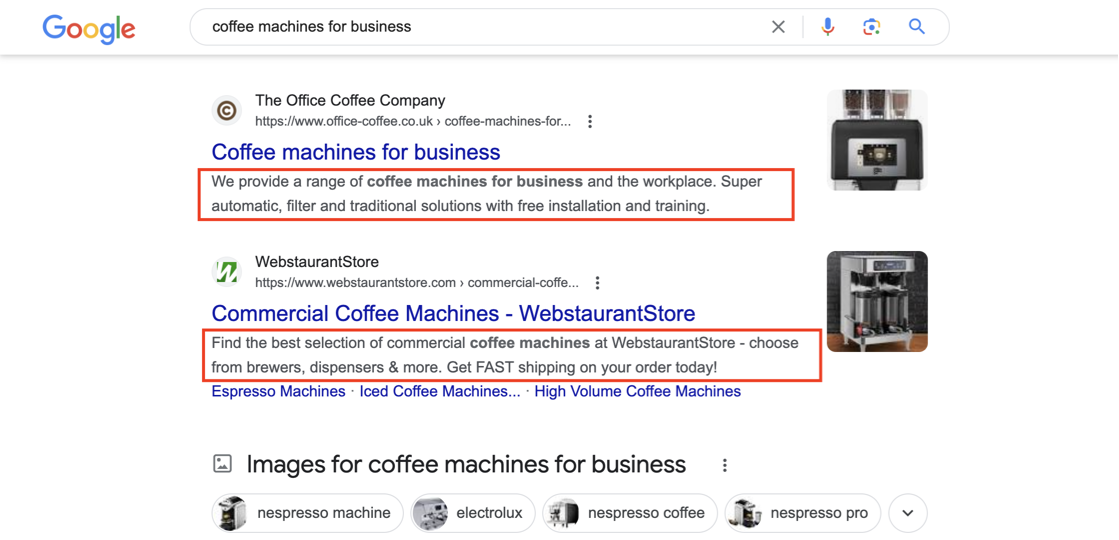
Examples of Strong Meta Descriptions
Good meta descriptions:
- “Master on-page SEO with our complete checklist. Get 25 proven optimization steps, expert tips, and AI-ready strategies to boost your rankings. Start optimizing today!”
- “We tested 30+ web hosting providers to find the best budget options. Find reliable hosting from $3/month with excellent uptime and support.”
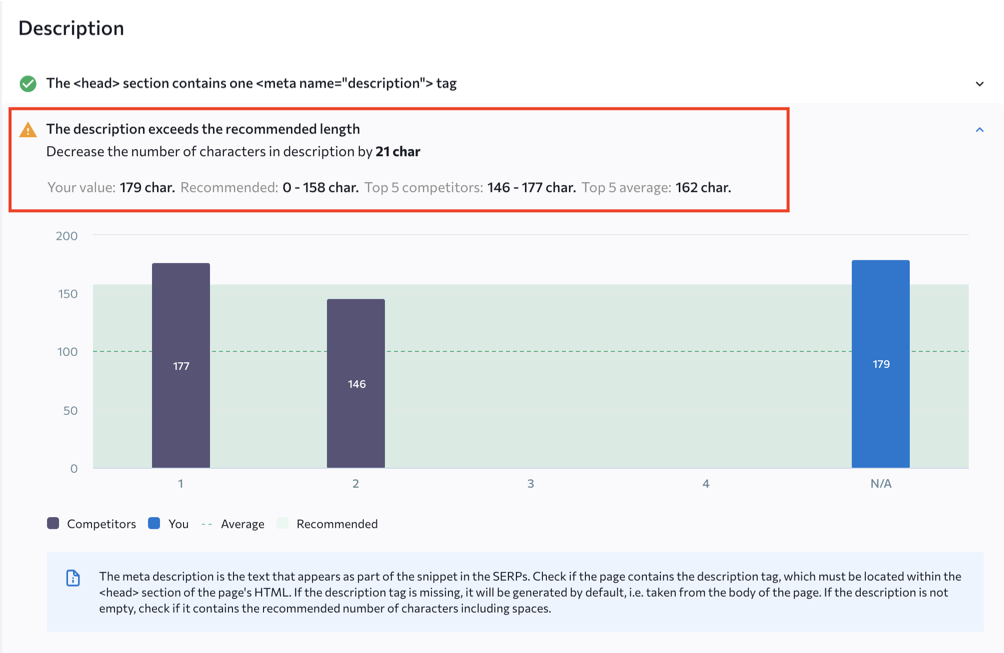
By the way, you can use a suitable on-page SEO checker to scan all your site pages and identify gaps in your meta descriptions and title tags. This saves plenty of time since you don’t need to look separately for each page’s metadata.
Many agencies struggle to write compelling, click-worthy meta descriptions at scale. Consider using AI writing assistants like Jasper or Copy.ai to generate description drafts, then have a human editor refine them. This helps speed up the process while still ensuring quality.
Agency Tip: When you manage hundreds of pages, use AI tools like Jasper, Copy.ai, or ChatGPT to generate meta description drafts at scale. Create a detailed prompt that includes your target keyword, value proposition, and CTA requirements. Then have a human editor review and refine each description for quality and brand voice consistency.
Page Heading Structure
Headings organize your content and help both users and search engines understand what each section covers. Poor heading structure confuses readers and bots alike.
What Page Headings Accomplish
Page headings, or header tags, typically range from H1 to H6. These special tags help organize and structure your page content to boost its readability and improve content perception.
Why Page Headings Matter
Page headers dramatically affect user experience on your pages. They also help search engines better perceive the content structure of your pages. Well-structured headings make your content easier to read and understand for both humans and search engine crawlers.
Proper heading structure dramatically improves user experience by making content scannable and easier to navigate. Search engines also use headings to understand content hierarchy and identify key topics. Well-structured headings are particularly important for AI extraction since chatbots and AI Overviews often pull information from clearly formatted headings.
How to Optimize Page Headings
Maintain an accurate hierarchy of headings. Always start with the H1 heading and include your primary keyword in it. This header helps users and search engines get a better idea of the page content.
Then consider other headings from H2 to H6, commonly to H4, and rank all the headers in order of their importance.
Heading Hierarchy: Correct Structure vs. Common Mistakes
Search engines use heading tags to understand your content’s hierarchy and identify key topics. Skipping levels or using multiple H1s confuses crawlers and weakens your topical relevance signals.
✅ Correct Hierarchy
❌ Broken Hierarchy
- Use one H1 per page. The H1 should contain your primary keyword and clearly state the page topic.
- Follow proper hierarchy. Never skip levels. Don’t jump from H1 to H3 without an H2 in between.
- Make H2s into questions when relevant. This helps with featured snippet optimization and AI extraction.
- Include keywords in H2-H4 headings. Use long-tail keywords and semantic variations naturally.
- Keep headings descriptive and concise. Clearly communicate what each section covers.
- Use headings to improve scannability. Break up long text blocks with relevant subheadings.
To further optimize your content, incorporate relevant long-tail keywords into your H2-H6 headers. These keywords should relate to your topic and potentially represent high-volume search terms. Use clear and relevant page headers that reflect both the main subject and potential search terms.
Examples of Heading Structure
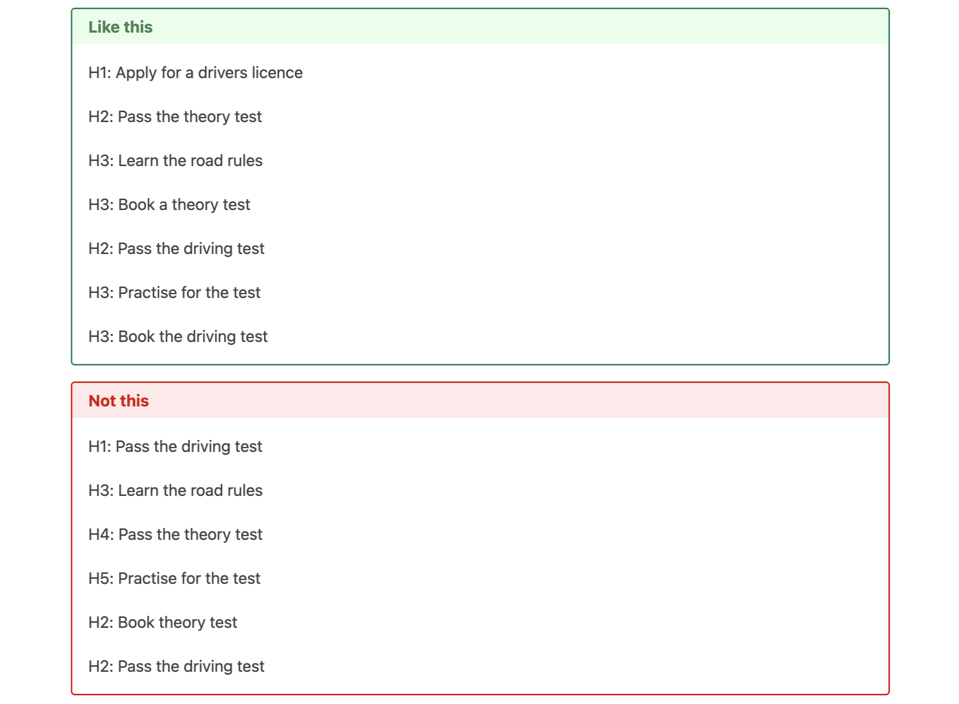
A common mistake agencies make with headings? They skip levels. For example, they jump from an H1 to an H3 without an H2 in between. This confuses search engines about your content hierarchy. Use tools to crawl your site and identify pages with heading issues to fix.
Agency Tip: Use tools like Screaming Frog or Semrush Site Audit to identify heading structure issues across your site at scale. Common problems include missing H1s, multiple H1s, or skipped heading levels. Fix these systematically to improve both user experience and SEO performance.
SEO-Friendly URLs
URLs appear in search results, get shared on social media, and tell users what they’ll find when they click. A messy URL undermines trust before users even visit your page.
What Makes URLs Important
The page URL is simply the web address of a particular website page. URLs that are both user-friendly and SEO-friendly contribute to positive user experience and increased website traffic.
They offer a concise page content description, build user trust, and make your content effortlessly shareable online. Clear, concise URLs with relevant keywords can boost your pages’ ranking for target search queries.
Clear, keyword-rich URLs contribute to positive user experience and improved website trust. They provide a concise description of page content, make your content easily shareable, and can boost rankings for target search queries. URLs also appear in search results and can influence click-through rates.
How to Optimize Page URLs
If you initially create evergreen page URLs, you save yourself the trouble of puzzling over a huge URL base to try to identify weak and inappropriate addresses for further redirection. For optimal URL design, use static and clear URLs that avoid numbers, capital letters, underscores, and other special characters.
To separate words in your page URLs, only use hyphens. Keep them short and include target keywords in each URL.
URL Anatomy: What Search Engines and Users Want to See
URLs appear in search results, get shared on social media, and tell both users and crawlers what they’ll find. A clean URL builds trust before anyone even clicks.
✅ SEO-Friendly URL — Clean, Descriptive, Keyword-Rich
❌ Problematic URL — Confusing, Untrusted, Unshareable
seo-checklist
seo_checklist
Use hyphens, never underscores
/blog/seo-tips
/Blog/SEO-Tips
Always lowercase — URLs are case-sensitive
/seo-checklist
/the-complete-on-page-seo-optimization-checklist-guide
Keep it short: 3–5 words maximum
https://
http://
HTTPS is a ranking factor — no exceptions
/blog/seo/checklist
/p?id=453&ref=9
Use logical hierarchy, not parameters
Plan URLs once
Change URLs later
URL changes require 301 redirects
- Keep URLs short and descriptive. Aim for 3-5 words when possible.
- Use hyphens to separate words. Never use underscores or spaces.
- Include target keywords. Place your primary keyword in the URL.
- Use lowercase letters only. Avoid capital letters and special characters.
- Make URLs static. Avoid parameters, numbers, or session IDs when possible.
- Create a logical hierarchy. Use folder structure to indicate content relationships.
- Plan URLs carefully from the start. Changing URLs later requires redirects and can cause ranking drops.
Examples of URL Structure
Good URLs:
- https://website.com/blog/on-page-seo-checklist
- https://website.com/blog/en/web-design/
- https://website.com/coffee-grinders/cuisinart/supreme-grind-automatic
Bad URLs:
- https://website.com/blog/OnPage_SEO_?#
- https://website.com/blog/SEO_article_1233453453
- http://website.com/product.aspx?ID=99996&IT=88f7d65d
As an agency managing hundreds of URLs, define a clear URL structure and naming convention from the start. Changing URLs later often means complex redirects. Tools like SE Ranking can help identify poor, lengthy, or non-descriptive URLs that need updates or redirects.
Critical for Agencies: When you manage hundreds of URLs for clients, define a clear URL structure and naming convention before launch. Changing URLs after publication requires 301 redirects, which can temporarily affect rankings and requires ongoing maintenance. Use tools like SE Ranking or Screaming Frog to identify poor URLs (lengthy, non-descriptive, or parameter-heavy) that need updates.
High-Quality Page Content
Content forms the foundation of all SEO success. You can perfect every technical element, but poor content will still tank your rankings.
What Quality Content Means Today
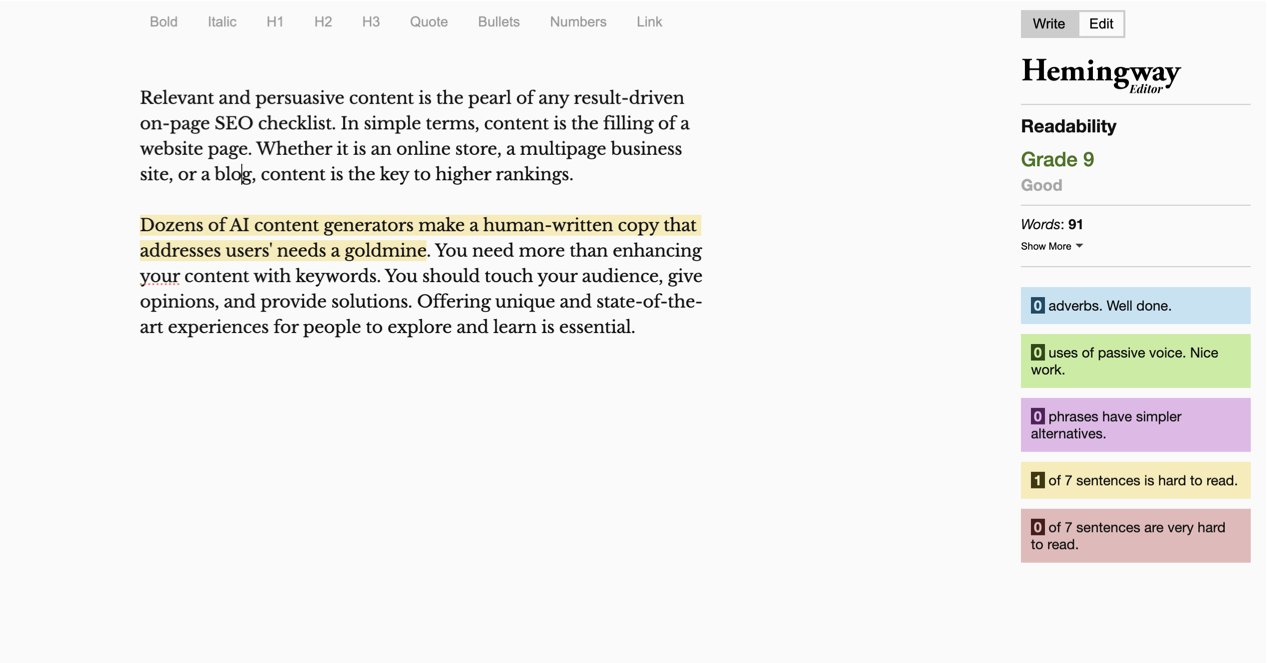
Relevant and persuasive content is the pearl of any results-driven on-page SEO checklist. In simple terms, content is the filling of a website page. Whether you run an online store, a multi-page business site, or blog, content is the key to higher rankings.
Quality content today goes beyond keyword optimization. It’s comprehensive, well-researched, user-focused content that demonstrates expertise and provides unique value that competitors don’t offer. Google’s algorithms prioritize what they call “information gain”—content that adds something new or valuable to the conversation.
Why Page Content Matters Most
Although AI content generators streamline content creation tasks and workflows, they deprive your content of originality and user focus. A genuine, human-written copy that addresses users’ needs is what you should strive for.
Content is the foundation of all SEO success. Even perfect technical optimization can’t compensate for poor content. Google’s helpful content updates specifically target thin, derivative, or AI-generated content that doesn’t provide genuine value. High-quality content attracts backlinks, generates engagement, and satisfies user intent—all critical ranking factors.
You need to do more than enhance your content with keywords. Strike a chord with your audience, give opinions, and provide solutions. Page content with unique and state-of-the-art experiences for people to explore and learn is essential to boost your online visibility.
How to Optimize Page Content
The recipe for success? Create an evergreen copy that fully reveals the topic, showcases your expertise, and delivers wisdom users can use to solve various pain points. Naturally enhance this content with topic-related keywords, accurate page structure, and proper URL and metadata so that your target market can find and see it.
Focus on making your content easily readable. This matters equally for mobile and desktop users and search engines. Check your literacy level, choose readable fonts, provide enough room for separating the text, and maintain a neat length of paragraphs and sentences. Use well-known tools like Grammarly or Hemingway Editor to make your content clear and readable.
- Aim for comprehensive coverage. Most top-ranking pages span 1,500-2,500+ words for competitive topics.
- Focus on information gain. Provide unique insights, original research, or perspectives that competitors lack.
- Write for humans first. While keyword inclusion matters, natural language and readability are paramount.
- Use semantic keywords naturally. Include related terms and variations throughout your content.
- Break up text effectively. Use short paragraphs (2-3 sentences), bullet points, and visual elements.
- Target an 8th-10th grade reading level. Use tools like Hemingway Editor or Grammarly for most topics.
- Make content scannable. Use descriptive subheadings, bold important concepts, and add a table of contents for long articles.
- Include multimedia. Embed relevant images, videos, infographics, and interactive elements.
Many agencies face the challenge of scaling high-quality content production. While nothing beats a skilled human writer, AI writing tools like ChatGPT can help generate first drafts or ideas to speed up the process. Just make sure to always have a human review, write, and edit the AI-generated content for quality control.
Agency Tip: While AI writing tools like ChatGPT can help generate first drafts and speed up content production, always have skilled human writers review, fact-check, and enhance AI-generated content. Google’s algorithms can detect and penalize low-quality AI content that lacks genuine expertise or adds no unique value. The sweet spot? Use AI for efficiency while adding human insight for quality.
E-E-A-T Signals
Google wants to show users content from real experts who have actual experience. If you can’t prove you know what you’re talking about, your content won’t rank.
What E-E-A-T Means
E-E-A-T stands for Experience, Expertise, Authoritativeness, and Trustworthiness. It’s Google’s framework for assessing content quality, particularly for topics that could impact users’ health, finances, safety, or well-being (known as YMYL – Your Money or Your Life topics).
Why E-E-A-T Signals Matter Now
Google has increasingly emphasized E-E-A-T signals in its quality rater guidelines and algorithm updates. Content that clearly demonstrates expertise and trustworthiness consistently outranks technically perfect but authorless content. In an era of AI-generated content, proving genuine human expertise has become more important than ever.
How to Demonstrate E-E-A-T
Strengthen your E-E-A-T signals with these strategies.
E-E-A-T: Google’s Trust Framework Decoded
Google’s quality raters assess content on four dimensions. Trustworthiness is the foundation — the other three signals feed into it. Especially critical for YMYL (Your Money or Your Life) topics.
Experience
First-hand, real-world knowledge about the topic
- Photos of product in use
- Personal anecdotes & case studies
- Screenshots of actual results
- Specific metrics & outcomes
Expertise
Formal qualifications or deep subject knowledge
- Author bios with credentials
- Professional affiliations
- Technical depth & accuracy
- Industry certifications listed
Authoritativeness
Recognition as a go-to source in your field
- Backlinks from trusted sites
- Mentions in industry publications
- Original research & data
- Consistent quality publishing
Trustworthiness
The foundation — accuracy, transparency, and safety
- HTTPS encryption enabled
- Clear contact & privacy info
- Cited sources & references
- Accurate, up-to-date content
- Include detailed author bios. Add credentials, experience, and professional affiliations.
- Cite authoritative sources. Link to respected industry publications, research papers, and expert sources.
- Publish original research or data. Conduct surveys, case studies, or experiments to provide unique insights.
- Showcase real experience. Include specific examples, personal anecdotes, and first-hand knowledge.
- Display trust signals. Add security badges, customer testimonials, privacy policies, and contact information.
- Keep content current. Regularly update articles with fresh data, new examples, and updated statistics.
- Get expert reviews. Have industry professionals review or contribute to your content.
- Build author authority. Create author profile pages and establish expertise through consistent, quality content.
Google now explicitly rewards content that demonstrates first-hand experience. For product reviews, show photos of you using the product. For tutorials, include screenshots of your actual results. For case studies, provide specific metrics and outcomes from your real work.
AI-Optimized Content Structure
AI-powered search is mainstream now. If your content isn’t structured for AI extraction, you miss out on significant visibility in AI Overviews and chatbot responses.
What AI Optimization Means
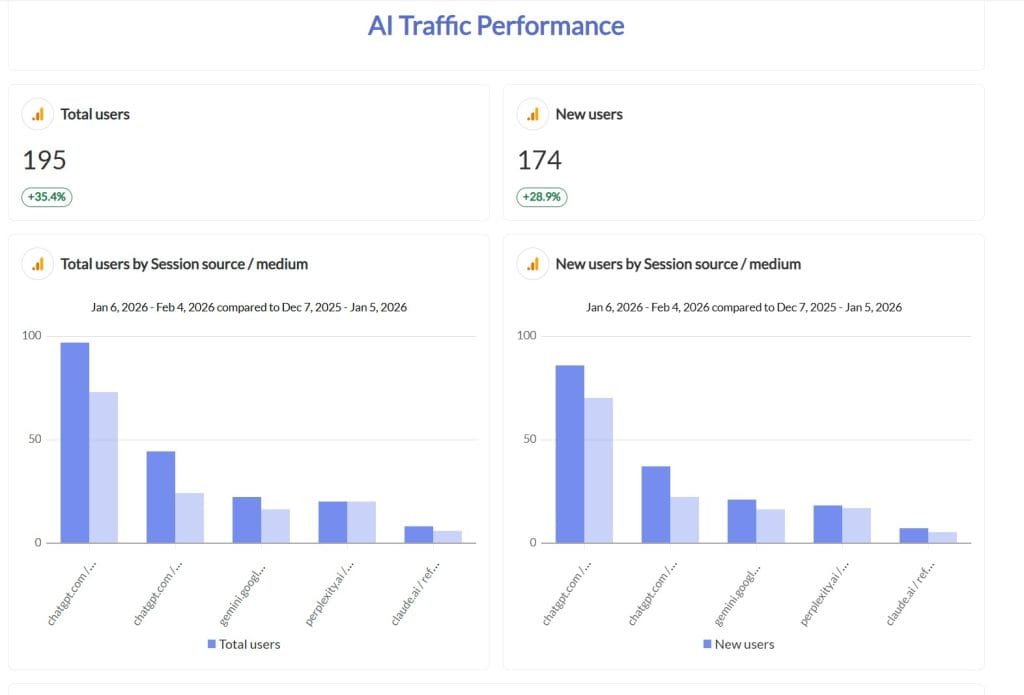
AI optimization means you structure your content so it’s easily understood and extracted by AI systems like ChatGPT, Google’s AI Overviews (formerly SGE), Perplexity, and other AI-powered search tools. This has become one of the most significant SEO developments.
Why AI Optimization Matters
AI-powered search is mainstream, with an estimated 10-15% of searches featuring AI-generated summaries. If your content isn’t optimized for AI extraction, you miss out on significant visibility. AI systems need clearly structured, factual content they can confidently reference and cite.
How to Optimize for AI Extraction
Make your content AI-friendly with these techniques.
- Use question-based headers. Format H2 and H3 tags as direct questions (e.g., “What is on-page SEO?” instead of just “On-Page SEO”).
- Provide clear, concise answers. Follow each question with a direct 2-3 sentence answer before expanding with details.
- Structure information logically. Use numbered lists, bullet points, and step-by-step formats.
- Include definitions. Define technical terms clearly and early in your content.
- Add data and statistics. Include specific numbers, dates, and quantifiable information.
- Use citations and attribution. Link to authoritative sources to build trust with AI systems.
- Don’t block AI crawlers. Make sure your robots.txt doesn’t block GPTBot, PerplexityBot, or other AI crawlers.
- Create FAQ sections. These are particularly easy for AI systems to extract and cite.
Example of AI-Friendly Content Structure
What On-Page SEO Involves
On-page SEO is the practice of optimizing individual web pages to rank higher in search engines and earn more relevant traffic. It includes optimizing content, HTML elements, and page structure.
Monitoring Tip: Check how AI systems cite your content by searching for your brand or content topics in ChatGPT, Perplexity, and Bing Chat. If your content isn’t getting cited, analyze what structure and format competing sources use and adapt accordingly.
Search Intent Matching
You can rank for a keyword, but if your content doesn’t match user intent, you’ll have high bounce rates and low engagement. These signals tell Google your content isn’t relevant.
What Search Intent Matching Means
Search intent matching means you make sure your content aligns with what users actually want when they search for a particular keyword. Google’s algorithms are sophisticated at detecting whether content truly satisfies user intent.
Why Intent Matching Matters
Even if you rank for a keyword, mismatched content leads to high bounce rates and low engagement. These signals tell Google your content isn’t relevant. Intent-matched content consistently outperforms technically optimized but irrelevant content.
How to Match Search Intent
Follow these steps to match search intent.
- Analyze the top 10 results. Before you create content, study what’s already ranking for your target keyword.
- Identify the dominant content type. Are top results blog posts, product pages, videos, or comparisons?
- Match the format. If top results are list articles, create a list article. If they’re in-depth guides, create a guide.
- Study SERP features. Look for featured snippets, People Also Ask boxes, and other features to understand what Google thinks users want.
- Consider search modifiers. Words like “best,” “how to,” “what is,” “vs,” and “review” indicate different intents.
Featured Snippet Optimization
Featured snippets appear at position zero, above all other organic results. They can increase your traffic by 20-30% for the ranking page.
What Featured Snippets Accomplish
Featured snippets are the answer boxes that appear at the top of Google search results (sometimes called “position zero”). They provide direct answers to user queries and can dramatically increase visibility and traffic.
Why You Should Optimize for Featured Snippets
Featured snippets receive high click-through rates and position your content as the authoritative answer. They’re particularly valuable since they appear above all other organic results. Studies show that featured snippets can increase traffic by 20-30% for the ranking page.
How to Optimize for Featured Snippets
Increase your chances of getting featured snippets with these techniques.
Featured Snippet Types: How to Win Position Zero
Featured snippets appear above all organic results and can increase traffic by 20–30%. Each type requires a specific content format. Structure your content to match and you dramatically increase your chances of being featured.
Most common (~70%)
Paragraph Snippet
On-page SEO is the practice of optimizing individual web pages to rank higher in search engines and earn more relevant traffic. It includes optimizing content, HTML elements, and page structure.
Trigger keywords: “what is,” “what does,” “why is,” definition queries
Format rule: Answer in 40–60 words directly after the question heading
Second most common (~20%)
List Snippet
- 1. Conduct keyword research
- 2. Optimize title tags
- 3. Write meta descriptions
- 4. Structure headings properly
- 5. Compress & optimize images
- … 20 more items
Trigger keywords: “how to,” “steps to,” “best,” “top,” numbered processes
Format rule: Use numbered or bullet lists with H2/H3 subheadings
Growing in frequency (~10%)
Table Snippet
| Metric | Good | Poor |
|---|---|---|
| LCP | ≤ 2.5s | > 4s |
| INP | ≤ 200ms | > 500ms |
| CLS | ≤ 0.1 | > 0.25 |
Trigger keywords: “vs,” comparisons, pricing, specs, data queries
Format rule: Use HTML tables with clear headers and structured data
The Position Zero Formula: Use the target question as an H2 heading → provide a direct 40–60 word answer immediately below → then expand with supporting details, lists, and examples. This pattern works across all three snippet types and also optimizes for AI Overviews.
- Target question keywords. Focus on “what,” “how,” “why,” “when,” and “where” queries.
- Provide concise answers. Keep definitions and answers to 40-60 words.
- Use proper formatting. Use lists, tables, and step-by-step formats.
- Structure content with Q&A format. Use the question as a header, followed by a direct answer.
- Include supporting details. After your concise answer, expand with more comprehensive information.
- Optimize for “People Also Ask.” Answer related questions within your content.
Semantic Keywords and LSI Keywords
Google understands context and topic relationships. Using semantic keywords demonstrates comprehensive topic coverage and helps you rank for multiple related searches.
What Semantic Keywords Mean
Semantic keywords are words and phrases related to your main keyword. They help search engines understand the context and topic of your content. LSI (Latent Semantic Indexing) keywords are synonyms and related terms that add depth to your content.
Why You Should Use Semantic Keywords
Google’s algorithms understand context and topic relationships. Using semantic keywords demonstrates comprehensive topic coverage and helps you rank for multiple related searches, not just your exact target keyword.
How to Find and Use Semantic Keywords
Follow these steps to find and use semantic keywords.
Semantic Keyword Map: How One Topic Expands into Rankings
Google understands context, not just exact keywords. By using semantic variations and related terms, a single page can rank for dozens of related queries — building topical authority that exact-match keywords alone can’t achieve.
People Also Ask
Google’s related questions reveal user intent patterns and semantic neighbors
Related Searches
Bottom of SERP suggestions show how Google clusters related queries
Competitor Content
Analyze which related terms top-ranking pages consistently include
SEO Tools
Semrush, Ahrefs keyword magic tools surface semantic clusters automatically
- Analyze "People Also Ask" boxes. These questions reveal related topics users care about.
- Check "Related Searches." Look at the bottom of Google results pages.
- Use SEO tools. Semrush, Ahrefs, and other tools have semantic keyword features.
- Study competitor content. See what related terms top-ranking pages use.
- Include variations naturally. Don't force keywords; use them where they fit naturally.
Content Freshness and Updates
Google's Query Deserves Freshness algorithm prioritizes recently updated content for queries where timeliness matters. Regular content updates signal that your site is actively maintained and provides current information.
Why Content Freshness Matters
Google's Query Deserves Freshness (QDF) algorithm prioritizes recently updated content for queries where timeliness matters. Regular content updates signal that your site is actively maintained and provides current information.
How to Implement a Content Freshness Strategy
Follow these steps to keep content fresh.
- Schedule quarterly reviews. Audit key pages every 3 months for outdated information.
- Update statistics and data. Replace old numbers with current research and trends.
- Add new examples. Include recent case studies, tools, or techniques.
- Refresh screenshots and images. Show current interfaces and designs.
- Expand content. Add new sections that cover emerging topics or questions.
- Update publication dates. Change the "last updated" date when you make significant updates.
- Monitor algorithm updates. Adapt content based on new ranking factors.
Create a content calendar that schedules regular updates for your most important pages. High-traffic pages should get reviewed every 3 months, while evergreen content can get updated every 6-12 months.
Image Optimization
Images can slow down your page speed and hurt your Core Web Vitals scores. Yet optimized images also appear in Google Image Search and drive additional traffic.
What Image Optimization Accomplishes
No on-page SEO checklist is complete without highlighting page imagery. Images are visuals that help emphasize the text content on a webpage. Image optimization means you refine your images to make them clear and valuable both for website visitors and search engines.
Why Image Optimization Matters
Images can affect page speed, accessibility, and crawling. Image optimization is vital for on-page SEO.
Images significantly impact page load speed, which is a confirmed ranking factor. Optimized images also appear in Google Image Search, which drives additional traffic. With Core Web Vitals being critical, image optimization can make or break your page experience scores.
Optimized images also improve your chances to appear in Google Image Search results. Image SEO is important now, and agencies doing it right will win big with traffic and branding.
How to Optimize Images
Make sure your images are high-quality and tagged correctly to get more people to see them. Compress your images so they load faster without slowing down your website.
Image Formats Compared: Why WebP Wins for SEO
Images are often the largest assets on a page and the biggest factor in LCP scores. Choosing the right format can reduce file sizes 25–35% with no visible quality loss — directly improving Core Web Vitals.
- Use modern formats. Prefer WebP over JPEG/PNG for better compression (20-30% smaller file sizes).
- Compress images. Use tools like TinyPNG, ImageOptim, or Squoosh for bulk compression.
- Use descriptive file names. Name images with keywords (e.g., "on-page-seo-checklist.webp" not "IMG_1234.jpg").
- Add descriptive alt text. Describe what the image shows and include relevant keywords naturally.
- Specify dimensions. Include width and height attributes to prevent layout shift (CLS).
- Implement lazy loading. Load images only as users scroll to them.
- Use responsive images. Serve different image sizes based on device and screen size.
- Add image captions when helpful. Captions are visible to users and add context.
- Use browser caching. Store images locally to speed up repeat visits.
- Use web-friendly file formats. JPEG for photos, PNG for graphics with transparency, WebP for best compression.
Image ALT text and captions are key for SEO. Alternative or ALT text is necessary to showcase how the image relates to a particular part of the page content. Although alternative text is hidden from users, search engines can fully index it. Meanwhile, image captions are visible to users and describe imagery within the body content.
For agencies managing image-heavy sites, use a tool like TinyPNG or ImageOptim to compress images in bulk. This saves time. Also consider using a CDN (content delivery network) to serve images faster to users around the world.
Agency Tip: For agencies that manage image-heavy client sites, use bulk compression tools and CDNs (Content Delivery Networks) to serve images faster globally. Services like Cloudflare, Cloudinary, or Imgix can automatically optimize and deliver images in the best format for each user's browser and device.
Internal Linking Strategy
Internal links help search engines discover and index pages, pass authority between pages, establish site hierarchy, and keep users engaged longer. Pages with more internal links pointing to them get seen as more important by search engines.
What Internal Links Do
Internal links are links within your website. You link from one page to another to create a web of content relations and showcase more helpful information to your prospects.
Why Internal Links Matter
Internal links benefit both users and search engines. Internal links heighten your website navigation, boost the contextual connection of pages, and help to increase the value of principal pages on your site.
Internal links are crucial for SEO since they help search engines discover and index pages, pass authority between pages, establish site hierarchy, and keep users engaged longer. Pages with more internal links pointing to them get seen as more important by search engines.
Agencies should think of internal links as a way to show Google and users what your most important pages are. The pages with the most internal links pointing to them get seen as the most valuable by search engines.
How to Build Strong Internal Links
Navigational links like ones in the menu or breadcrumb chain and links to recent or related posts and useful content-rich pages make smart internal links.
When you build internal links, the main thing to consider is the anchor text you use when you link to pages. Anchor text defines the topic of the link to Google and your target audience and has a significant influence on click-through rate and link authority.
- Add 2-5 internal links per page. Link to related, helpful content.
- Use descriptive anchor text. Make anchor text keyword-rich and descriptive of the destination page.
- Link deep into your site. Don't just link to homepage or top-level pages.
- Create topic clusters. Build pillar pages with comprehensive coverage, then link related subtopic pages to it.
- Use contextual links. Links within content are more valuable than sidebar or footer links.
- Avoid excessive links. Too many links dilute their value and can appear spammy.
- Fix broken internal links. Regularly audit and fix 404 errors.
- Update old content with new links. When you publish new content, add links from relevant older articles.
- Use follow links. Avoid nofollow on internal links.
Topic Cluster Model: How Internal Links Build Authority
Internal links distribute ranking authority across your site. A pillar page covers a broad topic comprehensively, while cluster pages target specific subtopics — all linked together to signal topical relevance to search engines.
2–5
Internal links per page
Link to related content with descriptive anchor text. Contextual links within body text carry more weight than sidebar or footer links.
0
Orphan pages allowed
Every page needs at least one internal link pointing to it. Orphan pages get crawled less and rank poorly.
∞
Update links with new content
When you publish new content, go back and add internal links from relevant older articles. This keeps your cluster web growing.
For agencies, internal links can be time-consuming to implement at scale. Consider using a tool like Screaming Frog to generate an internal linking map of your site. This helps you spot orphaned pages with no inbound internal links or important pages that need more links pointing to them.
Agency Tip: Use Screaming Frog, Semrush, or Ahrefs to generate internal linking reports. Identify orphaned pages (no internal links pointing to them) and important pages that need more internal link authority. Create a systematic process for adding internal links whenever new content gets published.
External Links to Authoritative Sources
External links to high-authority, relevant sources enhance your content's credibility and E-E-A-T signals. They show you did research and are willing to acknowledge other experts.
Why External Links Matter
External links to high-authority, relevant sources enhance your content's credibility and E-E-A-T signals. They show you did research and are willing to acknowledge other experts, which Google views favorably.
How to Use External Links Effectively
Follow these guidelines for external links.
- Link to authoritative sources. Prefer .edu, .gov, industry leaders, and respected publications.
- Link to supporting evidence. Cite research, statistics, and expert quotes.
- Use descriptive anchor text. Make it clear what users will find when they click.
- Open in new tabs. Use target="_blank" to keep users on your site.
- Link naturally. Don't force external links where they don't add value.
- Verify link quality. Check that external links are to reputable, current sources.
- Add 2-3 external links per 1,000 words. This demonstrates thorough research without overdoing it.
External links to authoritative sources are now considered a ranking signal for E-E-A-T. They demonstrate that you researched your topic and are confident enough in your content to reference other experts.
Schema Markup and Structured Data
Schema markup helps search engines better understand your content and display it in visually engaging ways. This can dramatically increase your click-through rates from search results.
What Schema Markup Does
Schema markup is structured data, which serves as the backbone of your page content structure to search engine bots.
Schema markup is structured data that helps search engines better understand your content. It enables rich results like star ratings, FAQ accordions, how-to steps, and other enhanced search listings.
Why Schema Markup Matters
Proper schema markup is your best option to pave the way to rich results or snippets that pull more data from your pages. This makes your website look more captivating and trustworthy in search results. You can implement schema in one of three common languages: microdata, JSON-LD, and RDFa.
Schema markup helps search engines better understand your content and display it in visually engaging ways, like FAQ accordions, recipe cards, review star ratings, and more. This can dramatically increase your click-through rates from search results.
Schema markup is essential for getting rich results, which significantly improve click-through rates and visibility. Schema is also crucial for AI extraction since structured data helps AI systems understand and cite your content accurately.
How to Implement Schema Markup
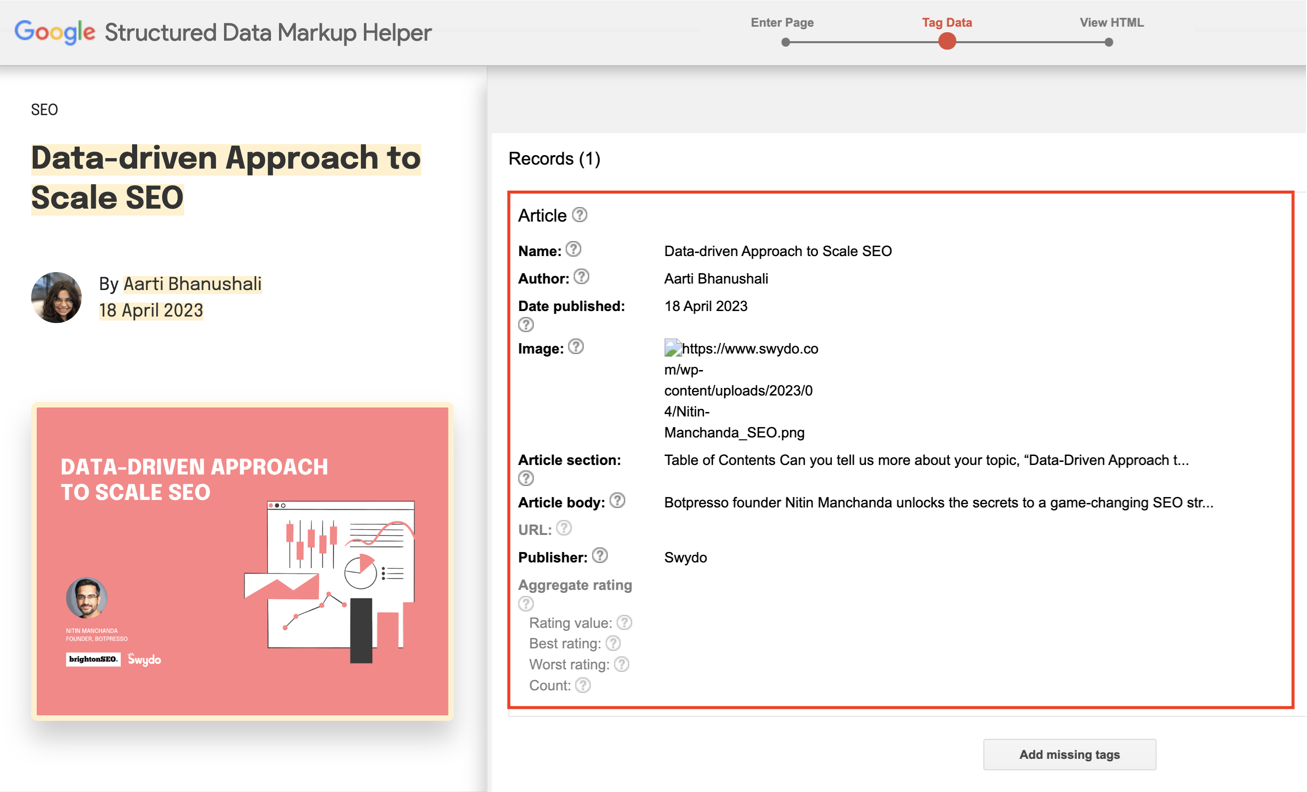
There are 30 different types of structured data markups you can choose from to help Google better understand your pages. Whether it's an article, breadcrumb, job posting, or any other content, you can expertly represent it to Googlebot with schemas.
To enrich your pages with accurate schema markup, use Google Structured Data Markup Helper or Schema.org with its exhaustive collection of schemas.
Schema Markup: How Structured Data Transforms Your SERP Listing
Schema markup tells search engines exactly what your content is. The result: rich snippets that take up more visual space in SERPs and dramatically increase click-through rates compared to plain blue links.
Without Schema — Plain listing
example.com › blog › seo
On-Page SEO Checklist: Complete Guide
Learn about on-page SEO optimization. This guide covers title tags, meta descriptions, headings, and more to help improve your rankings...
With Schema — Rich result ✨
On-Page SEO Checklist: Complete Guide (2026)
Master on-page SEO with 25 proven steps. Expert tips and AI-ready strategies for higher rankings...
Article
Blog posts, news articles. Shows publish date, author, breadcrumbs.
FAQPage
Q&A content. Creates expandable FAQ accordions in search results.
HowTo
Step-by-step tutorials. Shows numbered steps directly in SERPs.
Product
E-commerce pages. Displays price, availability, star ratings.
LocalBusiness
Physical locations. Shows address, hours, map in local results.
VideoObject
Video content. Adds thumbnail, duration, upload date to results.
Breadcrumb
Site hierarchy. Replaces URL with clickable path navigation.
Person
Author bios. Strengthens E-E-A-T signals with identity info.
- Use JSON-LD format. Google recommends this format over Microdata or RDFa.
- Implement relevant schema types. Common types include Article, FAQPage, HowTo, Product, LocalBusiness, and VideoObject.
- Use Google's Structured Data Markup Helper. This tool generates proper schema code.
- Test with Rich Results Test. Validate your schema implementation.
- Monitor in Search Console. Track rich result performance and fix errors.
- Keep schema updated. Match schema to current content and remove outdated markup.
Priority Schema Types
Some of the most widely applicable and impactful schema types to start with:
- Article - For blog posts and news articles
- FAQPage - For pages with Q&A format
- HowTo - For step-by-step tutorials
- Product - For e-commerce pages with reviews and pricing
- LocalBusiness - For businesses with physical locations
- VideoObject - For pages with video content
- Breadcrumb - For improved site navigation in search results
- Organization - For company information and branding
- Person - For author bios and personal branding
For agencies that manage many sites, use a schema markup generator tool like Merkle's or Technicalseo.com's to speed up implementation. The key is to add schema wherever it makes sense across your sites since those rich results can be a major competitive advantage.
Agency Tip: Use schema generators like Merkle's or TechnicalSEO.com's tools to create schema markup at scale. For WordPress sites, plugins like Yoast or Rank Math can automatically add basic schema. Always validate schema with Google's Rich Results Test before you publish.
Core Web Vitals Optimization
Core Web Vitals are confirmed ranking factors. Poor scores mean lower rankings regardless of how good your content is.
What Core Web Vitals Measure
Core Web Vitals are Google's user experience metrics that measure loading performance, interactivity, and visual stability. They're confirmed ranking factors and critical for page experience.
What Changed with Core Web Vitals
In March 2024, Google replaced First Input Delay (FID) with Interaction to Next Paint (INP) as a Core Web Vital. INP measures overall responsiveness throughout the page lifetime, not just first interaction.
The Three Core Web Vitals
Page experience is a major set of metrics that helps Google ranking systems assess URLs and arrange them according to content and overall quality grade in the search results.
The quality of your website's page experience defines your search visibility and rankings. A secure connection with HTTPS data encryption, mobile usability, safe browsing, interstitial-free pages, and strict adherence to Core Web Vitals make an excellent page experience. Google has stated that page experience is a ranking factor, so agencies can't afford to ignore it.
How to Improve Core Web Vitals
To polish your pages for better page experience, make sure your site takes care of users' data and provides a secure browsing experience. To improve user experience, eliminate distracting and intrusive ads and pop-ups that plague your website. Optimize your pages for mobile users and refine the navigation so users can seamlessly explore your content and distinguish its main parts.
Pay attention to Core Web Vitals, particularly to Largest Contentful Paint (LCP), Interaction to Next Paint (INP), and Cumulative Layout Shift (CLS). These pillars define whether your pages are stable, interactive, and fast enough to satisfy web surfers and deliver user-centric experiences.
Core Web Vitals: The Three Metrics Google Measures
These are confirmed ranking factors. Google replaced FID with INP in March 2024. Target the "Good" threshold for each metric to avoid ranking penalties.
Largest Contentful Paint (LCP)
Loading Performance
Measures how long the largest visible element takes to render. Fix with image compression, CDN, reduced JS/CSS, and preloading key resources.
Interaction to Next Paint (INP)
Responsiveness — Replaced FID in 2024
Measures responsiveness to all user interactions, not just the first. Fix by minimizing JS execution, breaking up long tasks, and deferring non-critical scripts.
Cumulative Layout Shift (CLS)
Visual Stability
Measures unexpected layout shifts. Fix by setting image/video dimensions, reserving space for ads, and using font-display: swap.
For Better LCP (Loading)
Optimize and compress images (use WebP format). Remove unnecessary third-party scripts. Use a Content Delivery Network (CDN). Implement browser caching. Minimize CSS and JavaScript. Use resource hints (preconnect, preload). Optimize server response time. Use lazy loading for below-the-fold images.
For Better INP (Interactivity)
Minimize JavaScript execution time. Break up long tasks into smaller chunks. Optimize event handlers. Defer non-critical JavaScript. Use web workers for heavy computations. Avoid large layout shifts during interaction. Optimize third-party scripts.
For Better CLS (Visual Stability)
Always specify image and video dimensions. Reserve space for ads and embeds. Avoid inserting content above existing content. Use font-display: swap to prevent invisible text. Make sure proper sizing for dynamically injected content. Avoid animations that cause layout shifts.
Fundamental tools like PageSpeed Insights and Google Search Console can help you monitor page experience metrics on your website.
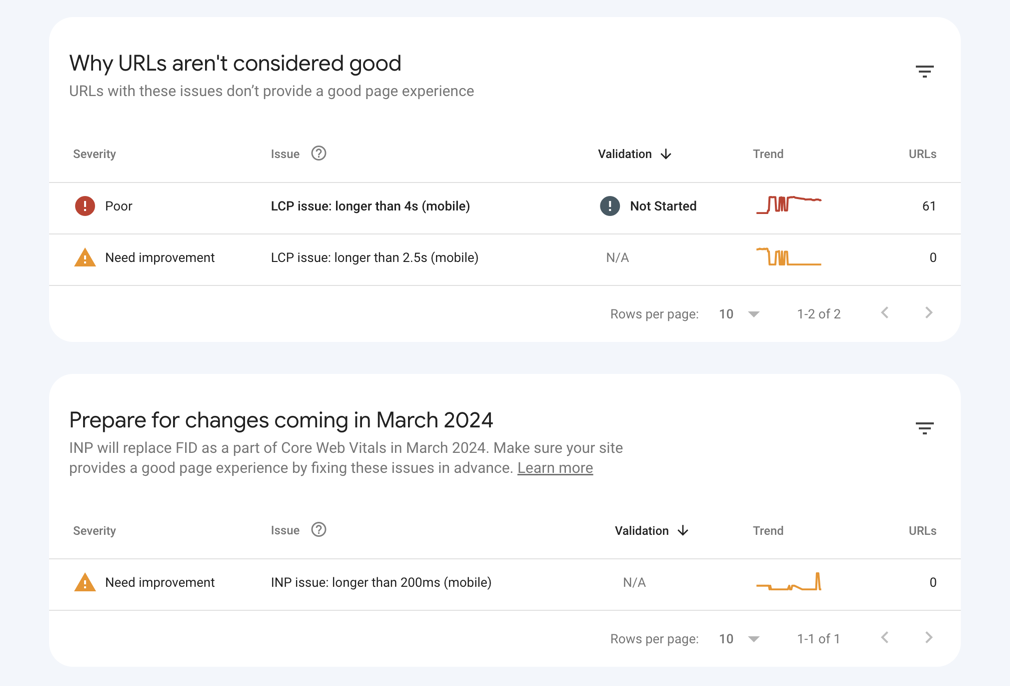
For agencies, improving Core Web Vitals at scale can be daunting. Focus on the pages that matter most first (homepage, key landing pages, etc.). Then tackle issues theme by theme—for example, find a lazy loading solution for images across the entire site. Use Google's recommendations in PageSpeed Insights and Search Console as a practical to-do list.
Agency Tip: Use PageSpeed Insights and Search Console's Core Web Vitals report to identify problematic pages. Focus on high-traffic pages first for maximum impact. Many Core Web Vitals issues can get solved with proper hosting, CDN implementation, and image optimization. Tackle these foundation issues before micro-optimizations.
Mobile Optimization
Google uses mobile-first indexing. That means it primarily uses the mobile version of your content for indexing and ranking. With over 60% of searches happening on mobile devices, mobile optimization isn't optional.
Why Mobile Optimization Matters
Google uses mobile-first indexing, meaning it primarily uses the mobile version of your content for indexing and ranking. With over 60% of searches happening on mobile devices, mobile optimization isn't optional.
How to Optimize for Mobile
Follow these mobile optimization steps.
- Use responsive design. Make sure your site adapts to all screen sizes.
- Test on real devices. Don't rely solely on emulators.
- Optimize tap targets. Make buttons and links at least 48x48 pixels.
- Improve mobile page speed. Mobile users are even more impatient than desktop users.
- Simplify navigation. Use hamburger menus and clear hierarchy.
- Use readable font sizes. Minimum 16px for body text on mobile.
- Avoid intrusive interstitials. Pop-ups that cover content hurt mobile experience.
- Make sure same content on mobile and desktop. Don't hide content on mobile versions.
- Make forms mobile-friendly. Large input fields, appropriate keyboard types.
HTTPS Security
Browsers now mark non-HTTPS sites as "Not Secure." This dramatically hurts user trust and conversions. There's no excuse for not using HTTPS.
Why HTTPS Matters
HTTPS is a confirmed ranking factor and a basic trust signal. Browsers now mark non-HTTPS sites as "Not Secure," which dramatically hurts user trust and conversions. There's no excuse for not using HTTPS.
How to Implement HTTPS
Follow these steps to implement HTTPS.
- Get an SSL certificate. Many hosts offer free SSL via Let's Encrypt.
- Install and configure SSL. Follow your host's documentation.
- Update internal links. Change all http:// links to https://.
- Set up 301 redirects. Redirect all HTTP traffic to HTTPS.
- Update Search Console. Add the HTTPS version as a new property.
- Update sitemap. Make sure all URLs use HTTPS.
- Fix mixed content warnings. Make sure all resources load over HTTPS.
Structured Data Beyond Schema
Open Graph tags and Twitter Cards make sure your content looks its best when shared on social media platforms. They provide attractive titles, descriptions, and images, which increases the likelihood of clicks and engagement.
What Structured Data Beyond Schema Means
Structured data is like giving search engines a backstage pass to your website. It's code that provides explicit information about your content and helps search engines understand and display it effectively. Schema markup is one type, but there's more to explore, like Open Graph tags and Twitter Cards.
Why Additional Structured Data Matters
Think of structured data as dressing up your website for a special occasion. Open Graph tags and Twitter Cards make sure your content looks its best when shared on social media platforms. They provide attractive titles, descriptions, and images, which increases the likelihood of clicks and engagement.
How to Implement Additional Structured Data
Optimize your website for social sharing by including Open Graph tags within the section. These tags allow you to control how your content appears when shared on various platforms, including Facebook and LinkedIn. You can also tailor how your shared content looks on X (Twitter) by using Twitter Cards. These small additions can make a big difference in how visible your website and social media accounts are.
Additional Page Experience Elements
Beyond Core Web Vitals, several other page experience elements affect your rankings and user satisfaction.
Page Experience Factors to Address
Focus on these page experience elements beyond Core Web Vitals.
- Safe browsing. Make sure no malware or deceptive content.
- No intrusive interstitials. Avoid pop-ups that cover main content.
- Accessible navigation. Clear menu structure and breadcrumbs.
- Readable fonts and contrast. Make sure text is easily readable.
- Avoid auto-playing media. Let users control audio and video playback.
- Proper spacing. Adequate white space for comfortable reading.
- Fast-loading pages. Target under 3 seconds for mobile.
- No broken links or images. Regularly audit and fix errors.
Duplicate Content Prevention
Duplicate content confuses search engines about which version to rank. This dilutes your SEO efforts and can get seen as an attempt to manipulate rankings.
Why You Should Avoid Duplicate Content
Duplicate content confuses search engines about which version to rank. This dilutes your SEO efforts and can get seen as an attempt to manipulate rankings.
How to Prevent Duplicate Content
Follow these steps to prevent duplicate content.
Duplicate Content: The Problem and the Fix
When the same content exists at multiple URLs, search engines don't know which version to rank. This splits your ranking authority across duplicates instead of concentrating it on one page. Canonical tags are the primary fix.
❌ Problem: Split authority
Google sees 4 competing pages. Ranking authority is diluted 4 ways.
✅ Fix: Consolidated authority
All authority flows to one URL. Google knows exactly which page to rank.
/* Place in <head> of every duplicate version to point to the preferred URL */
URL Parameters
Tracking params, filters, session IDs
Fix: Canonical tag + parameter handling in GSC
www vs non-www
Both versions resolve to same content
Fix: 301 redirect to preferred version
HTTP vs HTTPS
Both protocols serving same pages
Fix: 301 redirect all HTTP to HTTPS
Mobile Subdomains
m.example.com mirrors main content
Fix: Responsive design or canonical tags
Trailing Slashes
/page and /page/ both resolve
Fix: Pick one format, 301 the other
Thin / Similar Pages
Multiple pages with near-identical content
Fix: Consolidate into one comprehensive page
- Use canonical tags. Point to the preferred version of similar pages.
- Implement 301 redirects. Redirect duplicate URLs to the main version.
- Use consistent URLs. Pick one version (www vs non-www, trailing slash vs none).
- Create unique titles and meta descriptions. Every page should have unique metadata.
- Avoid boilerplate content. Minimize repeated content across pages.
- Use robots.txt wisely. Block indexing of duplicate pages when necessary.
- Consolidate similar pages. Merge thin content into comprehensive pages.
AI Crawler Access
If you block AI crawlers, your content won't appear in AI-powered search results and chatbot responses. Unless you have specific concerns about AI training on your content, allow these crawlers to maximize visibility.
What AI Crawlers Do
AI crawlers like GPTBot (OpenAI), PerplexityBot, and others index web content to train and inform AI models. If you block these crawlers, your content won't appear in AI-powered search results.
How to Manage AI Crawler Access
Follow these guidelines for AI crawler access.
AI Crawler Access: Who's Indexing Your Content for AI Search
Blocking AI crawlers means your content won't appear in AI-powered search results, chatbot answers, or AI Overviews. Unless you have specific concerns about AI training, allow these crawlers to maximize your visibility.
User-agent: GPTBot
Allow: /
User-agent: Google-Extended
Allow: /
User-agent: PerplexityBot
Allow: /
User-agent: ClaudeBot
Allow: /
# Check your current robots.txt at: yoursite.com/robots.txt
- Check your robots.txt. Make sure you're not blocking AI crawlers unless you intend to.
- Allow major AI bots. GPTBot, PerplexityBot, ClaudeBot, and Google-Extended should generally get allowed.
- Monitor AI citations. Check if AI systems are referencing your content.
- Balance control and visibility. Consider your goals before you block AI access.
- Update robots.txt carefully. Blocking AI crawlers means losing AI search visibility.
Common AI Crawlers:
- GPTBot (OpenAI/ChatGPT)
- Google-Extended (Google's AI training)
- PerplexityBot (Perplexity AI)
- ClaudeBot (Anthropic)
- CCBot (Common Crawl)
Local SEO Elements
If your client serves specific geographic areas, add local SEO elements to improve visibility in local searches.
For Location-Based Businesses
If your client serves specific geographic areas, add local SEO elements.
- Include location in H1. "Best Coffee Shop in Austin, Texas"
- Add LocalBusiness schema. Include address, hours, contact info.
- Optimize for "near me" searches. Include city and neighborhood names.
- Create location-specific pages. For multi-location businesses.
- Add Google Maps embed. Show your physical location.
- Include local keywords naturally. City names, landmarks, neighborhoods.
- Get listed in local directories. Google Business Profile, Yelp, industry directories.
Analytics and Search Console Setup
Proper tracking is crucial for measuring SEO success and identifying opportunities. You can't improve what you don't measure.
Essential Tracking Tools
Proper tracking is crucial for measuring SEO success and identifying opportunities.
- Google Search Console - Essential for monitoring search performance, indexing issues, and Core Web Vitals.
- Google Analytics 4 - Track user behavior, traffic sources, and conversions.
- Third-party SEO tools - Consider Semrush, Ahrefs, or SE Ranking for keyword tracking and competitive analysis.
Key Metrics to Monitor
Track these metrics to measure SEO success.
- Organic traffic and trending patterns
- Keyword rankings for target terms
- Click-through rates (CTR) from search results
- Core Web Vitals scores
- AI Overview impressions (new in Search Console)
- Featured snippet ownership
- Pages with indexing issues
- Bounce rate and engagement metrics
- Conversion rates from organic traffic
Post-Optimization Performance Tracking
After you implement on-page optimizations, monitor results over time.
- Wait 30-90 days. Most changes take 4-12 weeks to show full impact.
- Track ranking changes. Monitor target keyword positions weekly.
- Measure traffic changes. Compare organic traffic before and after optimization.
- Monitor CTR improvements. Check if better titles/descriptions increase clicks.
- Document changes. Keep a log of what got optimized and when.
- A/B test when possible. Test different approaches on similar pages.
- Review Core Web Vitals. Track improvements in page experience metrics.
The Takeaway
On-page SEO is an essential aspect of optimization that dramatically affects website search performance. It covers a range of elements, including page metadata, content, keywords, page headings, URLs, internal linking, schema markup, and page experience. All require your precise attention and effort.
On-page SEO remains essential for search visibility, but it has evolved significantly. Success now requires more than just technical optimization. You also need to demonstrate expertise, optimize for AI extraction, and maintain content freshness.
The Key Differences Today
Several major shifts have changed on-page SEO.
- AI optimization is mandatory. Structure content for AI Overviews, chatbots, and voice assistants.
- E-E-A-T signals are critical. Demonstrate genuine expertise and trustworthiness through author bios, citations, and original research.
- Information gain matters more than keyword density. Provide unique value that competitors don't offer.
- Core Web Vitals include INP. Overall responsiveness gets measured now (replaced FID in 2024).
- Content freshness is a ranking signal. Regular quarterly updates are essential.
- Featured snippets are more competitive. Optimize specifically for position zero with concise, formatted answers.
- AI crawler access is important. Don't block GPTBot, PerplexityBot, and other AI crawlers.
As an agency, doing on-page SEO effectively comes down to systems and scale. You need efficient processes and the right tools to optimize hundreds or thousands of pages within your clients' sites. Focus on the highest-impact actions like improving page titles/meta descriptions, optimizing for page experience and Core Web Vitals, and implementing schema markup to gain rich results.
High-Impact Actions to Focus On
Focus on these high-impact actions.
- Improve page titles and meta descriptions for better CTR
- Optimize for page experience and Core Web Vitals
- Demonstrate E-E-A-T through author bios, citations, and original content
- Implement schema markup for rich results
- Structure content for AI extraction
- Maintain content freshness with quarterly updates
To achieve high-end online visibility for your agency's client websites, you need a flexible strategy, timely action, and a comprehensive on-page SEO checklist. These on-page optimizations are key to achieving the SEO success your clients desire.
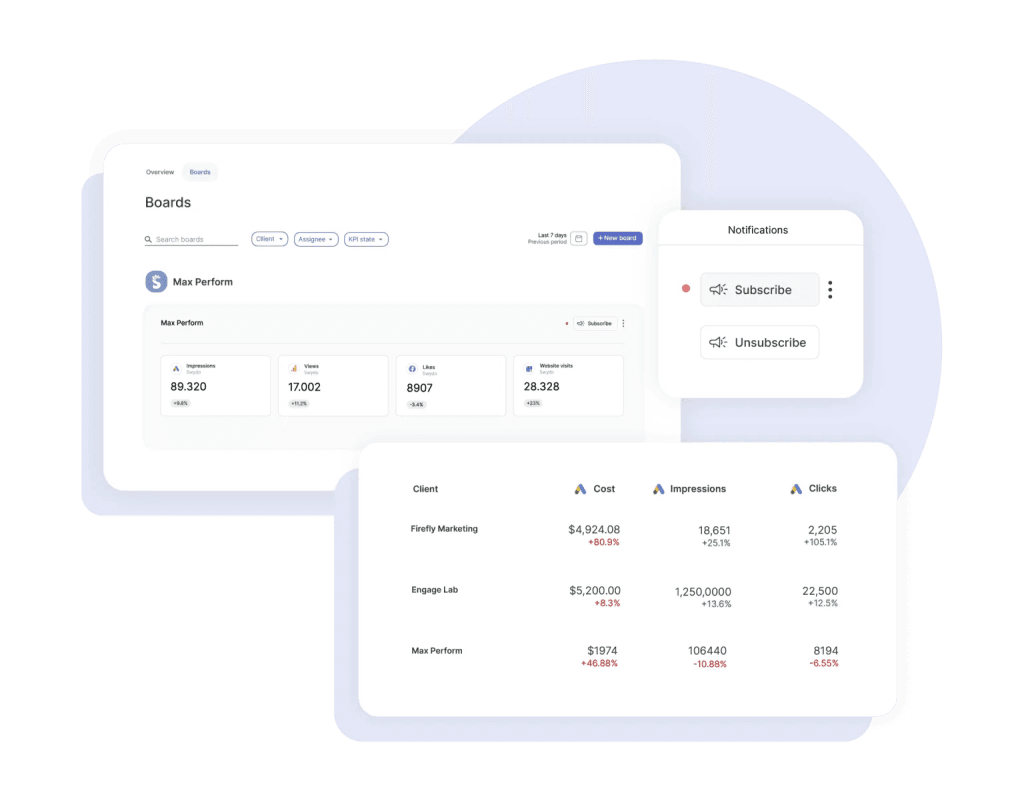
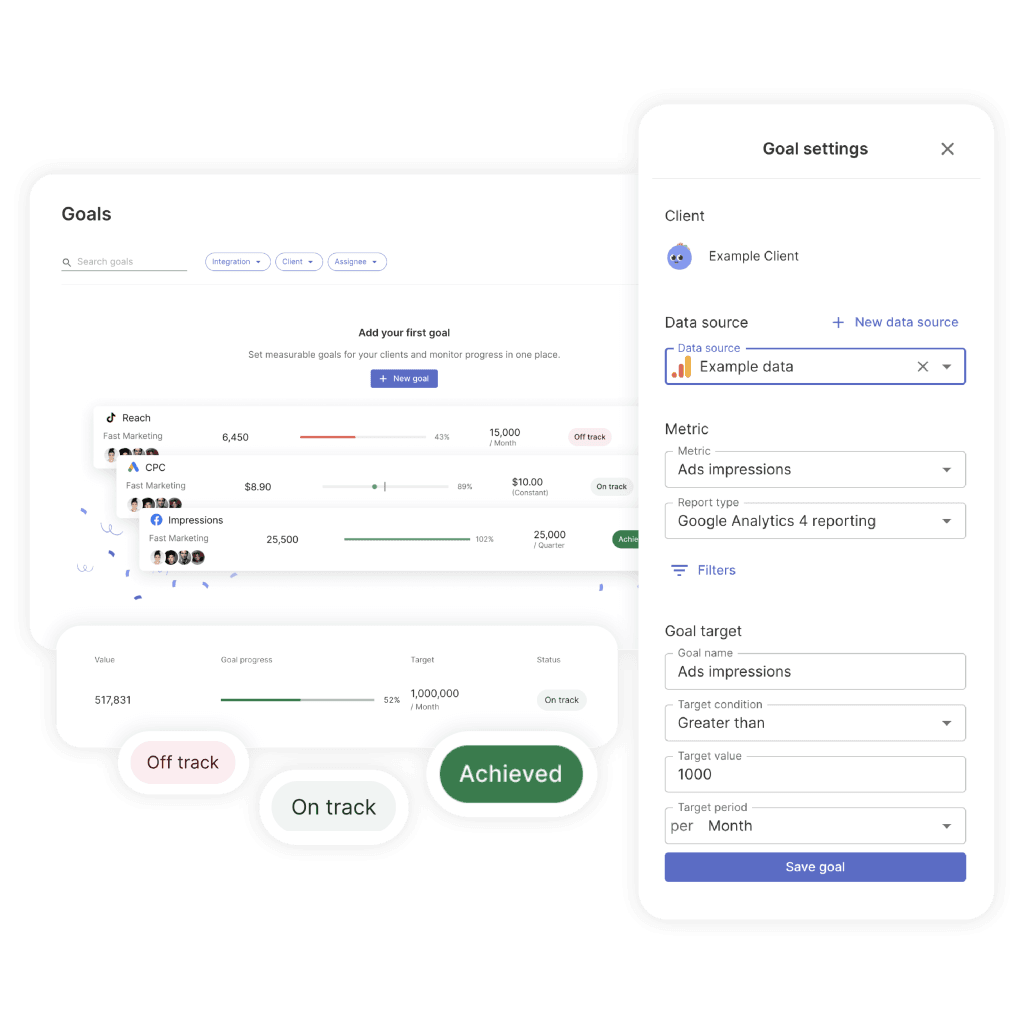
Save time and automate your on-page SEO reporting with Swydo. You can track your SEO efforts and integrate multiple data sources like Google Analytics 4, Semrush, SE Ranking, Google Sheets and Google Search Console into one report or dashboard, and set it up to run automatically for your desired time frame. Give it a try, start your free trial today!
On-Page SEO FAQ
Your complete reference for optimizing pages, improving rankings, and staying ahead of algorithm updates
SEO (Search Engine Optimization) is the practice of optimizing websites to rank higher in search engine results pages. It involves improving content, technical elements, and user experience to increase organic (unpaid) visibility and traffic from search engines like Google.
Modern SEO also accounts for AI-powered search results, E-E-A-T signals, and Core Web Vitals—making it more sophisticated and valuable than ever before.
On-page SEO refers to optimizing individual web pages to rank higher in search engines. This includes optimizing content, title tags, meta descriptions, headings, URLs, images, and internal links. Unlike off-page SEO (such as backlinks), you have complete control over on-page factors.
Today, on-page SEO also involves structuring content for AI extraction, demonstrating E-E-A-T, and ensuring excellent page experience through Core Web Vitals, mobile usability, and HTTPS encryption.
Search intent is the reason behind a user's search query. It can be informational (learning something), navigational (finding a specific site), transactional (making a purchase), or commercial investigation (researching before buying). Matching your content to search intent is one of the most critical ranking factors today.
Google's algorithms have become highly sophisticated at detecting whether content truly satisfies user intent. Even perfectly optimized pages won't rank well if the content doesn't align with what searchers actually want. Analyze the top 10 results for your target keywords to understand what type of content Google rewards.
Keyword density is no longer a major ranking factor. Instead of focusing on specific percentages, use keywords naturally and include semantic variations throughout your content. Google's AI understands context and topic coverage far better than exact keyword repetition.
Focus on comprehensive topic coverage and "information gain"—providing unique value that competitors don't offer. Use related terms from "People Also Ask" boxes and related searches to demonstrate topical authority rather than repeating your primary keyword.
Yes, focus on one primary keyword per page, but include related long-tail keywords and semantic variations. This approach helps you rank for multiple related searches while maintaining clear page focus and avoiding keyword cannibalization between pages.
Use tools like Semrush, Ahrefs, or SE Ranking to find keyword clusters—groups of related terms that can all be addressed within a single comprehensive page rather than spread across separate thin pages.
Title tags should be under 60 characters to display fully in search results. Include your primary keyword near the beginning, make each title unique, and write compelling copy that encourages clicks while accurately describing the page content.
Adding freshness signals like the current year can help for time-sensitive topics. Include value propositions such as numbers, benefits, or unique angles (e.g., "10 Proven Strategies" or "Complete Guide") to stand out in the SERPs.
A meta description is a brief summary (150–165 characters) that appears under your title in search results. While it doesn't directly affect rankings, a compelling meta description with a clear call-to-action can significantly improve click-through rates—which can indirectly boost rankings.
Include your primary keyword (Google bolds matching terms), address user intent directly, and add action words like "Learn," "Discover," or "Get started." Make every meta description unique across your site to avoid wasting differentiation opportunities.
Use one H1 tag per page with your main keyword, then H2 tags for major sections, and H3–H6 for subsections. Never skip heading levels (such as jumping from H1 to H3 without an H2). This hierarchy helps search engines understand content structure and improves accessibility.
Formatting H2s as questions (e.g., "What is on-page SEO?" instead of just "On-Page SEO") helps with featured snippet optimization and AI extraction. Include long-tail keywords and semantic variations in your H2–H4 headings naturally.
SEO-friendly URLs are short (3–5 words), descriptive, use hyphens to separate words, include target keywords, and avoid numbers or special characters. For example, "website.com/seo-tips" is far better than "website.com/page123?id=456."
Plan URLs carefully from the start—changing them later requires 301 redirects that can temporarily affect rankings and require ongoing maintenance. Use lowercase letters only, create a logical folder hierarchy, and keep URLs static without session IDs or parameters.
Use descriptive file names with keywords (e.g., "on-page-seo-checklist.webp" instead of "IMG_1234.jpg"), compress images for faster loading, and add alt text that describes the image content. Specify width and height attributes to prevent layout shift (CLS).
Prefer WebP format over JPEG or PNG for 20–30% smaller file sizes. Use bulk compression tools like TinyPNG or ImageOptim, implement lazy loading for below-the-fold images, and serve responsive images sized for each device. A CDN can further speed up image delivery globally.
There's no magic word count, but most top-ranking pages span 1,500–2,500+ words for competitive topics. Focus on thoroughly covering your topic and providing unique value rather than hitting a specific number—quality and comprehensiveness matter more than length.
Make content scannable with short paragraphs (2–3 sentences), descriptive subheadings, a table of contents for longer articles, and multimedia elements like images, videos, and infographics. Target an 8th–10th grade reading level for most audiences.
Internal linking connects pages within your website using relevant anchor text. It helps search engines discover and index pages, distributes page authority, establishes site hierarchy, and keeps users engaged longer. Pages with more internal links pointing to them are treated as more important by search engines.
Add 2–5 internal links per page to related content using descriptive, keyword-rich anchor text. Build topic clusters with pillar pages linking to subtopic pages. Regularly audit for broken links and update older content with links to new articles as you publish them.
Core Web Vitals are Google's user experience metrics and confirmed ranking factors. They measure three things: Largest Contentful Paint (LCP) for loading speed (target under 2.5 seconds), Interaction to Next Paint (INP) for responsiveness (target under 200ms—this replaced FID in 2024), and Cumulative Layout Shift (CLS) for visual stability (target under 0.1).
Use PageSpeed Insights and Google Search Console's Core Web Vitals report to identify problem pages. Common fixes include compressing images to WebP, using a CDN, minimizing JavaScript, specifying image dimensions, and implementing lazy loading. Focus on high-traffic pages first for maximum impact.
Page speed is a confirmed Google ranking factor and crucial for user experience. Faster sites have lower bounce rates, higher conversion rates, and better mobile performance. Users expect pages to load in under 3 seconds on mobile devices.
Use PageSpeed Insights to identify specific improvements. Key strategies include optimizing and compressing images, removing unnecessary third-party scripts, implementing browser caching, minimizing CSS and JavaScript, and using resource hints like preconnect and preload.
Yes—HTTPS is a confirmed Google ranking factor and a basic trust signal. Browsers mark non-HTTPS sites as "Not Secure," which dramatically hurts user trust and conversions. There's no excuse for not using HTTPS today.
Many hosting providers offer free SSL certificates via Let's Encrypt. After installing SSL, update all internal links to HTTPS, set up 301 redirects from HTTP, update your sitemap and Search Console property, and fix any mixed content warnings.
Mobile-first indexing means Google primarily uses the mobile version of your site for indexing and ranking. With over 60% of searches happening on mobile devices, your site must be responsive, fast-loading on mobile, and provide the same content across all devices.
Test on real devices (not just emulators), make buttons at least 48×48 pixels, use a minimum 16px font size for body text, simplify navigation with clear hierarchy, and avoid intrusive pop-ups that cover content on smaller screens.
Schema markup is structured data that helps search engines understand your content better. It can generate rich results like star ratings, FAQ accordions, how-to steps, or business information directly in search results—dramatically increasing click-through rates and visibility.
Use JSON-LD format (recommended by Google) and implement relevant schema types such as Article, FAQPage, HowTo, Product, LocalBusiness, and VideoObject. Tools like Google's Structured Data Markup Helper and Merkle's schema generator speed up implementation. Always validate with Google's Rich Results Test before publishing.
Duplicate content is identical or very similar content appearing on multiple URLs. It confuses search engines about which version to rank, dilutes your SEO efforts, and can be seen as an attempt to manipulate rankings.
Prevent it by using canonical tags for similar pages, implementing 301 redirects for duplicate URLs, choosing a consistent URL format (www vs. non-www, trailing slash vs. none), creating unique titles and meta descriptions for every page, and consolidating thin pages into comprehensive ones.
E-E-A-T stands for Experience, Expertise, Authoritativeness, and Trustworthiness. It's Google's framework for assessing content quality, especially for YMYL (Your Money or Your Life) topics that could impact users' health, finances, safety, or well-being.
Demonstrate E-E-A-T by including detailed author bios with credentials, citing authoritative sources, publishing original research or data, showcasing first-hand experience with specific examples, and regularly updating content. In an era of AI-generated content, proving genuine human expertise has become more important than ever.
AI has transformed SEO in several major ways. Google's AI Overviews now appear in an estimated 10–15% of searches, requiring content structured for AI extraction. AI tools can assist with content creation and keyword research. And AI crawlers need access to your site to index your content for chatbot and AI-powered search visibility.
Optimize for AI by using question-based headers, providing clear 2–3 sentence answers before expanding on details, structuring information with numbered lists and step-by-step formats, including definitions and specific data, and creating FAQ sections that are easy for AI systems to extract and cite.
Information gain refers to the unique value your content provides beyond what competitors already offer. Google's algorithms specifically look for original insights, new data, unique perspectives, or more comprehensive coverage. Simply rewriting competitor content with different words isn't enough to rank well.
To improve information gain, conduct original research or surveys, include real case studies with specific metrics, share first-hand experiences, provide proprietary frameworks or methodologies, and add expert commentary that can't be found elsewhere.
Generally, no. Blocking AI crawlers like GPTBot, PerplexityBot, or ClaudeBot prevents your content from appearing in AI-powered search results and chatbot responses. Unless you have specific concerns about AI training on your content, allow these crawlers to maximize your visibility.
Check your robots.txt file to make sure you're not unintentionally blocking AI bots. Major crawlers to allow include GPTBot (OpenAI/ChatGPT), Google-Extended (Google's AI training), PerplexityBot (Perplexity AI), ClaudeBot (Anthropic), and CCBot (Common Crawl). Monitor whether AI systems are citing your content by searching your topics in AI tools.
Target question-based keywords ("what," "how," "why"), provide concise 40–60 word answers immediately after the question heading, and use proper formatting like lists, tables, and numbered steps. Structure content with a Q&A format and also answer related "People Also Ask" questions within your page.
Featured snippets appear at "position zero" above all other organic results and can increase traffic by 20–30% for the ranking page. After your concise answer block, expand with more detailed information to satisfy users who click through for deeper coverage.
Google's Query Deserves Freshness (QDF) algorithm prioritizes recently updated content for time-sensitive queries. Regular content updates signal that your site is actively maintained and provides current, reliable information—boosting trust with both users and search engines.
Schedule quarterly reviews for high-traffic pages to update statistics, replace outdated examples, add new sections on emerging topics, refresh screenshots, and update the "last updated" date. Evergreen content can be reviewed every 6–12 months. Create a content calendar to systematize this process.
Technical fixes can show results in 2–4 weeks, while content optimizations typically take 4–8 weeks to reflect in rankings. New content may take 3–6 months to reach its full ranking potential. SEO is a long-term strategy that builds momentum over time with consistent effort.
After implementing on-page optimizations, monitor results for 30–90 days before drawing conclusions. Track ranking changes weekly, compare organic traffic before and after optimization, and document every change you make so you can attribute results to specific actions.
Essential free tools include Google Search Console (monitoring search performance and indexing), Google Analytics 4 (traffic and user behavior analysis), and PageSpeed Insights (speed and Core Web Vitals testing). These three cover the fundamentals for any site.
For advanced keyword research, competitor analysis, site auditing, and AI-powered features, consider paid tools like Semrush, Ahrefs, or SE Ranking. Agencies that manage multiple client sites also benefit from reporting tools like Swydo that combine data from multiple sources into automated client reports.
Monitor organic traffic trends, keyword rankings, click-through rates, and conversion rates from organic search. Use Google Search Console to track impressions, clicks, and average position. Also monitor AI Overview impressions, featured snippet ownership, and Core Web Vitals scores.
Set up goal tracking in Google Analytics 4 to measure conversions from organic traffic. For agencies, prioritize pages ranking on page 2 (positions 11–20) since these often need only minor optimization to reach page 1. Review performance monthly and conduct comprehensive audits quarterly.
Content quality and relevance to search intent is the most important factor. Google's goal is to provide users with the best answer to their questions. Technical factors like page speed, mobile-friendliness, and schema markup support great content but can't replace it.
Focus on E-E-A-T (demonstrating real expertise and trustworthiness) and information gain (providing unique value competitors lack). Combine strong content with solid technical optimization, proper heading structure, and AI-friendly formatting for the best results.
Review SEO performance monthly and conduct comprehensive audits quarterly. Update content regularly to keep it fresh and accurate, and stay informed about algorithm updates—but avoid making constant strategy changes that prevent you from measuring what's working.
SEO success comes from consistent, long-term effort. Schedule quarterly content freshness reviews, monitor Core Web Vitals and technical health continuously, and adapt your approach based on data rather than chasing every algorithm rumor. Focus on the fundamentals: great content, strong E-E-A-T, and excellent user experience.
Save time and automate your on-page SEO reporting with Swydo.
Start Your Free Trial Today