
LinkedIn analytics tools pull engagement, follower, and campaign data from your LinkedIn Pages, ads, and personal profiles into one place, so you can see what’s working without exporting a single CSV by hand. The right one depends on whether you’re growing a personal brand, running company Pages, or reporting LinkedIn results to clients next to every other channel.
That last distinction matters more in 2026 than it used to. In July 2025, LinkedIn shipped an official Member Post Analytics API and opened it to a set of approved partners. Almost overnight, the tools that scraped data from your browser session started breaking, and a few well-known ones shut down for good.
So the question isn’t only “which tool has the prettiest charts.” It’s “which tool gets its data the right way, for the kind of LinkedIn work you actually do.”
I’ve grouped the nine tools below by the job they do, not by brand popularity. Prices are month-to-month first, with the cheaper annual rate noted second, because the gap between the two is bigger than most pricing pages let on.
9 LinkedIn analytics tools at a glance
Grouped by the job they do, with how each one gets its LinkedIn data.
| Tool | Best for | LinkedIn data | Data access | Free plan | From (monthly) |
|---|---|---|---|---|---|
| LinkedIn Native | The free baseline | Profiles, Pages | Native | Yes | Free |
| AuthoredUp | Personal post analytics | Profiles, Pages | Read-only | 14-day trial | $19.95 |
| Taplio | Creator analytics plus AI | Profiles | Unofficial API | 7-day trial | $39 |
| Socialinsider | Competitor benchmarking | Pages | Official API | 14-day trial | $99 |
| Hootsuite | All-in-one suite | Pages, Ads | Official API | 30-day trial | $99 |
| Buffer | Lightweight and cheap | Profiles, Pages | Official API | Yes | $6 / channel |
| Sprout Social | Enterprise depth | Pages, Ads | Official API | 30-day trial | $249 / seat |
| Metricool | Best value, multi-account | Pages, Ads | Official API | Yes | $25 |
| Swydo | Agency client reporting | Pages, Ads | Official API | 14-day trial | 10 sources incl. |
Prices shown are monthly. Annual billing is cheaper on every paid tool. The Data access column is the key 2026 filter: official-API and read-only tools are account-safe, while unofficial browser-API tools carry more risk after LinkedIn’s enforcement push.
What a LinkedIn Analytics Tool Actually Does
A LinkedIn analytics tool tracks the metrics LinkedIn’s own dashboard either buries or won’t keep for long: impressions, engagement rate, follower growth, demographics, post performance over time, and ad results. The good ones store history past LinkedIn’s short native window, compare periods, and turn raw numbers into something a client or a CMO can read in ten seconds.
The 2026 shift is about data access. LinkedIn’s official analytics API now lets approved tools read post and profile data directly, with the account holder’s permission. The launch partners included names you already know (Hootsuite, Buffer, and Metricool among them), and LinkedIn doesn’t charge those vendors for access.
The upshot for you is simple. Tools built on the official API are stable and safe for your account. Tools that still scrape LinkedIn through a browser extension are living on borrowed time.
You can see it play out in the graveyard:
- Shield: for years the default for personal-profile analytics, now winding down. Its founders said plainly that Google and LinkedIn made it clear they couldn’t keep running it as built.
- Inlytics: gone. Its domain now points at a competitor.
- Kleo: its free extension got a cease-and-desist and came back as a paid web app.
If a “best LinkedIn analytics tools” list still recommends any of those three as live products, it hasn’t been touched since the API changed everything.
So when you pick a tool, the first filter isn’t features. It’s how the tool gets its data.
The Three-Layer LinkedIn Analytics Stack
Most LinkedIn measurement falls into three layers, and you’ll likely use one from each rather than a single do-everything tool:
- Layer one: native analytics. LinkedIn’s own free dashboard. The baseline everything else builds on.
- Layer two: creator and engagement analytics. Tools that go deep on post performance and personal-profile or single-Page growth.
- Layer three: management and reporting. Suites that schedule and analyze across channels, plus the agency reporting tools that package LinkedIn results next to Google, Meta, and the rest for a client.
Name it the Three-Layer LinkedIn Analytics Stack and your tool choices get a lot clearer. A solo creator lives in layers one and two. An agency reporting to twenty clients lives in layers one and three. Knowing which layer you’re shopping in stops you from overpaying for an enterprise suite when you needed a $20 post-analytics tool, or the reverse.
The Three-Layer LinkedIn Analytics Stack
Most teams use one tool from each layer, not a single do-everything app.
LAYER 3
Management and reporting
Schedule, analyze, and report LinkedIn next to every other channel.
LAYER 2
Creator and engagement analytics
Deep post and profile performance for people who post.
LAYER 1
Native analytics
LinkedIn’s own free dashboard. The foundation everything builds on.
A solo creator lives in layers 1 and 2. An agency reporting to clients lives in layers 1 and 3.
1. LinkedIn Native Analytics
The free baseline every other tool is measured against.

Start here, always. LinkedIn’s built-in analytics cover the essentials for both personal profiles (Creator mode “post impressions” and audience data) and company Pages (visitors, followers, content performance, competitor benchmarking, and lead-gen form results). For Pages, the demographic breakdowns alone (job function, seniority, industry, company size) are genuinely useful and hard to get anywhere else.
The catch is memory and rollups. LinkedIn shows you a rolling window, exports are clunky, and there’s no clean way to compare this quarter to last or to drop it into a polished LinkedIn Page analytics report next to your other channels. That’s exactly the gap the paid tools fill.
Pricing: Free.
Creator and Engagement Analytics Tools
The second layer is built for people who post: creators, founders, and social managers who need to know which posts land and why. These tools go deeper on individual post performance than LinkedIn’s native view, and the best of them now do it through read-only, account-safe methods rather than risky scraping.
2. AuthoredUp
Best for personal-profile and single-Page post analytics after Shield’s exit.

AuthoredUp has quietly become the tool people name first when they ask what replaced Shield. It pairs a post editor (previews, formatting, hooks, saved snippets) with analytics that track engagement, reach, and performance trends across your posts, for both personal profiles and company Pages. It reads your data without taking over your session, which is why it’s held up while scraper tools fell over.
If your job is to grow your LinkedIn personal brand and prove your posts are working, this is the cleanest pick in the layer. It won’t report on ad spend or other channels. That’s not its lane.
My favorite feature: post-by-post engagement history that actually persists, so you can spot your real top performers instead of guessing from the last week.
Pricing: $19.95/month, or $16.63/month billed annually. 14-day trial.
3. Taplio
Best for creators who want AI content help bundled with their analytics.

Taplio bundles scheduling, a post inspiration feed, AI drafting, and analytics into one creator-focused workspace. For personal brands that want one place to write, schedule, and measure, it’s a strong fit, and its analytics cover engagement and follower growth well.
One honest note. Taplio still runs on LinkedIn’s unofficial browser-based API, and it ran into a company-Page restriction during LinkedIn’s enforcement push in 2025. It works, and plenty of creators rely on it. Just know it sits on the riskier side of the data-access line than an official-API tool, and the entry plan ships without AI credits.
My favorite feature: the AI post generator trained on high-performing LinkedIn content, which is a real time-saver if drafting is your bottleneck.
Pricing: From $39/month (Starter); AI-enabled plans from around $65/month. 7-day trial.
4. Socialinsider
Best for competitive benchmarking on company Pages.

Socialinsider is the tool to reach for when the question is “how do we stack up against competitors.” It tracks company Pages, benchmarks them head to head, and publishes some of the most-cited LinkedIn engagement data in the industry. For agencies that need to show a client where they sit against three rivals, the side-by-side reporting is the draw.
It’s company-Pages-focused, so it’s not your tool for personal-profile analytics. And like most benchmarking platforms, it’s priced for businesses rather than solo creators.
My favorite feature: cross-profile benchmarking that puts your client and their competitors on the same chart, by metric, over the same period.
Pricing: From around $99/month (billed annually). 14-day trial.
Social Management Suites With LinkedIn Analytics
The third layer starts with the all-in-one suites: tools that schedule posts, manage engagement, and report across LinkedIn plus every other social network in one social media report. If you’re running social for several brands and want one login for posting and measurement, this is where you’ll land. All four below are built on LinkedIn’s official API, which is part of why they’re safe bets.
5. Hootsuite
Best for multi-network social teams that want posting and analytics in one suite.

Hootsuite is the veteran. It schedules, monitors, and reports across LinkedIn, Instagram, Facebook, X, and more, with customizable analytics and exportable reports, and it regularly lands on shortlists of the best social media reporting tools. For a social team that wants one tool to run everything, the breadth is the selling point, and it was a launch partner on LinkedIn’s official analytics API.
The trade is cost and heft. There’s no free plan anymore, the entry price is steep for a single user, and you’re paying for a lot of suite you may not use if LinkedIn is your only real channel.
My favorite feature: the cross-network report builder, so LinkedIn doesn’t sit in its own silo away from the rest of social.
Pricing: From $99/month (Professional), or about $83/month billed annually. 30-day trial; no free plan.
6. Buffer
Best for lightweight scheduling and analytics on a small budget.

Buffer is the friendly, affordable option. It schedules across channels, keeps a clean analytics view of post performance and engagement, and, unusually for this layer, has a genuine free plan for up to three channels. It’s also on LinkedIn’s official API. For freelancers and small teams, it covers the basics without the enterprise price tag.
Don’t expect deep competitive benchmarking or revenue attribution here. Buffer is built to be simple, and it stays in that lane on purpose.
My favorite feature: per-channel pricing, so you pay for what you connect instead of a big flat fee.
Pricing: Free plan (3 channels); paid from $6/channel/month, or $5/channel/month billed annually.
7. Sprout Social
Best for enterprise teams that need depth and don’t mind paying for it.

Sprout Social sits at the premium end. Its LinkedIn analytics are thorough (engagement, audience growth, tagging, paid-and-organic reporting, and presentation-ready exports), and the whole platform is built for bigger teams with approval workflows and serious volume. When budget isn’t the constraint and reporting polish is, Sprout delivers.
It’s expensive, and the headline per-seat rates require annual prepayment, so the real month-to-month number is higher than the one you’ll see first.
My favorite feature: the Optimal Send Times analysis, which leans on Sprout’s data to tell you when your LinkedIn audience is actually online.
Pricing: From $249/seat/month (Standard), or $199/seat/month billed annually. 30-day trial. Further reading: B2B reporting tools
8. Metricool
Best value for managing and measuring several LinkedIn accounts.

Metricool punches above its price. It schedules, analyzes, and reports across LinkedIn and other networks, supports multiple accounts cleanly, and runs on LinkedIn’s official API, all at a fraction of what the bigger suites charge. For small agencies and freelancers juggling a handful of brands, it’s one of the strongest value picks on this list. (SocialPilot, from $30/month or $25.50/month annually, plays a similar budget-multi-account role if you want a second option to weigh.)
Worth knowing before you sign up: the free plan doesn’t include LinkedIn, and connecting LinkedIn adds a small per-account fee on the entry tier.
My favorite feature: the multi-account dashboard that keeps every brand’s LinkedIn numbers a click apart without a separate login each time.
Pricing: Free plan (no LinkedIn); Starter $25/month, or $20/month billed annually. LinkedIn add-on from $5/account on Starter.
Agency Reporting and Monitoring
The other half of layer three is built for a different job: not scheduling posts, but reporting results. If you run an agency and your problem is packaging LinkedIn performance next to Google Ads, GA4, and Meta into a clean monthly report for each client (and catching problems before the client does), a reporting platform fits better than a social suite.
9. Swydo
Best for agencies reporting LinkedIn results to clients alongside every other channel.
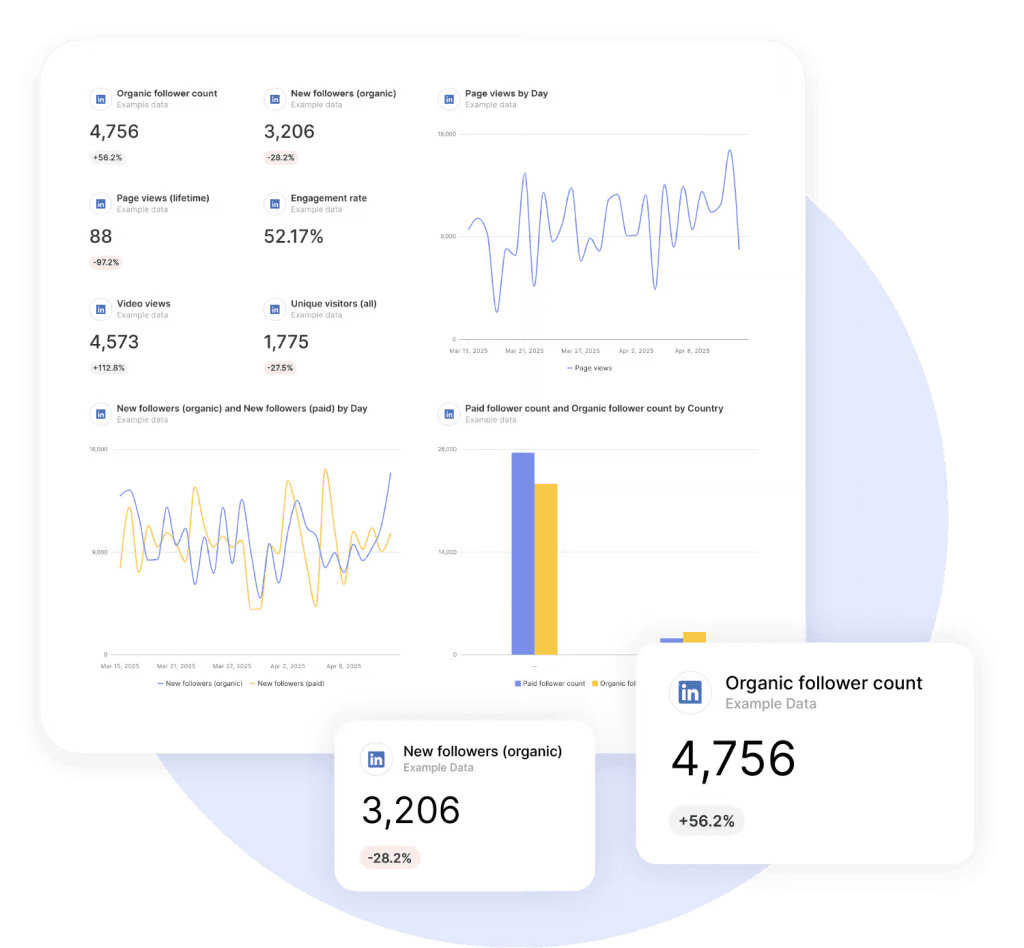
See your client’s LinkedIn Pages, ads, and revenue attribution in one report, sitting right next to their Google Ads and GA4 numbers. And don’t rebuild it next month, because the template does that for you.
Swydo is the reporting and monitoring layer for agencies, and LinkedIn is one of 30-plus direct connections it pulls from. We’re a LinkedIn certified marketing partner, and the LinkedIn Ads & Pages integration is a single connection that covers:
- Organic Page metrics: visitors, followers, content performance
- Ad performance: spend, leads, and campaign results
- Revenue Attribution Reporting: built from a template we developed with LinkedIn to tie campaigns back to pipeline
- Followers Gained, split organic vs. paid: a breakdown LinkedIn’s own export makes hard to see
That cross-channel angle is the real reason agencies use it for LinkedIn rather than a single-network tool.
My Favorite Feature: Combined Data Sources
Blend LinkedIn Ads with Google Ads, Meta, and other platforms inside one widget, and report true cross-channel cost, conversions, and ROAS, instead of making the client mentally add up five separate charts. It’s the difference between “here’s LinkedIn, here’s Google, here’s Meta” and “here’s what your whole paid mix returned.”
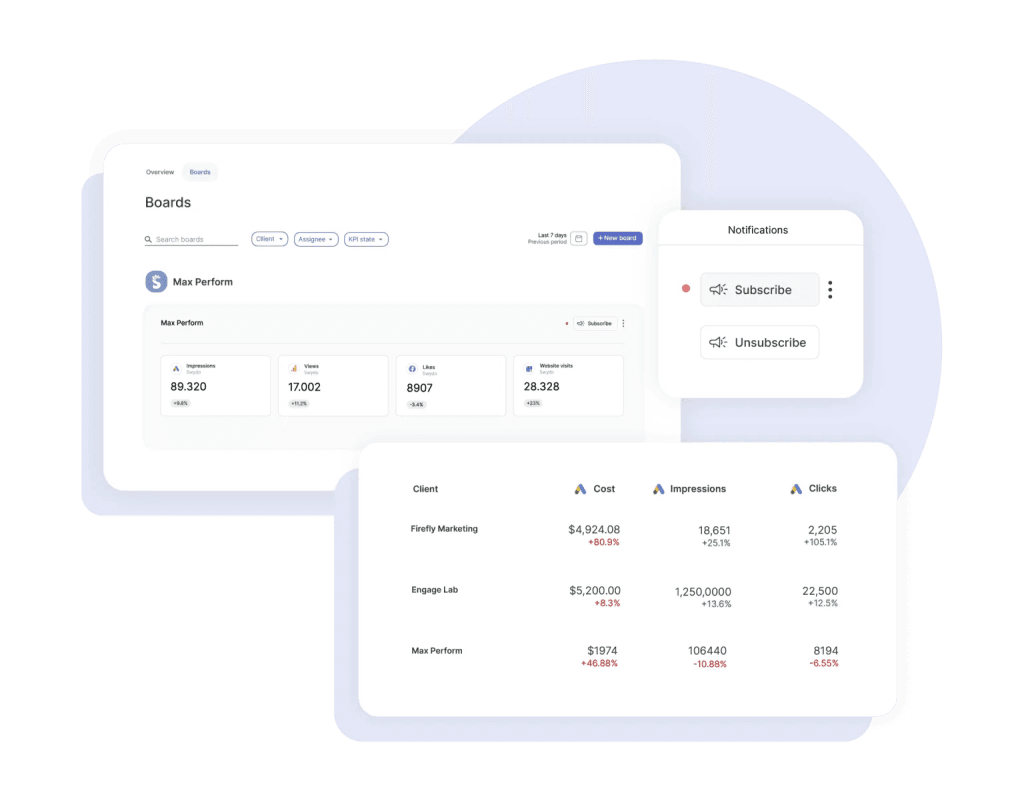
There’s a monitoring side too. Open Monitoring → Alerts and you can set a daily check on a client’s LinkedIn metric (cost-per-lead creeping up, engagement falling off) and get pinged by email or Slack before the monthly report, while you can still act on it.
Want to see your own LinkedIn numbers in it? The 14-day trial doesn’t need a credit card, and the 10 data sources included cover your first couple of clients. White-label dashboards, custom domains, and unlimited seats come standard, so your whole team logs in and every report carries your brand, not ours.
Sidenote. Swydo reports on LinkedIn Pages and Ads (the company side), and it’s built for client reporting, not personal-profile post analytics. If you’re growing a personal brand, AuthoredUp or Taplio (layer two) will serve you better. The trade is the point: for an agency tracking LinkedIn next to every other channel, with revenue attribution and proactive alerts in the same place, that’s the job Swydo is built for.
Pricing: 14-day free trial, no credit card. Flat rate includes 10 data sources, unlimited seats; per-source cost drops as you scale, and reporting frequency doesn’t change the price.
Further reading: create LinkedIn Ads reports in 5 steps
How to Choose the Right LinkedIn Analytics Tool
The right LinkedIn analytics tool comes down to five questions, and the first one now outranks the rest. Run your shortlist through these before you pay for anything.
- How does it get its data? Official-API tools (Hootsuite, Buffer, Metricool, Sprout, Swydo for Pages and Ads) are stable and account-safe. Browser-extension scrapers are a risk in 2026. Useful sometimes, but fragile.
- Personal profile or company Page? Personal-brand analytics point you to AuthoredUp or Taplio. Company-Page work, especially benchmarking, points to Socialinsider or a suite.
- Do you need organic and ads in one view? Many tools cover one or the other. If you report on both LinkedIn Pages and the LinkedIn Ads KPIs that matter, check that a single tool handles them before you stitch two together.
- Are you reporting to clients? If yes, you’re really shopping for client reporting software that includes LinkedIn, not a posting tool with a charts tab. White-label matters here; so does pulling other channels into the same report.
- Monthly or annual budget? Almost every tool on this list dangles a lower “per month” price that quietly requires a year upfront. If you want true month-to-month flexibility, read the toggle carefully. The real number is often 15 to 20% higher.
Which LinkedIn analytics tool fits you?
Match your situation to a starting point. You can always add a second tool later.
IF YOU
Just want the free baseline before paying for anything
START WITH
IF YOU
Are growing a personal brand and want to know which posts land
START WITH
IF YOU
Run company Pages and want to benchmark against competitors
START WITH
IF YOU
Manage social for several brands and want posting plus analytics in one login
START WITH
IF YOU
Need enterprise depth, approval workflows, and serious volume
START WITH
IF YOU
Report LinkedIn results to clients next to Google, Meta, and the rest
START WITH
Final Thoughts
If you’re a creator, your stack is LinkedIn native plus AuthoredUp or Taplio, and you’re done for under $40 a month. If you run social for several brands, a suite like Metricool, Buffer, or Hootsuite covers posting and measurement together. And if you’re an agency proving LinkedIn results to clients next to every other channel, a reporting layer beats a posting tool. That’s the job Swydo does, and the trial is the fastest way to see it on your own data.
The one rule that’s new this year: check how a tool gets its data before you fall for its dashboard. If LinkedIn is just one piece of a client’s mix, Swydo also covers PPC reporting and SEO reporting in the same place. For more on packaging it all up, see our guides to client reporting best practices, white label reporting tools, and social media reporting.
LinkedIn Analytics Tools FAQ
Direct answers to the questions people ask about tracking LinkedIn performance
Yes, and it is free. LinkedIn gives you built-in analytics for your posts, your personal profile, and your company Page, covering impressions, engagement, followers, and audience demographics. It is the source of truth, but it keeps only a short history, which is where paid tools come in.
Open the post and click “View analytics” right below it. For your profile, check the Analytics section on your profile; for a company Page, use the Analytics menu in the admin view. Everything updates on its own as people interact with your content.
Not very far. LinkedIn keeps only a limited recent window, roughly up to a year for Pages and shorter for individual posts, and it does not make older periods easy to compare. That short retention is the main reason people add a third-party tool, which stores history so you can compare month over month.
Yes, but the export is basic. LinkedIn lets you download Page and some post data to a spreadsheet, but you have to format it yourself, and it does not combine with your other channels. Reporting tools pull the same data automatically and build the report for you.
Partly. Premium adds some extra profile and post insights and a longer history of who viewed your profile, but it is not a reporting tool. To track performance over time, compare periods, or report to clients, you still need a dedicated analytics tool.
Yes, in the “Who viewed your profile” section, though the full list and longer history need Premium. This is a separate native feature, not something analytics tools provide. Analytics tools focus on post, Page, and ad performance instead.
There is no single best one; it depends on your goal. For a personal brand, AuthoredUp; for competitor benchmarking, Socialinsider; for managing several brands, Metricool or Hootsuite; for reporting to clients across channels, Swydo. Pick the use case first, then the tool.
LinkedIn’s own native analytics, because it is free and accurate. Buffer and Metricool also offer free plans, though Metricool’s free tier does not include LinkedIn. Free tools rarely store much history, so most people upgrade once they need to compare periods.
Most fall between about $20 and $250 a month, depending on depth and how many accounts you manage. Lightweight tools like Buffer and AuthoredUp start under $20, suites like Metricool and Hootsuite sit in the middle, and enterprise platforms like Sprout Social cost the most. Native LinkedIn analytics stay free.
If you post or report regularly, yes. They store the history LinkedIn drops, compare periods, track ads and organic together, and turn raw numbers into a report in minutes instead of hours. If you only check your stats occasionally, native analytics may be enough.
It depends on how the tool gets its data. Tools built on LinkedIn’s official API, or that only read your own data, are low risk. Tools that scrape LinkedIn or automate actions through a browser extension carry the most risk, because LinkedIn’s terms prohibit that and accounts can be restricted. Favor official-API tools.
Shield, long the most popular personal-profile analytics tool, has shut down. The most common replacement is AuthoredUp, which tracks post and profile performance in a read-only, account-safe way. Taplio is another option, though it runs on LinkedIn’s unofficial API.
For organic content, track impressions, engagement rate, and follower growth, and break them down by post format. For ads, track cost per lead and cost per acquisition. For company Pages, add visitor and demographic data so you know who you are reaching, not just how many.
It usually sits in the low single digits, often cited around 2% to 5%, but it varies by format and audience size. Rather than chase a fixed number, track your own trend and compare formats. A steady or rising rate matters more than hitting any single benchmark.
Native formats win. Document posts (carousels), multi-image posts, and video generally outperform plain text and posts with outbound links. The exact order shifts over time, but the pattern holds: rich, native content that keeps people on LinkedIn does best.
Impressions count how many times your post was shown; engagement counts interactions like reactions, comments, shares, and clicks. Engagement rate is engagement divided by impressions or followers. Impressions tell you reach, while engagement tells you whether the content actually landed.
AuthoredUp is the go-to, since it tracks post and profile performance for personal accounts in a read-only, account-safe way. Taplio is a strong alternative if you also want AI content help, though it relies on LinkedIn’s unofficial API. Native analytics cover the basics for free.
Yes. LinkedIn’s native Page analytics are solid, and most management suites and reporting tools pull Page data too. To compare your Page against competitors, Socialinsider is purpose-built. Company-Page analytics also include richer demographics than personal profiles.
Yes, but only on company Pages and only public data. Socialinsider is built for head-to-head benchmarking, and LinkedIn’s native Page analytics include a basic competitor view. You cannot see a competitor’s private post analytics or ad spend.
For agencies, the job is reporting LinkedIn results to clients next to every other channel, not scheduling posts, so a multi-channel reporting platform fits best. Swydo is built for this, pulling LinkedIn Pages and Ads into one report alongside Google, Meta, and GA4, with white-label dashboards.
Use one tool that pulls both LinkedIn Pages for organic and LinkedIn Ads for paid, then put them in the same report. Swydo’s LinkedIn Ads and Pages integration covers both, and its Combined Data Sources widget blends LinkedIn Ads with Google and Meta so you can show true cross-channel ROAS.
Yes, with the right reporting tool. White-label support puts your agency’s brand and a custom domain on every report and dashboard instead of the tool’s name. Swydo includes white-label dashboards, custom domains, and unlimited seats as standard.
Build the report once from a template, connect the LinkedIn account, and schedule it to send or update on its own. Swydo refreshes the data automatically and sends clients a live dashboard or PDF on whatever cadence you set, so monthly reporting stops being manual.
See your clients’ LinkedIn results next to every other channel, in one automated report.
Start Your Free Trial Today