
SEO monitoring tools watch your clients’ sites around the clock and alert you the moment rankings drop, pages break, backlinks vanish, or your brand fades out of AI search answers. The right setup for an agency isn’t one tool. It’s a stack: free Google tools as the base, a reporting hub to pull everything together, specialist trackers for the gaps, and an AI-visibility layer that barely existed two years ago.
You know the feeling. A client calls out of nowhere, “our rankings tanked overnight” or “why are our competitors beating us in ChatGPT?”, and you’re caught flat-footed, with no idea what happened or when. It’s the worst.
Run an agency and you’re juggling dozens of clients, each with their own site, rankings, and technical quirks. They expect you to have a pulse on performance 24/7, and increasingly they want to know how they show up in AI answers from ChatGPT, Perplexity, and Google’s AI Overviews. Checking every site by hand every day isn’t realistic. A monitoring system is your radar. It catches problems early so you can spend your time on strategy and growing the agency instead of firefighting.
So how do you build one that actually scales? Stack it in four layers.
What Makes Monitoring Different From Research Tools
SEO monitoring isn’t the same as the all-in-one suites you use for research, and mixing the two up is where a lot of agencies go wrong. Research tools help you plan your next move. Monitoring tools watch your clients’ sites when you’re not looking, a security system that never sleeps.
A good monitoring setup catches issues before your client does. Instead of “sorry, I missed that ranking drop last month,” you get to say “we spotted the shift last week and already fixed it.” That’s the difference between a reactive vendor and a proactive partner. The best systems run nonstop and keep an eye on:
- Big ranking changes for top keywords
- New or lost backlinks that could hurt performance
- Technical issues like broken pages, crawl errors, or indexing problems
- Drops in organic traffic or conversions
- Competitors creeping up on your clients’ spots
- Local visibility and review problems
- AI search visibility, how clients appear in ChatGPT, Perplexity, Google AI Overviews, and AI Mode
And they don’t just collect data. They ping you when something needs attention, so you’re not digging through reports to find the problem after it’s already cost your client traffic.
The Four-Layer Monitoring Stack
The cleanest way to think about agency monitoring is in four layers, each one covering what the layer below it can’t. Layer 1 is your free foundation. Layer 2 is the command center that unifies everything. Layer 3 is the specialists. Layer 4 is AI visibility. Build them in order and you get full coverage without paying for overlap.
No single tool does all four well, the part most “best tools” lists skip. A rank tracker won’t watch your uptime. An uptime monitor won’t tell you if you’ve dropped out of AI Overviews. The skill is picking one strong tool per job and wiring them into one place you actually check.
The Four-Layer Monitoring Stack
Each layer covers what the one below it can’t. Build them in order.
AI Visibility
How clients show up in ChatGPT, Perplexity, Gemini, and AI Overviews
Specialists
Deep rank data, technical crawls, uptime, and call tracking
Command Center
One dashboard that unifies every source and runs your alerts
Free Foundation
Rankings, traffic, conversions, and local visibility at zero cost
No single tool does all four well. Pick one strong tool per job and wire them into one place.
Layer 1, Get the Most Out of Google’s Free Tools
Google’s free tools are the foundation of any monitoring stack, and they’re far more capable than most agencies use them for. Search Console, Analytics, and Business Profile cover rankings, traffic, conversions, and local visibility for every client, at zero cost. All three got real AI upgrades over the last year. Set them up properly and you’ve covered the basics before spending a dollar.
Google Search Console, Your First Line of Defense
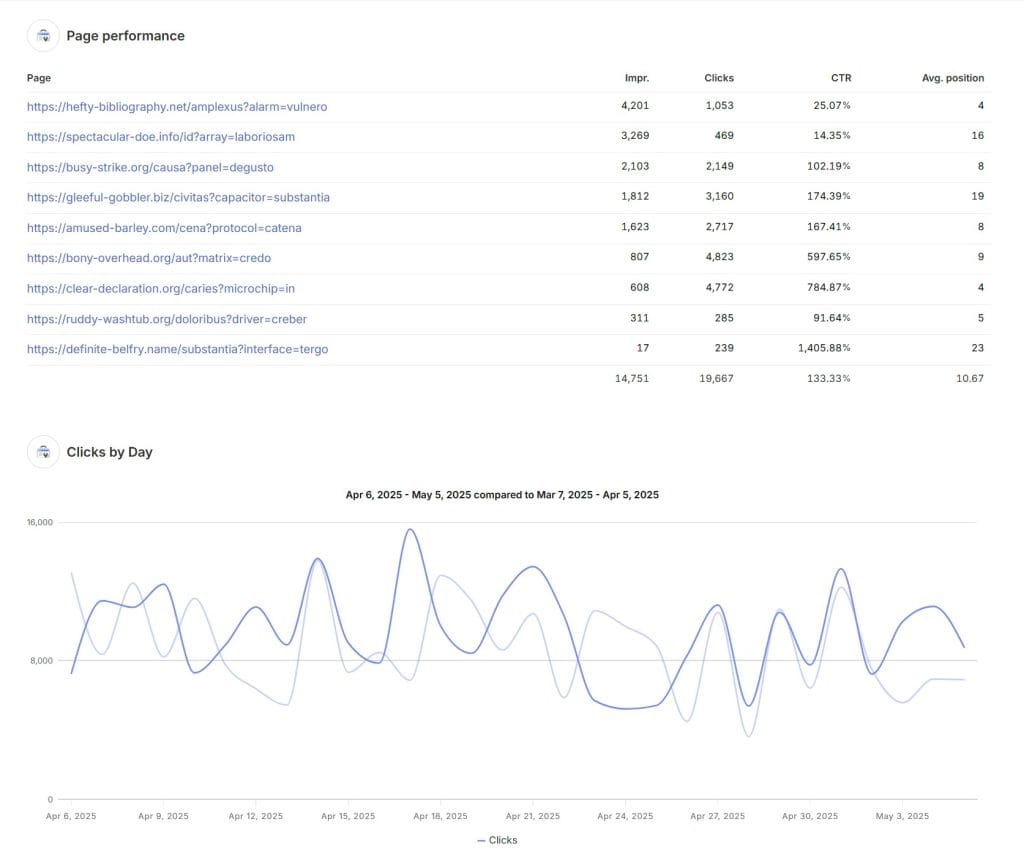
Google Search Console is where you catch indexing problems, ranking shifts, and manual actions first, and it now does a lot more than show clicks and impressions. In December 2025, Google added an AI-powered configuration feature: describe the analysis you want in plain language, something like “compare clicks from the UK versus France”, and GSC sets the filters, comparisons, and metrics for you. It rolled out globally in early 2026.
Turn on email alerts for every client property so critical issues hit your inbox the second they appear. Say a client’s e-commerce site gets a hacked page. GSC flags it before it tanks their rankings, and you’ve fixed it before they ever notice. That’s the kind of save that keeps clients around.
A few GSC features worth using on every account:
- Query groups, an AI-computed grouping of similar searches, so you see what users actually want without sorting through hundreds of variations
- Branded query filter, auto-recognizes brand names, variations, and misspellings, so you can split branded from non-branded traffic in a click
- Annotations, add notes directly to Performance charts to mark launches, migrations, or campaigns and line them up against traffic changes
- Coverage and page indexing reports, still the fastest way to spot indexing and crawl issues as Google finds them
If you’ve ever tried to explain to a client why GSC clicks and GA4 sessions don’t match, point them to the difference between GA4 and Search Console. It saves a recurring conversation.
Google Analytics, More Than Traffic Numbers
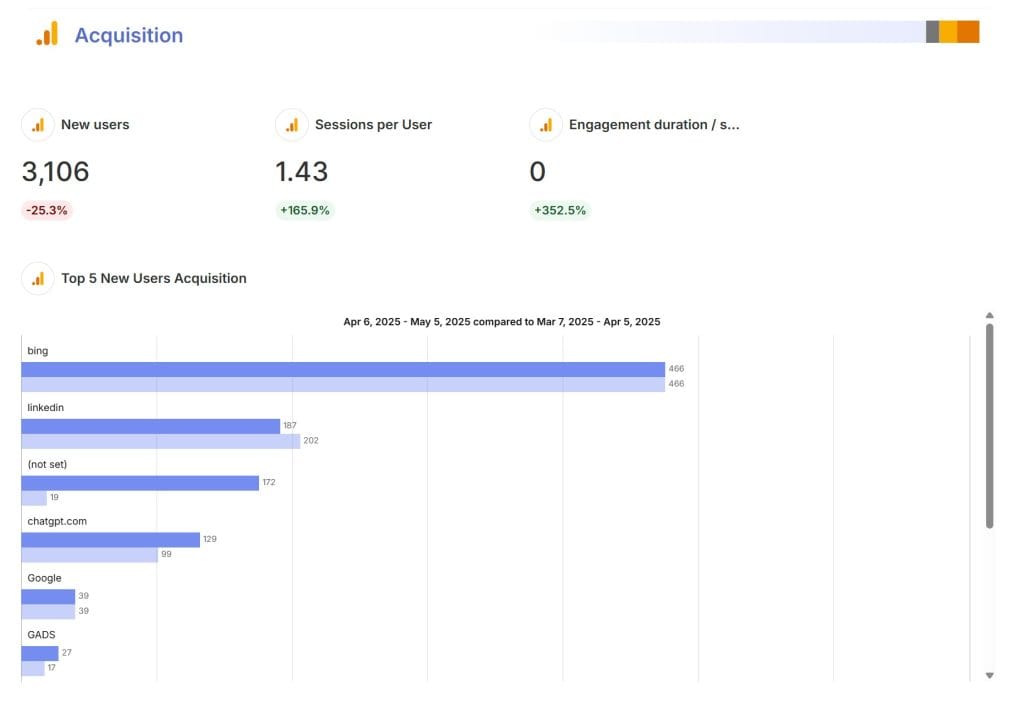
GA4 is a monitoring tool, not just a reporting one. Set it up right and it flags problems on its own. Its anomaly detection surfaces unusual spikes and drops automatically, and recent updates added a conversational AI layer on top.
Features worth using for monitoring:
- Anomaly detection, GA4 highlights unusual trends and drops and suggests likely causes, so a sudden traffic dip doesn’t sit unnoticed until your monthly report
- Ask Advisor, the Gemini-powered assistant inside GA4 that answers plain-language questions, surfaces insights, and helps diagnose performance changes
- Custom alerts, set thresholds for organic traffic drops, conversion-rate changes, or bounce spikes and get an email the moment one trips
- Consent Mode integration, view consented versus modeled data for cleaner compliance reporting
Set custom alerts for the metrics that matter to each client and route them to email so your team gets notified instantly. The same GA4 metrics drop into a web analytics report template if you’d rather watch them next to your other channels. While you’re in there, it’s worth setting up AI traffic tracking in GA4. Referrals from ChatGPT, Perplexity, and Gemini now show up as their own channel, and you’ll want that baseline before a client asks about it.
Google Business Profile, Don’t Sleep on Local Monitoring
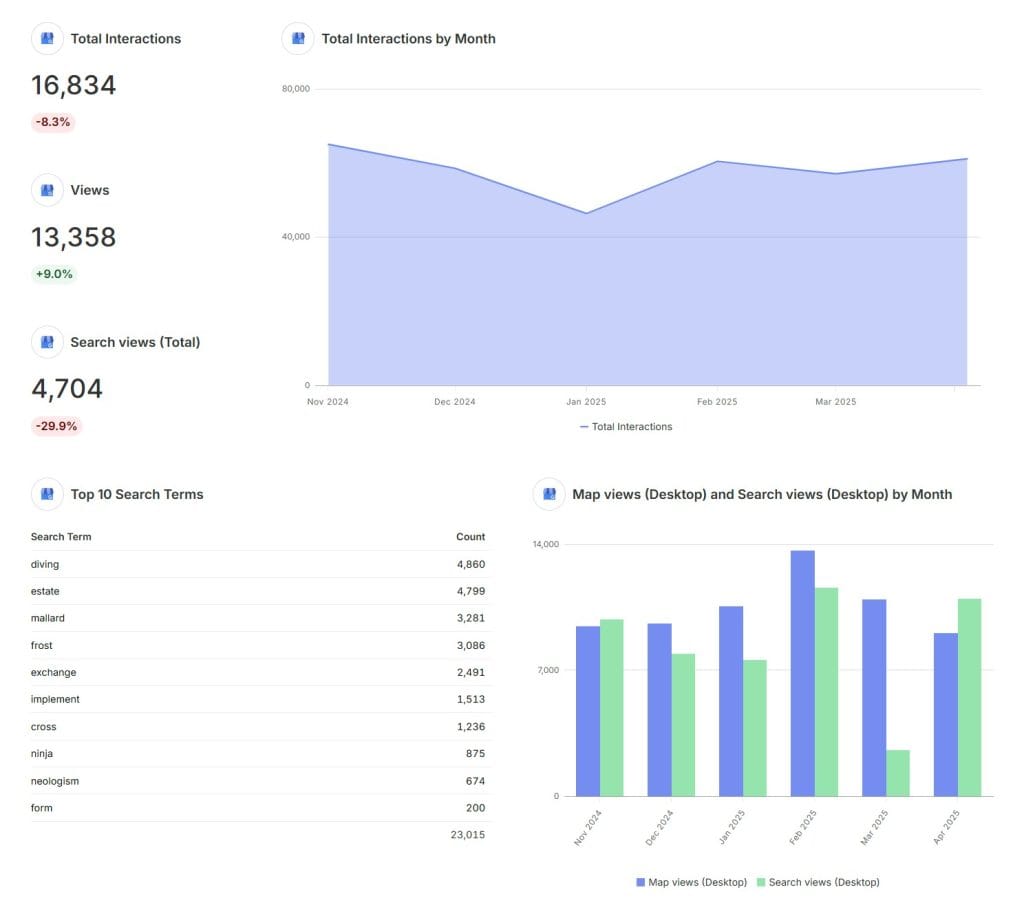
Google Business Profile is as important as the website for any client with a physical location, and it’s the layer agencies most often forget to monitor. For restaurants, law firms, dental practices, or retail, a single unanswered review or a flagged listing can cost more business than a ranking drop. GBP picked up several useful updates over the past year.
Recent GBP changes worth knowing:
- Post scheduling, schedule Business Profile posts in advance instead of posting live (rolled out November 2025)
- Multi-location posting, push a post to multiple locations at once, a real time-saver for multi-location clients (also November 2025)
- AI-assisted review handling, Google expanded its automated detection of fake and policy-violating reviews, and reporting a bad review is still a standing option
Turn on notifications for new reviews so nothing sits unanswered. A client’s dental practice with one angry one-star review left hanging for two weeks can scare off a month of new patients. Respond fast and you protect both their rankings and their reputation.
Layer 2, Bring Everything Into One Dashboard With Swydo

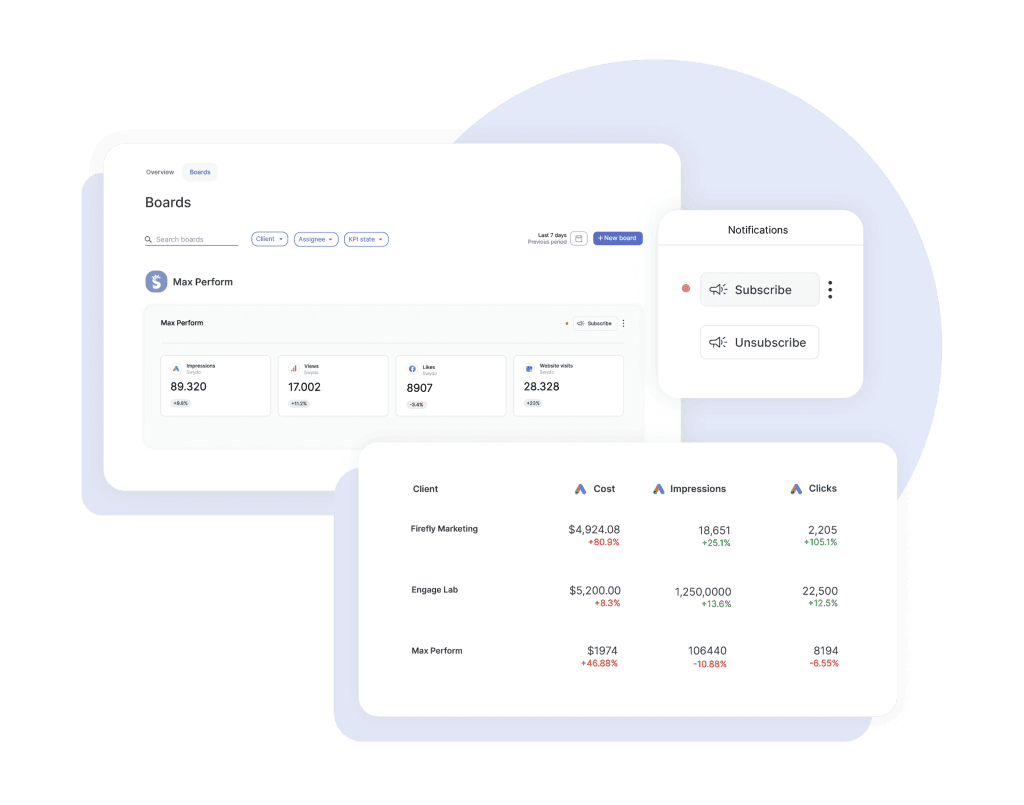
You flip between Search Console, GA4, and Business Profile for every client, and it gets old fast, worse as you add accounts. That’s exactly the job Swydo is built for. It’s the command center of the stack: it pulls data from your Google tools and 35+ other platforms into one place, then watches that data and alerts you when something moves. Reports for clients, dashboards for your team, alerts for the unexpected, all from the same connected data.
Swydo connects to more than 35 data sources, so you’re not only tracking SEO. You see how it ties to the rest of marketing. It pulls in:
- Google tools: Search Console, Analytics, Ads, and Business Profile
- SEO platforms like Semrush, AccuRanker, and SE Ranking
- Social accounts from Facebook, Instagram, and LinkedIn
- Call tracking from CallRail and CallTrackingMetrics
- Email platforms like Mailchimp, Klaviyo, and ActiveCampaign
To set up agency-wide monitoring, start with the Metrics Overview. Pick up to six metrics (organic traffic, conversions, keyword rankings) and see them across all clients in one view, or filter to a handful of key accounts so you’re not buried in data. For deeper per-client tracking, build a Monitoring Board: select a client, name the board (“SEO Performance”), and add widgets for rankings, traffic, or whatever that client cares about. Then set a target on a widget and subscribe to notifications, and Swydo alerts you by email or Slack the moment a metric crosses your threshold: a traffic drop below a floor, a ranking slide, a conversion dip.
There’s one more thing Swydo watches that most tools ignore: the connections themselves. Data Health Check Alerts flag a broken Google Ads connection or an expired token the moment it happens, with a red-dot warning and an email, so you fix the pipe before a client opens a dashboard full of blanks.
Be clear-eyed about what this layer is, though. Swydo is the command center, not the rank tracker or the crawler. It unifies your data and runs the alerts, but you still bring a tool like AccuRanker for deep daily rank data and a crawler like ContentKing for continuous technical monitoring. Swydo’s job is to put their output, and everything else, in one place you’ll actually check. There’s no permanent free tier either, but the 14-day trial needs no credit card and includes 10 data sources, which covers most agencies’ first two or three clients.
Layer 3, Specialist Tools That Cover the Gaps
Google and Swydo give you a strong foundation, but some monitoring jobs need tools built for one thing and done well. The four jobs worth adding a specialist for are rank tracking, technical monitoring, performance and uptime, and call tracking. Add them based on what your clients actually need, not all of them, and not all at once.
Rank Tracking With AccuRanker, Nightwatch, and SE Ranking
Dedicated rank trackers give you daily, precise position data that Search Console only estimates, and they catch movement before it shows up as a traffic dip. Your clients usually notice ranking changes before you see traffic shift in Analytics, so this is the gap to close first.
AccuRanker tracks keywords with daily or on-demand updates across locations, devices, and search engines, and it’s the precision option. Hit refresh and you get live ranking data in seconds. It tracks SERP features (Featured Snippets, Knowledge Panels, Local Packs, People Also Ask), shows local grid rankings down to the neighborhood, and fires competitive alerts when a rival starts climbing. AccuRanker also offers AccuLLM, a separate product line for tracking visibility inside AI answers: visibility scores, sentiment, average rank in LLM responses, and citation tracking.
- Professional: $224/month for 2,000-5,000 keywords
- Expert: $764/month for 10,000-25,000 keywords (adds AI CTR, Tag Cloud, and Looker Studio)
- Enterprise: custom pricing for 25,000+ keywords
- Annual billing saves about 10%; AccuLLM is priced separately
Nightwatch is the budget-friendly dedicated tracker, starting around $32/month with a 14-day trial. It tracks positions daily across Google, Bing, and AI search engines, supports a huge range of local locations, and includes AI-visibility tracking alongside traditional rankings, a strong fit for agencies that want one affordable tool covering both.
SE Ranking is the all-in-one option agencies reach for when they want rank tracking, site audits, and backlink monitoring under one login. The Core plan runs about $103/month billed annually (roughly $129 month-to-month), with a 14-day trial and no card required. It also connects directly to Swydo, so its positions feed straight into a client rank tracking report without manual exports. (Worth knowing: SE Ranking’s API only returns average-position history, so for deeper rank history pair it with AccuRanker.) For the full picture, here’s our SE Ranking review.
Algorithm Context With Semrush

Semrush tells you whether a ranking change is your client’s problem or the whole market’s, which saves you from chasing ghosts after every Google update. Semrush Sensor tracks algorithm volatility across more than 25 industries, and in 2025 Semrush leaned hard into AI search with its AI Visibility Toolkit.
Features that matter for monitoring:
- Semrush Sensor, tracks algorithm volatility so you know if a dip is site-specific or market-wide
- AI Visibility Toolkit, a $99/month add-on (per domain) that tracks brand presence across ChatGPT, Perplexity, Gemini, Google AI Mode, and AI Overviews, with an AI Visibility Score, sentiment, mentions, and citations
- Position Tracking, see which keywords help you appear as a source inside AI-generated answers
- Semrush Copilot, a free AI assistant included with subscriptions that reads across your tools and surfaces prioritized recommendations
Pricing (monthly billing):
- Pro: $139.95/month, 5 projects, 500 keywords
- Guru: $249.95/month, 15 projects, 1,500 keywords, historical data
- Business: $499.95/month, 40 projects, 5,000 keywords, API access
- Semrush One: bundles the SEO and AI Visibility toolkits: Starter $199/month, Pro+ $299/month, Advanced $549/month
Annual billing saves roughly 16-17%, and the AI Visibility Toolkit is a $99/month add-on on top of a base plan.
Technical Monitoring With ContentKing, Screaming Frog, and Sitebulb

Most technical SEO tools crawl a site once a week or month, but problems can appear any time, so the job here is catching technical changes the moment they happen. ContentKing, now part of Conductor and branded Conductor Website Monitoring, watches client sites continuously and alerts you to changes as they occur: meta tags, canonicals, robots directives, schema, internal links, and content edits. For clients with busy dev teams (an e-commerce site shipping product changes daily), that real-time view saves you from nasty surprises. Conductor doesn’t publish pricing; it’s quote-based and aimed at the enterprise end.
For on-demand technical work, Screaming Frog is the agency standard. It’s the crawler most SEOs run before and after a migration to catch broken links, redirect chains, duplicate titles, and missing tags, free up to 500 URLs, with a paid license for larger sites. Sitebulb is the friendlier alternative, turning a crawl into prioritized, plain-language fixes you can hand to a client. Either one pairs well with continuous monitoring: ContentKing watches between crawls, Screaming Frog or Sitebulb goes deep when you need a full SEO audit.
Performance and Uptime With Pingdom, UptimeRobot, and DebugBear

Site speed and uptime affect rankings, conversions, and user experience, but a one-off PageSpeed test doesn’t show how a site holds up over time. Pingdom (by SolarWinds) checks performance, uptime, and user experience constantly, testing from locations worldwide as often as every minute.
- Synthetic monitoring: proactive checks on availability and performance
- Real user monitoring (RUM): how the site actually performs for real visitors
- Transaction monitoring: simulates paths like cart checkout and alerts you if a step breaks
- Global testing locations with historical data to show clients improvement over time
Pingdom’s synthetic monitoring starts at $15/month month-to-month (about $10/month billed annually) for 10 uptime checks and 1 advanced check, scaling to roughly $95/month for 100 uptime checks and 20 advanced checks. Real user monitoring is priced separately, and there’s a 14-day free trial.
If you’re watching uptime across many client sites on a budget, UptimeRobot is the workhorse: a free tier covers basic checks, and paid plans start in the single digits per month. For Core Web Vitals specifically, DebugBear is purpose-built: it tracks lab and field performance over time and alerts you when a client’s vitals slip, which matters more now that page experience is baked into how Google ranks.
Calls and Revenue With CallRail and CallTrackingMetrics
Rankings and traffic don’t pay the bills; leads and sales do, so for service clients, monitor the phone. Call tracking ties your SEO work directly to revenue, which is what keeps clients renewing. CallRail and CallTrackingMetrics attribute calls to the channels, keywords, and pages that drove them, so a drop in calls from organic search points you straight at a ranking issue on high-intent terms, even when overall traffic looks fine.
CallRail’s plans run from $50/month for basic call tracking up to $195/month for its Lead Conversion Complete plan, which bundles call tracking, form tracking, and conversation intelligence. CallTrackingMetrics scales from $79/month at the low end to $1,999/month for Enterprise, with unlimited users on every tier. Both connect to Swydo, so call data sits in your dashboards next to SEO metrics for the full revenue picture. The same logic applies well beyond search, too. If you run paid for these clients, Swydo works as a PPC reporting tool in the same account, and the alerting discipline carries straight over to PPC monitoring tools.
Layer 4, AI Visibility Monitoring Tools
AI search is the biggest shift in SEO monitoring since 2025, and it’s the layer most agencies haven’t built yet. Google’s AI Overviews now appear in roughly 15-16% of searches, and where they do, click-through on informational queries has fallen sharply. At the same time, ChatGPT, Perplexity, and Gemini are sending real, high-intent traffic. If you’re not monitoring AI visibility, you’re flying blind on a channel your clients are already asking about.
You don’t have to buy anything new to start. AI visibility splits into two jobs (how you rank inside AI answers, and how much traffic those answers send you), and Swydo already covers both. Its Semrush integration pulls AI Overview ranking metrics into your client reports, so AI-search positions sit right next to your regular rankings. Its GA4 integration captures the traffic side, and a prebuilt AI traffic report template breaks out visits from ChatGPT, Perplexity, and Gemini. AccuRanker connects too, so the rank data from your tracker flows in the same way. For a lot of agencies, that’s enough to start reporting AI visibility today, with alerts firing when it moves.
The dedicated platforms below earn their place when AI visibility becomes a named priority, when a client wants prompt-level tracking, share-of-voice scoring, or sentiment across dozens of queries. Match the tool to how much depth the client actually needs.
Otterly AI
Otterly is the straightforward pick for agencies that want AI-visibility tracking without a steep learning curve. It tracks brand mentions and citations across ChatGPT, Google AI Overviews, AI Mode, Gemini, Perplexity, and Copilot, and it’s picked up recognition from G2, OMR, and Gartner.
- Best for: teams wanting clean AI-visibility tracking without complexity
- Pricing: Lite from $29/month, Standard $189/month, Premium $489/month, Enterprise custom
Peec AI
Peec is the Berlin-based option built for multi-platform tracking, and its funding momentum says the category is heating up. The company raised a $21M Series A in late 2025, bringing total funding to around $29M. It focuses on real-time AI visibility across platforms and languages, which makes it a fit for European and global brands.
- Best for: global brands needing multi-platform tracking at mid-market pricing
- Pricing: Starter €89/month (25 prompts), Pro €199/month (100 prompts), Enterprise custom; separate agency tiers available
Profound
Profound is the enterprise end of AI-visibility tracking, built for large brands with dedicated content, digital PR, and SEO teams. Its Conversation Explorer lets you drill into the exact AI responses about your brand to find prompts you weren’t thinking to track, a genuine differentiator. Pricing is custom and sales-led, aimed at enterprise deployments rather than solo agencies.
- Best for: large organizations with global footprints and dedicated teams
- Pricing: custom enterprise pricing
Ahrefs Brand Radar
Brand Radar is the natural add-on for agencies already living in Ahrefs. It draws on Ahrefs’ search-backed prompt data (210M+ real prompts rather than AI-generated test queries) to show AI Share of Voice, mentions, citations, and impressions across AI Overviews, AI Mode, ChatGPT, Perplexity, Gemini, and Copilot.
- Best for: teams already using Ahrefs who want AI monitoring in the same tool
- Pricing: a paid add-on on top of an Ahrefs base plan (Lite starts at $129/month); the AI indexes run $199/month each or $699/month bundled for all six
Where to start: prove the channel with what you already have (Semrush’s AI Overview metrics and GA4’s AI traffic, both surfaced in Swydo) before paying for a dedicated platform. Add Otterly or Peec when a client needs prompt-level tracking and share-of-voice depth, and Profound at the enterprise end.
SEO Monitoring Tools at a Glance
Grouped by the job each one does in your stack, with starting monthly pricing.
| Tool | What It Monitors | From / Month |
| Layer 1: Free Foundation | ||
| Search Console | Rankings, clicks, indexing, manual actions | Free |
| Google Analytics 4 | Traffic, conversions, anomaly detection | Free |
| Business Profile | Local visibility, reviews, map actions | Free |
| Layer 2: Command Center | ||
| Swydo | Unifies 30+ sources, dashboards, threshold & connection alerts | $69 |
| Layer 3: Specialists | ||
| AccuRanker | Precise daily rank tracking, SERP features | $224 |
| Nightwatch | Affordable daily rank + AI-visibility tracking | ~$32 |
| SE Ranking | Rank tracking, audits, backlinks (Swydo-connected) | ~$129 |
| Semrush | Algorithm volatility, competitor & AI context | $139.95 |
| ContentKing | Continuous technical monitoring (Conductor) | Custom |
| Screaming Frog | On-demand technical crawls and audits | Free / licensed |
| Pingdom | Uptime, speed, real-user & transaction checks | $15 |
| UptimeRobot | Budget uptime monitoring across many sites | Free + paid |
| CallRail | Call & lead attribution to SEO | $50 |
| CallTrackingMetrics | Call tracking with unlimited users | $79 |
| Layer 4: AI Visibility | ||
| Otterly AI | Brand mentions & citations across AI search | $29 |
| Peec AI | Real-time multi-platform AI visibility | €89 |
| Profound | Enterprise AI visibility, Conversation Explorer | Custom |
| Ahrefs Brand Radar | AI Share of Voice for Ahrefs users (add-on) | +$199 |
Entry-level monthly pricing. Annual billing usually lowers these; AI-visibility add-ons sit on top of a base plan.
Build a Monitoring Stack for Your Agency’s Size
Your stack should match where your agency is, not where you wish it were. The number of clients you serve, the precision they need, and how much AI visibility matters to their industry decide what you actually buy. Here’s how the four layers scale.
Small Agency, 5 to 10 Clients
- Turn on alerts in Search Console, GA4, and Business Profile for every client
- Add a dedicated rank tracker, Nightwatch (from ~$32/month) or AccuRanker Professional ($224/month)
- Use Screaming Frog (free tier) for technical checks
- Get Swydo ($69/month base) to tie it all together
- Add Semrush Pro ($139.95/month) for algorithm context and entry-level AI tracking
Estimated monthly cost: $400-700
Mid-Size Agency, 10 to 25 Clients
- Connect Google tools to your dashboard for automated pulls
- Move up to AccuRanker Expert ($764/month) and add AccuLLM for AI visibility
- Add Semrush Guru ($249.95/month) for algorithm tracking and competitor analysis
- Use Pingdom (~$95/month) for performance and uptime
- Add CallRail Lead Conversion Complete ($195/month) for lead tracking
- Scale Swydo (around $159/month for 30 data sources)
- Consider Peec AI Pro (€199/month) for dedicated AI monitoring
Estimated monthly cost: $1,500-2,500
Enterprise Agency, 25+ Clients
- Build automated data pipelines for your Google tools
- Run agency-tier plans: AccuRanker Enterprise (custom), Semrush Business ($499.95/month) plus the AI Visibility Toolkit, and Conductor for continuous technical monitoring (custom)
- Add Pingdom at enterprise scale and CallTrackingMetrics Enterprise ($1,999/month)
- Scale Swydo across your full client base
- Add a dedicated AI-visibility platform, Profound for enterprise, or Semrush One to bundle SEO and AI tracking
Estimated monthly cost: $5,000+
How to Make Your Monitoring System Work
The right tools are the start, not the finish. How you set up alerts and respond to them is what separates a system that helps from one that just makes noise. Tier your alerts, verify before you escalate, and tune monitoring to each client. Do that and your stack earns its cost.
Set Up Alerts That Make Sense
Not every issue deserves a 2 a.m. wake-up. Sort alerts into three tiers so the urgent stuff reaches a human fast and the minor stuff waits for a scheduled review.
Tier Your Alerts So the Right Issues Reach a Human
Sort every alert into one of three tiers before it ever fires.
Examples
Site down, manual penalty, big ranking drop, AI-visibility loss
Who gets it
You + SEO lead
Action
Tell the client, fix now
Examples
Technical glitches, lost backlinks, smaller ranking shifts
Who gets it
Assigned specialist
Action
Investigate, then update the client
Examples
Minor changes, low-priority AI mention shifts
Who gets it
Team dashboard
Action
Note it, fold into routine work
Double-Check Before You Panic
False alarms waste your time and rattle your clients, so cross-check a signal before you escalate it. If AccuRanker shows a ranking drop, check Search Console to see whether traffic actually moved. If GSC flags an indexing issue, use ContentKing to pinpoint the cause. If GA4 shows a traffic dip, check Pingdom to rule out a performance problem. For AI-visibility drops, confirm across more than one platform before you raise it. A single tool’s reading can wobble.
Customize Monitoring for Each Client
Every client is different, and a huge e-commerce site in a brutal niche needs more watching than a local bakery’s five-page site. Tune your monitoring to:
- How big and complex the site is
- How tough the competition is
- How stable their rankings have been
- How much revenue is on the line
- How much AI search matters in their industry
Get Your Team on the Same Page
A monitoring system only works when it’s part of the routine, not a thing one person checks when they remember. Assign clear roles (who triages alerts, who handles technical fixes), set a schedule for system reviews, and write down standard responses for the common issues so anyone can act. Review what’s working every quarter, and fold AI visibility into your weekly check-ins now that it’s a real channel.
Think Like a Proactive Agency Owner
Tools and processes matter, but the real value shows up when your team starts thinking ahead instead of waiting for alarms. When Google announces an algorithm update, check your most exposed clients early. When you see AI Overviews expanding into commercial queries, get ahead of it and optimize the affected content before rankings move. That’s the whole point of a monitoring stack. It turns you from a firefighter into the agency that saw it coming.
Want the data behind why this layer matters now? Semrush’s analysis of AI Overviews across millions of keywords shows just how fast AI answers have spread through search results, worth a read before your next client strategy call.
Your Next Steps
- Audit how you’re using Google’s free tools, are you using the new AI features yet?
- Pick the specialist tools that fill the real gaps in your stack
- Add AI-visibility monitoring; it’s not optional in 2026
- Get Swydo or a similar platform to bring everything into one client-ready SEO report
- Write alert rules that match each client’s business
- Document how you’ll handle the common issues
- Train your team on AI search basics and monitoring
You can’t monitor every little thing, and you shouldn’t try. Focus on the metrics that matter to each client’s business and build systems that catch change fast. A strong monitoring stack turns you from a reactive firefighter into a proactive strategist, better results, happier clients, longer retention.
SEO Monitoring Questions, Answered
Direct answers on tools, rankings, AI visibility, alerts, and cost
SEO monitoring is the continuous, automated tracking of a website’s search performance: its rankings, organic traffic, technical health, backlinks, and visibility in both traditional results and AI answers. It runs in the background and alerts you the moment something changes, so problems get caught early instead of weeks later.
SEO monitoring is important because search performance can change overnight from an algorithm update, a technical error, a lost backlink, or a competitor’s move, and catching it early limits the damage. For anyone managing more than a couple of sites, it is the only practical way to spot issues before they cost real traffic and revenue.
An SEO audit is a deep, point-in-time review of a site’s health that you run every so often. SEO monitoring is continuous: automated tools watch rankings, traffic, and technical health every day and alert you when something changes. An audit tells you where you stand; monitoring tells you the moment that changes. You need both.
Core signals like rankings, traffic, uptime, and technical health should be monitored continuously through automated tools, not checked by hand on a schedule. Set daily alerts for critical issues, review dashboards weekly, and run a deeper manual audit monthly or quarterly. The whole point is that software watches around the clock so you do not have to.
The metrics worth monitoring are keyword rankings, organic traffic, conversions, indexing and crawl errors, site speed and Core Web Vitals, new and lost backlinks, competitor movement, local visibility and reviews, and presence in AI search answers.
Focus on the ones tied to each site’s goals rather than tracking everything at once. A lead-generation site cares most about conversions and call volume, while a publisher watches traffic and rankings.
Look for real-time or daily data, customizable alerts, and the specific coverage you need, whether that is rankings, technical health, uptime, or AI visibility. A good tool also brings multiple data sources into one dashboard.
Agencies should also check for multi-client management and white-label reporting. Since no single tool does everything well, most people combine a rank tracker, a technical monitor, and a reporting hub that ties them together.
There is no single best tool, because monitoring covers different jobs. For rankings, dedicated trackers like AccuRanker and Nightwatch are most accurate. For continuous technical monitoring, ContentKing (now part of Conductor) watches sites in real time. For uptime, Pingdom or UptimeRobot. For AI visibility, Otterly, Peec, or the AI features built into Semrush and Ahrefs.
The best setup is usually a small stack, one strong tool per job, unified in a single dashboard so you check one place instead of five.
Yes. Google Search Console, Google Analytics, and Google Business Profile are free and cover rankings, traffic, indexing, and local visibility for any site. Screaming Frog crawls up to 500 URLs free, and UptimeRobot has a free uptime tier.
Free tools are a strong foundation, but they lack precise daily rankings, real-time technical alerts, AI-visibility tracking, and a dashboard across multiple sites. Most people use them as the base and add paid tools on top.
Google Search Console is essential but not enough on its own. It shows impressions, average position, indexing status, and manual actions for free, and it includes AI-assisted reporting features. What it lacks is precise daily ranking data, real-time technical change alerts, uptime checks, AI-visibility tracking, and a view across several sites at once. Use it as the base and add specialist tools around it.
Free tools like Google Search Console cover the basics at no cost. Paid rank trackers start around $30 to $50 per month, all-in-one SEO suites run roughly $100 to $200 per month, and dedicated AI-visibility tools start around $30 per month and scale up from there. Most tools offer a free trial.
For an agency running a full stack across clients, a rough monthly budget looks like this:
| Agency size | Clients | Typical monthly stack |
|---|---|---|
| Small | 5 to 10 | $400 to $700 |
| Mid-size | 10 to 25 | $1,500 to $2,500 |
| Enterprise | 25+ | $5,000+ |
Cost scales with how many keywords and sites you track and how much AI-visibility coverage you add.
Agencies connect every client’s data sources into one platform, then build a dashboard per client plus a cross-client overview so they can scan all accounts at once. Automated alerts flag issues by email or Slack, and white-label reports keep clients informed.
Tools like Swydo are built for this. They pull rankings, traffic, and dozens of other sources into one place, send threshold alerts when a metric moves, and watch connection health so a broken integration gets flagged before a client sees a blank report.
A dedicated rank tracker is the most accurate way, because it checks positions daily across specific locations, devices, and search engines rather than averaging them the way Search Console does. Tools like AccuRanker and Nightwatch also track SERP features, local grid rankings, and competitor positions, and they can refresh on demand when you need a live check.
They measure different things. Search Console reports your average position blended across all users, locations, and devices over a date range. A rank tracker checks a specific keyword from a specific location and device at a set time.
Neither is wrong. Search Console shows blended, real-world reality, while a rank tracker shows precise, controlled positions you can compare cleanly over time. Use Search Console for true visibility and a rank tracker for exact movement.
Real-time technical monitoring uses a tool that re-crawls your site continuously and alerts you the moment a meta tag, canonical, robots rule, redirect, or piece of content changes. ContentKing, now part of Conductor, is built for this.
For deeper, on-demand audits, pair it with a crawler like Screaming Frog or Sitebulb. Continuous monitoring catches breakage between your scheduled crawls, which is when most surprises happen.
For uptime, a monitor like Pingdom or UptimeRobot checks your site from multiple locations every few minutes and alerts you the instant it goes down. For Core Web Vitals, a tool like DebugBear tracks loading, interactivity, and visual stability over time and warns you when scores slip.
Both matter because downtime and slow pages hurt rankings and conversions, and a single page-speed test only shows one moment instead of the trend.
Watch for a sudden, sustained change in rankings or organic traffic that lines up with a known update date, rather than a one-day blip. Algorithm-volatility trackers like Semrush Sensor show when the wider search results are unstable, which helps you tell a site-specific problem from a market-wide shift.
Mark the update date in your analytics so you can measure the real before-and-after impact instead of guessing.
AI search visibility tracking shows how often your brand appears, gets mentioned, and is cited in answers from ChatGPT, Perplexity, Gemini, Google AI Mode, and AI Overviews. You monitor it with a dedicated tool like Otterly, Peec, or Profound, or with AI features built into suites like Semrush and Ahrefs.
The metrics to watch are share of voice, brand mentions, source citations, sentiment, and where you rank inside AI answers.
Use an AI-visibility tool that sends prompts to ChatGPT, Perplexity, and other assistants and records when your brand shows up, how it is described, and which sources get cited. Otterly and Peec sit at the more accessible end of the market, while Profound serves enterprises.
These tools track changes over time, so you can see whether your presence in AI answers is rising or falling and which competitors are being recommended instead of you.
AI Overviews can reduce clicks, especially on informational queries, because users often get the answer without leaving the results page. They now appear on a large and growing share of searches.
The response is not to abandon SEO but to adapt: track where AI Overviews appear for your keywords, focus on queries that still drive clicks, and start measuring the traffic AI assistants send you so you can see the full picture.
In GA4, visits from ChatGPT, Perplexity, Gemini, and other assistants appear as their own traffic channel, so you can see how many each source sends and how well they convert. If they are not grouped automatically, you can build a channel or segment that captures the referral domains.
A reporting tool like Swydo can pull that AI traffic together with your AI Overview rankings into one client dashboard, so the whole AI channel sits in a single view.
Track share of voice (how often you appear versus competitors), brand mentions, source citations, sentiment, and your rank inside AI-generated answers. Pair those with GA4 data on how much traffic each AI assistant sends and how it converts. Visibility plus the resulting traffic together show how the AI channel is really performing.
Sort alerts into tiers by severity so the urgent ones reach a person fast and the minor ones wait. Critical issues like a site outage, a manual penalty, or a major ranking drop need same-day action; smaller technical or ranking shifts can wait a day or two; minor changes go to a weekly review.
Set the thresholds per site so a large site and a small one do not trigger the same way. Tiering is what stops alert fatigue.
Cross-check a signal before acting on it. If a rank tracker shows a drop, confirm in Search Console whether traffic actually moved. If traffic dips, check an uptime or speed monitor to rule out a technical cause. If a technical alert fires, use your crawler to pinpoint it.
For AI-visibility changes, confirm across more than one platform, since a single tool’s reading can fluctuate. A quick verification step keeps you from alarming clients over noise.
Monitor local SEO through Google Business Profile, which shows your map visibility, search and map actions, calls, and direction requests. Turn on notifications for new reviews so none sit unanswered, since response speed affects both reputation and local ranking.
For local rank tracking, use a tool with location-grid features to see how you rank across a service area, and watch each location separately for multi-location brands.
Monitor all your clients’ SEO from one dashboard and catch issues before they do.
Start Your Free Trial Today